



Netflix and HBO Max are both popular streaming services offering an extensive library of TV shows, movies, and more. However, if you are these two streaming platform users, the monthly subscription fees can be regarded as a burden. Even with the basic plan, Netflix Standard with ads plan and HBO Max Basic with Ads plan will cost $7.99/month and $10.99/month, respectively, amounting to about $19/month. Therefore, if you are a user of those two streaming platforms, there is a better option for you to save 40% money on streaming subscriptions.
Is the Verizon & Netflix bundle worth it in 2026?
If you have already subscribed to or want several services in a package (such as Max, Disney+, Hulu) and can find deals through third-party or telecom providers, then buying a Netflix package in 2026 may be worth it. If you only watch Netflix, it may be better to purchase separately or wait for potential Netflix Max deals. Just assess your current streaming costs and usage to make a decision.
Step 1. Get an Eligible Verizon Netflix Deal
At first, this bundle requires the following eligible plans:
- Mobile phone plans - Unlimited Ultimate, Unlimited Plus, and/or Unlimited Welcome.
- 5G Home, LTE Home plans, or Verizon Home Internet Lite plan.
- Fios Home Internet plans.
With this, you can add the perk via the My Verizon app or website in Account to Services & perks, then register your account to start streaming.
The package or package add-on through Verizon is not supported for Extra members at present.
Step 2. Sign Up for "Netflix & HBO Max (With Ads)" Perk on Verizon
Before you enjoy the perk of Netflix & HBO Max (With Ads), you need to sign up for it. At first, you need to search My Verizon application from the app store. After downloading, open it and find "My products & plan perks" in the Me tab. There are two options: Netflix and HBO Max. Click the register button on Netflix.
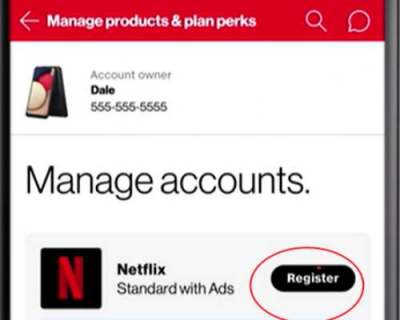
Step 3. Activate "Netflix & HBO Max (With Ads)" Bundle on Verizon
When you tap the register icon, you will now receive a text message. Click the activation link. Enter the email address you'd like to use for your Netflix subscription. If you have an existing account, just confirm the email address, and then tap directly with Netflix. Using the email associated with it, you'll keep your existing Netflix profiles. Follow along with the steps to register your Netflix Standard with Ads plan or choose to keep an existing plan.
If you don't have a Netflix account, create a new one. After that, you will receive a text with an activation link. Click the link and go to Netflix.com. Follow the prompts to link your existing Netflix account to your Verizon package. If you have created a new Netflix account, you can also link it to your Verizon package. After finishing, sign in to your Netflix app or on the Netflix official website and just enjoy movies, award-winning TV series, anime, documentaries, and even stand-up specials.
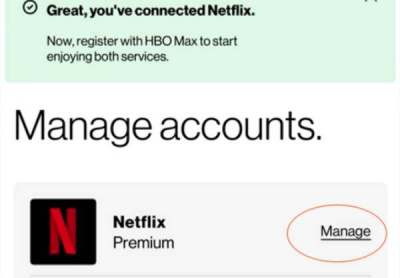
If you accidentally linked the wrong account, just contact Netflix customer service and provide the right email address to re-link your Netflix account to your package.
Step 4. Upgrade to Ad-Free Netflix Standard Plan on Verizon
With the Standard (with ads), you just click the "Yes, Start Watching". If you want to upgrade the plan to the ad-free Netflix Standard plan or Premium plan, choose "Show Other Plan" and confirm the plan you want to subscribe to. If you choose to upgrade your plan, you can pay the difference between the price of Netflix Standard with Ads and that of Netflix Standard and Premium.
Step 5. Manage Verizon Netflix Deals
When you don't want to renew your subscription, there are two methods to cancel your subscription.
Method 1: Using My Verizon App
Step 1 Open the My Verizon app on your phone.
Step 2 Go to the Me tab in the lower right corner and find "My products & plan perks".
Step 3 Select the Netflix perk.
Step 4 Choose the "Unsubscribe" or the toggle to disable it.
Step 5 Confirm the cancellation.
Method 2: Using Verizon Website
Step 1 Tab "Sign in" and choose "account overview" on the My Verizon website with your email and password.
Step 2 Then, go to the "Account" section and then "My products & plan perks".
Step 3 Click "Manage" and then "Manage" again next to the active subscription.
Step 4 Tap "Cancel subscription" and then confirm.

Bonus Tip: Best Way to Get Netflix for Free Forever
Although Netflix and Verizon bundle offers the cheaper Ad-supported plan, there is still a good way to enjoy the Netflix service and get Netflix for free forever. You can download Netflix with ViWizard Netflix Video Downloader, which can save the Netflix Video to MP4 format. Also, you can download enough content for the whole year without an ongoing subscription and save the content permanently. That's a really large province with a single payment! Just try ViWizard and enjoy your favorites.
There is a step-by-step guide for ViWizard below:

Key Features of ViWizard Netflix Video Downloader
Free Trial Free Trial* Security verified. 5, 481,347 people have downloaded it.
- Download Netflix movies and TV shows as MP4 or MKV files
- Preserve HD, 4K, HDR video, audio tracks, and subtitles
- Accelerate downloads when saving long videos or complete seasons
- Remove ads automatically during video downloads
- Save Netflix videos for playback on different devices
Step 1Log in with Your Netflix Account
First, download and install ViWizard Netflix Video Downloader on your computer. Then, launch the software. You will see a Sign in window in ViWizard, you can log in to your Netflix account with your email and password. Now, you are able to access the Netflix library, including movies, TV shows, anime, and original content.

Step 2Adjust Download Settings
Next, click the three-stripe icon in the upper-right corner of the ViWizard interface and select the "Preferences" option. In the "Download" section, you can set up the video quality (low, medium, high) according to your preference. In addition, ViWizard provides the highest video quality. There are also options for the audio track, subtitles, and the output location of the file. After setting, click "OK" to confirm your preferences.

Step 3Select Content to Download
Enter the keyword or title in the search bar and select the content you want to download. You can either search by the URL of some videos. Then, open it in the list.

Step 4Start Video Download
Once you choose the content, click the lower download icon. Then, save the content by clicking the Download button. Your videos will be saved in MP4 or MKV format on your computer.

Step 5Access and Play Downloads
To find your downloaded content, head to the "History" section. You can locate the video file on your computer by clicking the "Folder" icon next to the titles. Now you can stream Netflix movies and shows with friends or family and watch them on almost all devices, even if your subscription is outdated.

Conclusion
This post offers a step-by-step guide on getting a Verizon & Netflix bundle. If you want to reduce the spending on Netflix and HBO Max subscriptions, follow the steps in this article. ViWizard Netflix Video Downloader is a better option. With ViWizard, you can download your favorites so that you can watch them even after canceling the Netflix plan. So, take your Netflix viewing experience to the next level with ViWizard!
You May Be Interested


Dave Henry, a multimedia technologist at ViWizard, focuses on delivering the best solutions for digital media challenges, including audio and video conversion, media optimization, and troubleshooting.

Leave a Comment (0)