



Strawberry Music Player is a powerful, open-source music player support many streaming music platforms, including Tidal. Tidal, as a popular streaming service, offers high-quality, high-fidelity sound and hi-def video quality. When you connect Tidal to Strawberry Music Player, you can access Tidal's extensive music library alongside its local collection. Therefore, this article offers a complete guide on how to use Tidal on the Strawberry Music Player. Moreover, we prepared a good tool for you to listen to your Tidal playlist for free!

A splendid Tidal downloader for both free and paid users that downloads full songs, albums, playlists, artists, and audiobooks to MP3, FLAC, WAV, and more while keeping the original lossless audio and ID3 tags so you can save Tidal music offline on Windows, Mac, or any device without streaming restrictions.
Part 1. What Is Strawberry Music Player?
Strawberry Music Player is a free, open-source music player that was created in 2018 with a focus on local music playback and active development. Music collection organizer designed for people who want more control over listening to and managing their audio collections. If you are an audiophile and a serious music collector, Strawberry Music Player is an excellent choice for you. In addition, this is a cross-platform audio player that is available for Linux, macOS, and Windows.
Feature
- Play and organize music
- Supports WAV, FLAC, WavPack, Ogg Vorbis, Speex, MPC, TrueAudio, AIFF, MP4, MP3, ASF, and Monkey's Audio
- Native desktop notifications
- Playlist management and playlists in multiple formats
- Advanced audio output and device configuration for bit-perfect playback on Linux
- Edit tags on audio files
- Album cover art from Last.fm, Musicbrainz, Discogs, Musixmatch, Deezer, Tidal and Spotify
Part 2. How to Connect Tidal to the Strawberry Music Player (Windows/Mac/Linux)
In this part, we will teach you how to link your Tidal account to Strawberry Music Player. This guide includes installation and connection on Windows/Mac/Linux.
On Windows/Mac:
Step 1 Install Strawberry Music Player on Your Computer
Step 2 Go to the Strawberry website, and find the version you want.
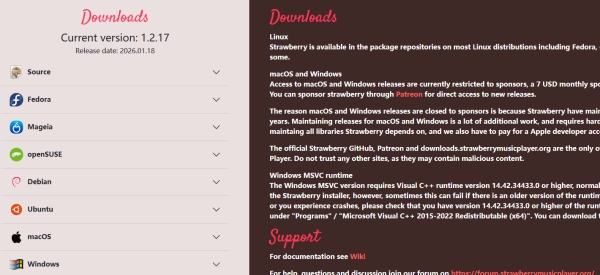
Step 3 Download Strawberry Music Player (Windows or Mac) and install it.
Step 4 At first, go to Tools > Settings (or Strawberry > Preferences on Mac) and select the Tidal tab.
Step 5 Next, check the Enable box and select Use OAuth.
Step 6 Click on the Access or Login button. This will open a browser window. Just enter your Tidal account email and your password in the browser, and confirm the connection.
Step 7 The browser should redirect back to Strawberry, and the status should show as logged in.
On Linux:
Step 1 First, make sure you have a browser on your Linux device, such as Chrome or Edge.
Step 2 Then, go to the Strawberry website.
Step 3 You can find the Linux version of Strawberry Music Player.
Step 4 Download and install it.
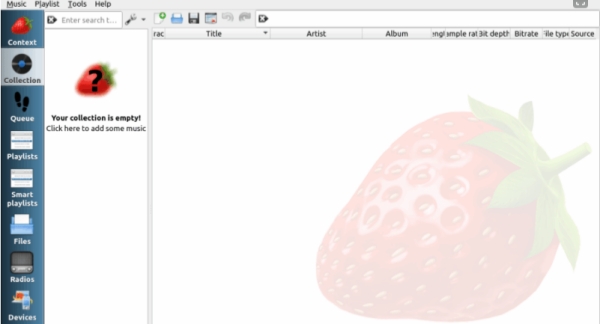
Step 5 Now we will start linking Tidal and the Strawberry Music player. Install an Android emulator on your Windows. Download and install an older version of the Tidal app.
Step 6 Log in to your Tidal account within the emulator. Use a file explorer to navigate to /Android/data/com.aspiro.tidal/cache/okhttp. Locate the file containing X-Tidal-Token and extract the token value.
Step 7Then, open the Strawberry Music Player. Go to 'Tools > Configuration > Tidal'. Then, select 'Enable > Use OAuth'. Enter the Client ID (token) you extracted from the Tidal app into the 'Client ID' field. Click 'Authorize'.
Step 8Now, a pop-up will open the Tidal login page in your browser. Then, sign in to Tidal with your email and password and authorize access. After done, return to the Strawberry Music Player to start streaming.
Part 3. How to Fix Tidal Not Working with the Strawberry Music Player
If you encounter Tidal not working on the Strawberry Music Player, you can troubleshoot it by trying the steps below.
Step 1 Most issues can be fixed by reinstalling. If you have already Strawberry Music, uninstall it and install it again.
Step 2 Go to Tools > Configuration > Tidal, check Enable, check Use OAuth, and enter a valid API token in the Client ID field.
Step 3 If authentication fails, ensure the redirectURI is set to https://www.tidal.com.
Step 4 If you have the official Tidal app installed, it might conflict with Strawberry. Uninstall or remove the official app, particularly on Linux, to allow Strawberry to handle tidal:// links.
Step 5 Update Strawberry to at least version 0.7.1, as older versions have a bug that fails to parse track duration.
Step 6 Ensure Strawberry is properly installed in your PATH.
Step 7 Clear the Tidal cache within Strawberry to resolve persistent playback issues.
Bonus. Get Tidal Songs on the Strawberry Music Player for Free
As we all know, even if you download Tidal music, you can't access it after your subscription expires. So, you have to pay for the Tidal plan to listen to Tidal music on the Strawberry Music Player. But don't worry, we have a solution to help you keep Tidal songs after cancel subscription. Then, you can play Tidal music for free on the Strawberry Music Player. There is an easy-to-use and splendid tool - ViWizard TIDAL Music Converter.
ViWizard TIDAL Music Converter allows you to download full songs, albums, playlists, artists, and audiobooks on Tidal to MP3, FLAC, and WAV. Also, you can keep the original lossless audio and ID3 tags for offline play on Strawberry Music Player. In addition, whether you are a Windows or Mac user, ViWizard TIDAL Music Converter is available. With this convenient tool, you can get high audio quality of Tidal tracks without any further costs for Tidal.

Ready to take your TIDAL music offline? ViWizard TIDAL Music Converter helps TIDAL subscribers save songs, albums, playlists, artists, podcasts, and audiobooks with reliable music conversion. Start converting and keep your TIDAL library within reach.
There is a step-by-step tutorial for ViWizard TIDAL Music Converter:
Step 1Select Tidal Playlists
Launch ViWizard TIDAL Music Converter and log in with your account. ViWizard has a built-in Tidal's web player, where you can browse and choose the tracks, albums or playlists you like. Within the interface, select the playlist you want to download and click the Add Music icon at the right button to load it to the converter.

Step 2Set Output Format
Then, click the menu in the upper-right corner of the screen and choose Preferences. Choose the Conversion tab and select a compatible format from the output formats drop-down menu. You can select MP3, M4A, M4B, WAV, FLAC or AIFF. Click OK to save your changes.

Step 3Download Tidal Playlists
Go to the conversion section to check the added playlists. You can remove specific tracks by clicking the trash button at the right side of each track. Once everything is ok, click the Convert button to begin the download process.

Step 4Access Your Downloaded Tidal Playlists
After the conversion, ViWizard will save all the downloaded Tidal playlists or tracks in your selected output folder. You can tap on the history button at the top menu to check all the downloaded contents. Also, you can click on the File icon of each track to locate them within your computer File Manager.

Conclusion
In a word, this post provides a complete guide for you to connect Tidal to the Strawberry Music Player. Moreover, we recommend a powerful tool to get Tidal music for free. With ViWizard TIDAL Music Converter, you can save Tidal music permanently. Click this download button and try it for free!
You May Be Interested


Dave Henry loves movies and all things video. He likes checking out different video formats and trying new media players to see how they change the viewing experience.

Leave a Comment (0)