


When talking about music streaming, most people turn to popular platforms and apps that offer extensive libraries and music from both big artists and indie talents. However, there is often one headache: you need to upgrade to a premium account to enjoy all the features, such as offline listening. But what if you could play music without a subscription? This is where Freefy comes in.
So, what is Freefy? Freefy is a user-friendly music streaming service. You can listen to your favorite tracks without paying for a subscription. Whether you're into pop, rock, indie, or niche genres, Freefy offers a variety of music from different artists and labels. Simply put, it's a platform for you to discover and enjoy music. Both iOS and Android users can get this app.
In this guide, we'll introduce Freefy, a free music platform where you can listen to your favorite tracks without any subscription. We'll also walk you through how to download Freefy music for offline playback, using tools like audio recorders and online download websites. Let's dive in.

Part 1. Can You Download Freefy Music?
You cannot directly download music for offline listening from the Freefy app or web player. Freefy is primarily designed for music discovery and streaming, offering a simple way to explore and enjoy music without hidden fees or forced subscriptions. You can create playlists, share your favorite tracks, and discover new music based on your interests.
- Free Music Streaming: Listen to music for free without a premium subscription.
- Music Discovery: Find new artists, albums, and playlists based on your listening preferences.
- Custom Playlists: Create personalized playlists for different moods, activities, or occasions.
- Ad-Free Listening: Enjoy uninterrupted music playback without distracting advertisements.
But what if you want to download Freefy music and listen to it offline? Since there is no built-in download option, you'll need to use another approach. Below, we'll introduce two simple options: audio recorders and online tools.
Part 2. How to Download Freefy Music with Audio Recorders
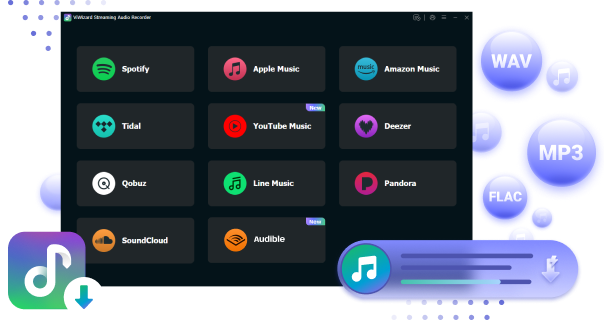
If you want to save Freefy music for offline listening, ViWizard Audio Capture is one option to consider. It records songs as they play on Freefy and saves them as local audio files, so you can listen to them without opening the Freefy player.
ViWizard supports common formats such as MP3, WAV, M4A, and FLAC, giving you more flexibility when saving your recordings. You can also adjust the output settings to suit your preferred audio quality. It is easy to use, with a simple interface that doesn't require much technical knowledge. Just add your web browser, play the Freefy song you want, and let ViWizard capture the audio. Afterward, you can save the recording and play it with your preferred music player.
Besides Freefy, ViWizard Audio Capture can also record audio from other websites and apps, such as Spotify, Apple Music, YouTube Music, SoundCloud, and Deezer. Here is how to use it.
Read More : How to Download Music from Deezer to Phone & PC

Key Features of ViWizard Audio Capture
Free Trial Free Trial* Security verified. 5, 481,347 people have downloaded it.
- Record streaming audio and system audio from different sources
- Capture music, podcasts, and online audio content
- Export recorded audio in 17 formats for different devices and platforms
- Record audio automatically without saving tracks individually
- Organize captured audio files with customizable output options
Download Freefy Music with ViWizard Audio Capture
 Step 1: Install ViWizard Audio Capture and Select Freefy Browser
Download and install ViWizard Audio Capture from its official website. Then, click the "Select/Add an app" button (usually at the top left). Choose the browser you use to access Freefy. If it's not listed, drag and drop the browser's icon from your desktop into ViWizard.
 Step 2: Configure Output Audio Settings
Click the "Format" button (typically at the bottom left) to choose your desired audio format (e.g., MP3 or WAV). You can also customize advanced settings like sample rate and bit rate if needed.
 Step 3: Start Recording the Freefy Audio
Click the "Start" button to begin recording. ViWizard will likely launch the browser you selected and direct you to Freefy. Start playing the audio you want to record on Freefy. ViWizard should automatically detect and capture the sound. When finished, click the "Stop" button. The recorded audio will appear in the Capture list.
 Step 4: Edit and Save the Recorded Audio
If you need to remove some unwanted segments, you can edit the captured audio using ViWizard's editing tools (e.g., trimming). When you're happy with the result, click the "Save" button to download the audio to your computer. You can find all your captured audio in the "History" section within ViWizard.
Part 3. How to Download Freefy Music with Online Tools
If you don't want to install desktop software, online tools offer another way to get Freefy music. They work directly in your browser, so there's no need to download or set up a separate program. You can access the tools on both desktop and mobile devices. After testing various online tools, we found MP3Juices to be one option worth trying. It searches available online sources for music and provides MP3 downloads.
However, be careful when using online downloaders. Many are supported by ads and may open new tabs or redirect you to other websites. Avoid entering personal or account information, and only download music when you have the necessary permission to do so.
Download Freefy Music with MP3Juices
01Open Freefy and find the song you want to download.
02Click the three dots near the song and copy the song link.
03Go to the MP3Juices website in your browser.
04Enter the song URL into the search box, then click Search.
05Look through the search results and find the version that matches the Freefy song you want.
06Click the Download button under the selected track and follow the on-screen instructions to save the MP3 file to your computer.
Part 4. FAQs About Downloading Freefy Music
Can I download music directly from Freefy?
No. Freefy is mainly a streaming and music discovery platform and does not currently provide a built-in option to download songs as local audio files.
What is the best way to download Freefy music?
You can use an audio recorder such as ViWizard Audio Capture to record Freefy songs as they play. Alternatively, you can try an online tool such as MP3Juices to search for and download available MP3 files.
Is It Safe to Download Freefy Music?
Yes, but you should choose a trustworthy tool and avoid suspicious download websites. For a safer option, ViWizard Audio Capture can record Freefy music as it plays and save it as an audio file. Always avoid unknown pop-ups and downloads, and only download music you have permission to use.
Part 5. Conclusion
Freefy is a nice option for streaming and discovering music for free, but it has a few drawbacks. There's no built-in download option for offline listening, and you may sometimes run into buffering, playback issues, or ads while listening.
If you want to save Freefy music for offline playback, ViWizard Audio Capture is a good option. It can record songs as they play and save them as MP3, WAV, M4A, or FLAC files. You can also adjust the audio quality and trim unwanted parts before saving. The simple interface makes it easy to use, even for beginners. Hope this guide helps you enjoy your favorite Freefy music more easily. Happy listening!
You May Be Interested


From new releases to old favorites, Matt Smith is always on the lookout for good music. He follows the latest in digital entertainment and shares songs and media he thinks are worth checking out.

Leave a Comment (0)