


Losing your internet connection doesn't have to mean losing your music. With Spotify Offline Backup, Premium users can keep listening to recently streamed and queued tracks even when they go offline, without downloading songs in advance.
But how does this feature work, how can you enable it on your phone or in your car, and what can you do if it stops working? This guide covers everything you need to know, from setting up and troubleshooting Offline Backup to comparing it with regular downloads. If you also want to keep Spotify music as local audio files, we'll introduce ViWizard Spotify Music Converter as an alternative for creating a separate music collection.
Part 1. What Is Spotify Offline Backup?
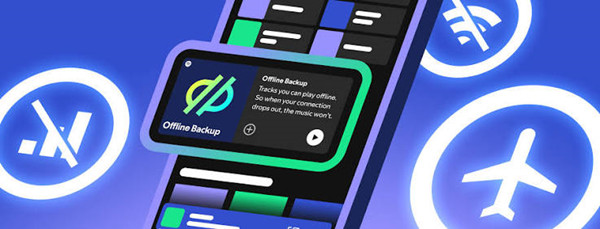
Introduced on October 3, 2024, Spotify Offline Backup is a feature for Premium subscribers that automatically creates a personalized playlist from recently streamed and queued tracks cached on their devices. It lets users keep listening when their internet connection drops, without downloading songs or preparing a playlist in advance. This is especially useful when travelling, commuting, flying, or visiting places with poor network coverage. For example, users who lose their connection on a train or during a flight can open Spotify and continue listening to their Offline Backup playlist. As Spotify describes it, the feature offers "another way to keep listening to music offline, no downloads required."
The feature is also supported on Android Auto and Apple CarPlay, allowing users to continue listening through their car's audio system when their phone is offline. On Android and iOS, they can find the playlist on the Home feed or search for it directly.
Part 2. How to Use Spotify Offline Backup
To use Offline Backup, users need an active Spotify Premium subscription and must enable Offline Listening in Spotify's Settings and Privacy. Depending on the app version, this setting may appear under Data Saving and Offline or Storage. Spotify requires more than five recently listened-to songs, so users should stream or queue several tracks online to let Spotify cache them.
Once enough tracks are cached, Offline Backup appears automatically when the internet connection drops. Users can find it on the Home feed or search for it by name, then tap Play. The playlist refreshes as users listen online. Avoid clearing Spotify's cache or reinstalling the app, as this may remove cached tracks.
2.1How to Use Offline Backup on Android Smartphones or iPhone
On Android and iOS, users can search for songs, browse by mood or genre, and sort tracks by title, artist, album, frequently played, or recommended order. They can also shuffle playback or tap Add to save the playlist to their Library. When online, it appears under Playlists and Downloaded.
01Open Spotify on your phone.
02Tap your profile picture and select Settings and Privacy.
03Find Offline Listening and turn it on.
04Connect to the internet and stream or queue more than five recently listened-to songs.
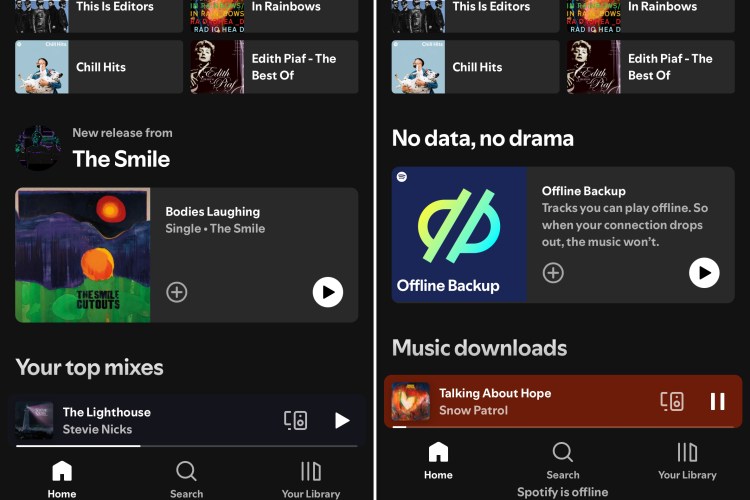
05When offline, open Spotify and go to Home.
06Find Offline Backup in the Home feed or search for it by name.
07Tap Play to listen to the cached songs.
08Open the playlist to search, filter, or sort tracks.
09Tap Add to save it to Your Library.
2.2How to Use Offline Backup on Android Auto or Apple CarPlay
Offline Backup also works with Android Auto and Apple CarPlay. Users can find the playlist on Spotify's Home screen in the car and start playback. Sorting and filtering are unavailable on the car display, so adjust them on the phone before driving. Sorting preferences carry over to both systems, while filters carry over to Android Auto but not Apple CarPlay.
01Enable Offline Listening and cache more than five recently listened-to songs on your phone.
02Connect your phone to Android Auto or Apple CarPlay.
03Open Spotify on the car display and go to Home.
04When your phone loses its internet connection, find Offline Backup.
05Select the playlist and tap Play.
06Before driving, use Spotify on your phone to set your preferred sorting order or filters.
Part 3. How to Manage Spotify Offline Backup
After setting up Offline Backup, you can influence its song selection, save the playlist to Your Library, or turn off the feature. Here's how to manage it.
3.1How to Add Songs to Spotify Offline Backup
Spotify automatically builds Offline Backup from recently streamed and queued tracks stored in your device's cache. You can't manually add individual songs, but listening to or queuing your preferred tracks online may influence future updates. Spotify doesn't guarantee that specific songs will appear.
For more control, create a regular playlist with your preferred tracks and download it for offline listening with Spotify Premium.
3.2How to Remove Songs from Spotify Offline Backup
Spotify doesn't let you manually remove individual tracks from Offline Backup. The playlist is automatically generated from cached listening activity and can't be edited like a regular playlist.
To avoid unwanted tracks, use the available search, mood, and genre filters to find other music. Alternatively, create and download a separate playlist with your preferred songs.
3.3How to Save Spotify Offline Backup to Your Library
Saving Offline Backup makes it easier to find in Your Library. This saves the playlist, not separate audio files outside Spotify.
On mobile (iPhone and Android)
01Open Spotify and go to Home or search for Offline Backup.
02Open the playlist.
03Tap Add at the top.
04Find it later in Your Library.
3.4How to Remove Spotify Offline Backup from Your Library
You can remove the saved playlist from Your Library without turning off Offline Listening or deleting the cached tracks used to generate it.
On mobile (iPhone and Android)
01Open Spotify and go to Your Library.
02Find and open Offline Backup.
03Tap the Add button to remove it from Your Library, if available.
3.5How to Turn Off Spotify Offline Backup
To stop using Offline Backup, turn off Offline Listening. You can enable it again whenever you want to use the feature.
On mobile (iPhone and Android)
01Open Spotify and tap your profile picture.
02Select Settings and privacy.
03Find Data-saving and offline or Storage.
04Locate Offline Listening and switch it off.
3.6How to Refresh or Update Spotify Offline Backup
Offline Backup updates automatically as you listen to Spotify online. To refresh its content, connect to the internet and stream or queue more songs. There is no manual refresh button, and you can't guarantee which tracks will appear.
01Connect your phone to the internet.
02Open Spotify and stream your preferred songs.
03Queue additional tracks if needed.
04Keep Offline Listening enabled so Spotify can update Offline Backup.
Clearing Spotify's cache or reinstalling the app may remove the cached tracks used by Offline Backup. If the playlist disappears, listen to music online again to rebuild the cached content.
Part 4. How to Fix Spotify Offline Backup Not Working
Sometimes, you may open Spotify expecting to find your Offline Backup playlist, only to discover that it is missing or no longer available. This can happen if Offline Listening is turned off, Spotify hasn't cached enough songs, or your device is running low on storage. Clearing the cache or reinstalling the app can also affect the playlist. The following tips can help you get it back.
Step 1Enable Offline Listening
Open Spotify, go to Settings and Privacy, and make sure Offline Listening is turned on. Offline Backup will not appear if this setting is disabled.
Step 2Listen to Music Online
Reconnect to the internet and stream or queue several songs to let Spotify cache them. Spotify's original announcement specifies more than five recently listened-to songs. Continue listening online until enough tracks are cached for the playlist to appear.
Step 3Check Available Storage
Make sure your device has enough free space for Spotify to cache music. Remove unnecessary files or apps if storage is low. Avoid clearing Spotify's cache, as this removes the tracks used by Offline Backup.
Step 4Rebuild Cached Content
If you have cleared the cache or reinstalled Spotify, reconnect and listen to music online again. After reinstalling, sign in to an eligible Premium account and re-enable Offline Listening. Spotify does not provide a manual option to generate the playlist immediately.
Step 5Update Spotify
If Offline Backup still does not appear, check for the latest Spotify update. Spotify recommends updating the app when users cannot find the feature. After updating, reopen Spotify and verify that Offline Listening is enabled.
Step 6Check the Correct Location
On Android and iPhone, look for Offline Backup on the Home feed while offline or search for it by name. With Android Auto or Apple CarPlay, check Spotify's Home screen when your phone has no internet connection. Sorting and filtering are unavailable on car displays, so adjust these options through the mobile app.
Step 7Verify Your Account and Requirements
Make sure you have an active Premium subscription, Offline Listening enabled, sufficient recent listening activity and cached tracks, and enough device storage. If Offline Backup remains unavailable, reconnect and listen online to rebuild the cached content.
Step 8Use Regular Downloads as an Alternative
If you need reliable offline access to specific songs or albums, download them through Spotify in advance. Regular downloads are a separate feature, not a fix for Offline Backup, but they let you choose exactly what to keep available offline.
Part 5. How to Back Up Spotify Music as Local Audio Files
Spotify Offline Backup offers convenient offline listening but requires Premium, Offline Listening to be enabled, and sufficient recent listening activity and cached tracks. Clearing the cache, reinstalling Spotify, or running low on storage can also affect availability.
For users who want more control over their music backups, ViWizard Spotify Music Converter offers an alternative. It converts selected Spotify songs, albums, or playlists into local MP3, FLAC, WAV, AIFF, M4A, or M4B files. Users can adjust audio quality and file size, convert tracks in batches, and preserve details such as title, artist, and album. Converted files can be organized into folders, stored on a computer or external drive, and transferred to compatible devices for offline playback.
To get started, install ViWizard on a Windows PC or Mac and open the Spotify Web Player through its built-in interface. Select the songs, albums, or playlists to back up, choose an output format and audio settings, then click Convert. Once finished, open the output folder to manage or transfer the files.
While Spotify Offline Backup supports automatic listening within Spotify, ViWizard gives users more control over their local music collection. It is intended for personal use, such as private listening, not commercial purposes.

Key Features of ViWizard Spotify Music Converter
Free Trial Free Trial* Security verified. 5, 481,347 people have downloaded it.
- Convert Spotify songs, playlists, albums, podcasts, and audiobooks
- Export Spotify music in 6 formats for different devices and players
- Support Spotify Premium and free accounts for music conversion
- Preserve music metadata when organizing converted collections
- Batch download Spotify playlists and large music libraries
Part 6. Spotify Offline Backup vs. Regular Downloads vs. Local Audio Backup
| Feature | Offline Backup | Regular Downloads | ViWizard Local Backup |
|---|---|---|---|
| How it works | Uses cached tracks | Downloads selected music | Converts selected tracks |
| Music selection | Automatic | Manual | Manual |
| Internet needed | To build and update | To download | To convert |
| Offline playback | Spotify app | Spotify app | Compatible media players |
| Storage | Spotify cache | Spotify app | Local folders or external drives |
| Best for | Unexpected offline listening | Planned offline listening | Keeping a separate music collection |
Spotify offers two ways to listen offline: Offline Backup and regular downloads. Offline Backup is useful when users unexpectedly lose their connection while commuting, travelling, or flying. They can open the playlist from Spotify's Home feed and continue listening, provided Offline Listening is enabled and enough tracks have been cached. However, available music depends on recent listening activity and device storage. Regular downloads are better for planned offline listening, letting Premium users save specific songs, albums, or playlists before going offline.
For a separate music collection, ViWizard Spotify Music Converter converts selected Spotify tracks into local MP3, FLAC, WAV, and other audio files. Users can store them on a computer or external drive and transfer them to compatible devices for playback through other media players. This offers more flexibility for organizing and accessing music, but requires conversion time and storage space.
In short, Offline Backup suits unexpected connection loss, regular downloads help prepare specific music in advance, and ViWizard lets users build a portable collection of local audio files.
Part 7. Final Thoughts
Spotify Offline Backup is a handy way to keep listening when your internet connection suddenly drops. It automatically creates a playlist from recently streamed and queued tracks, so you don't have to download songs or prepare anything in advance. Just enable Offline Listening, keep streaming music online, and Spotify will have cached tracks ready when you go offline. However, if you want to choose exactly what music to keep and have a separate copy outside Spotify, Offline Backup may not be enough.
In that case, consider ViWizard Spotify Music Converter as an alternative for local audio backup. It lets you convert selected Spotify songs, albums, and playlists into formats such as MP3, FLAC, and WAV, then store them on your computer or an external drive. If you want more control over your music collection and how you access it offline, give ViWizard a try and start building your own local music library.
You May Be Interested


Adam Gorden is always looking for new ways to explore music and videos. He likes trying different media tools and learning how to manage audio and video files with ease.

Leave a Comment (0)