


Tunepat Tidal Media Downloader is a professional and affordable tool to help you download Tidal music. If you want to save your Tidal playlist to MP3 or another format forever, it is worth a try. This is a real and complete review. In my opinion, Tunepat Tidal Media Downloader is an easy-to-use tool with a simple interface. You don't need a guide for it. But there are still some disadvantages.
In this post, we will evaluate this tidal music downloader from some aspects: its key features, price, pros and cons, how it works, and customer feedback. In addition, we have found the best alternative to Tunepat Tida Media Downloader - ViWizard TIDAL Music Converter. Let's discover whether Tunepat Tidal Media Downloader is really worth it.

A splendid Tidal downloader for both free and paid users that downloads full songs, albums, playlists, artists, and audiobooks to MP3, FLAC, WAV, and more while keeping the original lossless audio and ID3 tags so you can save Tidal music offline on Windows, Mac, or any device without streaming restrictions.
Part 1. Introduction to TunePat Tidal Media Downloader

What is TunePat Tidal Media Downloader?
TunePat Tidal Media Downloader is a tool that allows you to listen to Tidal songs, albums, playlists, and podcasts offline on your computer. Tidal's free account is available to users in the United States, who can then use TunePat to obtain high-quality Tidal songs without ads.
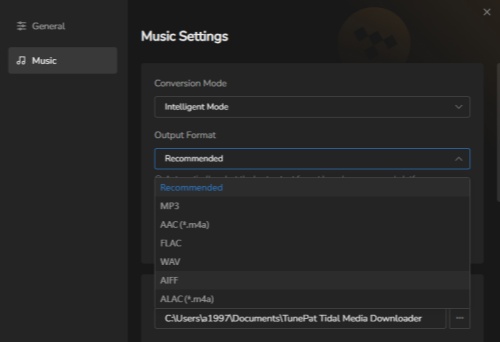
In addition, TunePat Tidal Media Downloader is also an audio converter. TunePat allows you to convert songs to MP3, AAC, WAV, FLAC, AIFF, and ALAC formats. Besides, you can customize the sample rate, bit rate, output file name, and ways of output file arrangement in Settings.
Besides downloading and converting, TunePat offers some functions like Burn CDs, Audio Editor, and Tag Editor. With an application, you can get many different features.
TunePat Tidal Media Downloader Pricing
| Plans | Price | Key Features |
|---|---|---|
| 3-Month Plan | $29.95 | Auto-Renewal Cancel Anytime! 1 License for 1 Computer 3-Month Free Updates 5-Day Money Back Guarantee |
| 1-Year Plan | $49.95 | Auto-Renewal Cancel Anytime! 1 License for 1 Computer 1-Year Free Updates 5-Day Money Back Guarantee |
| Lifetime Plan | $79.90 | One-Time Fee 1 License for 1 Computer Lifetime Free Updates 30-Day Money Back Guarantee |
Payment Options: Credit card, PayPal, and other popular methods.
Supported Platforms: Windows, macOS.
Part 2. Key Features of TunePat Tidal Media Downloader
✔️Advantages:
- User-friendly interface with easy navigation: The tool is intuitive and easy to use, even for beginners, with a clean and straightforward design.
- Supports multiple popular output formats: Converts music to various formats, including MP3, AAC, FLAC, and others, providing flexibility.
- Preserves ID3 tags: Keeps album art, song titles, and artist info intact during conversion.
- Works with both Tidal Web Player and desktop app: You can convert music from either platform, making it versatile.
- Allows music splitting and CD burning for advanced users: Includes additional features for those who want to get more out of their conversions.
❌Disadvantages:
- Trial version only allows converting the first minute of each song: The free trial limits your ability to fully test the software with complete songs.
- Occasional performance hiccups or bugs: Some users have experienced minor glitches or performance issues.
- Lacks advanced customization options: Compared to other tools, it offers fewer options for fine-tuning your conversions.
- No monthly subscription: There are only 3-month plans, a year plan, and a lifetime plan. It's unfriendly for users who don't want to commit to a long-term plan.
- Limited support for platforms: It only works on Windows and macOS, so it's not available on other operating systems like Linux or mobile.
TunePat Tidal Media Downloader allows you to download Tidal songs, albums, playlists, and podcasts for offline listening, converting them to MP3, AAC, WAV, FLAC, etc., while preserving original Hi-Res audio quality and ID3 tags. It also offers 10x faster conversion, batch downloads, and an integrated web player for convenience, allowing permanent offline access to music without the Tidal app.
Part 3. Full Review of TunePat Tidal Media Downloader
TunePat Tidal Media Downloader delivers what most users want - converting Tidal Music tracks into downloadable formats. Like many trial programs, it only allows 1-minute downloads until you purchase the full version, but the software runs smoothly once unlocked.

What Users Are Saying
There is some feedback from Trustpilot. If we want to have a more comprehensive understanding of TunePat Tidal Media Downloader, these reviews are helpful. TunePat Tidal Media Downloader has received a 4.3-star rating on Trustpilot based on 396 reviews. This mixed reception highlights that while many users find the software valuable, there are notable areas for improvement, particularly regarding security.

Positive Feedback
Many users praise the software for its smooth functionality and fast download speeds. A satisfied user shared the experience of downloading from Tidal and other music platforms. Regular updates to ensure compatibility with the latest operating systems, which have further enhanced the user experience. This has made TunePat Tidal Media Downloader a recommended choice for users looking for efficiency and reliability.
Negative Feedback
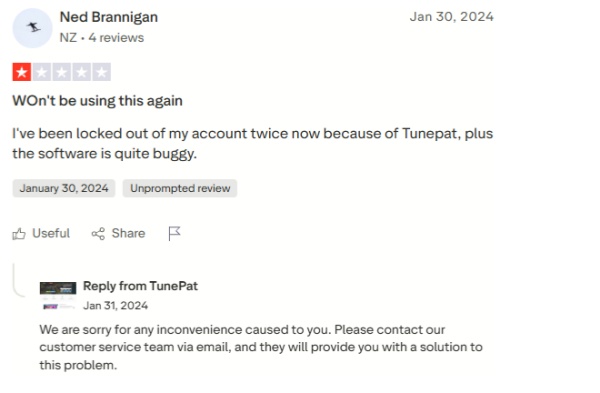
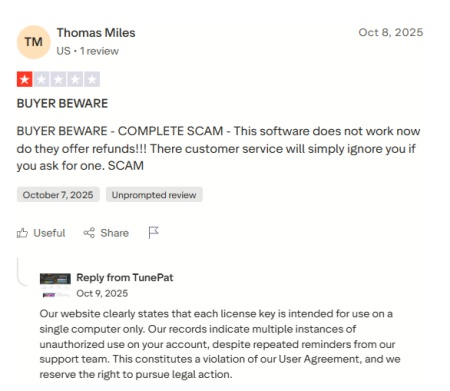
On the other hand, some users reported dissatisfaction with the refund policy and security problems. A notable complaint involved a user who was denied a refund despite being within the money-back guarantee period. Frustrated by repeated refusals, the user described the experience as untrustworthy and advised caution for potential buyers. Also, a user has been locked out of his account twice because of this tool. Therefore, before you use this tool, you must consider the locked account risks.
Part 4. How to Use TunePat Tidal Media Downloader (Step-by-Step Guide)
The step-by-step guide is shown below. Just walk through these steps and download Tidal music for offline listening:
Step 1 At first, go to the official TunePat website and download the Tidal Media Downloader. It's available for both Windows and macOS, so pick the version that suits your system. Once downloaded, install it following the on-screen instructions.
Step 2 Launch theTunePat Tidal Media Downloader on your computer. Before downloading Tidal music, you might want to adjust a few settings. You can choose where to save your downloaded files and select your preferred output format (MP3, AAC, FLAC, etc.) in settings.
Step 3Now you can choose to use the Tidal app or the Tidal web player. To access your Tidal library (playlists, albums, podcasts, etc.), you'll need to log in to your Tidal account directly within the TunePat app or on the web player in TunePat. This makes it easy to select the music you want to download.
Step 4 If you are use Tidal web player, just hit the Add button or browse your Tidal library to choose the tracks, playlists, or albums you'd like to convert. You can pick a few songs or an entire playlist - whatever works best for you. If you are use Tidal App, you can draw the song to TunePat, or click left-hander and choose add to TunePat.
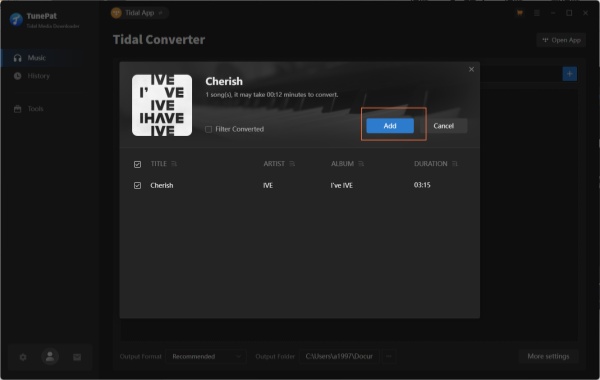
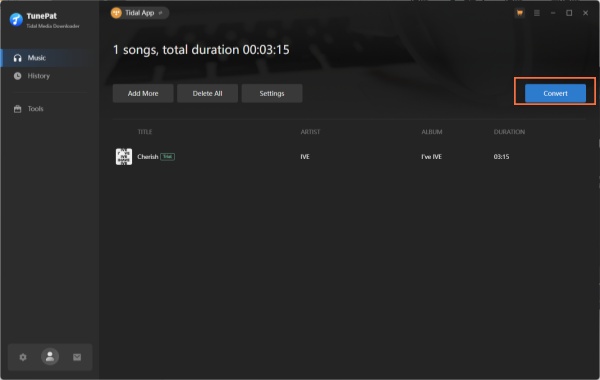
Step 5 Click Convert to begin the conversion. TunePat will start downloading and converting the selected music into your chosen format.
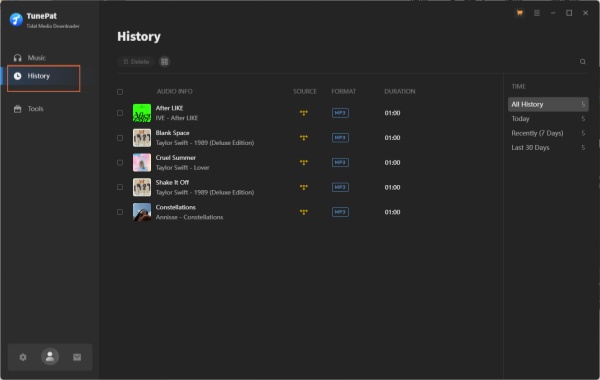
Step 6 After the conversion finishes, your music will be saved in the History section. Now, you can listen to your Tidal music offline - no restrictions!
Part 5. Best Alternative to TunePat Tidal Media Downloader
Based on the analysis above, you'll notice that TunePat Tidal Media Downloader might not be the most user-friendly choice for beginners. If you're exploring a solid alternative to TunePat Tidal Media Downloader, here's one that you should give a look at in 2026 - ViWizard TIDAL Music Converter . This tool offers similar core features, such as high-quality audio conversion and batch downloads without requiring a Tidal subscription, but stands out in terms of pricing and ease of use. Here's why choose ViWizard TIDAL Music Converter:
- A more option-friendly price: ViWizard TIDAL Music Converter provides monthly plan for users who don't want to get a long-term plan.
- More efficient refund: If you want to refund, ViWizard has a contact to guarantee your money back.
- Safe account ensuring: There is no account locking risk. You don't need to worry about this problem.
- Faster download speed: ViWizard offers up to 40× faster speed when downloading and converting music from Tidal locally. TunePat's speed is 10×.

Key Features of ViWizard TIDAL Music Converter
Free Trial Free Trial* Security verified. 5, 481,347 people have downloaded it.
- Convert TIDAL songs, playlists, albums, artists, podcasts, and audiobooks
- Export TIDAL music in 6 formats for different devices and players
- Preserve Hi-Res FLAC and original audio quality
- Preserve Dolby Atmos audio and metadata during conversion
- Batch download TIDAL playlists, albums, and large music collections
There is a guide for you to use ViWizard TIDAL Music Converter to download or converter Tidal music:
Step 1Enter Tidal tracks to ViWizard
Make sure the ViWizard TIDAL Music Converter is installed on your computer. Launch it and log in your Tidal account, you can head to your Tidal music library to find some tracks that you want to download. Then click the 'Add Music' icon to add them to the conversion list.

Step 2Adjust output parameters
Now head to the menu bar in the program and click the 'Preferences' button. A new window will pop up and you should click the 'Conversion' tab to adjust the output parameters as you want. The converter allows the users to select the output format, channel, sample rate, and bit rate. After adjusting, don't forget to hit the 'OK' button to save your settings.

Step 3Download and convert Tidal Music
Click the 'Convert' icon button in the bottom right corner of the ViWizard program to start the download and conversion process. After a while, this converter will export Tidal tracks to your targeted format and save them as local audio files.

Step 4Access Your Downloaded Tidal Music
Once the conversion is complete, ViWizard TIDAL Music Converter will save the downloaded tracks in your chosen output folder. To access them, click the History button to view all your downloaded music. The Open Folder icon will take you directly to the folder where the converted tracks are stored. You can also use the search bar in the History section to find specific tracks or sort them by title, artist, album, and more.

Part 6. Comparison Between TunePat Tidal Media Downloader and Its Alternative
Comparison TunePat with alternatives provides a clearer understanding of performance, workflow, and ease of use, helping users decide which tool best fits their needs for managing Tidal Music offline.
| Tool | TunePat Tidal Media Downloader | ViWizard TIDAL Music Converter |
|---|---|---|
| Purpose | Convert and download Tidal Music tracks to common audio files | Convert and download Tidal Music audio to multiple formats |
| Supported Input | TIDAL Music | TIDAL Music |
| Output Formats | MP3, WAV, FLAC, AIFF, M4A | MP3, M4A, M4B, WAV, AIFF, FLAC |
| Batch Conversion | Yes | Yes |
| ID3 Tag/Metadata Support | Yes | Yes |
| Free Trial Limit | Limited conversions | Partial song conversion |
| Download Speed | 10× | 40× |
| Pricing | 3-month/annual/lifetime | Monthly/annual/lifetime |
Conclusion
In a word, TunePat Tidal Media Downloader is an easy-to-use tool for most people. But before you decide to use it, you need to consider the factors above, like the risk of account suspension or no refund available. Anyway, we recommend that you use ViWizard TIDAL Music Converter - a more professional assistant to help you download Tidal to the format you want. Just enjoy your Tidal time!
You May Be Interested


Adam Gorden is always looking for new ways to explore music and videos. He likes trying different media tools and learning how to manage audio and video files with ease.

Leave a Comment (0)