


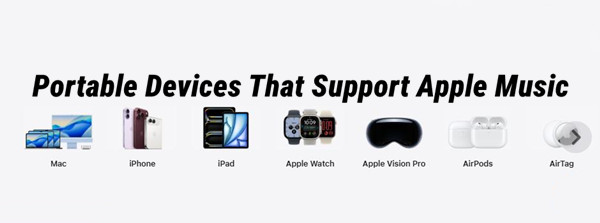
If you like listening to music on the go, you have more options than just using your iPhone. Apple Music works on iPhone, iPad, and Android phones and tablets, while other portable music players can be used with compatible local audio files. The main difference is how each device accesses and plays your music.
For example, devices with the Apple Music app can stream music and download it for offline listening within the app. Dedicated music players usually rely on local audio files instead, so format support and storage space become more important. Your choice may also depend on battery life, portability, and how much control you want over your music files.
In this guide, we'll look at which portable devices can play Apple Music, how to use Apple Music or local music files on them, and what to consider when choosing a portable device for your music.
Part 1. What Is a Portable Apple Music Device?
A portable Apple Music device is a portable music player that supports Apple Music through a compatible operating system and app. It isn't an official Apple product category. Apple supports Apple Music on iPhone, iPad, Android devices, Mac, PC, and the web. Some third-party portable players also use Android and Wi-Fi to run streaming apps. For example, Sony's NW-A306 is an Android-based portable audio player with streaming-app support. This gives you a way to combine Apple Music with dedicated music playback and local audio files.
Part 2. What Portable Devices Support Apple Music?
If you want to use Apple Music on a portable device, you'll mainly find three groups: Apple devices, Android devices, and compatible third-party music players. iPhone and iPad support Apple Music directly, while Android phones and tablets require Android 5.0 or later. Some Android-based portable music players can also run Apple Music. Sony's NW-A306, for example, supports Android, Wi-Fi, and streaming apps. Since support varies by model, check the device specifications before choosing one.
2.1iPhone and iPad
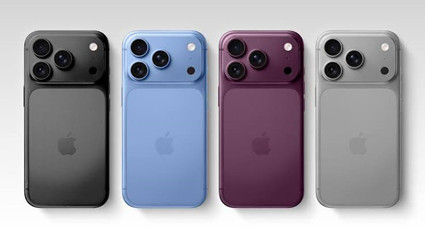
Apple Music is available in the Music app on iPhone 5s and later and iPad models that support iOS 10 or later. Users can stream music, add songs, albums, and playlists to their library, and download them for offline listening. With Sync Library enabled, the library is available across compatible devices using the same Apple Account. Offline downloads remain within the Music app rather than as ordinary audio files.
2.2Android Phones and Tablets
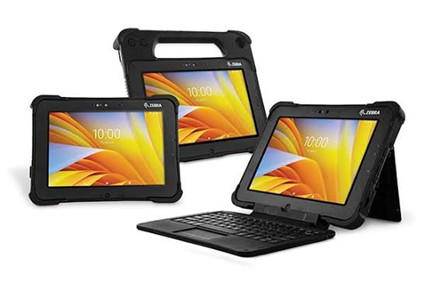
Apple Music is available through the official app on Android 5.0 Lollipop or later. It works on supported Android phones and tablets from manufacturers such as Samsung, Google, and OnePlus. You can stream music, access recommendations and playlists, and download content for offline listening. Apple Music also supports Android Auto and Chromecast on compatible devices.
Read More: Play Apple Music on Android Guides & Tutorials
2.3iPod touch

The iPod touch is a legacy Apple Music device. Apple discontinued the product line in 2022, with the 7th-generation iPod touch as the final model. Compatible models can use the Music app to stream Apple Music and download songs, albums, and playlists for offline playback. Sync Library can keep the library available across compatible devices. As a discontinued product, the iPod touch is mainly an option for existing-device owners.
The iPod touch 6th generation runs iOS 12 and comes with 32GB, 64GB, or 128GB of storage, Wi-Fi, and a 4-inch Retina display. It supports Apple Music, although its older hardware and operating system are more limited than newer Apple devices. The iPod touch 7th generation is the final model. It runs iOS 15, uses the A10 Fusion chip, and comes with 32GB, 128GB, or 256GB of storage. It supports Apple Music for streaming and offline listening, with better performance and storage than the 6th generation. Apple Music requires a separate subscription.
Read More: Play Apple Music on iPod Guides & Tutorials
2.4Apple Watch

Apple Music is available in the Music app on Apple Watch Series 3 and later, as well as compatible Apple Watch SE and Ultra models. Depending on the model, the watch can connect through a paired iPhone, Wi-Fi, or cellular service. Users can browse, add, and download music for offline playback. Cellular models can also stream music with an active cellular connection.
Read More: Play Apple Music on Apple Watch Guides & Tutorials
2.5Other Supported Apple Devices

Apple Music also works on Mac, Apple TV 4K, HomePod, and Apple Vision Pro, but each serves a different purpose. Mac provides the full Apple Music experience for browsing, streaming, and managing your library. Apple TV 4K brings Apple Music to your TV, while HomePod can play Apple Music directly or through AirPlay. Apple Vision Pro adds Apple Music to its spatial computing experience.
These devices extend Apple Music beyond phones and tablets, but they are not all designed for portable listening. Available features depend on the device, software, subscription, country, and region.
Read More: Play Apple Music on Apple TV Guides & Tutorials
2.6Other Portable Music Players
Portable music players such as Sony Walkman take a different approach. Newer Android-based models, including the NW-A306 and NW-ZX707, can connect to Wi-Fi and run supported music apps. If the player's Android version supports Apple Music, you can use the app much like on an Android phone, without an iPhone.
Other Walkman models focus on local music. Compatible audio files can be transferred to internal storage or a microSD card and played through the Walkman's Music app. Sony states, "DRM-free iTunes Plus® songs purchased from the iTunes Music Store® online music store can be transferred and played back on your portable player."
The main difference is how music reaches the player. An Android-based Walkman can use a supported streaming app over Wi-Fi, while a traditional music player relies on compatible local files. MP3 support does not by itself mean Apple Music support. Apple Music subscription downloads remain managed by the Apple Music app and cannot be copied to a conventional player.
Sony Walkman
The Sony NW-A306 runs Android 12 and has Wi-Fi, 32GB of internal storage with about 18GB available, and microSD support. Sony rates it for up to about 26 hours with a music-streaming app, although actual battery life varies. It supports Apple Music and is listed at $399.99 in the U.S.
The NW-WM1AM2 runs Android 11 and has 128GB of internal storage, with about 103GB available, plus microSD support. It has a 5-inch HD display and is rated for up to about 40 hours with MP3 or 96kHz/24-bit FLAC playback. Its original U.S. price was $1,399.99.
The NW-A105 and NW-ZX507 run Android 9 and support Apple Music. The NW-A105 has 16GB of internal storage, while the NW-ZX507 has 64GB, with about 48.64GB available. Both support microSD expansion and have 3.6-inch HD displays. Their older Android version may limit compatibility with newer apps.

HiFi WALKER
The HiFi WALKER G7 Pro runs Android 13 and has 32GB of internal storage plus a 128GB TF card, with support for cards up to 1TB. It features a 5.2-inch HD touchscreen, dual-band Wi-Fi, and a 2,500mAh battery rated for about 62 hours of music playback. Google Play is included, and Apple Music is supported. Its official price is $104.

HiBy
The HiBy R4 runs Android 12 with 4GB of RAM and 64GB of internal storage, plus microSD support up to 2TB. It has a 4.7-inch touchscreen, dual-band Wi-Fi, and about 11 hours of battery life through its 3.5mm output. It supports Apple Music and is listed from $249.
The HiBy M300 runs Android 13 with 4GB of RAM and 32GB of internal storage, plus microSD expansion. It has a 4-inch touchscreen, Wi-Fi, Bluetooth, and up to about 29 hours of playback. It supports Apple Music, with prices starting at $199.
The HiBy R6 Pro II runs Android 12 with 6GB of RAM, 64GB of internal storage, Wi-Fi, and a 5.9-inch 1080p display. It supports Apple Music and is listed from $549. The HiBy R6 Pro MAX also runs Android 12, with 6GB of RAM, 128GB of internal storage, Wi-Fi, and a 5.9-inch 1080p display. It supports Apple Music and has an 8,200mAh battery. HiBy lists it at $799, down from $999.
iBasso
The iBasso DX180 is an Android-based high-resolution player with Wi-Fi, 128GB of internal storage, microSD expansion, and a 5-inch touchscreen. It supports Apple Music and is designed for high-resolution local playback. iBasso lists it at $480 in the U.S.
Part 3. How to Play Apple Music on a Supported Device
On a supported portable device, Apple Music runs through the Apple Music app or native integration, so no conversion is needed. For example, an Android-based Sony Walkman such as the NW-A306 supports music streaming apps over Wi-Fi. You can install Apple Music, sign in with your Apple Account, then stream songs, albums, and playlists or download them for offline listening. Downloads remain managed within Apple Music.
This method suits users who want the full Apple Music experience, including its catalog, playlists, library, and offline listening. Before using Apple Music directly on a portable device, check that the specific model supports the app and meets its software and network requirements.
Step 1Connect the Walkman to Wi-Fi
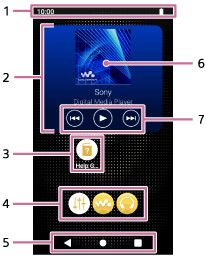
01On the NW-A306, open Settings and connect the player to a Wi-Fi network.
02Make sure the connection is stable before downloading music. The NW-A306 uses Wi-Fi for music streaming and direct downloads.
Step 2Install Apple Music and Sign In
01Open the Walkman's app store and search for Apple Music.
02Install the Apple Music app, then open it.
03When prompted, sign in with the Apple Account associated with your Apple Music subscription.
04After signing in, you can access your Apple Music library and the available catalog.
Step 3Add Music to Your Library
01In Apple Music, find the song, album, or playlist you want to listen to.
02Use Add to add the music to your library.
03Open Library to find the music you have added.
Step 4Download Music for Offline Listening
01Open the song, album, or playlist you want to keep on the Walkman.
02Tap Download to save it to the device.
03Wait for the download to finish before disconnecting from Wi-Fi. Keep enough storage available if you plan to download a large amount of music.
Step 5Play the Downloaded Music
01Open Library in Apple Music and select a downloaded song, album, or playlist.
02Tap the track to start playback.
03You can continue listening to the downloaded music when the Walkman is not connected to the internet.
Part 4. How to Play Apple Music on an Unsupported Device
If a portable device does not support the Apple Music app or native integration, you need compatible local audio files instead. Apple Music downloads cannot be copied as MP3, WAV, or FLAC files to an unsupported device such as a traditional MP3 player. Instead, users need to convert Apple Music content into compatible local files.
The basic workflow is to access the Apple Music content on a Windows or Mac computer, convert it with ViWizard Apple Music Converter, and transfer the resulting files to the portable player. ViWizard supports MP3, M4A, M4B, WAV, FLAC, and AIFF. First, check which formats the player supports. After conversion, transfer the files to the player's storage or supported memory card and play them through its native music player. This method is best for users with a traditional MP3 player, dedicated music player, or other unsupported device.

Key Features of ViWizard Apple Music Converter
Free Trial Free Trial* Security verified. 5, 481,347 people have downloaded it.
- Convert Apple Music songs, albums, playlists, and artists into MP3 for easy access
- Preserve lossless audio, high-resolution lossless, and Dolby Atmos quality
- Strip DRM from Apple Music for unrestricted offline listening
- Save converted audio files while retaining full ID3 tag details
Step 1Install ViWizard Apple Music Converter
01Download and install ViWizard Apple Music Converter on your Windows PC or Mac.
02Open ViWizard to access the built-in Apple Music web player and conversion features.

03Use the built-in web player to sign in with your Apple Account associated with your Apple Music subscription.

04Browse your Apple Music library or search for the songs, albums, or playlists you want to convert.

Step 2Convert Apple Music to Local Audio Files
01Open Settings > Preferences > Conversion and select MP3 as the output format for broad compatibility with traditional MP3 players.

02Adjust the bit rate and sample rate if needed, and choose whether to keep lyrics.
03Find the song, album, or playlist you want to convert.
04Click the "+" button to have ViWizard analyze the selection and load the tracks into the conversion list.
05Review the selected tracks before starting the conversion.
06Open the conversion list and click Convert to start the process.

07Wait for the conversion to finish, then open the output folder to find the converted audio files with their metadata and album art preserved.

Step 3Transfer the Converted Music to the Player
01Connect the unsupported MP3 player to your computer with a USB cable.
02Open the player's storage and copy or drag the converted audio files to its Music folder or another supported location.
03Wait for the transfer to finish, then safely eject the player from your computer.
Step 4Play the Music on the Player
01Open the player's built-in music app or library and find the transferred audio files.
02Select a track to start playback.
03The music is now stored locally on the player, so you can listen without the Apple Music app or an internet connection.
Part 5. What to Consider When Choosing a Portable Device for Apple Music
Before choosing a player, check Apple Music compatibility first. Then consider its operating system, Wi-Fi support, storage, battery life, and support for local audio files. These features determine how you can access, download, store, and play music on the device.
1. Apple Music App Support
If a device supports the Apple Music app, you can use Apple Music directly instead of transferring individual audio files. On supported Apple devices, Apple Music is available through the Music app, while Android phones and tablets can use the Apple Music app after you sign in with your Apple Account. Some other devices also support Apple Music through built-in integrations. From there, you can browse the catalog, access your library, stream music, and download supported content for offline listening. Features vary by device, operating system, region, and account, so check what the specific device supports before buying it.
2. Local Audio File Support
Local audio file support becomes important when a device cannot run Apple Music but can play files from its internal storage or a memory card. You can transfer compatible files to the device and play them without the Apple Music app or an internet connection. Support varies by player; some accept MP3, while others also support lossless formats such as FLAC or WAV. Apple Music subscription downloads are protected and managed by the Apple Music app, so they cannot simply be transferred as regular local files.
As an alternative, tools such as ViWizard Apple Music Converter can convert supported Apple Music content into local formats such as MP3, M4A, M4B, WAV, FLAC, and AIFF. You can then transfer the resulting files to your player, as long as it supports the format you chose.
3. Supported Audio Formats
The supported audio formats determine which local files a player can recognize and play. MP3 is widely supported, while M4A, FLAC, WAV, AIFF, and M4B support varies by device, so check the manufacturer's specifications before transferring or creating files. Format support also determines which output makes sense when converting Apple Music content.
If your device supports FLAC, for example, you can use it for lossless local files; if it only supports a few compressed formats, MP3 may be the easier choice. Apple Music supports lossless audio from 16-bit/44.1 kHz to 24-bit/192 kHz, but higher-resolution lossless audio takes more storage and data.
4. Storage and Offline Listening
Storage capacity determines how much music you can keep offline. On a device that supports the Apple Music app, downloaded music is managed by Apple Music, and the amount of space it uses depends partly on your audio quality setting. Standard compressed audio takes less space, while Lossless and especially Hi-Res Lossless take considerably more. As a rough example, a four-minute song at 256 kbps AAC uses about 7 to 8 MB, although the exact size varies with track length and encoding. Lossless files are larger, and Hi-Res Lossless files can be larger still.
Part 6. Apple Music App Devices vs. Portable Music Players
| Feature | Apple Music App | Local Audio Files on an MP3 Player |
|---|---|---|
| Music source | Apple Music catalog and music in your library | Audio files stored on the player |
| Adding music | Add music to your library, then download it in Apple Music | Transfer compatible audio files to the player |
| Offline playback | Downloaded music plays offline in Apple Music | Stored files play directly from the player |
| Audio format | Apple Music manages the playback format | The file must match the player's supported formats |
| File transfer | Downloads stay within Apple Music and are not transferred as ordinary audio files | Compatible files can be transferred by USB, drag and drop, or supported software |
| Subscription | Apple Music subscription content requires an active subscription | Local files can be played without an Apple Music subscription |
| Playlists | Playlists can be downloaded for offline playback in Apple Music | Playlist support depends on the player and transfer method |
| DRM | Apple Music subscription downloads are protected and managed by Apple Music | Playback depends on the file's DRM status and the player's support |
If you're comparing an Apple device with a portable music player, the main difference is what each device is designed to do. iPhone and iPad are general-purpose Apple devices with Apple Music integrated into the Apple ecosystem. Portable music players are built mainly for music playback. On a compatible model, you can use Apple Music alongside local audio files. If the player doesn't support the app, you'll need compatible local music files instead.
Part 7. Final Thoughts
A portable Apple Music device can give you Apple Music access, local audio playback, or both. If your player supports the Apple Music app, you can stream and download music for offline listening. If it doesn't, you can use compatible local audio files instead. If you need to put Apple Music tracks on a traditional MP3 player, ViWizard Apple Music Converter can convert them to MP3 and other common formats for transfer. Just check your player's supported formats and Apple Music requirements first, then choose the method that fits your device.
You May Be Interested


Adam Gorden is always looking for new ways to explore music and videos. He likes trying different media tools and learning how to manage audio and video files with ease.

Leave a Comment (0)