


You might be heading out for a long flight, preparing for a road trip, or commuting somewhere with unreliable Wi-Fi. You open Deezer, find your favorite songs, and wish you could save them for offline listening before leaving. Maybe you also want to keep a few tracks as MP3 files so you can play them on an MP3 player or other devices. Either way, knowing how to download Deezer music can come in handy.
In this guide, we'll show you 3 ways to download music from Deezer to mobile and desktop. Whether you want to use Deezer's official offline feature, save tracks as MP3 with dedicated software, or try open-source tools, you'll find step-by-step instructions to help you choose the right method.

Part 1. Can You Download Music from Deezer?
Yes, you can download music from Deezer in three ways, depending on whether you want offline listening or regular audio files. Deezer's official download feature is available to paid subscribers, including Premium, Student, Family, and HiFi users. You can download songs, albums, and playlists through the app, but the files remain protected inside Deezer and cannot be exported as MP3 or FLAC files. Downloads are also unavailable through the web player.
Here are the three main options:
- Deezer Official Downloads: Download music through the Deezer app for offline listening with a paid subscription.
- Dedicated Software: Use a desktop tool like ViWizard Deezer Music Converter to save Deezer tracks in common audio formats such as MP3 and FLAC.
- Open-Source Tools: Try community-developed downloaders and command-line tools to download music, although their availability and reliability may vary.
When using third-party tools, be aware of potential security, copyright, and Deezer terms-of-service concerns. Only download music you're authorized to use, and keep downloaded files for personal use rather than sharing or distributing them. Next, let's look at Deezer's official download method and what you need before getting started.
Read More : Deezer Downloaders for Windows, Mac, Online, and Mobile
Part 2. How to Download Music from Deezer Officially
Deezer's official download feature is available to eligible paid subscribers. If you don't have a subscription yet, you can check whether a free trial is available. Once you have access to a paid plan, you can download your favorite tracks, albums, and playlists through the Deezer app on supported devices.
2.1 Requirements for Downloading Deezer Music

To download from Deezer, you should have:
- An eligible paid subscription: You need Deezer Premium, Student, Duo, Family, or another eligible paid plan to use offline downloads. If you're a new or eligible returning user, check the Deezer website for a free trial offer.
- The Deezer app: Install the official Deezer app on your iPhone, Android phone, Mac, or Windows PC. The web player doesn't support offline downloads.
- Enough storage space: Make sure your device has sufficient space for the songs, albums, or playlists you want to save.
- An internet connection: You'll need Wi-Fi or mobile data to download music initially.
Free trial availability and duration vary by region and account eligibility. Check the subscription terms before signing up, as your trial may automatically renew as a paid plan unless you cancel in time. Once you've checked these requirements, follow the steps below to download Deezer music on your phone or computer.
Read More : 7 Ways to Get Deezer Premium for Free
2.2 How to Download Deezer Music on iPhone and Android
Once you have an eligible paid subscription, you can download music through the Deezer mobile app. You may need to add individual tracks to your Favorite Tracks or a playlist before downloading them.
01 Open the Deezer app on your iPhone or Android device and sign in.
02 Search for the song, album, or playlist you want to download.
03 For an individual track, tap the heart icon or three-dot menu and add it to Favorite Tracks or a playlist.
04 Open Favorites and select Favorite Tracks, Playlists, or Albums.
05 Open the music collection you want to save and tap the Download icon, and it turns green.

06 Wait for the download to finish. Your downloaded music will be available in the app for offline listening.
⭐Tip: You can also enable Offline Mode by going to Profile > Settings > Offline & data > Activate offline mode (the menu wording may vary by app version). This makes Deezer play downloaded content rather than stream music over the internet. You don't need to turn it on just to download tracks.

2.3 How to Download Deezer Music on Mac and Windows
You can also use the Deezer desktop app to download music for offline listening where this feature is supported. The web player does not provide the same download option.
01 Download and install the Deezer desktop app on your Mac or Windows PC.
02 Open the app and sign in to your paid Deezer account.
03 Go to Favorites in the sidebar.
04 Choose Favorite Tracks, Playlists, Albums, or another supported music category.
05 Open the collection you want to download and click the Download icon, if available.
06 Wait for the download to finish. A checkmark or completed download indicator should appear.


Want to download Deezer music to your Windows or Mac? Explore 4 easy ways using official downloads, dedicated software, open-source tools, and online downloaders, and find the best option for you.
Part 3. How to Download Deezer Music to MP3 with Dedicated Software
Deezer's official offline feature is handy, but there's a catch: downloaded tracks stay locked inside the Deezer app. You can't export them as regular MP3 files or play them in other music players, and they'll become unavailable when your subscription ends. So, if you'd rather have more flexibility with your offline music, ViWizard Deezer Music Converter is another option worth exploring.
With ViWizard, you can download supported Deezer songs, albums, and playlists and convert them into MP3, FLAC, WAV, AIFF, M4A, or M4B files. It also supports batch conversion, preserves lossless audio quality from compatible Deezer HiFi sources, and keeps ID3 tags to help you organize your music library. Once converted, your tracks can be played with other compatible music players or transferred to supported devices.

Key Features of ViWizard Deezer Music Converter
Free Trial Free Trial* Security verified.5,481,347 people have downloaded it.
- Convert Deezer songs, albums, playlists, and artists
- Export Deezer music in 6 formats for different devices and players
- Preserve Deezer HiFi music for lossless audio collections
- Preserve metadata and lyrics when organizing music libraries
- Batch download Deezer playlists and music collections
How to Download Deezer Music with ViWizard
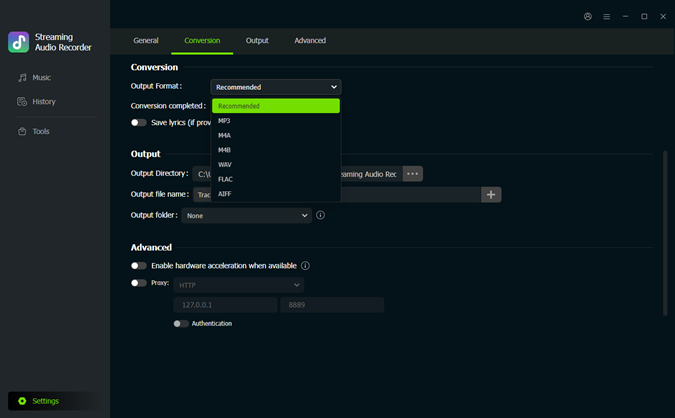 Step 1. Choose an Output Format
Open ViWizard Deezer Music Converter on your computer. Click the Settings icon in the bottom-left corner and select Conversion. Choose an output format, such as MP3 or FLAC, then adjust the audio quality and output folder if needed.
 Step 2. Find Music on Deezer
Return to the Music interface and click the Deezer icon to open the built-in player. Browse your library or use the search bar to find the song, album, or playlist you want to download.
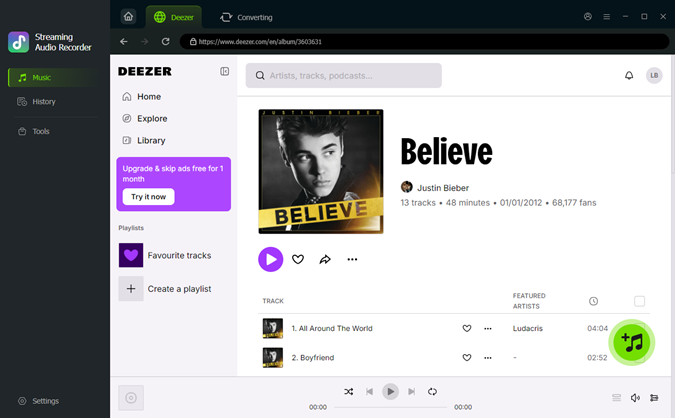 Step 3. Add Tracks to the Download List
Open your chosen track, album, or playlist and click the + button to add it. Check the songs you want and select Add to list.
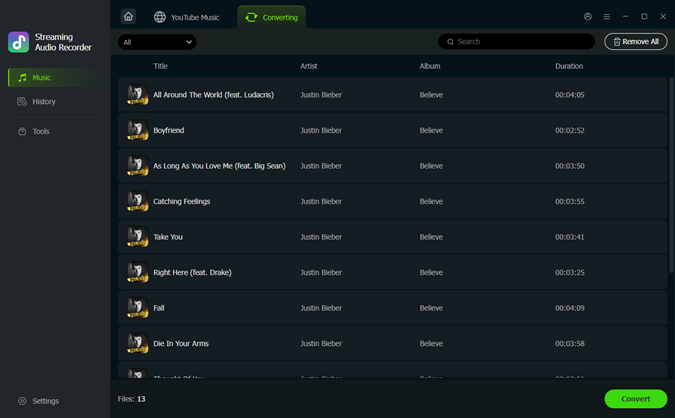 Step 4. Download Your Music
After you have added all your favorite songs, click Convert to start. Once done, open History to locate your converted files in the output folder. You can then transfer them to compatible devices or play them using other music players.
How to Transfer Downloaded Deezer Music to Phone
With ViWizard Deezer Music Converter, you can effortlessly download music from Deezer. For those looking to enjoy their downloaded Deezer music on their mobile devices, we've prepared an easy guide to transfer these tracks to your phone.
For iOS
01 Launch iTunes on your Windows PC or Finder on your Mac. Your iPhone will appear in the sidebar or menu.
02 In iTunes or Finder, go to the "Music" section and create a new playlist. You can name it something like "Deezer Downloads."
03 Drag and drop your downloaded Deezer music files from your computer directly into the new playlist in iTunes or Finder.
04 After adding the music, click on your iPhone's icon or name. Go to the "Music" tab and ensure that "Sync Music" is selected. Choose to sync the playlist you just created.
05 Click "Apply" or "Sync" to begin the transfer. Once the sync is complete, safely eject your iPhone from the computer. The music will now be available in the Apple Music app on your iPhone.

For Android
01 Connect your Android phone to your computer using a USB cable.
02 On your phone, make sure File Transfer or MTP mode is enabled.

03 Open the folder on your computer where your downloaded Deezer music is saved.
04 Open your phone's storage folder and navigate to a location for music files, such as Music or a custom folder.
05 Select the Deezer music files on your computer and drag them into the folder on your Android device.
06 Wait for the transfer to complete. Once finished, you can open any music player app on your Android phone to play the tracks offline
Part 4. How to Download Deezer Music to MP3 with Open-Source Tools
If you're looking for another way to save Deezer music as MP3 files, Deemix is an open-source, third-party downloader worth knowing about. It supports downloading individual tracks, albums, and playlists, with options to choose your preferred audio format and quality. Unlike Deezer's official offline feature, it is designed to save music directly to a local folder.
Getting started takes a little more work, though. You'll need to install Deemix and connect your Deezer account using an ARL token. Audio quality also depends on your Deezer account and the available source. Here's how the process works.

How to Use Deemix to Download Deezer Music
Step 1 Download and Install Deemix
Visit the Deemix website or its available community repositories to find an installation package for your operating system. Download a compatible version for Windows, Mac, or Linux and follow the installation instructions.
Step 2 Get Your Deezer ARL Token
To connect your Deezer account, you'll need its ARL token.
- Open Deezer in Chrome or Edge and log in to your account.
- Press F12 or right-click the page and select Inspect to open Developer Tools.
- Go to Application (Chrome) or Storage (Firefox), then find Cookies for the Deezer website.
- Locate the cookie named arl and copy its value.
Keep this token private, as it can provide access to your Deezer account. Its validity may also expire, requiring you to reconnect later.
Step 3 Log In to Deemix
Open Deemix and navigate to Settings > Login > Log in with ARL. Paste your ARL token into the provided field and save or update the settings to connect your account.
Step 4 Set MP3 as the Output Format
Open the Deemix settings and select MP3 as your preferred download format. You can also choose the available audio quality.
Keep in mind that the available quality depends on your Deezer account and the source. Free accounts may be limited to 128 kbps, while eligible Premium accounts may offer MP3 downloads up to 320 kbps. FLAC availability also depends on account access and the source.
Step 5 Search for and Download Deezer Music
Now you can search for songs, artists, albums, or playlists directly in Deemix. Alternatively, copy a Deezer music link and paste it into the search or URL bar.
Select the tracks you want and start the download. Deemix will process the available music and save the resulting MP3 files to your configured output folder.
Read More : Deemix Not Working? Try These 4 Best Deemix Alternatives
Part 5. FAQs About Downloading Music from Deezer
Where Are Downloaded Deezer Files Stored?
Deezer stores downloaded music in an encrypted, hidden cache inside the app on your device. You can't access these files as regular MP3s or play them in other music players through Deezer's official features. If you want standalone MP3 files, you can consider a third-party tool like ViWizard Deezer Music Converter.
How Do I Listen to Deezer Music Offline?
To listen without an internet connection:
1. Open the Deezer app.
2. Go to Settings.
3. Turn on Offline Mode.
4. Play your downloaded tracks, albums, or playlists.
Make sure you've downloaded your music before going offline.
Can I transfer my downloaded Deezer music to another device?
No, you cannot. Deezer's downloaded files are encrypted and are tied to your specific account and the device they were downloaded on. They are not standard audio files (like MP3s) and cannot be moved or copied to another device. To transfer the music, you need to convert it to common format with dedicated converters like ViWizard.
Is there a limit to how many songs can be downloaded?
While there isn't a total song download limit, there are restrictions on library size:
Favorite Tracks: Up to 10,000.
Playlists: Up to 2,000.
Albums: Up to 2,000 on desktop, but only 1,000 on mobile.
Podcasts: Up to 1,000.
Part 6. Conclusion
Whether you want to listen offline through Deezer, save MP3 files with ViWizard, or experiment with open-source tools like deemix, there are a few ways to keep your favorite tracks close. The right choice depends on where and how you want to play your music.
If you'd rather not keep your music locked inside the Deezer app, give ViWizard Deezer Music Converter a try. It might be just what your offline music collection needs!
You May Be Interested





From new releases to old favorites, Matt Smith is always on the lookout for good music. He follows the latest in digital entertainment and shares songs and media he thinks are worth checking out.

Leave a Comment (0)