


Did you download a movie from iTunes but get a "file format not supported" message when trying to play it on an Android device or another media player? If so, the problem may be caused by Apple's FairPlay DRM protection. Some iTunes movies and TV show episodes are protected by DRM, which means they can only be played through authorized Apple apps, accounts, or devices. Because of this, you may not be able to play or transfer these videos like regular MP4 files.
Fortunately, some tools can help convert supported iTunes M4V videos. One of them is ViWizard iTunes M4V Converter, which is designed to convert eligible iTunes video files. Depending on the source file and software version, it can convert supported M4V videos into more widely used formats, such as MP4. In this guide, we'll explain how to check whether your videos are supported and how to use ViWizard to convert eligible iTunes movies and TV shows into DRM-free files.
Part 1. Can You Remove DRM from iTunes Movies and TV Shows?
Users may want to remove DRM to preserve purchased movies. However, buying or renting a movie from iTunes only gives you the option to download it. You can save it offline on a compatible computer, smartphone, or tablet, provided it runs a supported operating system. These M4V files can be synced across compatible devices, but access remains limited by the content's terms.
For example, an iTunes rental is valid for 30 days. Once you start watching, you have 48 hours to finish it before it expires. Even downloaded rentals become inaccessible after this period because of the DRM protection embedded in the M4V file.
Apple doesn't provide an official procedure for removing DRM from iTunes movies or TV shows. Its supported options include downloading eligible purchases, keeping backups, authorizing computers, and accessing content through the Apple TV app. Third-party programs offer another approach by processing some protected iTunes videos and converting them into common formats such as MP4. For example, ViWizard iTunes M4V Converter can technically remove DRM from some iTunes movies and TV shows, although Apple doesn't certify it as an authorized DRM-removal solution. Such removal may also conflict with Apple's terms or applicable laws.

Need iTunes videos on more devices? ViWizard iTunes M4V Converter helps iTunes users convert purchased movies, TV shows, and videos with flexible video conversion. Convert your videos and enjoy playback with fewer format limitations.
Part 2. How to Remove DRM from iTunes Movies and TV Shows

Removing DRM from iTunes movies and TV shows might sound complicated, but the process can be relatively simple with the right software. One option is ViWizard iTunes M4V Converter, a dedicated iTunes DRM-removal tool that converts purchased and rented movies from M4V into DRM-free formats such as MP4 and MKV. It supports various portable devices, allowing users to transfer converted videos for playback on compatible devices.
ViWizard works on both Windows and Mac, but compatibility varies. It is fully compatible with iTunes on Windows. On Mac, it supports macOS 10.8 through 10.12, but not newer versions such as macOS 14 Sonoma. Users with newer Macs may need an alternative; the Windows version is recommended for PC users.
Key Features of ViWizard M4V Converter
Free Trial Free Trial* Security verified.5,481,347 people have downloaded it.
- Convert iTunes movies, TV shows, and local videos into MP4 or MKV
- Export videos in multiple formats for different devices and players
- Preserve HD, 4K video, audio tracks, subtitles, and metadata
- Customize video settings and merge multiple video clips
- Play converted iTunes videos across different devices
How to Handle DRM in iTunes Movies and TV Shows with ViWizard M4V Converter
- Compatible OS: Mac, Windows
- Java Required: Not Required
- Supported iTunes Version: iTunes 12.10.2 and later
- Remove DRM from iTunes Music: No
- Remove DRM from iTunes Movies: Yes
- Remove DRM from iTunes TV Shows: Yes
- Remove DRM from iTunes Audiobooks: Yes
01 Open ViWizard M4V Converter on your computer. Make sure iTunes is installed so it can access your iTunes library.
02 Click the "Library" button to load all your purchased or rented iTunes movies, TV shows, and M4V videos.
03 Click on the M4V files you want to convert. For multiple files, hold Ctrl (Windows) or Cmd (Mac) and select the files, then press "OK".
04 Alternatively, you can drag and drop files directly from your iTunes folder into ViWizard.
05 Click "Format" and select "Lossless M4V" for the best quality, keeping original audio, subtitles, and video intact.
06 Click "Output" to choose where the converted files will be saved. Pick a folder that's easy to find later.
07 Click "Convert" to begin removing the DRM. ViWizard will decrypt and convert your files.
08 The conversion may take a few minutes, depending on file size. ViWizard will notify you once it's done.
09 Go to the output folder to find your DRM-free files, ready to play on any device.
- Removes DRM from iTunes movies and TV shows
- Converts videos to MP4 and other formats
- Keeps subtitles and audio tracks
- Works on Android and smart TVs
- Supports batch conversion
- Requires installation
- Paid software
- Depends on computer performance
Part 3. How to Remove DRM from Apple TV Movies and TV Shows
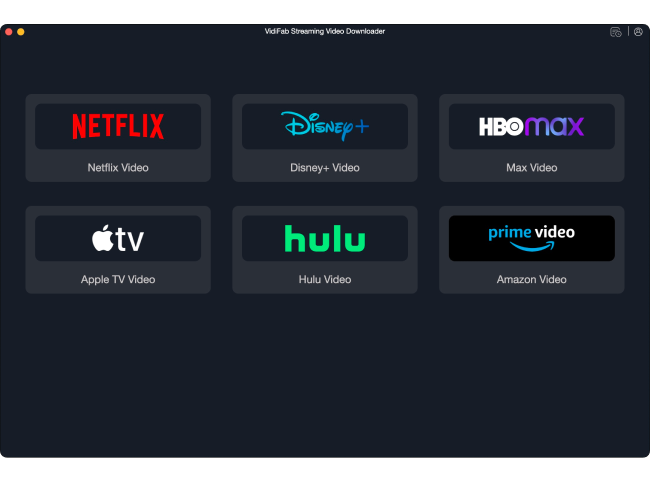
The Apple TV app provides access to purchased movies, rentals, and subscription-based shows, each with different access conditions. Purchased content is linked to your Apple Account and can be downloaded on supported devices when eligible. However, Apple doesn't provide an official DRM-removal tool, and accessing a title through the Apple TV app instead of iTunes doesn't change its DRM protection.
Downloading a show for offline viewing doesn't make it a permanent purchase. For users who want to save streaming videos, VidiFab Streaming Video Downloader is designed to download content from Apple TV and other popular streaming services for offline viewing.
Unlike file-conversion tools, VidiFab focuses on downloading streaming content. It can help users build an offline video library for times when internet access is limited or when traveling. Compared with screen recording, downloading offers a more direct and convenient way to manage offline videos.
- Compatible OS: Windows, macOS
- Java Required: Not Required
- Supported Apple TV+ Content: Movies and TV shows via streaming download
- Remove DRM from Apple TV+: Yes (streaming video download support)
- Convert Apple TV+ Videos to MP4: Yes
- Download Apple TV+ Movies: Yes
- Download Apple TV+ TV Shows: Yes
- Downloads Apple TV+ videos for offline viewing
- Saves videos in MP4 format
- Supports full episodes and seasons
- Keeps HD quality
- Works without internet after download
- Requires installation
- Paid tool
- May be affected by streaming updates
Part 4. Is It Legal to Remove DRM from iTunes Movies and TV Shows?
Not necessarily. Buying an iTunes movie lets you watch it under Apple's terms, but it doesn't automatically give you the right to remove its DRM. For example, you may want to convert a purchased movie to MP4 so you can play it on a non-Apple device. This may seem like a simple way to enjoy a movie you've paid for, but removing its protection can still cause legal problems.
In the United States, Section 1201 of the Digital Millennium Copyright Act (DMCA) generally prohibits bypassing technology that protects access to copyrighted content. The law allows some exceptions, but none gives users a general right to remove DRM from purchased movies for personal use. Apple also prohibits users from bypassing the security technology built into its services and content.
Other countries have their own rules, so owning a movie doesn't automatically mean you can legally remove its protection.
Part 5. Conclusion
DRM controls how you access and play digital movies and TV shows. With iTunes and Apple TV, purchased movies, rentals, and subscription content all come with different restrictions. You can download eligible purchases for offline viewing, but rentals expire and subscription downloads remain tied to an active subscription.
But what if you want more playback flexibility? Luckily, there are tools that can help. ViWizard iTunes M4V Converter helps convert iTunes movies and TV shows into DRM-free formats such as MP4, while VidiFab Streaming Video Downloader lets you save Apple TV content for offline viewing.
You May Be Interested





Dave Henry loves movies and all things video. He likes checking out different video formats and trying new media players to see how they change the viewing experience.

Leave a Comment (0)