



Shameless is one of those shows people do not just watch but also talk about. The series ended after 11 seasons on April 11, 2021, and it remains popular in 2026. You might start it alone at night or watch it with friends or family and find yourselves talking about Frank's choices or hoping Fiona finally gets a break. The show feels different because it does not glamorize struggle. It tells a raw and honest story about a poor family trying to survive on Chicago's South Side, and that perspective has changed how many viewers see poverty and resilience.
If you have not watched Shameless yet and are wondering whether it is worth your time, the answer is yes. Netflix makes it simple to start streaming Shameless, as long as it is available in your country. Just log in, search for the show, and press play. If you are wondering whether you can download it, we will also explain what options are available, since some movies and TV shows on Netflix are not always downloadable, including Shameless in certain regions.
Part 1: Introduction to Shameless

Life on Chicago's South Side is never simple for the Gallaghers. Frank, the father, spends most of his time drinking, scheming, and avoiding taking care of his six children: Fiona, Lip, Ian, Debbie, Carl, and Liam. The kids have to survive on their own while coping with their alcoholic father.
Each day brings new challenges. Money problems pile up, relationships get messy, and personal mistakes carry real consequences. Across eleven seasons, viewers watch the Gallaghers survive, fight, fail, and sometimes thrive in ways that are loud, shameless, and impossible not to care about. The story unfolds like life itself: unpredictable, messy, and never holding back.
Part 2: Where Can I Watch Shameless?
Shameless exists in two main versions. The original UK series, created by Paul Abbott, ran from 2004 to 2013 and follows the Gallagher family in Manchester. It has 11 seasons with 139 episodes and is known for its darker, grittier humor.

The US version, adapted by John Wells for Showtime, ran from 2011 to 2021 and is set in Chicago. It also has 11 seasons with 134 episodes and goes deeper into the characters and storylines in a more detailed, character-driven way.
Today, the US series can be streamed on platforms like Netflix with a subscription, though availability may vary by region. Episodes are also available for purchase on Apple TV, Amazon Prime Video, or Fandango at Home. The UK version can be watched on Channel 4 in the UK and on select international platforms. Both versions follow the same dysfunctional Gallagher family, but the US series is easier to watch for international audiences.
Part 3. How to Watch Shameless on Netflix
To watch Shameless (U.S.) on Netflix, you need an active Netflix subscription. Any standard plan works, and all 11 seasons are available on supported devices such as mobile phones, desktops, smart TVs, and streaming devices.
However, the show must be included in your country's Netflix library. Try searching for the series in the Netflix app. If it appears in your search results, you can stream it immediately.
Shameless (U.S.) is not available on Netflix worldwide. Its availability depends on regional licensing agreements. It has been offered in major markets like United States, Canada, United Kingdom, Australia, and parts of Europe. In many regions, the show is scheduled to leave Netflix between 2025 and 2026. The United States is expected to keep it the longest, though this may still change.
Watch Shameless on Mobile Phones (iPhone or Android)
Open the Netflix app on your phone.
Tap Sign In and enter your email and password.
Tap the Search icon at the bottom of the screen.
Type Shameless into the search bar at the top.
Tap Shameless (U.S.) from the results.
Tap Episodes and select your preferred season.
Tap an episode and press Play.
Watch Shameless on Desktop (Windows or Mac Browser)
Go to https://www.netflix.com.
Click Sign In in the upper right corner.
Enter your Netflix email and password.
Go directly to the Shameless (U.S.) page on Netflix, or use the Search bar at the top of the homepage.
Click Shameless (U.S.) from the results.
Click Episodes to choose a season.
Click an episode to start watching.
Watch Shameless on Smart TV (Roku, Fire TV, Apple TV, Smart TV)
Turn on your TV and connect to Wi‑Fi.
Open the Netflix app from your TV's home screen. If needed, download it from your TV's app store.
Select Sign In and enter your account details using the on-screen keyboard.
Navigate to Search.
Search for Shameless.
Select Shameless (U.S.) from the results.
Choose a season, then select an episode. Press Play on your remote to begin streaming.
Part 4: Can You Download Shameless on Netflix?
As of 2026, Shameless is still available for streaming on Netflix in some regions, as mentioned above. However, being able to stream the show does not always mean you can download it for offline viewing. Netflix treats streaming rights and download rights as two different things. In many countries, including the United States, the "Download" button may not appear on the Shameless page.
Some users turn to tools like ViWizard Netflix Video Downloader. This software can decode Netflix videos and convert Shameless into MP4 files for offline viewing. ViWizard Netflix Video Downloader offers a free trial so you can test it before deciding whether to use it.

Need Netflix movies and TV shows for offline viewing? ViWizard Netflix Video Downloader helps Netflix subscribers across all plans save movies and shows with a simple and reliable video downloading solution. Download your favorites and enjoy them beyond the official app.
Part 5: Why Can't I Download Shameless on Netflix?
Shameless, like other popular shows such as The Office (UK), The Walking Dead, Marvel's Agents of S.H.I.E.L.D., Gilmore Girls, and Grey's Anatomy, may not be available for download for a few reasons explained by Netflix:
- Streaming-only rights: Netflix may have permission to stream Shameless, but the licensing agreement does not always include offline downloads.
- Regional restrictions: In some countries, other companies may hold the rights to the show, so Netflix cannot offer downloads there.
- Licensing costs and availability: Download rights sometimes involve extra costs or agreements. For some shows, this means streaming is allowed but offline downloads are limited.
Part 6: How to Download Shameless on Netflix to MP4
If the "Download" button is missing for Shameless, it usually means the show is not available for download, even if it is available to stream on your device in your region. This is different from titles that come with a visible "Download" button.
If you want to save Shameless as MP4 files for more flexible offline viewing, a practical workaround is to use ViWizard Netflix Video Downloader. This desktop tool lets you download Netflix movies and TV shows as standard MP4 files, so they are not limited to the Netflix app. After installing it on a Windows or Mac computer, log into your Netflix account inside the program, search for Shameless, click the Add button, choose the seasons or episodes you want, select MP4 as the output format, and start the download.
Key Features of ViWizard Netflix Video Downloader
Free Trial Free Trial* Security verified. 5, 481,347 people have downloaded it.
- Download Netflix movies and TV shows as MP4 or MKV files
- Preserve HD, 4K, HDR video, audio tracks, and subtitles
- Accelerate downloads when saving long videos or complete seasons
- Remove ads automatically during video downloads
- Save Netflix videos for playback on different devices
Step 1Launch the Program and Sign In
Open the Netflix video downloader on your Windows or Mac computer. Inside the built‑in Netflix web player, sign in with your Netflix account details. Once logged in, you can browse the full Netflix library, including all available seasons of Shameless.

Step 2Adjust Download Settings
Before downloading, open the Settings or Preferences menu. Choose MP4 as the output format to ensure broad device compatibility. You can also select video quality, audio language, and subtitle options based on your preference. Save the settings so they apply to all selected episodes.

Step 3Search for Shameless
Use the search bar within the program to type Shameless or paste the show's Netflix link. Open the series page and select the season you want. You can then choose individual episodes or select multiple episodes at once.
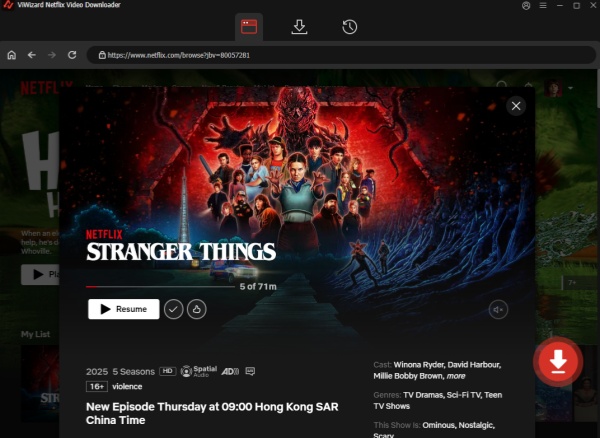
Step 4Download the Episodes
Click the Download button to begin saving the selected episodes. You may add multiple episodes or entire seasons to the download list. The software will process each episode automatically and convert them into MP4 files on your computer.

Step 5Locate and Play Your Files
After the download is complete, go to the Converted or History section to view finished items. Click the folder icon to open the file location on your computer. Your Shameless episodes are now saved as standard MP4 files, ready to transfer to smartphones, tablets, USB drives, or TVs for offline viewing.

Part 7: How to Transfer Downloaded Shameless Episodes to Other Devices
Once downloaded, the episodes are saved as standard MP4 files on your computer. You can then transfer them to smartphones, tablets, USB drives, TVs, or even game consoles. This gives you more flexibility and control over how and where you watch.
Remember to avoid any commercial use and keep the files for personal viewing only, such as watching on smartphones, Smart TVs, or other compatible devices.
Transfer Shameless Downloads to Android Phone
Connect your Android phone to your computer using a USB cable.
Unlock your phone and select File Transfer mode if prompted.
Open This PC on Windows or Finder on Mac.
Click your Android device under Devices.
Open Internal Storage.
Go to the Movies or Video folder.
Drag the Shameless MP4 files into this folder.
Safely eject your phone from the computer.
Open a video app like VLC to watch the episodes offline.
Transfer Shameless Downloads to iPhone
Connect your iPhone to your computer using a USB cable.
Open iTunes on Windows or Finder on Mac.
Click your iPhone under Devices.
Go to the Movies or File Sharing section.
Drag the Shameless MP4 files into the video area.
Click Sync to transfer the files.
Safely disconnect your iPhone.
Open the Apple TV app or another compatible video app to watch offline.
Transfer Shameless Downloads to USB, Then to Smart TV
Insert a USB flash drive into your computer.
Open the folder where your Shameless MP4 files are saved.
Drag the files onto the USB drive.
Safely eject the USB drive from your computer.
Insert the USB drive into your Smart TV's USB port.
Open the Media Player or USB section on your TV.
Select the episode you want to watch.
Press Play on your remote to start streaming.
Conclusion:
Shameless is a chaotic, funny, and often heartfelt look at life on Chicago's South Side. However, streaming and downloading Shameless on Netflix can vary depending on your region.
For offline viewing, some users choose tools like ViWizard Netflix Video Downloader to save episodes as MP4 files. This software allows you to download Shameless and other shows or movies directly to your computer, offering a more flexible way to watch offline when the download option is unavailable in the Netflix app.
You May Be Interested





Dave Henry, a multimedia technologist at ViWizard, focuses on delivering the best solutions for digital media challenges, including audio and video conversion, media optimization, and troubleshooting.

Leave a Comment (0)