


Digital Rights Management, or DRM, is now a feature of the majority of streaming services, including Netflix, Hulu, Disney+, and Apple TV+. Netflix, in particular, invests heavily in content protection; for instance, it spent $12 billion on original content creation in 2020.
At the same time, Netflix uses a multifaceted strategy to prevent content piracy in order to keep its subscription members from leaving. To explain Netflix DRM in detail, this article will cover all the essential information you need to understand Netflix DRM and provide 5 solutions for you to bypass DRM.

Part 1. What Is Netflix DRM?
Digital Rights Management (DRM) is a solution that includes several technologies, which target digital content protection and the regulation of the way content is accessed, shared, or disseminated. Netflix implements video DRM that is supported by Google Widevine and Apple FairPlay DRM to prevent piracy and illegal copying of its content. Through this, Netflix can restrict the manner in which authenticated users might interact with its services.
Part 2. How Does Netflix DRM Work?
So, how does Netflix DRM work? Netflix does not only depend on DRM to fight piracy, but instead, it uses a range of encryption methods. Netflix has implemented the following to rule out unauthorized access:
Netflix's licensing server checks your device's credentials (OS, app, security level) and, if approved, sends a decryption key to a secure area (CDM/TEE) on your device, not directly to the app. This means Netflix just "lends" its content to you. So, your downloads will be outdated or unavailable after a while. The video is arriving as encrypted segments. The DRM technologies will prevent you from recording Netflix movies or originals, and so on. And to save Netflix films forever is unacceptable.
Key Netflix DRM Technologies
- Widevine: For Android, Edge, Chrome, Firefox, etc.
- FairPlay: For Apple devices (like iOS, macOS).
- PlayReady: For Microsoft devices and so on.
Part 3. 5 Methods to Remove Netflix DRM
Without doubt, Netflix DRM lets people find and use high-quality, legal digital content from a ton of sources and services. Also, it makes sure that people can fairly pay for arts and support the content creators they like. However, sometimes it influences the viewing experience of people. In addition, it limited how, where, and when we use the digital content we've paid for. Therefore, we find 5 methods to bypass Netflix DRM. Noticeably, we offer these methods just for personal use and refuse commercial use.
Method 1: Use Netflix Video Downloader
Netflix's DRM system is designed to prevent users from pirating, distributing, and reproducing videos; however, if you have a Netflix membership and your internet connection is not always stable enough for smooth Netflix online streaming, you can use a professional Netflix downloader, such as ViWizard Netflix Video Downloader or StreamFab Netflix Downloader, to improve your viewing experience. To avoid violating Netflix's video content protection, we must clearly state that ViWizard is only for personal use and not distribution.
Tool 1: ViWizard Netflix Video Downloader
ViWizard Netflix Video Downloader is a safe program that not only allows you to download unlimited movies and shows from Netflix, but also preserves all of the video's details. Whether it's in full HD or Ultra HD, subtitled in multiple languages, or audio tracks in 5.1 Dolby Atmos, ViWizard makes offline viewing greater than ever. Additionally, ViWizard can convert Netflix videos to DRM-free MP4/MKV formats, freeing you from the limits of cross-device playback. Let's follow the guide to download your favorites!

Key Features of ViWizard Netflix Video Downloader
Free Trial Free Trial* Security verified. 5, 481,347 people have downloaded it.
- Download Netflix movies and TV shows as MP4 or MKV files
- Preserve HD, 4K, HDR video, audio tracks, and subtitles
- Accelerate downloads when saving long videos or complete seasons
- Remove ads automatically during video downloads
- Save Netflix videos for playback on different devices
Step 1Sign in to Your Netflix Account
Download and install the ViWizard Netflix Video Downloader on your computer. Launch the software and then enter your email and password, followed by "Sign in." Once you've signed in, you'll have access to all of Netflix's content, including movies, TV series, documentaries, anime, and originals.

Step 2Configure Download Settings
Click the hamburger icon in the upper right corner of the ViWizard interface, then select "Preferences." The "Download" section allows you to setup the output location, video quality and format, language for subtitles and audio, and so on. After you've made your selections, click "OK" to make the changes.

Step 3 Start the Download
Use the search bar and enter the title, keyword, URL, or code. Once you've found the desired video, select the episodes you want to download. Click the "Download" button to begin the procedure. If you want to download it later, you can click the "add to list" to keep the episode or movies in the download list.

Step 4View and play downloaded Netflix videos
To view the downloaded content, click the folder icon next to the video title on the right side. Then, you can transfer the Netflix video files to other devices and watch them offline whenever and wherever you like, free of Netflix's DRM restrictions.

Tool 2: Use StreamFab Netflix Downloader
Also, you can try StreamFab Netflix Downloader to not only handle Netflix download restrictions but also enhance your video-viewing enjoyment. StreamFab not only helps you bypass Netflix DRM but also offers unlimited downloads. The only disadvantage is the price. About $55/month may be a burden to most people.
There is a tutorial for StreamFab Netflix Downloader.
Step 1 Download StreamFab Netflix Downloader and launch it on your computer.

Step 2 Select and play a video from Netflix. StreamFab will analyze it automatically.

Step 3 Next, click the download button to download Netflix videos immediately or choose to add them to the "Downloading Queue."

Step 4 After downloading, you can play the downloaded TV show or movies by using any video media player!
Method 2. Use Screen Recorder Like Bandicam
For video content, screen recording or a screenshot is also a way to rip video. To prevent this, Netflix uses a more sophisticated DRM system. Whether you're watching a Netflix video in a browser on your PC or an iOS or Android device, the DRM will intercept the command and display a black screen rather than any video if you attempt to record a video or take a screenshot. To deal with this, some Screen recorders claim to be able to remove Netflix DRM.
The following is a simple guide to using a screen recorder (Bandicam as an example):
Step 1 Download Bandicam and install it.
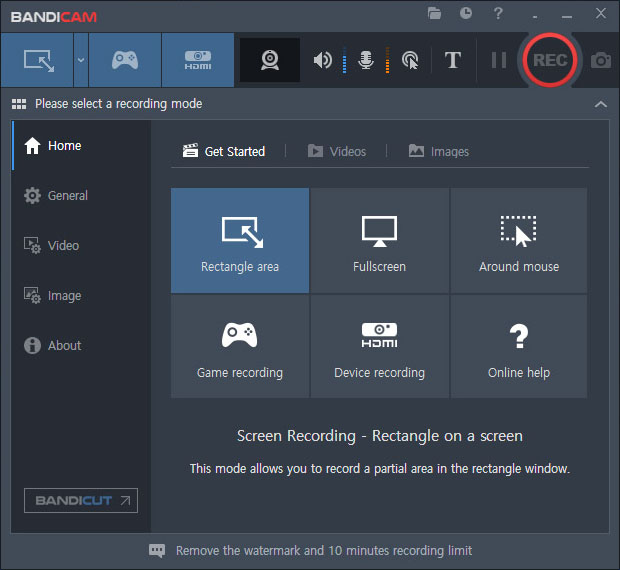
Step 2 Open your browser and uncheck the "Use hardware acceleration when available" option in Edge/Chrome or use Firefox.
Step 3 Choose the 'Rectangle on a screen' menu on Bandicam, and click the REC button.
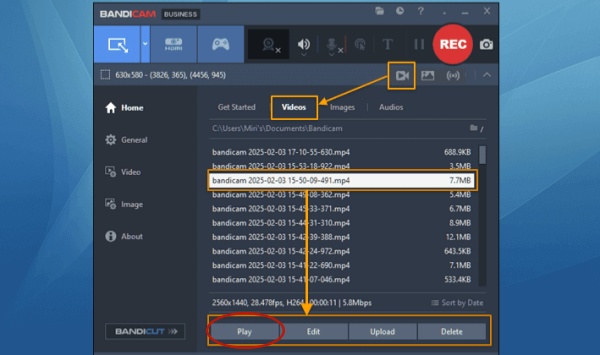
Step 4 Find the home and click on the video icon to play recorded content.
Method 3: Use Other Capture Devices
Using external capture devices can help bypass Netflix DRM, too. By connecting a capture card via HDMI (often after an HDCP stripper), you can intercept the video signal before it hits the display. If you want to remove Netflix DRM in this way, you can follow the guide below:
Step 1 Connect your video source to the device's HDMI input with an HDMI cable.
Step 2 Pass the signal through to your TV/monitor via another HDMI cable.
Step 3 Link the device to your computer with USB/Thunderbolt for recording in software like OBS Studio.
Step 4 You can now record the content. After recording, you can start streaming.
Method 4. Mirroring Display
Using PC display settings to mirror your screen (especially on devices like Xreal glasses) can sometimes bypass DRM. You can cast Netflix to TV or other devices. This is the most reliable method. However, Netflix has canceled this feature recently, so only a part of users can use this way. These devices support Netflix mirroring below:
- Chromecast devices (3rd gen or older) without a physical remote
- Google Nest Hub smart displays
- Select cast-enabled Vizio TVs
- Select cast-enabled Compal TVs
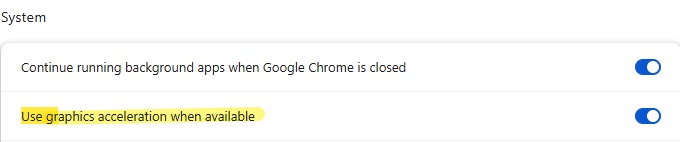
Method 5. Disabling Hardware Acceleration
You can remove the Netflix DRM by unchecking "Use hardware acceleration when available" in the browser settings. Disabling hardware acceleration in Firefox, Edge, or Chrome might help, but it's not guaranteed. Besides, this way will result in lower video quality.
Part 4. FAQs about Netflix DRM
Is it legal to bypass Netflix DRM?
The answer to this varies depending on the laws for your area. For some areas, it is in a legal gray area if you bypass Netflix DRM only for personal viewing, rather than scattering around. However, no matter where you're in, you should not share the Netflix video files in most situations.
Is there a visible watermark on Netflix content?
Although dynamic watermarking–unique watermarks included in the video–is used by Netflix, most viewers are unable to see it. In the event of piracy, these watermarks are used to link content to its original viewer.
What is DRM-enabled content?
Video or audio content protected by Digital Rights Management technology is referred to as DRM-enabled content. The sharing, downloading, and duplicating of the content are restricted by this protection.
Can I download Netflix videos for offline use?
Yes, Netflix allows downloading on mobile apps for offline viewing, but the videos are still DRM-protected and can't be transferred to other devices. To bypass this, you can use ViWizard Netflix Video Downloader.
Part 5. Conclusion
Netflix DRM is an important technique for content protection. However, sometimes it can be restrictive for viewers with poor and slow internet connections. To improve your streaming experience, you may avoid DRM limitations and download Netflix content for offline viewing by using tools such as the ViWizard Netflix Video Downloader. But we must advocate again that it is forbidden for distribution. In a word, whether you want to watch without an internet connection or download videos for later viewing, this software is your best chance for unlocking Netflix content.
You May Be Interested

Bypass Netflix Download Limit: The Expert Guide in 2026

What Does Limited Series Mean on Netflix? Full Guide & Top Picks

Download Squid Game Seasons 1-3 from Netflix to MP4

How to Get Netflix for Free - Unlimited Entertainment

5 100% Working Ways to Remove Netflix Ads

How to Cancel Netflix Subscription on All Devices [Detailed Guide]


Dave Henry, a multimedia technologist at ViWizard, focuses on delivering the best solutions for digital media challenges, including audio and video conversion, media optimization, and troubleshooting.

Leave a Comment (0)