


Nowadays, most people can't live without the internet and entertainment, especially streaming entertainment. So, there is someone who combined the internet with TV shows, movies, and so on. Netflix, Hulu, and other streaming services emerged.
And there is a question: Should I use Netflix or Hulu? Which one is better? Considering Netflix is widely considered the biggest streaming service globally by subscriber count, it seems Netflix has already won. But Hulu is also a popular streaming service offering a large library of TV shows, movies, and critically acclaimed Originals. Therefore, there will be a streaming battle: Netflix vs Hulu. Let's have a look!
Part 1. Netflix vs Hulu: Overview
Before we start our comparison, we'd better have an understanding of these two streaming services.
Netflix Overview: Best Original Fans
What is Netflix? Netflix is not strange to us. Netflix is a global subscription streaming service. With a bunch of original series, Netflix gets many fans. What's more, Netflix has a dependable and user-friendly interface while offering a vast range of features and a constantly evolving catalog with diverse content. So, Netflix is absolutely the best choice for original fans.
Hulu Overview: Best for Network TV Show Fans
Hulu is a popular streaming service owned by Disney. It is known for streaming current episodes of popular network shows from ABC, FX, or FOX, along with Hulu Originals such as The Handmaid's Tale and Only Murders in the Building. Hulu provides rapidly updated episodes and a live TV option, which brings advantages. Therefore, Hulu is best for network TV show fans.
Part 2. Netflix vs Hulu: Key Differences
In this part, we will compare Netflix with Hulu from several key points, including content, price, viewing experience (video quality), and bundles. You will have a deeper understanding of them.
Hulu vs Netflix: Content
Netflix content includes a vast library of original and licensed movies, TV shows, documentaries, and specials across nearly every genre, featuring global hits like Stranger Things and Squid Game, plus award-winning documentaries like Our Planet, The Walking Dead, and Making a Murderer, alongside reality TV, kids' programming, and stand-up comedy, with new releases added weekly.
Hulu offers a vast library of TV shows, movies, and Hulu Originals like The Bear, Only Murders in the Building, covering everything from current network hits to classic favorites, with options for ad-supported or ad-free viewing. For live TV, the Hulu + Live TV package offers 95+ live channels, including ABC, NBC, CBS, ESPN, FX, TNT, Disney Channel, Cartoon Network, CNN, Fox News, and more. The theme includes news, sports, family, and entertainment with unlimited DVR. It is also bundled with Disney+ and ESPN (ESPN+), making it a comprehensive streaming service with on-demand and live content.
Hulu vs Netflix: Price
Netflix's plan has three types: Standard (with ads), Standard (ad-free), and Premium. The prices for them are $7.99/month, $16.99/month, and $24.99/month. In addition, if you have a Standard (ad-free) plan or a Premium plan, you can choose to add an extra member for $6.99/month (with ads) or $8.99/month. The extra member can enjoy the same services as the owner account.
Hulu offers the basic Hulu plan, which gets you the on-demand streaming library for just $11.99. If you want to get rid of annoying ads, you can remove them for an additional $7.00/month with Hulu (No Ads). Compared to Netflix, Hulu has a live news feed from ABC. If you are a live show fan and don't mind trading a few ads for TV options. Hulu is a good option.
Netflix: No free trial offered
Hulu: a one-month free trial on its ad-free plan, and a one-week free trial on the Hulu + Live TV service.
Hulu vs Netflix: Bundles
Netflix offers savings by combining services on a single bill, or through third-party platforms like +play through providers like Verizon (with Max), T-Mobile (free on some plans), and Xfinity (with Apple TV+ and Peacock).
- Verizon: Offers a $10/month bundle with Netflix (with ads) and Max, available with select mobile and home internet plans.
- Xfinity (Comcast): Provides a "StreamSaver" bundle for $15/month, including Netflix (with ads), Peacock (with ads), and Apple TV+.
- T-Mobile: Includes Netflix for free on certain plans, like Go5G™ and Magenta® with two or more lines, or single-line Experience plans.
- +play (Verizon): A platform where you can bundle services like Netflix and Starz.
There are three bundles of Hulu. Compared to Netflix, Hulu has an optional bundle. You can get three services at a relatively lower price. It's to one's profit who wants to enjoy three services.
| Bundles | Price |
|---|---|
| Disney+, Hulu, & ESPN Select (With Ads) | $19.99/month |
| Disney+, Hulu, & ESPN Select Premium (No Ads) | $29.99/month |
| Disney+, Hulu, & ESPN Unlimited (With Ads) | $35.99/month |
| Disney+, Hulu, & ESPN Unlimited Premium (No Ads) | $44.99/month |
| Hulu (With Ads) + Live TV | $89.99/month |
| Disney+, Hulu, & Max (With Ads) | $19.99/month |
| Disney+, Hulu, & Max (No Ads) | $32.99/month |
Hulu vs Netflix: Resolution/Quality
Netflix offers up to 4K Ultra HD. To get HD on Netflix, you must have a Standard plan ($16.99). A Premium ($24.99) plan is required for 4K. Netflix supports Dolby Atmos and 5.1 surround sound on higher tiers. Netflix requires higher bandwidth for 4K streaming. Most titles on Netflix support 4K.
Hulu is primarily 1080p, with 4K only on select Originals and supported devices. Hulu provides 1080p HD for most content across its plans. Hulu content is largely limited to stereo, with surround sound on select, mostly newer content. Hulu is generally more efficient at delivering 1080p.
Part 3. Hulu vs Netflix: Pros and Cons
Pros and cons of Hulu and Netflix are as follows:
Netflix
- Pros
- Simple interface that's easy to use
- Good recommendation system
- Optional subscription plans
- Abundant resources of movies, shows, and originals, including Stranger Things, Wednesday
- UHD & HDR experience
- Cons
- A weekly TV shows update
- Fee for extra members
- Limited bundles
Hulu
- Pros
- Access to network shows and originals
- New episodes are available almost immediately
- Optional bundles
- Cons
- Smaller catalog of originals than its rivals
- Only in the US
- Relative complicated page
- Glitches on occasion
Part 4. Comparison between Netflix and Hulu
| Services | Netflix | Hulu |
|---|---|---|
| Monthly price | $7.99/month (with-ads plan) $16.99/month (ad-free plan)(Add 1 extra member for $8.99/month) $24.99/month (Premium plan)(Add up to 2 extra members for $8.99/month) |
$9.99/month (with-ads plan) $18.99/month (ad-free plan) |
| Top content | Stranger Thing Kpop Demon Hunter Bridgerton Wednesday |
Star Trek: Picard South Park The Handmaid's Tale Ru-Paul's Drag Race |
| Video Quality | 1080p/4K | 1080P/4K |
| Downloads | Support (Ad-free plan or above) | Support (Ad-free plan or above) |
| Dolby Atmos | ✅ | ❌ |
| 4K HDR Available | Yes (Premium plan) | Yes (For some original titles) |
| Simultaneous Streaming | 2-4 | 2 |
| Live Channel Count | No | 90+ |
| Bundle Options | limited | optional |
| International Availability | 190+ countries | Only in the US |
| Content Focus | Original series, films, global shows | Live TV (optional), network TV shows |
Part 5. Netflix vs Hulu: Which one is better for you?
It's time to find out who the winner is. So who wins? Netflix, without a doubt. Netflix has a more user-friendly page. And the Netflix originals like Stranger Things are incredibly attractive. Hulu seems a little more limited in originals. Moreover, Netflix offers services in 190+ countries, but Hulu is only available in the US. Notably, Netflix has movies ranging from around 4,000 to over 6,000 films. If you are a movie fan, Netflix is a no-brainer option. Younger audiences, comedy enthusiasts, and fans of original, foreign, or independent content are all on Netflix.
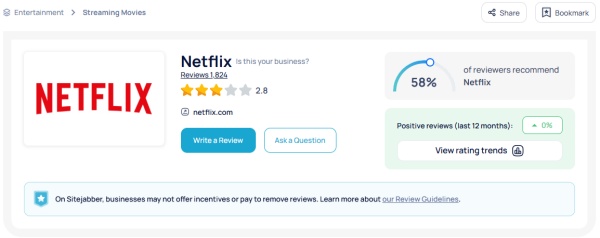
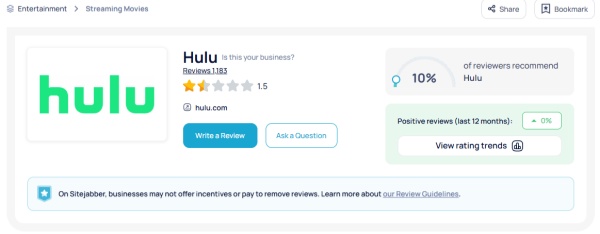
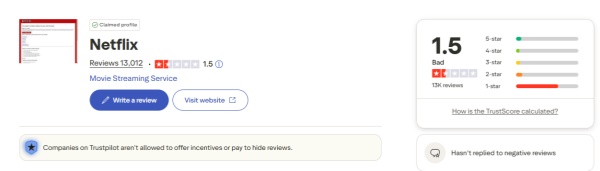
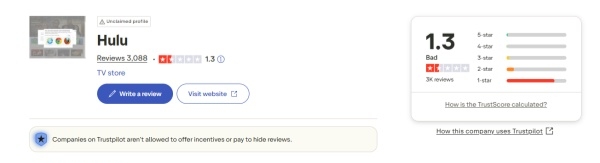
What's more, we find the scores of Netflix and Hulu on Trustpilot and Sitejabber: Netflix is higher than Hulu. Users' experience doesn't lie. Therefore, if you want to choose one streaming platform to relax in your free time, Netflix is absolutely the best choice.
Bonus: How to Download Netflix to MP4 for Offline Viewing
Finally, if you choose Netflix, this part is a surprise. Can you download Netflix titles to the MP4 format forever? Yes, of course. We provide you with an excellent tool – ViWizard Netflix Video Downloader. This tool can help you download any Netflix TV shows or movies to your computer. So, you can cast them to a TV or other better screens without the Netflix cast limitation.
In addition, if you have the Standard plan (with ads), ViWizard Netflix Video Downloader allows you to remove the ads. So, you can enjoy a smooth viewing experience to binge-watch your favorite Netflix series like Stranger Things or The Beast in Me. There is a step-by-step guide on how to download Netflix content using the ViWizard Netflix Video Downloader.

Key Features of ViWizard Netflix Video Downloader
Free Trial Free Trial* Security verified. 5, 481,347 people have downloaded it.
- Download Netflix movies and TV shows as MP4 or MKV files
- Preserve HD, 4K, HDR video, audio tracks, and subtitles
- Accelerate downloads when saving long videos or complete seasons
- Remove ads automatically during video downloads
- Save Netflix videos for playback on different devices
Step 1Open ViWizard and Log In
Fire up ViWizard Netflix Video Downloader on your Windows or Mac computer. Use the built-in Netflix player to sign in with your account credentials. This gives you full access to Netflix's library, including all five seasons of Stranger Things.

Step 2Set Your Download Preferences
Click the menu icon (three lines) and go to Preferences. Here you can tweak your download options — choose MP4 as the output format, set video quality, select audio channels, pick your preferred language, and enable subtitles. Make sure to save your changes so every episode downloads just the way you like it.

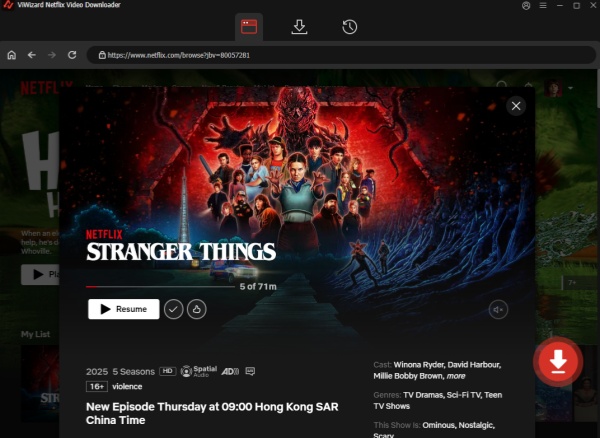
Step 3Find Stranger Things
Back in the ViWizard interface, use the search bar to locate Stranger Things by typing the title or pasting the season/episode URL. Once you've found the season you want, open it to get ready for download.
Step 4Start Downloading
Click the Download button to begin. You can also add episodes or entire seasons to a queue if you want to schedule multiple downloads. ViWizard handles each episode automatically, saving them as MP4 files to your device's default download folder.

Step 5Access Your Downloads
Once the downloads finish, go to the Converted tab in ViWizard. You'll see all your completed episodes here. Click the folder icon next to any title to locate the MP4 files on your computer. Now you're ready to binge Stranger Things offline — whether on your laptop, TV, or even while traveling.

Conclusion
When comparing Netflix and Hulu, both have unique advantages, but your choice depends on your priorities. But I really think Netflix is more worth it to me for a sea of titles and the best video quality. If you are the same as me, I want to recommend this tool again - ViWizard Netflix Video Downloader. With it, you can save Netflix to MP4 on your computer forever and watch it without the internet. Now, just click the download button and try it for free!
You May Be Interested


Dave Henry loves movies and all things video. He likes checking out different video formats and trying new media players to see how they change the viewing experience.

Leave a Comment (0)