


Picture flawless, studio-quality sound flowing into Mac speakers with no patchy Wi-Fi interruptions. That's what Qobuz, the music enthusiast's site that preserves every note, does. Playing classical symphonies or the newest beats, the Qobuz Mac app makes them all come alive. So, how exactly do you download the tracks to the Mac computer? Here's the scoop on three simple methods: download with subscription, get purchased music, or download as local files without purchasing. And I'll address all the burning Qobuz for Mac FAQs. Time to become a Qobuz Mac download expert? Here's the beginning.

Method 1. Download Qobuz Music on Mac for Offline Listening
Qobuz gives you two main ways to download music on a Mac. The first is using the Qobuz desktop app to save songs for offline listening. The second is to purchase tracks or albums, which lets you download permanent hi-res audio files that you can play anywhere. The catch? Offline playback through the app requires a Qobuz Studio or Sublime subscription, while buying music outright can get expensive.
Want a better option? If you want to save money and keep permanent files from Qobuz, tools like ViWizard Qobuz Music Downloader make it easy. Or, skip ahead to Method 2 or Method 3 for cheaper, even free, ways to download Qobuz music on your Mac.
1.1 Download with a Qobuz Subscription
Download and install the Qobuz app for Mac from the official website. Choose the version that matches your macOS (options include macOS X 10.10, 10.11+, or 11+ for Apple M1).

Log in to your Qobuz account.
Browse or search for the album or track you want to download.
Click the three dots next to the song or album and choose "Import."
Navigate to the "Offline" section where you can check and listen to the downloaded Qobuz tracks and albums.

When you download tracks, playlists, or albums from Qobuz using the Qobuz Mac app, they are saved within the app itself. You can listen to them offline, but only on that specific Mac. These downloads won't sync to other devices, so you can't access them anywhere else. Also, you can't transfer the downloaded files because they're encrypted and not stored as normal files on your Mac's storage.
1.2 Download Purchased Music
When you purchase music on Qobuz, you get DRM-free files, meaning you can play them anywhere without needing the Qobuz app. This is good if you want to own the music, not just have the ability to play it offline.
Before downloading the purchased music, go to the Qobuz website's download store to buy it. Search for the tracks or albums you want, then click "Buy the Album" or "Buy Track." Choose your preferred audio format and quality, and complete the payment.

Once purchased, you can download the music in two ways: 1) Download the files directly to your computer, one track at a time. 2) Use the Qobuz Downloader to download in batch.
Option 1. Download Track by Track
After you purchase the tracks or albums, you can download the files directly in your browser, but you need to do it manually, track by track.
Click Download track by track.
Select your preferred music format.
You can download the tracks individually by clicking the download icon next to each song title.
Once downloaded, the music you purchased from the Qobuz website will be in the folder where your browser saves downloads.

Option 2. Download Songs/Albums in Bulk
Qobuz also has a special app called "Downloader." The Downloader saves files straight to your chosen folder on your Mac. No need to dig through a browser's download limbo. It's a direct pipeline from Qobuz to your hard drive, keeping your music organized and ready. Choose this method if you are handling a big downloads. You can get the Qobuz Downloader from here. After you download and install it, follow these steps:
Click Download with Qobuz Downloader.

Click Open in the pop-up window.

In the Downloader app, pick the sound quality you want. FLAC is usually picked first, but you can click it to change.

Click "Add to queue," then click "Start download" in the next window.

After downloading, you can find your music by clicking the small folder icon next to it. This shows where the files are on your computer. You can also choose where you want to save the files.
Music you buy from Qobuz usually comes in open file formats. These include FLAC, ALAC, AIFF, WMA, WAV, MP3, AAC, DSD, or DXD. This means the files are not locked, and you can play them on any music player and put them on any of your devices.
Method 2. Download Qobuz Music to Mac as Local Files
Do you want to download Qobuz music as local files onto Mac without buying them? There is a trick that suits you. You are able to download the entire Qobuz music library in any open file format by using a professional Qobuz downloader. Here I recommend using the ViWizard Qobuz Music Downloader. It has a dedicated Mac version to help Qobuz users (regardless of what subscription you are in) obtain the original Qobuz audio in MP3, FLAC, WAV, AIFF, and more universal formats. In this way, you are able to enjoy your favorite Qobuz tracks, albums, and playlists in the highest Qobuz music quality on any device you like.
Click the Free Trial button below and try to keep your Qobuz music collection forever even after the subscription period has ended.

Key Features of ViWizard Qobuz Music Downloader
Free Trial Free Trial* Security verified. 5, 481,347 people have downloaded it.
- Convert Qobuz songs, albums, and playlists
- Export Qobuz music in 6 formats for different devices and players
- Preserve lossless audio quality when creating music archives
- Save complete albums without collecting individual tracks
- Batch download Qobuz albums, playlists, and music collections
Step 1Set Output Preferences
Click the menu icon in the top-right corner and select Preferences. Here, you can choose an output format like FLAC, MP3, or WAV, adjust the bitrate and sample rate for optimal quality, and set an output folder on your Mac to keep your downloads organized. Once everything is configured, click OK to save your settings.

Step 2Log in to Qobuz in ViWizard
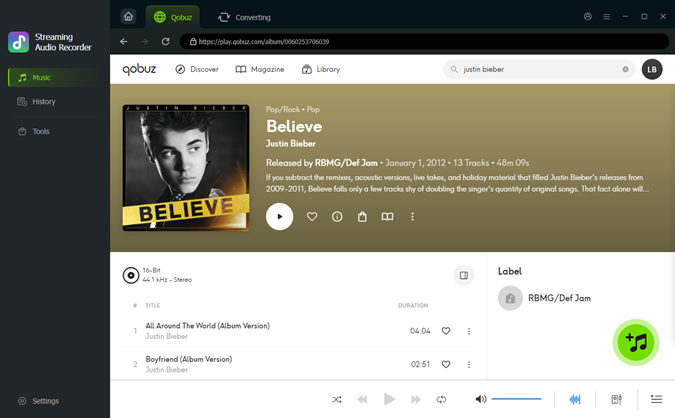
Go back to the main interface of the ViWizard program and click the Qobuz music logo. This opens the built-in Qobuz web player. Log in with your Qobuz account to load your collection. Don’t worry, your information stays safe; this step is only to access your library.

Step 3Add Qobuz Music
Browse your favorite albums, playlists, or tracks, then click Add Music to queue them for download.
Step 4Download Qobuz Music to Mac
Go to the conversion list, where all selected tracks are queued. Click Convert, and ViWizard will quickly process your downloads, saving your Qobuz music as local files on your Mac. Once finished, open the Qobuz Mac app to enjoy your tracks offline—or find them in your selected folder for unlimited playback.

Method 3. Download Qobuz Music to Mac via a Open Source Tool
If you want a free way to download music from Qobuz to your Mac, there are some tools on GitHub that can help. They use the Qobuz API to fetch songs in the highest quality available, up to 24-bit/192kHz FLAC. Some working tools include Qobuz-dl and QobuzDownloaderX-MOD.
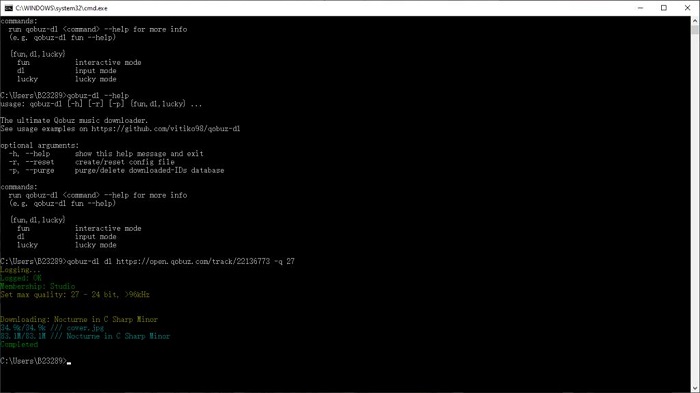
Below, we will use Qobuz-dl as an example. It is a Python-based tool that lets you download Qobuz tracks, albums, or entire playlists by pasting a URL into your Terminal.

Install Python: Make sure Python 3 is installed on your Mac. Check by typing python3 --version in Terminal. If it is not installed, you can get it using Homebrew by running brew install python.
Install the Tool: Open Terminal and run the following command:

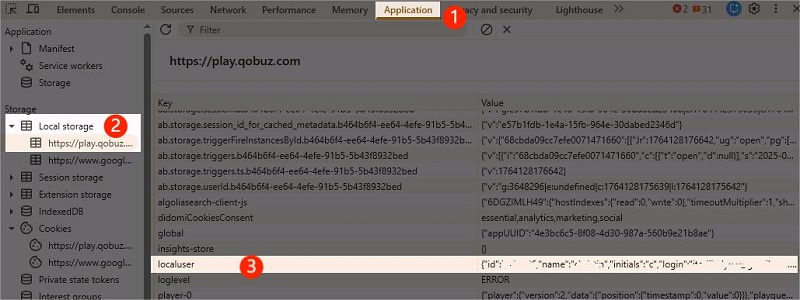
Authenticate: You will need your Qobuz User ID and Token. These can be found in your browser's Local Storage while logged into the Qobuz Web Player. Run qobuz-dl once to generate the configuration file, then paste your credentials into it.
Download Music: Use this command to download music at the highest quality:

Discover how to use Qobuz-DL and its alternatives, like QBDLX and ViWizard Qobuz Downloader to save Hi-Res tracks offline with ease.
FAQs About Downloading Qobuz Music on Mac
Can I use Qobuz on Mac without the app?
Yes, Qobuz also has a web player. You can search for "Qobuz web player" in your browser to find it. The website player lets you listen to music without installing the app, but you can't download anything and listen offline.
Can I transfer Qobuz downloads to other devices?
Downloads you get with a Qobuz subscription are usually locked. They only work with the Qobuz app on the device you downloaded them to. Because of copyright rules (DRM), you can't move these files to other devices and use them outside the Qobuz app. However, music you buy from the Qobuz store usually doesn't have this lock. So, you can move it to other devices and play it in other music players. If you do not want to pay extra to get the actual music files from Qobuz, consider using ViWizard Qobuz Music Downloader as it allows you to get the Qobuz music files without spending money to get them.
Is the Qobuz Mac app free to download?
Yes, you can download the Qobuz Mac application from the Qobuz website. The app is free, but to use most of its features (like streaming and downloading), you need to pay for a Qobuz subscription.
What are the system requirements for Qobuz on Mac?
You'll need macOS X 10.10 or later (10.11+ or 11+ for newer systems like M1). You also need a Mac with an Intel 64-bit chip. To be sure about the latest needs, check the Qobuz website.
Conclusion
Mac users have a few ways to download music from Qobuz. The easiest way is to download the music using the Qobuz Mac application for offline playback. Another way is to buy music from the Qobuz store online. This gives you music files that aren't locked, so you can play them on any device. For the most cost-effective way to get the Qobuz downloads to Mac is using ViWizard Qobuz Music Downloader, because you can keep Qobuz music forever on your Mac without spending extra to buy them.
You May Be Interested


From new releases to old favorites, Matt Smith is always on the lookout for good music. He follows the latest in digital entertainment and shares songs and media he thinks are worth checking out.

Leave a Comment (0)