


Qobuz, a renowned music streaming service, is celebrated for its Hi-Res audio quality. While the platform offers exceptional sound, many users seek efficient ways to download tracks for offline listening. This has led to the popularity of third-party tools like Qobuz-DL, which provide advanced features for downloading lossless and high-resolution music.
In this article, we'll break down how Qobuz-DL works, how to install it, and introduce the best alternatives including Qobuz-DL GUI versions like QBDLX, and the professional-grade ViWizard Qobuz Music Downloader.

Part 1. What Is Qobuz-DL?
Qobuz-DL is an open-source tool that allows users to download lossless and high-resolution music directly from Qobuz. With an active Qobuz subscription, you can download unlimited music to your computer without needing to purchase each track from the Qobuz store. The tool is available on platforms like GitHub (search "Qobuz-DL GitHub"). It supports popular audio formats such as FLAC and MP3, ensuring that the rich audio quality of Qobuz is preserved.

Key Features of Qobuz-DL:
- Cross-Platform Support: Works on Windows, macOS, and Linux.
- High-Quality Downloads: Supports multiple quality levels, from 320 kbps MP3 to Qobuz 24-bit Hi-Res FLAC.
- Flexible Inputs: Download albums, playlists, artists, or tracks by pasting URLs.
- Direct Inputs: Utilize the interactive mode and lucky mode to search, browse and download music directly from the terminal.
- Batch Download: Support downloading multiple tracks, albums and playlists at once.
- Metadata Embedding: Adds album art, titles, and artist details to files.
This command-line tool offers powerful download control for those familiar with technical setups. However, its complexity may discourage beginners, which is where other tools come in.
- Pros
- Downloads albums, playlists, tracks
- Supports flexibile modes (Interactive and Lucky Modes)
- High-quality FLAC, MP3
- Works on Windows, Mac, Linux
- Free, open-source
- Cons
- Needs Python setup
- Command-line only
- Steep learning curve
Is Qobuz-DL Safe?
Yes, the software itself is safe. Because it is "open-source," anyone can look at the code to ensure there are no viruses. However, using it violates Qobuz's Terms of Service. You should only use it for personal archiving, and never share the files with others.
Part 2. How to Install Qobuz-DL on Windows/Mac/Linux
What You Need to Use Qobuz-DL
Before installing the tool, you need three things on your computer:
- Python 3: Download it from the official website. On Windows, check the box that says "Add Python to PATH" during installation.
- FFmpeg: This tool handles audio processing in the background. Qobuz-DL won't work properly without it.
- Your Qobuz Token: You need a valid Qobuz subscription. You also need your ID and Token.
Step 1. Find Your Qobuz Token
Go to the official Qobuz web player and log in with your account.
Open your browser's Developer Tools.
- Windows/Linux: press F12 or Ctrl + Shift + I
- macOS: press Option + Command + I
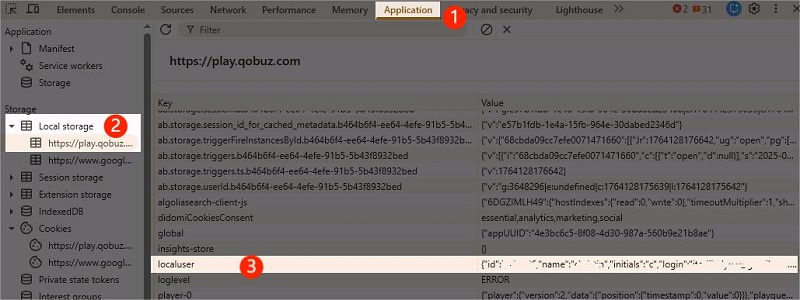
Go to the Application tab. In Firefox, it may be called Storage.
In the left sidebar, expand Local storage and select https://play.qobuz.com.
Find a key named localuser in the table on the right.
Click the localuser key to view its value. Copy it into Notepad to see the full content.
Inside the data, you'll find your id (user ID) and token (authentication token).
Copy the value next to token. This is what you'll use for Qobuz-DL.
Step 2. Install Qobuz-DL on Your Computer:
For Windows:
Get Qobuz-DL: Head to the qobuz dl github repository (e.g., vitiko98/qobuz-dl). Download the source code as a ZIP or clone it using Git.
Install Dependencies: Open Command Prompt, navigate to the extracted folder, and run:

Run Qobuz-DL: Type qobuz-dl.exe to execute the program. If fails, run qobuz-dl -r to reset your config file.
Check Installation: Type qobuz-dl --help to confirm it's working. You'll see a list of commands.
For macOS/Linux:
Download the Qobuz-DL: Visit the official GitHub repository for qobuz-dl (e.g., vitiko98/qobuz-dl) and download the file.
Install Dependencies: Open Command Prompt, navigate to the extracted folder, and run:
Run Qobuz-DL: Type qobuz-dl to execute the Qobuz-DL.
Test It: Run qobuz-dl --help to ensure proper setup.
Step 3. Set Up Qobuz-DL
Type qobuz-dl in your command window and press Enter.
The command line will show you the exact location where it saved a file named config.json.
Navigate to that location and open the config.json file using a simple text editor like Notepad or VS Code.
Inside the file, you will see a section that looks like this:
"id": null,
"token": null
},
Replace the null values with your Qobuz id and token.
Save the file and close your editor.
Part 3. How to Use Qobuz-DL Modes and Commands
Qobuz-DL has three modes that let the program know what content you want to find and download. These are Download mode, Interactive mode, and Lucky mode. Below, we'll explain each mode and show how to use them to download music from Qobuz.
1. Download Mode
This is the most common and straightforward mode. Use it to download a specific track, album, playlist, artist page, or label page using with its Qobuz web link.
How to Use Download Mode:
Go to the Qobuz web player and copy the link of the music you want.
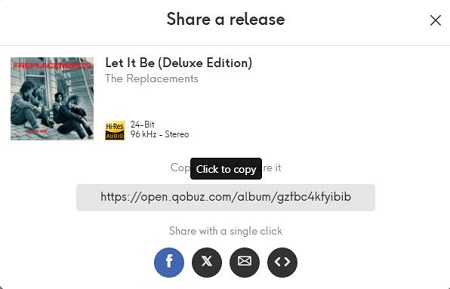
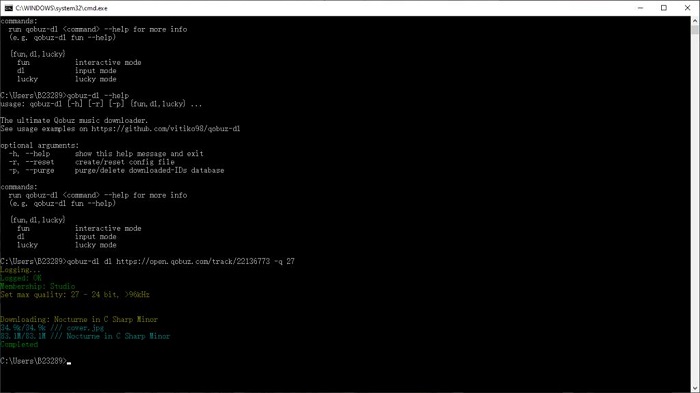
Paste the link after the qobuz-dl dl command in your terminal.
For example, to download a playlist:
2. Interactive Mode
Interactive mode is ideal if you're unsure which version of an album to download, like standard, deluxe, or remastered. You can also use it for tracks and playlists. The main feature of this mode is that it lets you choose from a list of results before downloading.
How to Use Interactive Mode:
Type qobuz-dl fun and press Enter. To limit the number of results, add -l followed by the number you want. For example, to show 10 results, type: qobuz-dl fun -l 10
Enter your search term, e.g., fka twigs magdalene.
Qobuz-DL will show a numbered list.
Type the number next to the release you want, and the download starts.
3. Lucky Mode
Lucky Mode is the fastest way to download a known item. The program finds the first result that matches your search and downloads it automatically.
How to Use Interactive Mode:
Type the artist or album name after qobuz-dl lucky.
Add --type album, track, or artist to specify what you want.
The tool finds the best match and downloads immediately.
Lucky Mode Command Examples:
- Download the first album result:
- Download the first 5 artist results:
- Download the first 3 tracks in 320 quality:
- Use
qobuz-dl dl--help, qobuz-dl fun--help, and qobuz-dl lucky--helpto see advanced options and learn more about each mode. - Reset the database with
qobuz-dl -pif issues arise.
How to Customize Your Qobuz-DL Download
You can combine any of the three modes above with flags to customize quality and other settings. Always place the flags at the end of your main command.
1. Customize the Download Audio Quality
To download in a specific audio quality, add -q flag at the end. You can choose from four values:
- -q 27: download in Hi-Res FLAC 24-bit/192kHz
- -q 7: download in Hi-Res FLAC 24-bit/96kHz
- -q 6: download in CD quality FLAC 16-bit
- -q 5: download in MP3 320kbps
2. Customize the Download Directory
To save your downloads to a specific folder, add -d followed by the full path. For example, to download a track in 24-bit/96kHz to the New Music folder on the C drive:
3. Download with Cover Art
If you want to include the album cover inside the music file, add --embed-art at the end of the command. For example:
Part 4. An Easier GUI Alternative to Qobuz-DL: QBDLX-MOD
Command lines scare you? QobuzDownloaderX-MOD (hereafter referred to as QBDLX-MOD) offers a Qobuz-DL GUI version that's a breeze to use. Built on Qobuz-DL's core, they swap code for clicks.
What Is QBDLX-MOD and Why Is It Better?
QBDLX-MOD is a modified version of the original Qobuz DownloaderX, originally developed by AiiR. This enhanced version isolates all Qobuz API interactions into a separate library project called QobuzApiSharp. It also brings notable improvements, such as optimized search functionality and a fully refactored backend.
Compared to the Qobuz-DL, QBDLX-MOD is not only more powerful but also more user-friendly—especially for those without coding experience who want to download music from Qobuz using open-source tools.

Key Features of QBDLX-MOD
- Graphical Ease: Download with a click.
- Quality Choices: From 320 kbps to 24-bit Hi-Res.
- No Code Needed: Runs standalone on Windows.
- Enhanced Tagging: Embed full music metadata.
- Pros
- Easy GUI interface
- Search and browse directly
- No Python needed
- Free, open-source
- High-quality downloads
- Advanced tagging
- Cons
- Windows-only
- No special modes
- Limited input options
- Might have some bugs
How to Install and Use QBDLX-MOD
- Go to the QBDLX-MOD GitHub page.
- Extract the downloaded file and find the executable (e.g., QobuzDownloaderX.exe).
- Open QBDLX-MOD and log in with your Qobuz account.
- Click the Open Search button.
- Choose Track or Album from the category dropdown, then type the name of the song or album into the search bar.
- In the search results, click the Download button next to the song or album you want.
- QBDLX-MOD will download the music straight to your computer.


Part 5. Best Qobuz-DL Alternative: ViWizard Qobuz Music Downloader
In addition to the two open-source tools mentioned above, there are also professional converters designed to make downloading Qobuz music to computer even easier. If you're looking for a hassle-free, all-in-one solution, we highly recommend ViWizard Qobuz Music Downloader.
ViWizard Qobuz Music Downloader vs Qobuz-DL vs QBDLX-MOD
| Feature | ViWizard Qobuz Music Downloader | Qobuz-DL | QBDLX-MOD |
|---|---|---|---|
| Setup | One-Click Install | Python, Dependencies | Simple EXE |
| Supported Output Formats | MP3, FLAC, WAV, AIFF, M4A, M4B | MP3, FLAC | MP3, FLAC |
| Platform Compatibility | Win & Mac | Win/Mac/Linux | Win |
| Batch Download | ✅ | ✅ | ✅ |
| ID3 Tags | ✅ | ✅ | ✅ |
| Easy to Use | ✅ | ❌ | ✅ |
| Fast Download Speed | ✅ | ❌ | ❌ |
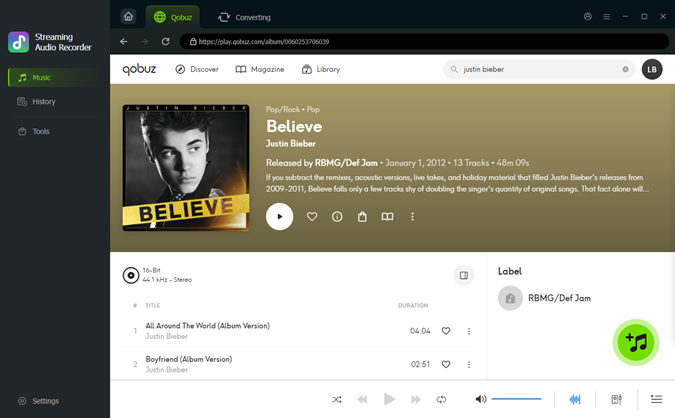
ViWizard Qobuz Music Downloader comes with the Qobuz web player built in, so you can browse and search for music directly within the software, no switching between apps. It supports multiple output formats, including MP3, FLAC, WAV, AIFF, M4A, and M4B, giving you full control over your library. As for audio quality, ViWizard preserves Qobuz's original Hi-Res FLAC sound, up to 24-bit/192kHz, so you won't miss a single detail.
Additional features include batch downloads with one click, customizable output folders, and full retention of metadata tags like title, artist, and album info. You can try ViWizard for free by clicking the FREE TRIAL button below.

Key Features of ViWizard Qobuz Music Downloader
Free Trial Free Trial* Security verified. 5, 481,347 people have downloaded it.
- Download Qobuz tracks, playlists, albums unlimitedly
- Convert Qobuz muisc to MP3, FLAC, WAV, AIFF, and more
- Keep Qobuz original Hi-Res sound, up to 24-bit
- Play Qobuz music across devices and media players
Step 1 Pick Your Download Quality and Format
Open the settings menu and choose Preferences. Here, you can select the format you want, such as FLAC or WAV for high quality, or MP3 if you want smaller files. You can also adjust details like bit depth and sample rate. Make sure you set an output folder so your downloads stay organized.

Step 2 Open Your Qobuz Library
Go back to the main screen and click the Qobuz icon. This opens the built-in Qobuz web player. Log in to reach your playlists, albums, and purchased music.

Step 3Select Music to Download
Browse or search for the tracks, albums, or playlists you want. Click the + button to load all items on the page. In the pop-up window, choose the songs you want and confirm with Add to List.
Step 4Download Your Music
Check your selected songs in the main window. When everything looks right, click Convert to start the download. The tool saves the tracks as DRM-free files in your chosen folder. You can move them to your phone, USB drive, or cloud storage and listen offline anytime.

Conclusion
Downloading Hi-Res music from Qobuz lets you enjoy stunning sound quality, and with the right tool, it's easier than ever. Qobuz-DL is great for advanced users who like full control and open-source freedom. QBDLX-MOD offers a simpler interface. But if you want the easiest and most convenient option, ViWizard Qobuz Music Downloader is the way to go. It's quick to install, easy to use, and packed with powerful features. Pick the tool that works best for you and start by building your offline Qobuz collection today.
You May Be Interested


From new releases to old favorites, Matt Smith is always on the lookout for good music. He follows the latest in digital entertainment and shares songs and media he thinks are worth checking out.

Leave a Comment (0)