


Qobuz is a premium music platform designed for audiophiles who value superior sound quality. There are three options for downloading music from Qobuz: 320 kbps MP3, CD-quality lossless sound (16-bit/44.1 kHz) and high-resolution lossless sound (up to 24-bit/192 kHz). High resolution is definitely preferred by audiophiles, but sometimes it's necessary to ensure broad compatibility with other devices or to improve storage efficiency. Even Qobuz's MP3 audio, which is 320 kbps, is above the quality of most streaming services. For this reason, Qobuz MP3 is also considered an ideal format.
This guide shows you four easy ways to download MP3s from Qobuz. First, we'll look at the two official options: downloading with a subscription or downloading tracks you've bought. Then we'll cover a free method and the quickest way to convert any Qobuz music to MP3 for offline listening on any device. Let's get started.

Part 1. Official Ways to Get Qobuz MP3s
Before diving into the methods, it's crucial to know the requirements and limitations of Qobuz downloads.
Requirements for Downloading Qobuz Music:
- A Qobuz subscription, either Studio or Sublime (for offline downloads in the app).
- A Qobuz account with purchased tracks (for permanent downloads).
- An internet connection for downloading tracks initially.
However, both official methods have limitations:
- Subscription-based downloads are encrypted and can only be played within the Qobuz app.
- Purchased music can be downloaded in various formats like FLAC, WAV, and ALAC, and MP3, but you should pay for the tracks and albums before downloading them.
Now, let's explore these methods in detail.
1.1 Downloading Qobuz MP3s with a Subscription
Qobuz Studio and Sublime subscribers can download music for offline listening, but these downloads are tied to the app.
Steps to download Qobuz Music to MP3 with a Subscription:
- Open the Qobuz app on your device.
- Log in to your account through the Qobuz app.
- Browse and find the track or album you wish to download.
- Click the three-dot icon next to the album or track title.
- Select the download or import option and choose MP3 format.
- Wait for the download to complete.

Steps to Find the Downloaded MP3 Qobuz Music:
- Open Qobuz desktop app.
- Click the download logo on the top and locate the tracks section.
- You will find that the songs you downloaded have been saved in MP3 format in Qobuz software.

However, the imported Qobuz MP3 trakc is only a cached file, because you can find the downloaded file in the Qobuz download path, and realize that it is not a real audio file that can be played. This means that the downloaded music is encrypted with DRM protection. If you cancel your subcription, you lose access to the downloads.
1.2 Downloading Purchased Qobuz Tracks or Albums as MP3
Another way to download music from Qobuz is by purchasing individual tracks or albums. This allows you to own the music without needing a subscription.
Steps to Download the Qobuz Purchased Music to MP3:
- Visit the Qobuz website and sign in to your account.
- Search for the album or track you want to purchase.
- Click Buy the album to purchase an album. Or click Buy the track to buy an individual tracks.
- Complete your payment and a download page will pop up.
- Choose from two download options: download with Qobuz Downloader or directly download track by track to your computer (it is recommended to use the downloader because you can select more audio formats and customize the download path).
- Select the MP3 format in the Qobuz downloader.
- Click the Start Download button and your purchased Qobuz tracks and albums will be saved to your computer in MP3 format.
Read more: How to Buy Music on Qobuz on Desktop and Mobile


It's not very cost-effective to download Qobuz in MP3 format by purchasing music from Qobuz, because the price of a single song is quite high. Unless you subscribe to Qobuz's sublime membership, which gives you a discount of up to 60%, but this can still be costly, especially for those who want to collect a large quantity of tracks and albums.
Part 2. A Free Way to Download Qobuz MP3
qobuz-dl is a free, open-source command-line tool that downloads music from Qobuz and saves it as local files. It can download single tracks, full albums, artist catalogs, and playlists in FLAC lossless, Hi-Res, or MP3 formats. However, because it uses Qobuz's API to fetch the files directly, you still need a paid Qobuz subscription to download full tracks.
Note: This tool operates outside Qobuz's official apps. You are responsible for using it in compliance with Qobuz's Terms of Use.
Steps to Download MP3s from Qobuz Using qobuz-dl
qobuz-dl runs on Python, so you must have Python installed on your computer. You'll also need FFmpeg for handling audio formats and encoding.
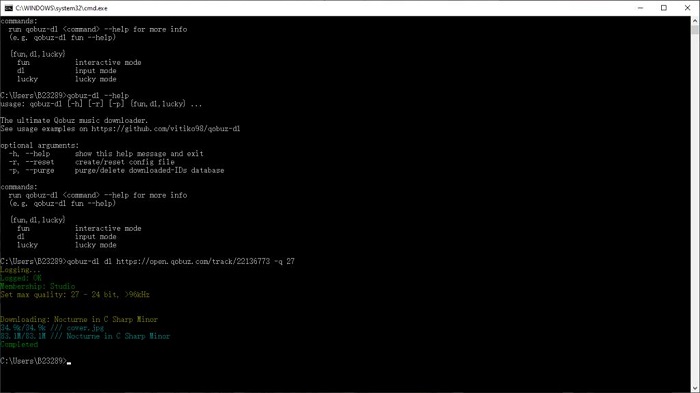
- Open Command Prompt or PowerShell on Windows, or Terminal on macOS.
- Type the following command and press Enter:
- To log in to your Qobuz account, type the command below and press Enter:
- Enter your Qobuz email and password when prompted.
- Copy the URL of the album, playlist, or track you want to download.
- Run this command, replacing [Your Link Here] with the URL you copied:
- qobuz-dl will download the music, convert it to MP3, and save it in a folder named "Qobuz Downloads" by default.

Part 3. The Best Way to Download MP3 from Qobuz
For users who want a more flexible and cost-effective solution, ViWizard Qobuz Music Downloader is the perfect tool. This software helps Qobuz users download and convert their favorite songs into various formats such as MP3, FLAC, WAV, AIFF, and more. With this tool, you can store your music permanently and play it on any device without restrictions.
Unlike Qobuz offline downloads, ViWizard Qobuz Music Downloader lets you get DRM-free audio files. Even if your membership expires, you can keep listening to the Qobuz music you've downloaded, whether it's tracks, playlists, or albums, they are yours forever. Unlike purchasing music from the Qobuz Store, ViWizard lets you download original music files without paying for the songs and albums, including Hi-Res audio files (up tp 192 kHz). So it seems that you can actually own the Qobuz music you download without having to pay for it.

Key Features of ViWizard Qobuz Music Downloader
Free Trial Free Trial* Security verified. 5, 481,347 people have downloaded it.
- Convert Qobuz songs, albums, and playlists
- Export Qobuz music in 6 formats for different devices and players
- Preserve lossless audio quality when creating music archives
- Save complete albums without collecting individual tracks
- Batch download Qobuz albums, playlists, and music collections
Step 1Set MP3 as Your Preferred Format
Click the menu icon in the upper right corner and choose Preferences. Here, you can select MP3 format for universal compatibility and efficient storage. If you prefer lossless quality, you can also choose FLAC, WAV, or AIFF. Additionally, customize settings such as bitrate (up to 320kbps) and sample rate to ensure optimal sound quality. Don't forget to set a dedicated output folder for better file organization.

Step 2Log in to Qobuz in ViWizard
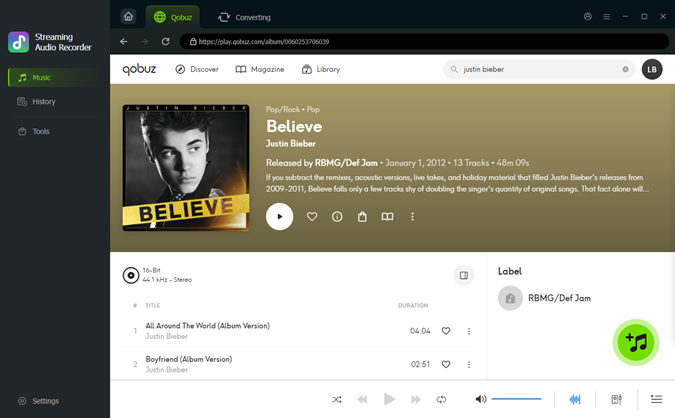
Return to the main ViWizard window and click the Qobuz icon. This opens the built-in Qobuz web player, so you don't need a browser or the Qobuz app. Log in with your Qobuz account to load your library. Your credentials aren't stored. They're only used to access your music.

Step 3Add Qobuz Music
Browse or search for tracks, albums, or playlists you want to download. Click the Add Music button in the bottom right corner to add your selections to the download list.
Step 4Download and Save Your Qobuz Music
Review your selected tracks in the main interface. Click the Convert button to begin the automatic downloading and conversion process. Within moments, you'll have DRM-free MP3 files saved in your specified folder. These files can be freely transferred to smartphones, USB drives, or cloud storage, giving you permanent access to your favorite Qobuz tracks anywhere, anytime.

Part 4. Qobuz MP3 FAQs
Does Qobuz sell MP3 downloads?
Yes, Qobuz absolutely sells MP3 downloads! When you buy an album or track from the Qobuz Download Store, you can choose the format you want. MP3 320kbps is always one of the available options, alongside higher quality formats like FLAC.
Can I transfer my downloaded Qobuz MP3 files to a MP3 player?
Yes, you can. If you bought MP3s from the Qobuz Download Store or converted Qobuz music with a third-party tool, the files are DRM-free. Just connect your MP3 player to your computer with a USB cable and copy the MP3 files into the player's music folder.
Where are my downloaded MP3 files stored on my computer or device?
When using the Qobuz app, Qobuz Music Downloader, or a third-party Qobuz MP3 converter, you can typically configure the destination folder in the settings.
Conclusion
While Qobuz provides official ways to download music, these methods come with limitations, such as DRM protection and the lack of an MP3 download option. Subscription-based downloads are restricted to the app, and purchased downloads can cost a lot of money. To bypass the Qobuz in-app downloads and save your money, the best solution is to ViWizard Qobuz Music Downloader, which enables you to convert and download Qobuz tracks in MP3 and other popular formats. This way, you can enjoy your favorite music offline, without restrictions, on any device.
You May Be Interested


From new releases to old favorites, Matt Smith is always on the lookout for good music. He follows the latest in digital entertainment and shares songs and media he thinks are worth checking out.

Leave a Comment (0)