


Qobuz is a premium music streaming and download platform built for listeners who care about sound quality. It offers a huge catalog of high-resolution and lossless tracks, making it a strong choice for audiophiles and music lovers who want more than just standard streaming. For students, the Qobuz Student Plan makes this experience much more affordable by offering a discounted subscription with the same core features.
In this guide, we'll walk you through what the student discount includes, how to get it step by step, and how to download music from Qobuz in different ways.

Part 1. FAQs about Qobuz Student Discount
What is Qobuz Student Discount?
The Qobuz Student Discount is a special pricing plan designed to make the service more affordable for students. This plan provides students with the same benefits as the standard subscription but at a reduced price. It's perfect for those who love high-quality audio streaming but are working within a student budget. Qobuz Student Plan features:
- Cost-effective Service: 60% off the standard subscription, with no compromise on features.
- 30 Days Free Trial: One-month free trial to experience the Qobuz difference.
- No Commitment: Allow students the freedom to change their minds.
- High-Quality Music Library: Stream over 100 million tracks in lossless CD-quality (FLAC 16-bit/44.1 kHz) and high-resolution (24-bit/192 kHz) formats.
- Deep Editorial Content: Offer a built-in magazine with exclusive content, including curated music selections, music news, weekly releases, hand-picked playlists, album reviews, artist interviews, and over 5000,000 exclusive articles.
- Playlists Transfer: Easily import playlists from other platforms for free using tools like Soundiiz.
- Ad-Free Listening: Let users enjoy uninterrupted music.
How much is Qobuz Student Plan?
It typically offers an over 60% discount compared to the regular subscription at $4.99 per month, but the exact pricing of the Qobuz Student Plan may vary depending on your region.
Can I cancel my subscription at any time?
Yes, Qobuz allows subscribers to cancel their plans at any time, and the consequences depend on how much time remains on your paid plan. There are no long-term commitments, and you can manage your subscription directly through your Qobuz account settings.
How long does the discount last?
You can take advantage of the student discount for up to 12 months after signing up. If you remain a student and successfully re-verify your status, you can renew the discount for an additional 12 months. Once your student discount reaches a maximum of 2 years, or if you fail to re-verify, your plan will automatically convert to the standard Studio Solo Subscription, and you will be charged the regular monthly rate.
Part 2. How to Get Qobuz Student Discount
If you want to get the Qobuz Student Discount, you need to make sure you meet the requirements for age, time, and status. If you are eligible, you can navigate to the Qobuz Student Plan page, choose the student offer, and create or sign into your account. And most importantly, you need to verify your active enrollment through the third-party service, SheerID. Now, check your eligibility and follow the instructions.
Eligibilities for the Qobuz Student Discount:
- Age Requirement: To qualify for our offer, applicants must be between 18 and 25 years old at the time of application.
- Duration of Offer: This offer is valid for a maximum of two years. A verification process will occur at the end of the first year; your subscription can continue if you still meet the eligibility criteria.
- Verification Process: A verification system will be implemented at the start of your subscription and again during the two-year period. Ensure that you provide the necessary documentation to confirm your student status during these verifications. Please note that this offer is not available to high school students.

Steps to Get Qobuz Student Discount
Getting the Qobuz Student Discount is a straightforward process. Follow these steps to start enjoying high-quality music at a reduced price:
01Navigate to the official Qobuz website rather than the app.
02Select the subscription plans section. Look for the student plan option. If you're new to Qobuz, create an account by providing your email address and setting a password.
03Choose the student plan from the available subscription options.
04If prompted, fill out your student verification form.
05If your school isn't instantly verified, upload a school-issued document that indicates your full name, the school's name, and the current date, like a class schedule, tuition receipt, or an official enrollment letter.
06Once verified, you can get the discounted rate.
07Proceed to complete your payment. You'll be charged the discounted rate for your subscription.
08After subscribing, you can immediately begin exploring Qobuz's vast library of high-resolution audio tracks.
Part 3. How to Download Music from Qobuz with Student Discount
You can download music from Qobuz in two ways: offline listening through the app or purchasing music from Qobuz and downloading tracks. However, the Qobuz Student Plan has some limitations. Unlike the Studio or Sublime plans, it doesn't offer up to 60% off purchases. Songs downloaded under the Student Plan for offline listening may also expire when your subscription ends.
To overcome these issues, there's another option: using ViWizard Qobuz Music Downloader. With it, you can use your Student Plan to get high-resolution audio files without purchasing, and these files are permanent. Next, we'll explain both methods in detail.
Way 1. Download Qobuz Music Using Your Student Plan
If you only have the Qobuz Student Plan, you can access the entire Qobuz library and download any content for offline listening on your mobile, tablet, or desktop. However, these downloads are cached files within the Qobuz app, not the original audio files uploaded by the artists.
On Mobile App (iOS or Android):
01Open the Qobuz app on your smartphone or tablet.
02Log in to your Qobuz account with a valid Student subscription.
03Tap the Gear icon, go to Downloads > Audio Quality, and select your preferred download quality.

04Return to the main interface and browse or search for the album, playlist, or track you want to download.
05Tap the three vertical dots next to the song, album, or playlist.
06Tap Download to start downloading the music, or toggle the Offline switch.
07Once finished, go to Library and select the Downloads tag to access your downloaded content.

Read More : How to Download Qobuz Music on iOS [2025 Guide]
Read More : Top 3 Ways to Download Qobuz Music on Android
On the Desktop App (Mac or PC):
01Open the Qobuz app on your computer and log in with your Student Plan.
02Find the album, playlist, or track you want to make available offline.
03Click the three vertical dots next to a song title, or under the description of a playlist or album.
04Select Import, then choose your preferred audio quality for the download.

05Once the download is complete, click the Offline tab (down arrow icon) at the top of the interface to find your downloaded Qobuz music.

Read More : How to Download Qobuz Music on Windows [Step-by-Step]
Read More : Qobuz Mac Download Guide: Save Music for Offline Listening
Way 2. Download Qobuz Music with ViWizard Qobuz Music Downloader [Lossless]
Compared to offline downloads in the Qobuz app, this method is much more cost-effective. With the Qobuz Student Plan, your downloads inside the app will expire once the subscription ends, and you don't get discounts like Sublime users do. By using ViWizard Qobuz Music Downloader, you can permanently keep all your favorite tracks, albums, playlists, and collections without worrying about subscription limits.
ViWizard Qobuz Music Downloader is software that supports Windows and Mac. After installation, you can select your preferred output format, such as MP3, FLAC, WAV, AIFF, M4A, or M4B. Then, customize the bitrate and sample rate up to 24-bit/192 kHz FLAC. Once you've configured the settings, ViWIizard helps download your Qobuz playlists, albums, and favorite tracks with full metadata preserved. That said, students can enjoy Hi-Res Qobuz music at a lower subscription cost while still saving their music collection forever.
Here's how to use ViWizard Qobuz Music Downloader to easily get high-resolution music files with your Qobuz Student Plan.

Ready to build a personal Qobuz music library? ViWizard Qobuz Music Converter helps Qobuz subscribers save songs, albums, and playlists with reliable audio conversion. Start converting and keep your favorite music within reach.
 Step 1: Adjust Output Settings
Launch ViWizard Qobuz Music Downloader on your computer. Go to the bottom-left settings menu, choose Conversion. Here you can pick your preferred output format, such as FLAC, set the sample rate and bitrate for the best sound quality. Decide the output folder and the file name. Once everything is set, click Music in the left sidebar.
 Step 2: Open Qobuz in ViWizard
In the Music section, select the Qobuz logo as the source platform. The built-in Qobuz web player opens. Log in to your Qobuz Student Plan account. Browse your library right in the application.
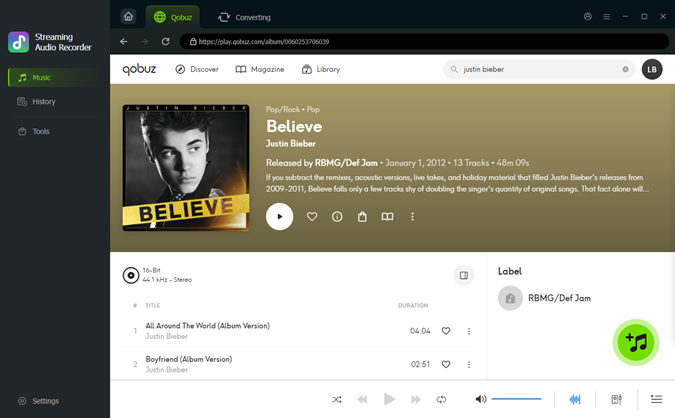 Step 3: Select Songs to Download
Use the integrated search bar to look for the songs, albums, or playlists you want. Play the song or open the playlist page, and you see the green plus icon. Click the plus button. ViWizard will scan the page and display all the available tracks in a pop-up. You can select all or pick only the songs you need, then click Add to list.
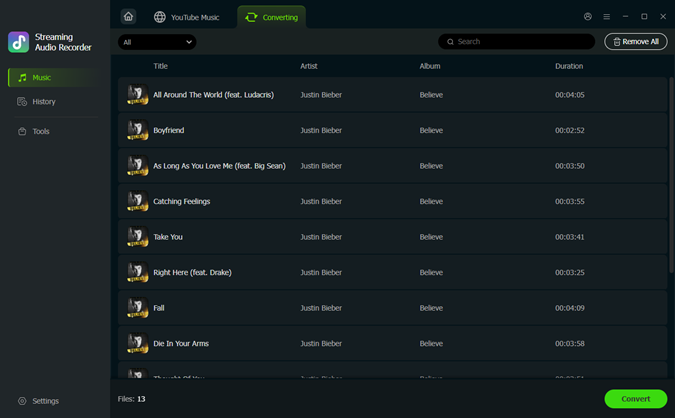 Step 4: Start Downloading Qobuz Music
Click Converting at the top of the screen to check the songs you want. Click Convert at the bottom left to start downloading. Within seconds, ViWizard converts your chosen Qobuz tracks into lossless files. Once finished, click History in the left sidebar. Play a song or click the folder icon to open the output folder and access your Hi-Res Qobuz music.
Conclusion
And that's everything we know about the Qobuz Student Discount. Hope it's helpful to you! If you're set up, you can enjoy high-quality music streaming at a lower price and explore a huge catalog of lossless and Hi-Res tracks.
For offline listening, you can use the Qobuz app to download music and play it anytime within your subscription. If you're looking for more control over your files and want to keep your music even after your plan ends, tools like ViWizard Qobuz Music Downloader offer an alternative way to save tracks in formats like MP3 or FLAC. Either way, the goal is simple—to enjoy better sound without paying full price!
You May Be Interested


From new releases to old favorites, Matt Smith is always on the lookout for good music. He follows the latest in digital entertainment and shares songs and media he thinks are worth checking out.

Leave a Comment (0)