


SoundCloud is one of the best places to stream user-uploaded music, remixes, and tracks from independent artists. Everything runs smoothly for online streaming until you want to download your favorite tracks on a computer. Why is it so hard to download SoundCloud music on a computer? Because unless the artist enables the download button, you're limited to subscribing to SoundCloud Go or Go+ and downloading tracks via the mobile SoundCloud app.
But! The situation changes completely when using a reliable SoundCloud downloader extension. This article details the best SoundCloud download extensions for major browsers, including Chrome, Firefox, Edge, Opera, Safari, and more. By the end, you'll be able to successfully download SoundCloud songs to your desktop device using just a web extension.

Part 1. Quick Comparison of Top SoundCloud Downloader Extensions
Check out our quick comparison of the top SoundCloud downloader extensions. Whether you're using Chrome, Firefox, Opera, or Edge, these tools let you download tracks and playlists in high-quality MP3.
| Browser | Extension | Features | MP3 Quality | Rating |
|---|---|---|---|---|
| Cross-Browser | Addoncrop SoundCloud Music Downloader | Download tracks & playlists | 320kbps | ★★★★★ |
| Chrome | SoundCloud Track Downloader | Single track download | 128kbps | ★★★ |
| Chrome | SoundCloud Enhanced Pro | Single track download | 128kbps | ★★★ |
| Firefox | SoundCloud Downloader by NotTobi | Download tracks & playlists | 128kbps | ★★★★ |
| Firefox | SoundCloud Downloader by anyo | Single track download | 128kbps | ★★★ |
| Opera | SoundCloud MP3 Downloader by momicolhkher | Single track download | 128kbps | ★★★ |
| Edge | SoundCloud Downloader by SPRISE | Single track download | 128kbps | ★★ |
Part 2. Editor's Pick: Addoncrop SoundCloud Music Downloader
Sticking to a single browser isn't an option. To be the best SoundCloud music downloader extension, we believe it should offer broad browser compatibility and the ability to easily download various types of SoundCloud content. Addoncrop SoundCloud Music Downloader delivers exactly that.
It supports to download SoundCloud singles, full-page songs, and playlists as MP3 files while fully preserving ID3 tag information. Compatible with browsers including Chrome, Firefox, Opera, Edge, Yandex, Vivaldi, and Brave.

Steps to Use the Addoncrop SoundCloud Music Downloader Extension:
01 Go to the official Addoncrop website.
02 Install the "Crosspilot" extension, which acts as a bridge to allow Addoncrop's tools to function across different browsers.
03 Install the "SoundCloud Music Downloader" extension for your specific browser.

04 Go to SoundCloud and find the track or playlist you want to download.
05 Please find the download button and click it.
06 For a single track, the download button is normally under the waveform.
07 For a playlist or a page of songs, the download button is located at the bottom-right corner of the page.
08 Once clicked, the SoundCloud music downloader extension will automatically download the detected songs to MP3.
09 You can see the download progress at the bottom-right window, and can pause the download anytime you want.
10 When the download is complete, navigate to your web browser's download folder, where you will find the downloaded SoundCloud songs.

- Pros
- Wide browser compatibility
- Supports downloading both single tracks and entire playlists
- Offers up to 320 kbps quality downloads
- Downloads are saved with ID3 tags
- Cons
- Requires installing a primary "Crosspilot" extension
- Limited format support
- Potential risk of being blocked by certain browsers
Part 3. Chrome SoundCloud Downloader Extensions
Chrome has some great SoundCloud downloader extensions that let you save tracks easily. Here are two of the best-rated Chrome extensions I found. I'll guide you on how to use them to download your favorite SoundCloud music in MP3 format.
3.1 SoundCloud Track Downloader
For Google Chrome users, besides using the Addoncrop SoundCloud downloader extension, the SoundCloud Track Downloader extension is another solid pick. However, it only downloads one single track to MP3 at a time. Whether the song is 3 minutes long or a 2-hour mix, the extension can download them all with just one click. If you just want to download songs from SoundCloud to your computer, this tool can be your top choice.

Steps to Use the SoundCloud Track Downloader Extension on Chrome:
01 Install the "SoundCloud Track Downloader" extension from the Chrome Web Store.
02 Go to a specific track page on SoundCloud.
03 Once the page has loaded, click on the extension icon in the extension toolbar.
04 Click the downward arrow download button.
05 The SoundCloud Track Downloader will convert the track to MP3 format and save it to your Google Chrome browser's default download location.

- Pros
- Lightweight
- Free and convenient
- Embeds metadata
- Cons
- Does not support playlists
- Does not support batch downloads
- Supports downloading only in MP3 format
3.2 SoundCloud Enhanced Pro
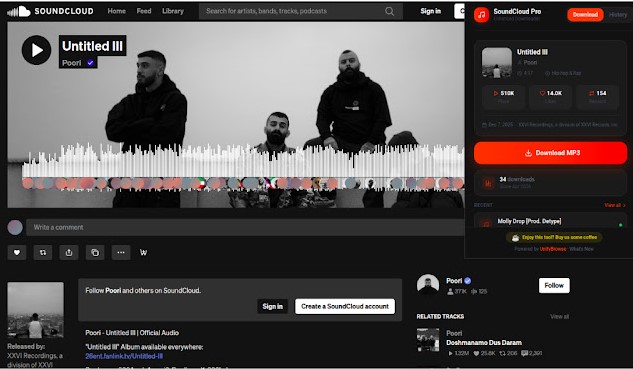
SoundCloud Enhanced Pro is a simple, free tool for Chrome users. It adds a "Download" button directly onto the SoundCloud page so you can save songs while you listen. It supports only public tracks and those permitted by the artist, ensuring compliance.
Many Reddit users say it works for them, and I tried it too. It downloads songs in MP3 format at 128kbps, complete with artwork and essential ID3 tags. That's perfect for casual single song downloads.
Steps to Use the SoundCloud Enhanced Pro Extension on Chrome:
01 Visit the SoundCloud Enhanced Pro page in the Chrome Web Store and click "Add to Chrome."
02 Open SoundCloud and go to the specific page of the song you want to download.
03 Click the extension icon in your browser toolbar. You will see that the tool has detected the track and displayed a "Download MP3" button.
04 Choose your preferred audio quality (the standard option is 128kbps).
05 Click the "Download MP3" button, and the song will be saved directly to your computer's local storage.
- Pros
- Works for public & artist-permitted track
- Saves cover art
- Let's you confirm the bitrate before downloading
- Trusted by the Reddit community
- Cons
- Mostly limited to 128kbps for public streams
- Requires clicking the extension icon each time
- Cannot bypass private or restricted content
Part 4. Firefox SoundCloud Downloader Extensions
Firefox also has two popular SoundCloud music downloader extensions that work right out of the box. Unlike most Chrome extensions, these Firefox tools integrate directly into the SoundCloud interface, adding a Download button on the track page. In my experience, both SoundCloud Downloader by anyo and SoundCloud Downloader by NotTobi work reliably.
4.1 SoundCloud Downloader by anyo
The SoundCloud Downloader by anyo is a lightweight (~25 KB) Firefox extension that adds a download button to every track on SoundCloud, including the private tracks. It allows you to download SoundCloud tracks in MP3 format in 128kbps quality. Like many downloader extensions, it also saves the metadata intact, such as the artwork, title, artist, genre, etc. For users searching for a SoundCloud downloader extension on GitHub, this tool is also available there.

Steps to Use the SoundCloud Downloader Extension by anyo on Firefox:
01 Navigate to the official "SoundCloud Downloader by anyo" page on the Firefox Add-ons store.
02 Click "Add to Firefox."
03 Open a SoundCloud track or a playlist page that contains the song you want to download.
04 Hover the mouse over the track title, and you will see the download button right next to the title.
05 Click the orange arrow-down download icon.
06 The extension will download the track as an MP3 file in the default Firefox download folder.

- Pros
- Privacy-focused
- Works with private tracks
- Adds metadata to the downloaded MP3 file
- Cons
- Downloads are typically at 128kbps
- Downloads one track at a time
- Limits to the MP3 format
- No playlist support
4.2 SoundCloud Downloader by NotTobi
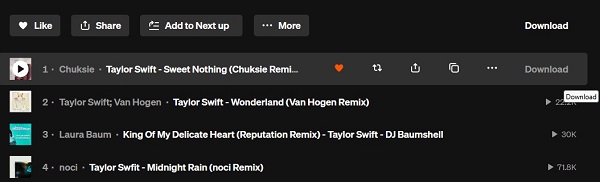
downloads both playlists and individual tracks. It adds a Download button next to each track title.All tracks are downloaded at a fixed 128kbps quality to ensure stability. It automatically embeds essential ID3 tags, including cover art, title, album, artist, and year, into every file. When downloading playlists, it saves each song as an individual MP3 file rather than a ZIP archive, saving you the hassle of manual extraction.
Steps to Use the SoundCloud Downloader Extension by NotTobi on Firefox:
01 Visit the SoundCloud Downloader by NotTobi page and click the "Add to Firefox" button to install the extension.
02 Go to the SoundCloud website and navigate to the specific page of the track or playlist you want to download.
03 Hover your mouse over the song title or the playlist area. You will see a "Download" text appear; click it to start the process.
04 The download will begin immediately. You can find your tagged MP3 files saved as individual tracks in your browser's default download folder.
- Pros
- Easily download multiple songs at once
- Includes artwork and metadata automatically
- Individual files save directly without ZIP compression
- Cons
- Restricted to 128kbps with no custom settings
- Only available for Firefox users
- Requires hovering to see the download option
Part 5. Opera SoundCloud Downloader Extension
SoundCloud MP3 Downloader, developed by momicolhkher, is a SoundCloud music downloader extension that works on the Opera browser. It adds a "Prepare" button for each song on SoundCloud, which functions like a download button that triggers the extension to fetch the audio and downloads the song as an MP3 128kbps file.
During testing, we found that the extension can be inconsistent. For some tracks, the page needs to be refreshed several times before the download works. In other cases, the extension may fail to detect the track location using its URL. So if you encounter the same issue, we recommend using the Addoncrop SoundCloud Music Downloader as an alternative.
Steps to Use the SoundCloud MP3 Downloader Extension on Opera:
01 Visit the official SoundCloud MP3 Downloader page in the Opera Add-ons store.
02 Click the "Add to Opera" button to install the extension.

03 Open a SoundCloud track or playlist page that includes the song you want to download.
04 Hover over the target track and click the "Prepare" button that appears.
05 Wait a few seconds while the extension parses the track URL.
06 The track will then be downloaded automatically in MP3 format at 128kbps.

- Pros
- Direct integration with the SoundCloud interface
- Free and simple to use
- Cons
- Fixed output format and bitrate (MP3, 128kbps)
- Cannot download full SoundCloud playlists
- No batch download support
- May fail to download certain tracks
Part 6. Edge SoundCloud Downloader Extension
The Microsoft Edge browser does not offer many extensions for downloading music from SoundCloud. In fact, the only option currently available in the Edge Add-ons store is the SoundCloud Downloader extension.
Like most SoundCloud song downloader extensions, it adds a download button below the waveform of each track and saves the audio in MP3 format. However, this extension is not free—it requires a subscription of $18.99 per month, which makes it quite expensive compared to other options. For this reason, we recommend using the Addoncrop SoundCloud Music Downloader or trying alternative solutions such as free online SoundCloud downloaders or dedicated desktop software.
Read More : Top 7 SoundCloud Downloaders: Desktop, Online & Extension Compared
Steps to Use the SoundCloud Downloader on Microsoft Edge:
01 Visit the SoundCloud Downloader extension page in the Microsoft Edge Add-ons store.
02 Click the "Get" button to install the extension.

03 Open the SoundCloud website and navigate to the track you want to download.
04 Click the extension icon in the Edge toolbar.
05 Select "Get License Key" and follow the prompts to complete your purchase.

06 Return to the SoundCloud track page and reload it.
07 A Download button will now appear under the waveform. Click it to start downloading.
08 Open the default download folder of your Edge browser to find the MP3 files you just saved.

- Pros
- Adds a download button below the waveform for easy access
- Saves SoundCloud audio in MP3 format
- Cons
- Not free
- No batch download support
- Fixed output format and bitrate
Part 7. Best Alternative to SoundCloud Downloader Extensions
While browser extensions can be handy for quick downloads, Many extensions are unstable and may stop working whenever SoundCloud updates its website.
Another limitation is audio quality. Most SoundCloud downloader extensions only capture tracks in 128kbps MP3, which is far from ideal for users who care about sound fidelity. On top of that, many of them do not support playlist downloads.
That's why many users prefer switching to a more stable and professional solution like ViWizard SoundCloud Music Downloader.

Want more flexibility with your SoundCloud music? ViWizard SoundCloud Music Converter helps SoundCloud listeners convert tracks, playlists, and albums with seamless music conversion. Save your favorites and keep your SoundCloud collection accessible.
| Features | ViWizard SoundCloud Music Downloader | SoundCloud Downloader Extensions |
|---|---|---|
| Stability | Stable | May break with updates |
| Security | Safe, ad-free | Risk of adware |
| Downloadable Content | Songs, playlists, albums, podcasts, liked page | Single tracks |
| Audio Quality | 320kbps MP3, FLAC, WAV, AIFF, M4A, M4B | 128kbps MP3 |
| Playlist Download | Full playlist support | Most are unsupported |
| Batch Download | Yes | No |
| Browser Compatibility | Works on Windows & Mac, no browser needed | Limited to specific browsers |
| Download Speed | Up to 65x faster | Normal |
ViWizard SoundCloud Music Downloader lets you download SoundCloud playlists, albums, single tracks, or even your liked page in batches at lightning speed, up to 65x faster. It's the perfect choice if you want to save SoundCloud music in 320kbps MP3, FLAC, WAV, AIFF, M4A, or M4B formats, complete with full metadata including artwork, title, artist, album, year, genre, and duration.
Steps to Use the ViWizard SoundCloud Music Downloader:
 Step 1: Configure Output Settings
Open ViWizard SoundCloud Music Downloader on your computer. Go to the menu and select Preferences, then navigate to the Conversion tab. Choose your preferred output format, such as MP3, FLAC, WAV, or M4A. You can also adjust the audio quality by setting the bitrate and sample rate. Once all settings are configured, click OK to save your preferences.
 Step 2: Log in to SoundCloud within ViWizard
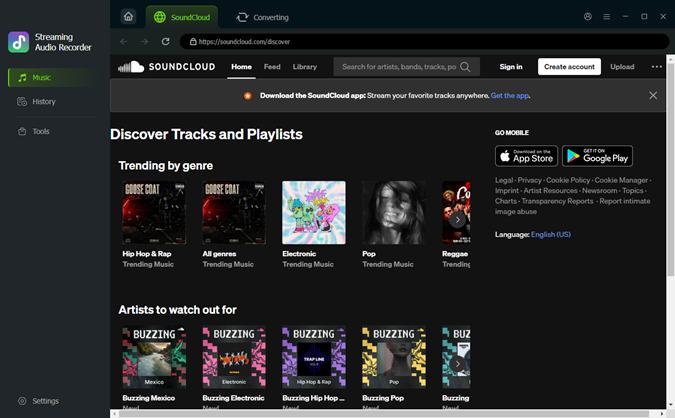
Return to the main interface and click the SoundCloud icon. The built-in web player will open, allowing you to log into your SoundCloud account.
 Step 3: Import SoundCloud Music for Download
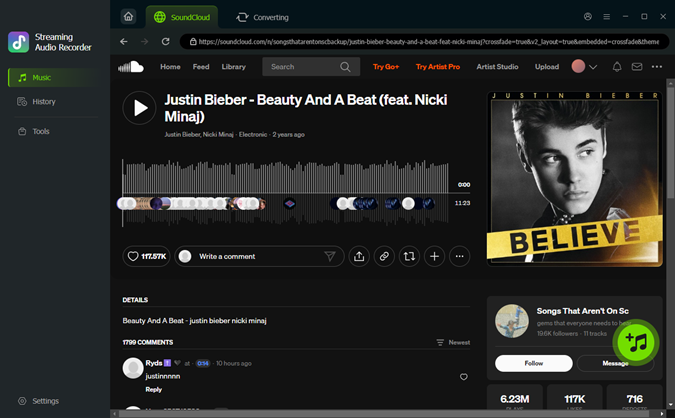
Open a track, playlist, album, or stay at your liked list, then click the plus icon. ViWizard will automatically detect the available songs. In the pop-up window, select the tracks you want to download and click Add to List. The selected songs will be queued and ready for conversion.
 Step 4: Start the Download and Conversion
Click the Convert button to begin downloading your selected tracks. ViWizard processes files at high speed, up to 65X, while maintaining excellent audio quality. After the conversion is complete, go to the History tab to access all finished files. From there, you can preview the songs and click the folder icon to locate the downloads in the output folder on your computer.
Conclusion
By the end of this article, you now know how to use a SoundCloud downloader extension to save music from SoundCloud directly to your computer. When choosing the best option, consider your priorities. If you want an all-in-one extension with wide compatibility across most web browsers, Addoncrop SoundCloud Music Downloader is a reliable choice. If your goal is to download large numbers of SoundCloud songs or playlists in 320kbps at high speed, ViWizard SoundCloud Music Downloader is the solution you won't regret. Download it today and enjoy your favorite SoundCloud tracks offline, completely free to try!
You May Be Interested

KlickAud SoundCloud Downloader Review: Is It Safe and Reliable?

Download SoundCloud to FLAC: Step-by-Step Guide

SoundCloud Mod APK Review and Safe Alternative in 2026

How to Download SoundCloud Songs on Android (4 Ways)

6 Best SoundCloud Alternatives for Listeners and Artists (2026 Guide)

Top 6 SoundCloud Artwork Downloaders to Save Album Art

Dave Henry loves movies and all things video. He likes checking out different video formats and trying new media players to see how they change the viewing experience.

Leave a Comment (0)