


Ever found a great track on SoundCloud and wished you could save it as an MP3 for offline listening? You're not alone. While SoundCloud makes discovering music easy, downloading it isn't always so simple. Its built-in download option is limited to tracks where creators enable downloads, while Go and Go+ subscribers can save music for offline listening within the app. But what if you want an actual MP3 file, especially in 320kbps quality?
That's where third-party tools come in. From online downloaders and browser extensions to dedicated desktop converters and open-source tools like yt-dlp, there are several ways to download SoundCloud to MP3. In this guide, we'll explore 8 practical methods, compare their pros and cons, and walk you through each one step by step so you can find the option that works best for you. Let’s dive in.

Part 1. Can You Download SoundCloud to MP3?
SoundCloud is a popular platform where artists and creators share their music. If you find a track you love, you may be able to download it directly using SoundCloud's built-in download option. However, this feature is only available for tracks whose creators have enabled downloads. Many artists choose to disable this option, so you can't download every track directly.

What about a SoundCloud Go or Go+ subscription? While both offer offline listening through the SoundCloud mobile app, they don't let you export downloaded tracks as standalone MP3 files. These offline tracks remain accessible only within the app, and you lose offline access when your subscription ends.
There's also the matter of audio quality. SoundCloud Go+ offers high-quality streaming at up to 256kbps AAC, but this doesn't mean you can download the original uploaded audio or get a 320kbps MP3 file. Even when a downloader offers a 320kbps output setting, the actual quality is still limited by the source audio.
So, how can you download SoundCloud music as MP3, preferably at 320kbps? Besides the official download option, you can explore desktop converters, online downloaders, browser extensions, and open-source tools. For example, ViWizard SoundCloud Music Converter is one desktop option worth looking into if you want to save SoundCloud tracks as MP3 files with more control over output quality.
Part 2. How to Download SoundCloud to MP3 with Official Methods
If you want to download music directly from SoundCloud, you can use its built-in download feature or subscribe to SoundCloud Go/Go+. However, these two options work differently. The built-in feature lets you download individual tracks when the creator enables downloads, while a Go or Go+ subscription lets you save tracks for offline listening inside the SoundCloud app. Here's how to use each method.
Method 1. Download SoundCloud Tracks Directly from the Website
SoundCloud allows creators to decide whether listeners can download their tracks. If a track has a download option, you can save it directly from the website without using a third-party tool.

01 Open SoundCloud in your browser and sign in to your account.
02 Search for the track you want to download and open its playback page.
03 Look for the Download file button below the track's waveform or in the More options menu.
04 Click Download file and follow any browser prompts to save the track to your computer.

Can you download songs from SoundCloud to your computer? This guide provides 3 ways to do so on Windows and Mac computers.
Method 2. Download SoundCloud Music for Offline Listening with Go/Go+
If a track doesn't have a download button, SoundCloud Go or Go+ is another official option. Both subscriptions support offline listening, so you can save music and listen without an internet connection.
However, this feature works only within the SoundCloud mobile app. It doesn't export songs as MP3 files that you can transfer to other devices or music players.
01 Visit SoundCloud and subscribe to Go or Go+.
02 Open the SoundCloud app on your Android or iOS device and sign in.
03 Go to Library and open Your likes or the playlist containing the tracks you want to save.
04 Tap the Download arrow to save the available music for offline listening.
05 Once downloaded, open your library and play the saved tracks without an internet connection.
- Want to save an individual track as a local file? Use the website's download button if the creator has enabled it.
- Want to listen offline in the SoundCloud app? Subscribe to Go or Go+ and save your music there.
- Want actual MP3 files? Neither method guarantees an MP3 download. You'll need to explore other SoundCloud-to-MP3 methods covered below.
- Safe and officially supported by SoundCloud.
- No third-party software or websites required.
- Free track downloads are available when enabled by creators.
- Go/Go+ supports offline listening without an internet connection.
- Preserves the original quality of creator-provided downloads.
- Not every track has a download button.
- Downloaded files aren't necessarily in MP3 format.
- Go/Go+ offline downloads are stored within the SoundCloud app.
- A paid subscription is required for Go/Go+ offline listening.
- You can't freely transfer subscription downloads to other devices.
Part 3. How to Download SoundCloud to MP3 with Desktop Converters
As mentioned earlier, SoundCloud's official download feature only works for tracks where creators have enabled downloads. Meanwhile, Go and Go+ subscriptions support offline listening but don't provide regular MP3 files that you can transfer to other devices.
If you want to keep supported SoundCloud tracks as local audio files, a desktop converter is another option. It can offer more flexibility with output formats, audio quality, and batch downloads. One tool worth considering is ViWizard SoundCloud Music Converter.
How to Download SoundCloud to MP3 with ViWizard SoundCloud Music Converter
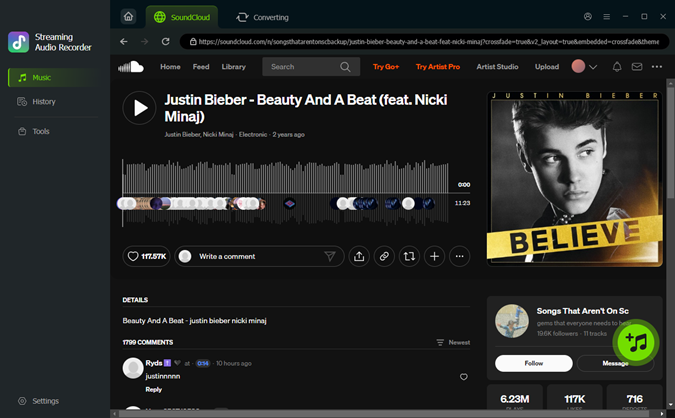
ViWizard SoundCloud Music Converter is designed to download and convert SoundCloud tracks, playlists, and albums on your computer. It comes with a built-in SoundCloud player, so you can browse music and select tracks without switching between different applications.
Here are some features relevant to downloading SoundCloud music:
- Multiple output formats: Convert music to MP3, FLAC, WAV, AIFF, M4A, or M4B to suit different playback needs.
- Adjustable audio quality: Download music at up to 320 kbps, depending on the source.
- Batch downloads: Add multiple tracks from playlists or albums instead of processing them individually.
- Track information: Retain available metadata, such as song titles and artists, to keep your music library organized.
- Faster conversion: Supports speeds of up to 65x, depending on your computer and the source.

Want more flexibility with your SoundCloud music? ViWizard SoundCloud Music Converter helps SoundCloud listeners convert tracks, playlists, and albums with seamless music conversion. Save your favorites and keep your SoundCloud collection accessible.
 Step 1. Choose the Output Format
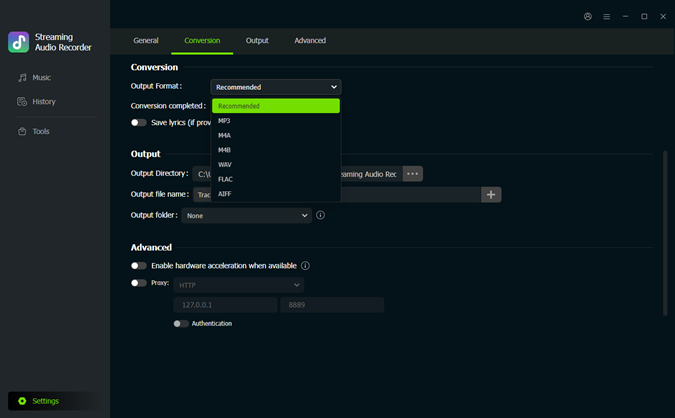
Launch ViWizard SoundCloud Music Converter on your Windows or Mac computer. Click the Settings icon in the bottom-left corner and open Conversion. Select MP3 as the output format. You can also adjust the audio quality and choose an output folder for your downloaded music.
 Step 2. Find Music on SoundCloud
Return to the Music interface and click the SoundCloud icon to open the built-in player. Browse your SoundCloud library or use the search bar to find the track, album, or playlist you want to download.
Step 3. Add Tracks to the Download List
Open the track, album, or playlist and click the + button to analyze the available music. Select the tracks you want to save and add them to the conversion list.
 Step 4. Download SoundCloud Music as MP3
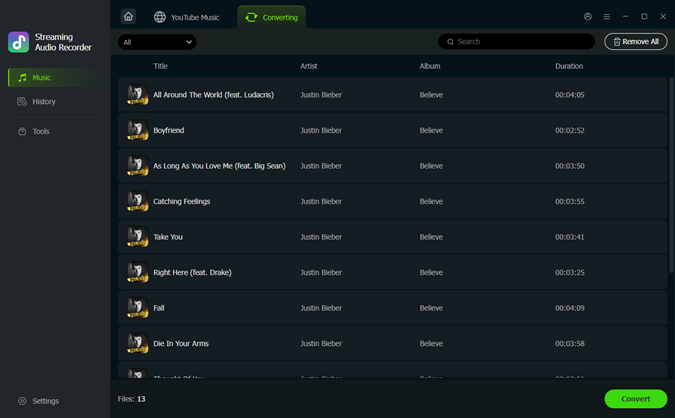
Check your selected tracks in the conversion list and click Convert to start downloading. When the process finishes, open History to find your converted MP3 files. You can then locate them in your output folder and transfer them to compatible devices for offline playback.
- Supports several popular audio formats, including MP3.
- Offers adjustable audio quality and output settings.
- Supports batch downloads of multiple tracks.
- Preserves available track information.
- Includes a built-in SoundCloud player.
- Requires installing desktop software.
- Some features require a paid license.
Part 4. How to Download SoundCloud to MP3 with Online Tools
If you don't want to install desktop software, online SoundCloud to MP3 converters offer a convenient alternative. Most work directly in your browser: copy a SoundCloud link, paste it into the converter, and download the processed audio.
These tools are useful for occasional downloads, but their features can vary. Some only support individual tracks, while others can process playlists or offer different audio formats and quality settings. You may also encounter advertisements, processing delays, or links that fail to convert.
Here are four online SoundCloud downloaders worth exploring.
4.1 Download SoundCloud to MP3 with Soundcloudrips
Soundcloudrips is an online SoundCloud downloader that supports several audio formats, including MP3, FLAC, M4A, WebM, AAC, OPUS, OGG, and WAV. It supports both individual tracks and playlists, making it useful if you want to save multiple songs.
The website also advertises support for longer tracks, including mixes of up to two hours. However, the actual download quality and availability can depend on the source and the website's processing.
Key Features
- ✅Supported formats: MP3, FLAC, M4A, WebM, AAC, OPUS, OGG, WAV.
- 🎵Supported content: Individual tracks and playlists.

How to download SoundCloud to MP3 with Soundcloudrips:
01 Open SoundCloud and copy the URL of the track or playlist you want to download.
02 Visit Soundcloudrips in your browser.
03 Paste the copied URL into the input box.
04 Select MP3 as the output format.
05 Click Download and wait for the website to process your link.
06 Click the final download option to save the MP3 file to your computer.
- Supports multiple audio formats, including FLAC and MP3.
- Supports individual tracks and playlists.
- No software installation or account registration required.
- Contains advertisements.
- Doesn't offer much control over output audio quality.
- MP3 bitrate isn't guaranteed to reach 320 kbps.
4.2 Download SoundCloud to MP3 with KlickAud
KlickAud is another browser-based SoundCloud to MP3 downloader. It focuses on MP3 output and provides a simple way to process SoundCloud links without installing additional software.
It supports SoundCloud tracks and playlists, and can also be used for longer audio content, such as podcasts and remixes. The website may offer different MP3 quality options, including 128 kbps and 320 kbps, depending on the available download.
Key Features
- ✅ Supported format: MP3.
- 🎵Supported content: Tracks, playlists, remixes, and podcasts.

How to download SoundCloud to MP3 with KlickAud:
01 Find the SoundCloud track, playlist, podcast, or remix you want to save and copy its URL.
02 Visit KlickAud in your browser.
03 Paste the copied URL into the download box.
04 Click Download to let KlickAud process the link.
05 Wait for the results page to appear.
06 Click the available MP3 Download link to save the audio file to your device.
- Simple interface with few steps.
- No desktop software installation required.
- Supports SoundCloud tracks and playlists.
- Offers MP3 downloads.
- Only supports MP3 output.
- Link processing may take some time.
- Actual audio quality depends on the available source and selected option.
- May fail to process certain SoundCloud links.
4.3 Download SoundCloud to MP3 with Soundcloudmp3.org
Soundcloudmp3.org is another online option for converting SoundCloud links into MP3 files. Its main appeal is its simple interface and focus on MP3 downloads.
You can paste a public SoundCloud track link into the website and let it process the audio. It aims to provide the highest available audio quality from the source, although this doesn't mean every download will be 320 kbps. The actual quality still depends on the original track.
Key Features
- ✅ Supported format: MP3.
- 🎵Supported content: Public SoundCloud tracks and, where supported, playlists.

How to download SoundCloud to MP3 with Soundcloudmp3.org:
01 Open SoundCloud and copy the URL of the track you want to download.
02 Visit Soundcloudmp3.org in your browser.
03 Paste the copied URL into the input box.
04 Click Download MP3 to let the website process the link.
05 Wait for the conversion to finish.
06 Click the final Download button to save the MP3 file to your device.
- Simple and clean interface.
- No software installation required.
- Focuses on MP3 downloads.
- Aims to retain the highest available source quality.
- Only supports MP3 output.
- Actual audio quality depends on the original upload.
- May fail to process some SoundCloud links.
- Playlist downloads may be slow or unreliable.
4.4 Download SoundCloud to MP3 with MusicVerter
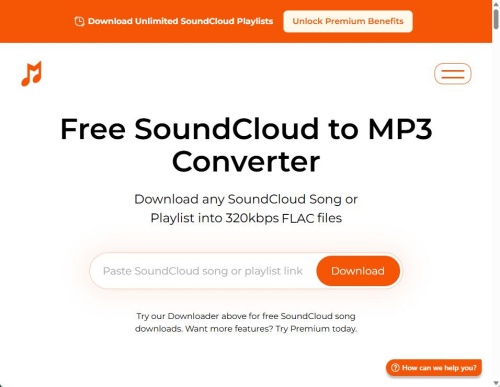
MusicVerter is an online SoundCloud downloader that supports both individual songs and playlists. Unlike tools that focus exclusively on MP3, MusicVerter advertises several output formats, including MP3, AAC, WAV, and FLAC.
Its free downloader supports unlimited SoundCloud song downloads, while its Premium plan adds features such as playlist downloads, SoundCloud Go+ downloads, embedded file information, and 320 kbps encoding. The Premium plan is advertised at $13 per month when billed annually. So, if you only need to download individual tracks, you can start with the free option.
Key Features
- ✅ Supported formats: MP3, AAC, WAV, and FLAC (availability varies by plan).
- 🎵Supported content: Individual songs on the free plan; playlists and SoundCloud Go+ songs are advertised as Premium features.
How to download SoundCloud to MP3 with MusicVerter:
01 Open SoundCloud and find the song or playlist you want to download. Copy its URL from the browser address bar or use the Share > Copy link option.
02 Visit MusicVerter's SoundCloud to MP3 converter.
03 Paste the copied SoundCloud URL into the input box.
04 Click Download to let MusicVerter process the link.
05 Wait for the conversion to finish. The song should download automatically to your device's default download folder.
- Free option for unlimited SoundCloud song downloads.
- Supports multiple advertised output formats.
- Premium supports unlimited playlist downloads.
- Premium advertises 320 kbps encoding and embedded file information.
- No desktop software installation required.
- The free downloader has fewer features than Premium.
- Playlist and SoundCloud Go+ downloads require Premium.
- Advertisements are included in the free experience.
- 320 kbps encoding is a Premium feature and doesn't guarantee that the original source has that level of quality.
Part 5. How to Download SoundCloud to MP3 with Browser Extensions
If you regularly download music from SoundCloud, a browser extension can save you the trouble of copying links and opening separate downloader websites. It adds download controls directly to the SoundCloud interface, so you can save tracks while browsing.
One option is the free Addoncrop SoundCloud Music Downloader. It supports single-track downloads, bulk playlist downloads, and audio trimming. The extension can convert audio to MP3 at up to 320 kbps and preserve ID3 tags such as the artist, song title, album, and year. It may also require the Crosspilot extension framework to install or run, depending on your browser.

How to Download SoundCloud to MP3 with Addoncrop
01 Visit the Addoncrop SoundCloud Music Downloader page and follow the installation instructions for your browser. If prompted, install Crosspilot first so the downloader can work properly.
02 Go to the SoundCloud website in the same browser.
03 Find the track or playlist you want to save.
04 Look for the download button added next to the track title or in the SoundCloud player.
05 Click it to download the song as an MP3 file.
06 Open the playlist and click the download arrow added to the page, usually near the bottom-right corner.
07 Follow the prompts to download its tracks in bulk. Addoncrop advertises support for large playlists, including those with 20 to 200 or more songs, though actual results may vary.
08 Open your browser's Downloads folder to find the saved MP3 files. Available ID3 tags, such as artist and song title, should be retained for easier music organization.

- Free to use.
- Adds download buttons directly to SoundCloud.
- Supports single-track and bulk playlist downloads.
- Offers MP3 conversion at up to 320 kbps.
- Preserves available ID3 tags.
- Includes audio-trimming tools.
- May require Crosspilot to install or operate.
- MP3 is the supported output format.
- Actual audio quality depends on the original source.
- Browser compatibility and extension availability may change.
- Large playlist downloads may take time or encounter errors.
Read More : Free SoundCloud MP3 Downloader Extensions for Chrome, Firefox, Opera, Edge
If Addoncrop doesn't work with your browser, you can look for alternatives in its extension store:
- Firefox: Search the Firefox Add-ons Store for SoundCloud downloader extensions, such as SoundCloud Downloader by anyo. Check recent reviews and permissions before installing.
- Opera: Search the Opera Add-ons Store for SoundCloud MP3 downloader extensions. Make sure the extension is still available and compatible with your browser version.
- More options: See our guide to SoundCloud Downloader Extensions for Chrome, Firefox, Opera, and More for additional choices.
Part 6. How to Download SoundCloud to MP3 with Open-Source Tools
If you like using command-line tools and want more control, GitHub has several open-source options you can use. The most popular one is yt-dlp, which is a newer and improved version of the old youtube-dl tool.
yt-dlp is free, open source, and works in the terminal. It can download videos and audio from many sites like YouTube, SoundCloud, and Bandcamp. You can tell it exactly what format you want, what quality to save, and even convert files to MP3 after downloading. It updates often, has good documentation, and works on Windows, macOS, and Linux.

How to Download SoundCloud to MP3 with yt-dlp
01 Install Python first, and then use the command pip install yt-dlp.
02 Install FFmpeg and make sure your computer knows where to find it.
03 Open Command Prompt or PowerShell on Windows, or Terminal on Mac/Linux.
04 Find the URL of the SoundCloud track or playlist you want.
05 Type or paste the following command, replacing [SOUNDCLOUD URL HERE] with the link you copied:

06 Press Enter, the program will start processing the link, download the track, convert it to MP3, and save it to the folder you are currently in (usually your user folder).
- yt-dlp continuously updates to adapt to website changes
- Offers granular file control features
- Compatible with Windows, macOS, and Linux systems
- Completely free
- Supports downloads from thousands of websites beyond SoundCloud
- Non-technical users require learning the operation techniques
- Requires installation of the FFmpeg software library
- No graphical user interface
Part 7. Best SoundCloud to MP3 Download Methods Compared
Each SoundCloud downloader works a little differently. Some are better for occasional downloads, while others offer more control over audio quality, formats, and playlists. Here's a side-by-side comparison of the eight methods covered above.
| Method | Output Format | Batch / Playlist Downloads | Audio Quality | Ease of Use |
|---|---|---|---|---|
| SoundCloud's Download Button | Original uploaded format | ❌ | Original file quality | ⭐⭐⭐⭐⭐ |
| SoundCloud Go/Go+ | In-app offline audio | ✅ | Up to 256 kbps AAC streaming | ⭐⭐⭐⭐ |
| ViWizard SoundCloud Music Converter | MP3, FLAC, WAV, AIFF, M4A, M4B | ✅ | Up to 320 kbps, source-dependent | ⭐⭐⭐⭐⭐ |
| Soundcloudrips | MP3, FLAC, M4A, WebM, AAC, OPUS, OGG, WAV | ✅ | Source-dependent | ⭐⭐⭐⭐ |
| KlickAud | MP3 | ✅ | Source- and option-dependent | ⭐⭐⭐ |
| Soundcloudmp3.org | MP3 | ⚠️ Limited / where supported | Source-dependent | ⭐⭐⭐ |
| MusicVerter | MP3, AAC, WAV, FLAC | ⚠️ Playlists with Premium | Up to 320 kbps advertised for Premium; source-dependent | ⭐⭐⭐ |
| Addoncrop | MP3 | ✅ | Up to 320 kbps, source-dependent | ⭐⭐⭐ |
| yt-dlp | MP3 and other formats through FFmpeg | ✅ | Configurable; source-dependent | ⭐⭐⭐ |
Part 8. Conclusion
Downloading SoundCloud music as MP3 doesn't have to be a headache. Whether you prefer official downloads, online converters, browser extensions, or open-source tools, there's an option for different needs. Just remember that a 320 kbps label doesn't magically upgrade lower-quality audio.
If you download tracks and playlists regularly and want more control over formats and audio quality, give ViWizard SoundCloud Music Converter a try. It might be just the tool you're looking for!
You May Be Interested





From new releases to old favorites, Matt Smith is always on the lookout for good music. He follows the latest in digital entertainment and shares songs and media he thinks are worth checking out.

Leave a Comment (0)