


You find a SoundCloud playlist packed with tracks you love and want to save it for your next trip, workout, or offline listening session. But when you hit the download button, you may find that not every track is available to download. Plus, SoundCloud's offline listening feature doesn't necessarily mean you can save songs as regular MP3 files.
So, how can you download SoundCloud playlists to MP3? In this guide, we'll cover 8 ways, from official download options to desktop converters, browser extensions, online tools, and open-source software. We'll explain how each method works, walk you through the steps, and discuss its pros and cons. In Part 7, you'll also find a comparison table to help you choose the right option. Let's get started!

Part 1. Can You Download SoundCloud Playlists?
No, SoundCloud doesn't provide a built-in option to download entire playlists as local MP3 files. Its official download feature only works for individual tracks when the creator enables downloads. You can find the Download file button beneath the track's waveform on the SoundCloud website, but not every track has one.
If you have a SoundCloud Go or Go+ subscription, you can save entire playlists for offline listening within the SoundCloud app. However, these downloads are encrypted and can't be exported as regular MP3 files.
So, which option should you choose?
- Official downloads: Download individual tracks when the creator enables the option, or use SoundCloud Go/Go+ for offline listening in the app.
- MP3 downloads: Use a desktop converter like ViWizard SoundCloud Music Converter, or try browser extensions, online tools, and open-source software.
Let's take a closer look at each method.

Want more flexibility with your SoundCloud music? ViWizard SoundCloud Music Converter helps SoundCloud listeners convert tracks, playlists, and albums with seamless music conversion. Save your favorites and keep your SoundCloud collection accessible.
Part 2. How to Download SoundCloud Playlists to MP3 with Official Methods
SoundCloud's official download options are limited. You can't download an entire playlist as a local MP3 file, but you can download individual tracks when creators enable the feature or save playlists for offline listening with a paid subscription. Here are the two options.

Option 1. Download Individual SoundCloud Tracks
Requirement: The track creator must enable downloads.
If a track is available for download, you can save it directly from the SoundCloud website without installing extra software. Here's how:
01 Open SoundCloud in your browser and sign in to your account.
02 Find the track you want to download.
03 Look beneath the waveform for the Download file button.
04 Click it to save the track to your computer.
Option 2. Save SoundCloud Playlists for Offline Listening
Requirement: An active SoundCloud Go or Go+ subscription.
If you mainly want to listen to your favorite playlists without an internet connection, SoundCloud's offline listening feature is another option. It lets you save playlists inside the mobile app for offline playback.
01 Open the SoundCloud app on your phone.
02 Find the playlist you want to save.
03 Tap the Download button (downward arrow) on the playlist page.
04 Wait for the download to finish. You can then find the playlist in your Library for offline listening.
- No third-party software needed.
- Free individual track downloads when enabled.
- Offline playlist listening with Go or Go+.
- No direct playlist downloads as MP3 files.
- Not all tracks are downloadable.
- Offline downloads stay within the SoundCloud app.
- A paid subscription is required for offline listening.

Get a SoundCloud free trial (Go & Artist Pro), learn how to cancel before being charged, and discover how to keep your music even after the trial ends.
Part 3. How to Download SoundCloud Playlists to MP3 with Dedicated Converter
SoundCloud's official options have some limitations: you can only download individual tracks when creators enable downloads, while Go and Go+ subscribers can only save playlists for offline listening within the app. If you want to keep your favorite playlists as local audio files and play them on other compatible devices, a desktop converter is another option.
One tool worth considering is ViWizard SoundCloud Music Converter. It supports downloading SoundCloud tracks, albums, and playlists and converting them to MP3, FLAC, WAV, AIFF, M4A, and M4B. You can also preserve available track information, such as song titles and artists, to keep your music library organized. Other handy features include batch downloads, audio quality of up to 320 kbps (depending on the source), and conversion speeds of up to 65×.
Key Features of ViWizard SoundCloud Music Converter
Free Trial Free Trial* Security verified.5,481,347 people have downloaded it.
- Convert SoundCloud tracks, playlists, and albums
- Export SoundCloud music in 6 formats for different devices and players
- Save favorite SoundCloud content beyond online streaming
- Preserve track information when organizing music collections
- Batch download SoundCloud playlists and music collections
How to Download SoundCloud Playlists with ViWizard
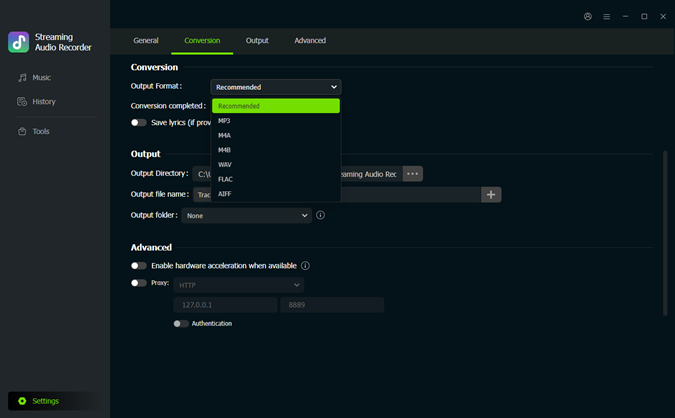 Step 1. Choose the Output Format
Open ViWizard on your computer. Click the Settings icon in the bottom-left corner and select Conversion. Choose your preferred format, such as MP3, and adjust the audio quality and output folder if needed.
 Step 2. Find Music on SoundCloud
Return to the Music interface and click the SoundCloud icon to open the built-in player. Browse your library or use the search bar to find the playlist you want to download.
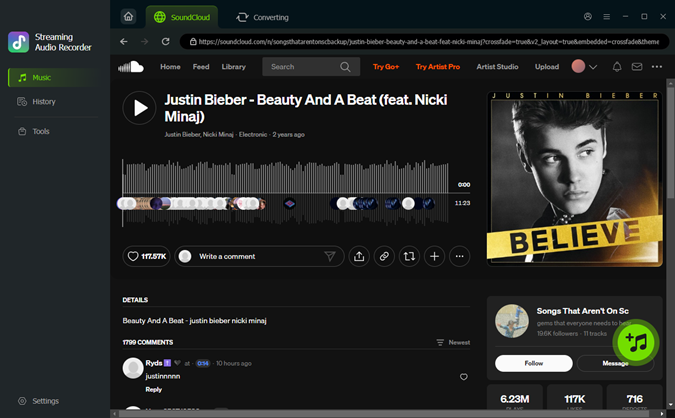 Step 3. Add Tracks to the Download List
Open the playlist and click the + button to analyze it. Select the tracks you want to save and add them to the download list.
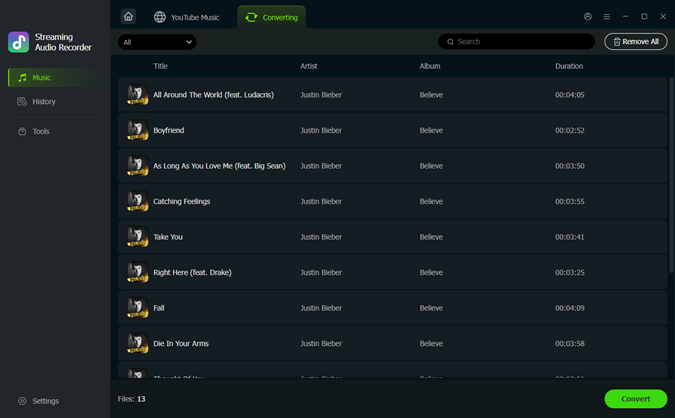 Step 4. Download Your Music
Open the download list and check your selected tracks. Click Convert to start downloading. When finished, go to History to find your saved files.
Once saved, your music files can be transferred to compatible devices and music players for offline listening, without relying on the SoundCloud app.
- Downloads entire SoundCloud Playlists in bulk.
- Preserves ID3 tags for each track.
- Provides multiple output formats (MP3, FLAC, WAV, M4A, AIFF, M4B).
- High-quality downloads up to 320 kbps.
- Simple and user-friendly interface.
- Works for all SoundCloud users.
- Up to 65× faster download speed.
- Windows and Mac only.
- Limited free version.
Part 4. How to Download SoundCloud Playlists to MP3 with Browser Extensions
If you prefer downloading music directly from your browser, Addoncrop SoundCloud Music Downloader is one extension to consider. It is designed to download individual SoundCloud tracks, entire playlists, and even audio from full pages as MP3 files at up to 320 kbps.
The extension also supports batch downloads, preserves available ID3 tags such as artist names and song titles, and includes a basic audio trimmer. However, it requires CrossPilot to work in Chrome, and its reliability can be an issue. Some users have reported installation problems, unwanted pop-ups, and redirects related to CrossPilot. Keep these limitations in mind before installing it.

How to Download SoundCloud Playlists with Addoncrop
01 Open the CrossPilot website and install the extension in your Chrome browser. It acts as a bridge for running Addoncrop extensions that aren't directly available through the Chrome Web Store.
02 Visit the official Addoncrop SoundCloud Music Downloader page and follow the installation instructions through CrossPilot. Review the requested permissions before proceeding.
03 Visit SoundCloud in Chrome and find the playlist you want to download.
04 Open the playlist and look for the download option added by Addoncrop. Click it to collect the available tracks into a download queue.

05 Process the queue and wait for the extension to download the tracks. Your MP3 files should appear in your browser's default Downloads folder.
- Supports individual tracks and full playlists.
- MP3 downloads at up to 320 kbps.
- Batch downloading saves time.
- Preserves available ID3 tags.
- Includes a basic audio trimmer.
- Requires CrossPilot for Chrome installation.
- May not work reliably with newer browser versions.
- Some users report unwanted pop-ups and redirects.
- Requires additional browser permissions.
Read More : Free SoundCloud MP3 Downloader Extensions for Chrome, Firefox, Opera, Edge
Part 5. How to Download SoundCloud Playlists to MP3 with Online Tools
If you don't want to install desktop software or browser extensions, online SoundCloud downloaders are worth trying. Most work by letting you paste a SoundCloud track or playlist URL and download the processed audio. Some support full playlists and ZIP downloads, while others limit free users to individual tracks. Here are four options to consider.
Tool 1. SoundCloudAud
SoundCloudAud is a free online SoundCloud downloader that supports individual tracks, albums, and entire playlists. Paste a playlist link, and it can process the tracks for individual MP3 downloads or bundle them into a ZIP file. You can also choose from different bitrate options, such as 128, 192, and 320 kbps. No account or software installation is required.
How to Download SoundCloud Playlists with SoundCloudAud
01 Open SoundCloud, find the playlist you want, and copy its URL.
02 Visit the SoundCloudAud website.
03 Paste the playlist link into the input box.

04 Click the conversion or download button and wait for the tracks to load.
05 Download the tracks individually or choose the ZIP option if available.

- Supports full playlists and batch downloads.
- Offers ZIP packaging.
- No registration or installation required.
- Playlist processing may not always be reliable.
- Actual audio quality depends on the source.
- Pop-ups or redirect ads may appear.
Tool 2. SoundCloudToMP3
SoundCloudToMP3 is a browser-based converter with a free option for individual tracks and a Pro plan for albums and playlists. Free users can convert one public track per day at 128 kbps without creating an account. If you want to download full playlists, albums, or long mixes, you'll need Pro, which costs $5 per month and also unlocks 192 kbps and 320 kbps output.

How to Download SoundCloud Playlists with SoundCloudToMP3
01 Open SoundCloud and copy the URL of a public track, album, or playlist.
02 Visit the SoundCloudToMP3 website.
03 Paste the URL into the input box.
04 Choose your preferred bitrate. Playlist downloads and 192/320 kbps options require Pro access.
05 Wait for the server to process the audio, then download the MP3 file.

- No account or software installation required for free single-track downloads.
- Supports albums, playlists, and long mixes with Pro.
- Background processing handles longer conversions.
- Free users are limited to one track per day.
- Playlist downloads require a paid membership.
- Higher bitrate settings don't improve the quality of the original audio.
Tool 3. DownloadSoundCloud (DownCloudMe)
DownCloudMe, formerly known as SoundCloudMe, is a free online downloader for SoundCloud tracks, playlists, albums, podcasts, and DJ mixes. It boasts MP3 downloads of up to 320 kbps and doesn't require an account or extra software. The website works in desktop and mobile browsers, so you can also use it on an Android phone or iPhone.
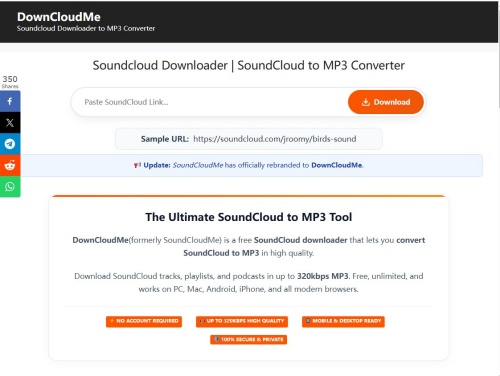
How to Download SoundCloud Playlists with DownCloudMe
01 Open SoundCloud and find the playlist you want to save.
02 Copy the playlist URL. On mobile, tap Share and select Copy Link.
03 Visit the DownCloudMe website.
04 Paste the URL into the download box and click Download.
05 Wait for the tracks to be processed, then select the available MP3 download option.
- Supports tracks, playlists, albums, podcasts, and DJ mixes.
- Advertises MP3 output of up to 320 kbps.
- No account or software installation required.
- Works on desktop and mobile browsers.
- Playlist processing may not always work as expected.
- Actual audio quality depends on the source.
- Check download prompts carefully for misleading buttons or redirects.
Tool 4. CloudMP3
CloudMP3 is a free online SoundCloud downloader for individual tracks and playlists. Paste a SoundCloud link into the website, search for the audio, and download the available MP3 file without installing software or registering an account. It advertises audio quality of up to 320 kbps and also offers the option to save downloads to Dropbox or Google Drive.

How to Download SoundCloud Playlists with CloudMP3
01 Open SoundCloud and copy the URL of the track or playlist you want.
02 Visit the CloudMP3 website.
03 Paste the link into the input box and click Search.
04 Wait for CloudMP3 to find the available audio.
05 Click Download to save the MP3 file, or choose Dropbox or Google Drive if those options are available.

- Pros
- Free to use without registration.
- Supports SoundCloud tracks and playlists.
- Advertises MP3 downloads of up to 320 kbps.
- Offers Dropbox and Google Drive storage options.
- Cons
- Playlist processing and download availability may vary.
- Cloud storage options may not appear for every download.
- Ads or occasional download errors may interrupt the process.
Part 6. How to Download SoundCloud Playlists to MP3 with Open-Source Tools
If you're comfortable using the command line, yt-dlp is a free, open-source tool worth trying. It can download audio from SoundCloud tracks and playlists, while FFmpeg handles the conversion to MP3. Unlike online downloaders, you can run a command to process an entire playlist and customize file names, metadata, and cover art.
You'll need to install both tools before getting started. The steps vary slightly depending on your operating system.

How to Download SoundCloud Playlists with yt-dlp
Step 1 Install yt-dlp and FFmpeg
First, install yt-dlp and FFmpeg. FFmpeg is required to extract and convert audio into MP3 format.
- Windows: Open Command Prompt or PowerShell and run:

- macOS: Open Terminal and install both tools with Homebrew:
- Linux: Install FFmpeg through your package manager. For Ubuntu or Debian, run:
Then install yt-dlp using pip or uv. For example, with uv:
Step 2 Copy the SoundCloud Playlist URL
Open SoundCloud and find the playlist you want to download.
01 Click the Share button beneath the playlist header.
02 Copy the playlist URL.
03 Make sure the playlist is public. If it's private, you'll need an authorized share link containing its secret token.
Step 3 Open the Terminal and Choose a Folder
Open Command Prompt, PowerShell, or Terminal. Navigate to the folder where you want to save your MP3 files. For example, to save them in your Downloads folder, run:
Step 4 Run the Download Command
To download the playlist and convert its tracks to MP3, enter:
Replace PLAYLIST_URL with the SoundCloud playlist link you copied. yt-dlp will process the playlist and save the audio files as MP3s.
Step 5 Add Cover Art and Metadata (Optional)
If you also want to embed cover art and track information, use this command instead:
This command does a few extra things:
- -x --audio-format mp3: Extracts the audio and converts it to MP3 using FFmpeg.
- --audio-quality 0: Uses the highest-quality variable bitrate setting available for the conversion.
- --embed-thumbnail: Embeds the available track artwork into the MP3 file.
- --embed-metadata: Adds available information, such as the track title and artist, to the file's metadata.
- -o "%(playlist_index)02d - %(title)s.%(ext)s": Adds track numbers to file names, helping keep the downloaded songs in playlist order.
- Free and open-source.
- Supports downloading entire SoundCloud playlists.
- Converts audio to MP3 with FFmpeg.
- Offers control over file names, metadata, and embedded artwork.
- Works on Windows, macOS, and Linux.
- Requires installing and updating command-line tools.
- You need to enter commands manually.
- Initial setup may be challenging if you're unfamiliar with the terminal.
- Download and conversion results can vary depending on the source and tool updates.
Part 7. What Is the Best Way to Download SoundCloud Playlists to MP3?
Each SoundCloud downloader has its own strengths and limitations. Some offer better control over audio quality and batch downloads, while others are free but may come with ads, usage limits, or extra setup steps.
The table below compares all eight methods based on audio quality, batch downloading, safety, ads, ease of use, and price.
| Method | Audio Quality | Batch Download | Safety | Ads | Ease of Use | Price |
|---|---|---|---|---|---|---|
| Official downloads | Original quality | ❌ | High | ❌ | Easy | Free |
| SoundCloud Go/Go+ | Up to 256 kbps | ✅ | High | ❌ | Easy | $4.99 or $11.99 per month |
| ViWizard | Up to 320 kbps | ✅ | High | ❌ | Easy | $71.95 per year (with free trial) |
| Addoncrop | Up to 320 kbps | ✅ | Low | ⚠️ | Moderate | Free |
| SoundCloudAud | Up to 320 kbps | ✅ | Low | ⚠️ | Easy | Free |
| SoundCloudToMP3 | Up to 320 kbps (Pro) | ✅ | Low | ⚠️ | Easy | Free / $5 per month |
| DownCloudMe | Up to 320 kbps | ✅ | Low | ⚠️ | Easy | Free |
| CloudMP3 | Up to 320 kbps | ✅ | Low | ⚠️ | Easy | Free |
| yt-dlp | Source-dependent | ✅ | High | ❌ | Advanced | Free |

This guide lists the top 10 SoundCloud MP3 downloaders that let you convert SoundCloud to MP3 320kbps easily.
Part 8. Conclusion
Found a SoundCloud playlist you don't want to lose? Now you know there are several ways to save it as MP3, whether you prefer free online tools or a more complete desktop solution. If you download playlists regularly, give ViWizard SoundCloud Music Converter a try and see if it fits your listening routine. Your favorite tracks will be ready whenever you are!
You May Be Interested






From new releases to old favorites, Matt Smith is always on the lookout for good music. He follows the latest in digital entertainment and shares songs and media he thinks are worth checking out.

Leave a Comment (0)