



Spotify album art makes it easy to recognize your favorite albums and adds a visual touch to your music collection. Sometimes, though, you may want to save a cover image for your own music library, use it for local audio files, or simply keep a copy of an album's artwork.
Spotify doesn't provide a direct download button for saving album covers as regular image files. However, there are several ways to find and save Spotify album art, from online album art downloaders and desktop tools to the Spotify Web API and other image sources.
In this guide, we'll walk through the most common ways to download Spotify album art, explain what each method can do, and help you choose the most suitable option for saving the cover images you need.
Part 1. Can You Download Album Art from Spotify?
Not directly. Spotify doesn't offer a built-in feature for downloading individual album covers as image files. Its offline download option is designed for listening without an internet connection, not saving artwork separately. Instead, you can use a third-party online downloader or desktop application. Most let you paste a Spotify album link to find and save its corresponding cover image.
Developers can also retrieve artwork URLs through the Spotify Web API. Its Get Album endpoint returns image URLs and dimensions in an images array. However, this requires authorization, API requests, album IDs, and additional code to retrieve the images.
Keep in mind that access doesn't automatically mean permission to reuse the artwork. Spotify's Web API documentation states that "Spotify content may not be downloaded" and prohibits facilitating content downloads or stream ripping. Its branding guidelines also require artwork to remain unchanged, include appropriate attribution, and link to Spotify content.
Part 2. How to Download Spotify Album Art Using an Online Downloader
Online downloaders are the easiest option if you only need a few album covers. They work in your browser, so there's no software to install.
Open an album in Spotify, click the three-dot menu, and select Share > Copy link to album. Paste the link into an online tool such as Spotify Art Getter, SpotiSongDownloader, or Spotisaver, then click the download button. Preview the artwork and save it. Some tools also offer different image sizes.
I prefer Spotify Art Getter because it focuses on album artwork without adding unnecessary MP3 download options.
This method works on computers and mobile devices with a browser and internet connection. Avoid unfamiliar downloaders that request your Spotify password or require additional software.
How to Download Spotify Album Art Using Spotify Art Getter
01Open the Spotify app or Spotify Web Player on your computer.
02Go to the album whose cover art you want to save.
03Click the three-dot menu next to the album title.
04Select Share, then select Copy link.

05Open Spotify Art Getter in your web browser.
06Paste the Spotify album link into the provided field.
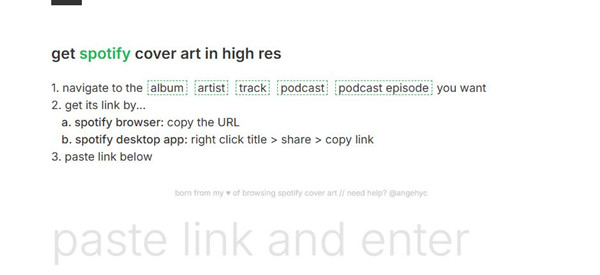
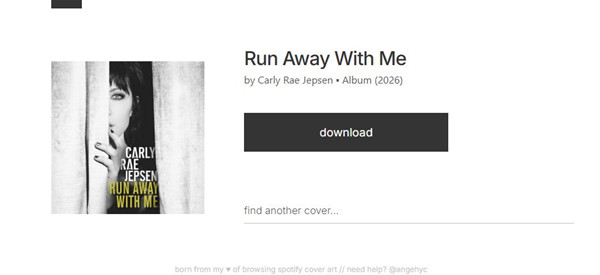
07Click the Enter key to retrieve the album artwork.
08Check the album title, artist, and cover to make sure the correct release was found.
09Click the download option and choose where to save the image.
Part 3. How to Download Spotify Album Art Using a Desktop Downloader
Desktop downloaders are useful when processing multiple tracks, albums, or playlists. They can save artwork alongside local music files, often preserving track titles, artist names, and other metadata.
Option 1: spotDL
spotDL is an open-source command-line tool for Windows, macOS, and Linux. After installing it, enter a Spotify track, album, or playlist link in the terminal. It uses Spotify metadata to find matching audio on YouTube, then saves the audio and available metadata, including album artwork.
Note that spotDL doesn't download original Spotify audio. Results depend on the matching source it finds.
How to Download Spotify Album Art Using spotDL
01Install spotDL on your computer.
02Make sure the required dependencies, including FFmpeg, are installed.
03Open Spotify and go to the album you want to process.
04Click the three-dot menu next to the album.
05Select Share, then select Copy link.
06Open Terminal on Mac or Linux, or Command Prompt/PowerShell on Windows.
07Enter the spotDL command followed by the Spotify album URL.
08Press Enter and wait for spotDL to process the album and its metadata.
09Open the output folder created or selected by spotDL.
10Check the downloaded files to make sure the artist, album, track names, and artwork are correct.
11Open the resulting file with a compatible metadata editor if you want to extract the embedded album artwork.
Option 2: ViWizard Spotify Music Converter
For a graphical alternative, ViWizard Spotify Music Converter offers a more straightforward workflow. Install the Windows or Mac application, open its built-in Spotify web player, and add the tracks, albums, or playlists you want to process. Choose an output format such as MP3, FLAC, or WAV, then click Convert. The resulting files can include track information and embedded album artwork.
However, ViWizard is primarily a music converter rather than a standalone image downloader. To extract the artwork, import the resulting music file into iTunes, open Song Info or Album Info, and drag the artwork into Windows Explorer or Finder to save it as a JPG or PNG file.

Key Features of ViWizard Spotify Music Converter
Free Trial Free Trial* Security verified. 5, 481,347 people have downloaded it.
- Convert Spotify songs, playlists, albums, podcasts, and audiobooks
- Export Spotify music in 6 formats for different devices and players
- Support Spotify Premium and free accounts for music conversion
- Preserve music metadata when organizing converted collections
- Batch download Spotify playlists and large music libraries
How to Download Spotify Album Art Using ViWizard Spotify Music Converter
01Open ViWizard Spotify Music Converter on your computer.
02Sign in to Spotify if prompted.

03Open Spotify and go to the album you want to process.

04Add the album or its tracks to the ViWizard conversion list.

05Review the tracks and remove any songs you do not want to include.
06Click Menu, then select Preferences.

07Open the Convert tab and select an output format such as MP3 or FLAC.

08Choose the folder where you want to save the converted files and click OK.

09Select the album or tracks you want to process.
10Click Convert and wait for the process to finish.
11Click History to view the completed conversions.
12Click the Open Folder icon next to the completed conversion.
13Open the converted files with a music player or metadata editor and check that the album artwork is included.
If you only need individual cover images, an online downloader is more convenient. Overall, spotDL suits command-line users, while ViWizard is better suited to those who prefer a graphical interface. ViWizard's free trial also has limitations.
Part 4. How to Retrieve Spotify Album Art Using the Spotify Web API
The Spotify Web API is a more technical option for developers who want to retrieve album artwork for their own applications or websites. It provides album metadata, including the album name, artist, release date, and artwork URLs.
To get started, create an application in the Spotify Developer Dashboard and configure authorization. Next, find the album ID from its Spotify link or URI and use it to request data from the Get Album endpoint.
The response includes an images array containing artwork URLs and, when available, their dimensions. You can use this information to select an appropriate image size, such as a larger cover for an album page or a smaller one for thumbnails.
Unlike dedicated downloaders, the API requires you to write code to make requests, process responses, and retrieve or display image references. It's best suited to developers building music-related applications, websites, or personal projects that use Spotify metadata.
How to Extract Spotify Album Art Using Spotify Web API
01Open the Spotify Developer Dashboard in your web browser.
02Sign in with your Spotify account and create a new application.
03Record the application credentials needed for Web API requests.
04Obtain a Spotify API access token using an appropriate authorization method.
05Open Spotify and go to the album whose artwork you want to retrieve.
06Copy the album's Spotify URL.
07Find the album ID in the URL by locating the value after /album/.
08Send a GET request to Spotify's Get an Album endpoint using the album ID.
09Include your access token in the Authorization: Bearer header.
10Open the JSON response and find the images array.
11Select an image from the images array, or select the first image for the largest available version.
12Copy the image's url value and use it to display or reference the album artwork.
13Keep the artwork in its original form and include the required Spotify attribution and link back.
Part 5. Alternative Ways to Find and Save Album Cover Images
If the methods above aren't suitable, there are a few simple alternatives for saving Spotify album artwork.
Method 1: Using iTunes (Windows/macOS)
iTunes is a common way to get high quality album art because Apple's catalog often has better resolution images than Spotify. The artwork can be saved and then embedded into local music files using iTunes or a tag editor. It is accurate and reliable, but it may require extra manual steps and may not work for rare releases that are not in Apple's catalog.
01Open iTunes on your computer.
02Search for the album you want in the iTunes Store.
03Click the album to open its page.
04Right click the album cover and select Save Image As.
05Choose a folder and save the image.
Method 2: Using Inspect Element (Web Browser)
This method uses the browser developer tools to find the album art URL directly from Spotify Web Player. The image link can be copied and downloaded, and sometimes the URL can be adjusted to get higher resolution. The method is more technical and may not always produce the highest resolution depending on Spotify's image delivery.
01Open Spotify Web Player in a browser like Chrome.
02Open the album page and find the album cover image.
03Right click the album cover and select Inspect.
04In the developer tools, locate the <img> tag containing the artwork URL.
05Copy the src link from the image tag.
06Paste the URL into a new browser tab and open it.
07Right click the image and select Save Image As.
Method 3: Using a Link Trick (Online Cover Downloaders)
Link trick tools let you paste a Spotify album or track link into a website and download the artwork in a few clicks. It is fast and easy without any technical steps. The main limitation is that the resolution is often limited to what Spotify provides, usually around 640 by 640. Some online tools may also change or go offline over time.
01Open Spotify and go to the album or track page.
02Click the three dots and select Share.
03Click Copy Link.
04Open an online album cover downloader website.
05Paste the Spotify link into the tool's input box.
06Click Download or Get Artwork.
07Choose the image size and save the cover to your computer.
Method 4: Using Screenshot (Not Recommended)
Screenshots are the simplest way to capture album art, but the result is usually low quality. The cover can be enlarged in Spotify and captured, then cropped in an editor. This method is only recommended when other options are not available, since screenshots often include UI elements and require extra editing.
Desktop (Windows / macOS)
01Open the Spotify desktop app.
02Find the album whose cover you want to save.

03Click the album cover on the right side of the album profile.
04A larger version of the album cover will appear.

05Take a screenshot of the album cover.
- On Windows: press PrtScn or use Snipping Tool or Snip and Sketch.
- On Mac: press Command + Shift + 4, then select the area.
06Open an image editor like Microsoft Paint or Apple Preview.
07Paste and crop the screenshot to focus on the album cover.
08Save the cropped image to your desired location.
Mobile (iOS / Android)
01Open the Spotify app on your mobile device.
02Navigate to the album whose cover you want to save.
03Tap the More options button (three dots).
04Scroll down and tap View album.
05Tap the album art to open the image view.
06Tap Save to Photos.
07If prompted, grant Spotify permission to access your photos.
08The album cover will be saved to your device's Photos app.
Part 6. Final Thoughts
Downloading Spotify album art doesn't have to be complicated. If you only need a few covers, an online downloader or browser-based method may be the quickest option. For larger collections, desktop tools can help you save artwork along with your local music files, while the Spotify Web API offers a more flexible approach for developers.
If you're looking for a simple way to manage Spotify tracks, albums, and playlists while keeping album artwork and other metadata with your music files, ViWizard Spotify Music Converter is worth considering. It provides a more convenient desktop workflow for converting Spotify music and preserving metadata, including album artwork.
Ready to organize your Spotify music collection? Try ViWizard Spotify Music Converter and see how it can simplify the process.
You May Be Interested

How to Download Spotify Songs, Albums, and Playlists for Offline Listening

Best 10 Free Spotify Album Downloaders for MP3 Downloads

How to Play Spotify Album/Playlist in Order without Premium

How to Download Spotify Music with a Free Account

How to Download Spotify Podcasts for Offline Listening

How to Download Spotify Audiobooks for Offline Listening

Adam Gorden is always looking for new ways to explore music and videos. He likes trying different media tools and learning how to manage audio and video files with ease.

Leave a Comment (0)