


Lossless audio keeps the details from the original recording while reducing file size compared with uncompressed audio. Unlike MP3 and other lossy formats, lossless formats such as FLAC, WAV, ALAC, and AIFF preserve the original audio data.
Many listeners look into lossless audio after upgrading their headphones or speakers and want to save Spotify music in the highest quality for offline listening, personal collections, or playback on other devices. Spotify now offers lossless audio for eligible Premium users, but official downloads remain inside the app. To save Spotify songs as regular audio files, you need a tool like ViWizard Spotify Music Converter.
This guide explains how to download Spotify music in lossless audio, save it as WAV or FLAC files, and transfer and play them across different devices.

Need Spotify music for offline listening? ViWizard Spotify Music Converter helps Spotify Premium and free users save songs, playlists, albums, podcasts, and audiobooks in popular audio formats with fast, reliable conversion. Start converting and enjoy Spotify music across more devices.
Part 1. Can You Download Spotify Music in Lossless Audio?
Yes, eligible Premium users can stream or download Spotify music in lossless audio, currently up to 24-bit/44.1 kHz.
For years, Spotify users had to accept limits on streaming quality. Even the highest 320 kbps setting for Premium users was still a compressed format. Spotify has now added a "Lossless" option on mobile, desktop, tablet, and many Spotify Connect devices. Supported tracks show a "Lossless" label, making them easier to identify. However, the rollout is still expanding and may not be available on every device or in every region.
Not every song supports lossless quality yet. Many tracks remain at 16-bit, wider 24-bit support is still rolling out, and some songs are still limited to 320 kbps. Users also need a Premium plan to access Spotify lossless audio. Since lossless downloads require more storage space and data, users with limited storage or mobile data should plan accordingly.
| Quality | Bitrate / Format | Per Minute | Per Hour | Hours to 1 GB | Storage per 3-min Song | Storage per 30-min Album | Storage per 1-hr Album |
| Normal | 96 kbps | 0.72 MB | 43.2 MB | 23.7 hrs | 2.16 MB | 21.6 MB | 43.2 MB |
| High | 160 kbps | 1.2 MB | 72 MB | 14.2 hrs | 3.6 MB | 360 MB | 72 MB |
| Very High | 320 kbps | 2.4 MB | 144 MB | 7.1 hrs | 7.2 MB | 720 MB | 144 MB |
| Lossless | ~24‑bit FLAC / 44.1 kHz | 16.7 MB | 1000 MB | 1.02 hrs | 50.1 MB | 500 MB | 1000 MB (~1 GB) |
Part 2. How to Download Spotify Music in Lossless Audio (Official Method)
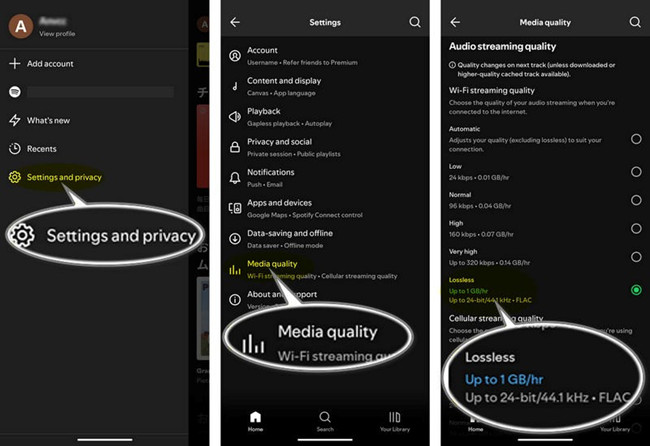
If you mainly want offline listening, Spotify's official download method is the easiest option. After enabling lossless audio on desktop under Settings > Audio Quality, or on mobile and tablet under Settings & Privacy > Media Quality, supported songs can be downloaded directly through the Spotify app. This feature applies to music only, while podcasts and audiobooks are not included.
The limitation is that Spotify keeps these downloads inside its own ecosystem. Unlike regular audio files, Spotify offline downloads cannot be opened in another player, copied to a USB drive, or added to a separate music library. They are only available within the Spotify app.
Key Requirements:
- Spotify Premium subscription: Individual ($11.99 per month), Duo ($14.99 to $16.99 per month), or Family ($19.99 per month)
- Supported region: Available in the US, UK, Canada, Australia, Germany, Japan, and other supported markets
- Compatible device: Availability depends on your device model and system support
- Up to date Spotify app: A recent version of the Spotify app is required
2.1How to Download Spotify Lossless Music on Desktop
01Open the Spotify desktop app. If you haven't installed it yet, download it from the Microsoft Store or Mac App Store.
02Click your profile picture in the top-right corner.
03Select Settings.
04Scroll down to Audio quality > Download.
05Select Lossless from the available options.
06Find an album or playlist you want to download in Lossless quality.
07Search for a song, browse your library, or create a new playlist.
08Check for the Lossless label next to supported tracks.
09Open the album or playlist and click Download.
10Wait for Spotify to save the tracks in Lossless quality for offline listening.
11Check for the small green arrow next to the album or playlist in the left panel.
12To remove offline files later, click Downloaded again. The playlist will stay in your library, but the downloaded files will be removed.
2.2How to Download Spotify Lossless Music on Mobile
01Open the Spotify app on your phone or tablet.
02Make sure the app is updated to the latest version.
03Go to Profile > Settings & Privacy.
04Select Media Quality (or Audio Quality).
05Choose Lossless under Download.
06Find the album or playlist you want to download.
07Add individual songs to a playlist if needed.
08Open the album or playlist.
09Tap Download.
10Wait for Spotify to save the songs in Lossless quality for offline listening.
11Check for the small green arrow next to the album or playlist.
12To remove downloads, tap Download again. The playlist will remain in your library, but the offline files will be cleared.
Part 3. How to Save Spotify Music as Lossless Audio Files
If you want to store Spotify songs locally or use them outside the app, you need another method. Spotify converters can save songs as common formats, with WAV and FLAC being popular choices for lossless audio.
ViWizard Spotify Music Converter helps both Premium and free users save Spotify music, podcasts, and available audiobooks as local files. It provides a built-in browser where users can sign in and access their Spotify libraries. Instead of using official downloads, ViWizard processes Spotify playback streams and saves them as formats such as WAV, FLAC, or AIFF with minimal quality loss. These files can then be organized, transferred, and played on other devices.
However, a lossless file format does not always mean true lossless quality. Saving a Spotify stream as FLAC does not restore audio details lost during compression. The final output still depends on the original source and account being used.
Key Features of ViWizard Spotify Music Converter
Free Trial Free Trial* Security verified. 5, 481,347 people have downloaded it.
- Convert Spotify songs, playlists, albums, podcasts, and audiobooks
- Export Spotify music in 6 formats for different devices and players
- Support Spotify Premium and free accounts for music conversion
- Preserve music metadata when organizing converted collections
- Batch download Spotify playlists and large music libraries
 Step 1: Set Up ViWizard on Your Computer
Download and install ViWizard Spotify Music Converter for Windows or Mac. Open the program and log in to your Spotify account. Both Free and Premium accounts work. You'll sign in inside the built-in Spotify interface, which lets you browse, search, and preview songs, albums, or playlists without switching apps.
 Step 2: Select the Music You Want to Download
Find the tracks, albums, or playlists you want in high-quality audio. You can also paste a Spotify link if you already have one. Click the + button to add them to your conversion list. You can choose individual songs, full albums, or entire playlists depending on your needs. We recommend starting with a few favorite tracks to test the output. If it meets your expectations, you can convert more, including playlists, albums, or even your entire music library.
 Step 3: Choose a High-Quality Audio Format
Go to Preferences > Conversion. Select a lossless-ready format like WAV, FLAC, or AIFF for your downloads. You can also set the audio quality to the maximum and organize your files by artist, album, or playlist to keep your library tidy.
 Step 4: Convert and Save Your Music
Click Convert to start. ViWizard will remove Spotify's restrictions and save your tracks in full-quality audio on your computer. Once finished, open the output folder to access your music. You can transfer these files to any device for offline listening, even if you only have a free Spotify account.
Part 4. How to Transfer Lossless Spotify Music Files to Other Devices
Once saved, local lossless files can be transferred like regular audio files between computers, phones, tablets, external drives, and other supported devices. Common transfer methods include USB connections, cloud storage, and file management apps.
The main consideration is file size. Lossless music takes much more storage than compressed audio. For example, one hour of lossless audio can take around 1GB of space.
4.1Transfer Lossless Spotify Music Files to Android
01Connect your Android phone or tablet to your computer using a USB cable.
02Unlock your device and tap the USB notification.
03Select File Transfer or Transfer files from the USB preferences.
04Open File Explorer on Windows or Finder on Mac.
05Select your Android device from the connected devices list.
06Open the Music folder or create a new folder for your lossless audio files.
07Copy and paste your Spotify lossless music files into the folder.
08Wait for the transfer to finish and safely disconnect your device.
09Open a music player that supports lossless formats to play your transferred files.
4.2Transfer Lossless Spotify Music Files to iPhone & iPad
Using Finder:
01Connect your iPhone or iPad to your Mac using a USB cable.
02Unlock your device and click Trust when prompted.
03Open Finder on your Mac.
04Select your iPhone or iPad under Locations in the Finder sidebar.
05Click Music in the device management window.
06Check Sync music onto [device name].

07Select Entire music library or choose specific artists, albums, genres, or playlists.
08Click Apply to sync your lossless music files.
09Open the Music app on your iPhone or iPad to access the transferred songs.
Using iTunes:
01Launch iTunes on your Windows computer.
02Click File > Add File to Library or File > Add Folder to Library.

03Select your lossless Spotify music files and add them to your iTunes library.
04Connect your iPhone or iPad to your computer using a USB cable.
05Click the Device icon in the upper-left corner of iTunes.
06Select Music from the left sidebar.
07Check Sync Music.

08Select your entire music library or choose specific songs, artists, albums, or playlists.
09Click Apply to start syncing your music files.
10Open the Music app on your iPhone or iPad to find your transferred songs.
Part 5. How to Play Lossless Spotify Music Files on Any Device
Most modern computers and mobile devices support common lossless formats such as FLAC and ALAC, but playback quality also depends on your device setup. A lossless file alone does not guarantee better sound. Your headphones, speakers, audio hardware, and playback software all affect the final listening experience.
5.1Play Lossless Spotify Music Files Using VLC Media Player
01Launch VLC Media Player on your computer or open the VLC app on your mobile device.
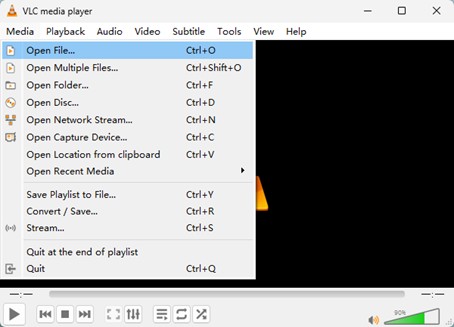
02Click Media > Open File from the top menu bar on desktop, or tap Audio from the bottom menu on mobile.
03Select the folder containing your lossless Spotify music files.
04Choose the lossless audio file you want to play.
05Click Open on desktop or tap the song on mobile to start playback.
5.2Play Lossless Spotify Music Files Using Foobar2000
01Launch Foobar2000 on your computer.
02Click File > Open from the top menu bar.
03Select your lossless Spotify music files and click Open to add them to the playback queue.
04Double-click a song to start playback.
05Click File > Preferences if you want to create a music library.
06Select Media Library from the left sidebar.
07Click Add under Music folders.
08Select the folder containing your lossless music files.
09Click Apply to scan and add your files to the library.
Part 6. Conclusion
The best way to download Spotify music in lossless audio depends on your needs. If you only want offline listening, Spotify's official lossless download feature provides the easiest option within the app. However, if you want to save songs as local files, transfer them to other devices, or build a personal music library, try ViWizard Spotify Music Converter today and save Spotify Music in WAV, AIFF or FLAC for more flexibility.
You May Be Interested


Nick Orin, a software developer at ViWizard, focuses on providing solutions for software-related challenges, including reviews, troubleshooting, and optimization tips.

Leave a Comment (0)