


Tidal removed its integration with Plex on October 28, 2024. This means you are no longer able to continue streaming Tidal on your Plex interface. "Why is Tidal leaving Plex?" Many users have the same question as you, and we will show you the answer in this post.
It seems that there is no way to continue to add your Tidal collection to Plex. Many users are left wondering if they can still add Tidal to Plex. Never give up so quickly. We have 2 workaround methods to link your Tidal library to Plex seamlessly. Let's try Soundiiz and ViWizard TIDAL Music Converter to keep Tidal listening on Plex!

Part 1. What Happened to Tidal on Plex?
Unlike traditional streaming services that offer a set catalog of content, Plex acts as a central hub for your own media library, making it easy to manage all your digital files in one place and allowing users to organize, access, and stream their personal collection of movies, TV shows, music, photos, and more from any device.

Plex and Tidal's partnership began as an effort to enhance the Plex experience by integrating high-quality music streaming for users. The collaboration allowed Plex users to access Tidal's vast library of music and stream it directly through Plex.
Despite the promising partnership, Plex announced that the Tidal integration will be discontinued. As of October 28, 2024, users will no longer be able to stream Tidal music through Plex. This means that any Tidal tracks that were streamed via Plex will no longer be accessible through the platform. While the exact reasons for the separation haven't been fully disclosed, it likely stems from business decisions or shifts in the companies' strategies.

Part 2. How to Add Tidal to Plex with ViWizard [Step-by-Step]
Although Plex's direct integration with Tidal will be shut down, you can still manually add Tidal music to your Plex library by downloading tracks and adding them to your local media server. One of the best ways to do this is using ViWizard TIDAL Music Converter. And here are a few benefits of adding Tidal to Plex via ViWizard:
With ViWizard TIDAL Music Converter, you don't need a Tidal subscription to download Tidal music. This means that you can download songs and add them to your Plex media server without any additional cost.
ViWizard TIDAL Music Converter allows you to download DRM-free, Hi-Res FLAC Tidal tracks and convert them into various formats, including lossless MP3, AIFF, WAV, FLAC, M4B, and M4A.
The converter also preserves the original ID3 tags and metadata, such as the title, artist, album, cover art, genres, track number, and release year. Plex will automatically recognize these tags, so you won't need to add the song details manually.
By adding local music files to Plex, there won't be any cellular data used during playback. This also cuts down the time needed for decoding and loading, which is especially helpful for devices with slower hardware or systems.

Key Features of ViWizard TIDAL Music Converter
Free Trial Free Trial* Security verified. 5, 481,347 people have downloaded it.
- Convert TIDAL songs, playlists, albums, artists, podcasts, and audiobooks
- Export TIDAL music in 6 formats for different devices and players
- Preserve Hi-Res FLAC and original audio quality
- Preserve Dolby Atmos audio and metadata during conversion
- Batch download TIDAL playlists, albums, and large music collections
A Step-by-Step Guide on Add Tidal to Plex via ViWizard
Step 1 Add Tidal tracks
Start by downloading and installing the ViWizard TIDAL Music Converter on your computer. Launch ViWizard, and you will enter the built-in Tidal Web Player immediately, log in with your Tidal HiFi account, and then you can select and choose the song you want to download from Tidal. After selection, hit the Add to list icon to add songs to the ViWizard conversion list.

Step 2 Adjust output format
Once you've added the desired tracks/playlists/albums to the conversion list, configure some settings. Click on the menu icon in the upper-right corner > Preferences > Conversion > Output Format, and set the desired format from the dropdown menu. Click on the OK button at the bottom right corner to save the change.

Step 3 Download Tidal tracks
You can then initiate the conversion process by clicking on the Convert button. When the download is complete, a red dot will appear on the list-icon below. Click on it or directly hit the History option to view your downloaded tracks in your local files.

Step 4 Add the downloaded Tidal music files to Plex
Once the Tidal tracks have been downloaded, add them to the Plex server. We've presented a very detailed tutorial in the following. But, for some users who'd like to follow the procedure in a step-by-step video guide, check out the video below.
How to Add Tidal Content to Plex Before It's Gone!
Install the Plex Media Server app on your computer. Launch it and log in to the app with your account.

Click on the device icon in the upper-left corner, and tap Manage Libraries > Add Libraries > Next.


Choose Music in the pop-up window, and click Next.

Tap Browse For Media Folder, and select the folders where you stored the downloaded Tidal music.

Tap the Add button when you finish the setup.

Wait a few second for Plex adding Tidal music to your music library. Now, you can play Tidal music on Plex Media Server whenever you want.

Part 3. How to Add Tidal to Plex with Soundiiz
If you just want to transfer your Tidal library to Plex to stream, you can consider employing Soundiiz to move your Tidal playlist, favorites, artists, and albums to your Plex account. Soundiiz supports multiple music streaming services, including Tidal and Plex. You can import your Tidal collections to Plex seamlessly.
Step 1 Visit Soundiiz's official website to start transferring Tidal to Plex.
Step 2 Tap the Start for free icon on the screen to link your Tidal account.
Step 3 Paste your Tidal account and password on the login page, you can also choose to sign in with your Google account.

Step 4 Look at the Tools section on the left, click the Transfer option to set Tidal as the source and Plex as the destination.
Step 5 Click the Connect icon to link your Plex account in the pop-up window.
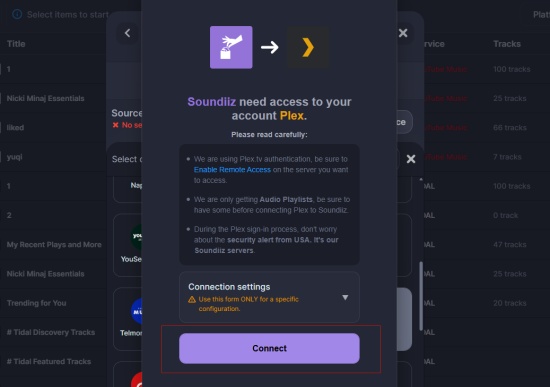
Step 6 Now the connection between Tidal and Plex is set up, tap the Start icon to continue the transfer.
Step 7 Choose the Playlists option and tap Confirm my selection. You can rename the playlist and write a simple description in the transfer window. If decided, click Save configuration option to proceed to the next step.
Step 8 You can check the content in the playlist. If there is no mistake, tap Confirm tab to allow Soundiiz to transfer your Tidal playlist to your Plex.
Part 4. FAQs about Tidal Plex Integration
What other music services are available on Plex?
Aside from Tidal, Plex currently does not partner with any other music streaming services. However, the shutdown may hint that Plex could be exploring partnerships with other music services in the future, so stay tuned. If you'd like to continue playing and managing your Tidal music on Plex, you can use ViWizard to build your own Tidal music library by following the method provided in Part 2.
Will my existing Tidal music library on Plex be affected?
Your existing Tidal library in Plex won't be automatically deleted. You can still use Tidal on Plex until October 28th, after that date, Tidal will no longer be supported. Even though, the music libraries on your Tidal app won't be affected, and you can still play Tidal tracks on its native app.
Can I continue to play my Tidal music library on Plex with Tidal HiFi quality?
No, you can't. Since Tidal ended Plex integration, you are no longer able to use the dedicated Tidal app and stream Tidal HiFi music on Plex. Even though you can transfer your Tidal library to Plex, the music will be delivered in the best quality Plexamp provides. But ViWizard TIDAL Music Converter can help you download Tidal tracks in Hi-Res and export the Tidal downloads to Plex.
Part 5. Conclusion
While the official Tidal-Plex integration is coming to an end, you can still use both apps separately. If you want to add Tidal music to your Plex library, you can use ViWizard TIDAL Music Converter which helps you download and add lossless Tidal music on Plex. By following the steps outlined in this guide, you can continue enjoying your favorite Tidal tracks on Plex, even after October 2024.
You May Be Interested


Dave Henry, a multimedia technologist at ViWizard, focuses on delivering the best solutions for digital media challenges, including audio and video conversion, media optimization, and troubleshooting.

Leave a Comment (0)