


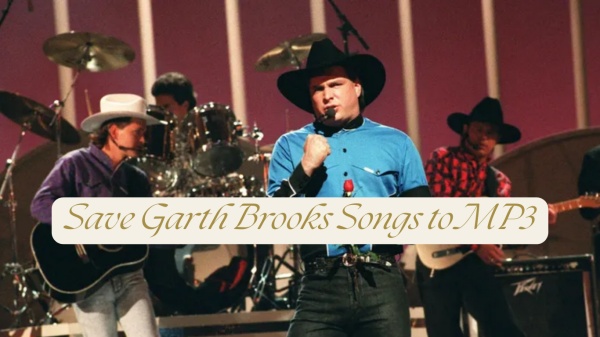
If you've ever searched for Garth Brooks on Spotify or Apple Music and found little or nothing, you're not alone. As one of the best-selling solo artists in U.S. history, Garth Brooks chooses Amazon Music as one of the primary platforms where you can stream his music today.
Why is Amazon Music a closed partner of Garth Brooks? It's Amazon Music's superior audio quality and the insurance to the integrity of full albums that contribute to the cooperation. So, you can typically find popular Garth Brooks albums and official collections, curated playlists featuring his biggest hits, and featured or promotional content related to Amazon Music releases.
So, in this post, we will share with you the top songs of Garth Brooks and how to download his songs to MP3 to permanently stream with ViWizard Amazon Music Downloader. Let's dive in!
Part 1. Popular Garth Brooks Songs on Amazon Music
If you're new to Garth Brooks or want to start with his most iconic tracks, Amazon Music makes it easy to explore his best-known songs. Below are some of the most popular Garth Brooks songs frequently streamed on Amazon Music, making them an excellent starting point.
#1. Friends in Low Places
Album: No Fences (1990)
Enjoy on Amazon Music: 🎵 Friends in Low Places
Introduction: This iconic anthem is widely considered Garth Brooks' signature song. With its relatable lyrics and sing-along chorus, it captures themes of humility, resilience, and finding belonging outside traditional success, making it one of the most streamed Garth Brooks tracks on Amazon Music.
#2. If Tomorrow Never Comes

Album: Garth Brooks (1989)
Enjoy on Amazon Music: 🎵 If Tomorrow Never Comes
Introduction: This timeless love song focuses on expressing affection before it's too late. Its gentle melody and heartfelt lyrics have made it a favorite for weddings and romantic playlists across Amazon Music.
#3. Callin' Baton Rouge
Album: In Pieces (1993)
Enjoy on Amazon Music: 🎵 Callin' Baton Rouge
Introduction: An upbeat, high-energy song that shines in live performances, Callin' Baton Rouge is a fan favorite. Its fast tempo and crowd-driven feel make it especially popular in live and concert-style playlists.
#4. Unanswered Prayers
Album: No Fences (1990)
Enjoy on Amazon Music: 🎵 Unanswered Prayers
Introduction: This reflective track explores the idea that unanswered wishes can still lead to meaningful outcomes. Its mature perspective and relatable message continue to resonate with listeners over time.
#5. Shameless
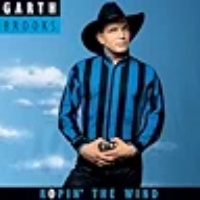
Album: Ropin' the Wind (1991)
Enjoy on Amazon Music: 🎵 Shameless
Introduction: Originally written by Billy Joel, Shameless became one of Garth Brooks' biggest crossover hits. The song blends country charm with mainstream appeal, helping broaden his audience beyond traditional country fans.
Part 2. How to Download Garth Brooks Songs on Amazon Music (Official Method)
If you want to download Garth Brooks songs for offline listening on the Amazon Music app, you need to subscribe to the Amazon Music Unlimited or Standard plan to obtain the download feature. Additionally, Garth Brooks' works account for Amazon Music Unlimited content, so you can only download the songs on your mobile Amazon Music app.
Step 1 Open the Amazon Music app on your mobile device.
Step 2 Click the Gear icon to go to Amazon Musci Settings to optimize the download audio quality option.
Step 3 Choose the audio quality as Standard, HD, Ultra HD.

Step 4 Tap the Search icon to find Garth Brooks songs and add your interested songs to your Amazon Music library. If you have already added Garth Brooks songs to your collection, go to My Music at the bottom to enter your Amazon Music library.
Step 5 Find and locate Garth Brooks songs, albums, or playlists. Tap the three-dot icon next to the title.
Step 6 Tap Download. When the download is complete, a downloaded icon will appear next to the song, and you can listen to it offline anytime.

Part 3. Best Method to Download Garth Brooks Songs without Unlimited
Unfortunately, the official downloading Garth Brooks songs is only playable inside the Amazon Music app, and the offline listening requires an active Amazon Music Unlimited subscription. Moreover, you can't export the downloads to other music streaming services, like Spotify or Apple Music.
If you don't have Amazon Music Unlimited — or want to keep your music permanently—a third-party downloader offers more flexibility. ViWizard Amazon Music Downloader allows you to download Garth Brooks songs directly from Amazon Music web player without relying on Unlimited features.
With ViWizard, you can convert Garth Brooks songs to 6 audio formats: MP3, M4A, M4B, WAV, FLAC, and AIFF. Moreover, you can have a further audio quality setting on bitrate, sample rate and stereo channel, allowing to have best downloading Amazon Music listening experience. Despite the audio quality, ViWizard also supports download Amazon Music in batch with 65x fast speed, which permits your to get the Garth Brooks MPS tracks as soon as possible.

Download songs, playlists, albums, and your whole music library from 10 major streaming platforms, including Amazon Music, to MP3, FLAC, WAV, AIFF, M4A, or M4B with original quality and ID3 tags for permanent offline listening.
Here is the step-by-step guide:
Step 1 Launch ViWizard and Set Format
Open ViWizard Amazon Music Downloader on your computer. Click Menu > Preferences > Conversion and select MP3 or FLAC. Choose your desired audio quality (64–256 kbps) and click OK to save the settings.

Step 2 Log in to Amazon Music
Click the Amazon Music icon in ViWizard and log in with your Amazon Music account. This allows you to access your music library, including albums, playlists, and tracks by Garth Brooks.

Step 3 Find and Add Garth Brooks Music
Use the built-in Amazon Music player to search for Garth Brooks. Open the album, playlist, or song you want to download. Click Add to List to queue the tracks for downloading.
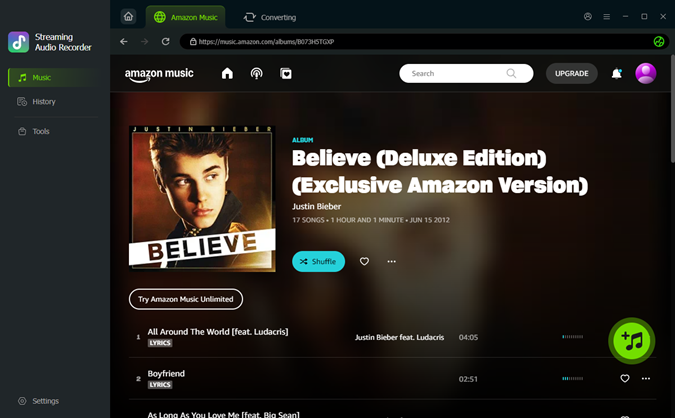
Step 4 Start Downloading
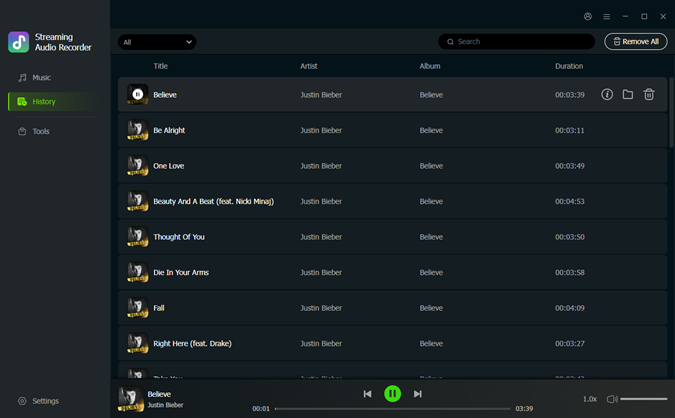
Once all desired tracks are added, click Convert. ViWizard will automatically download and convert the selected Garth Brooks songs to MP3 format. After conversion, open the History tab. Click the folder icon to locate your downloaded MP3 files on your computer. You can now play Garth Brooks music offline, transfer it to other devices, or manage your library as you like.
Bonus: Export Garth Brooks Downloads to Other Music Streaming Services
Do you transfer the Garth Brooks downloads to other music streaming service if you have multiple music streaming service accounts? Or, you are disappointed to Amazon Music services for it always buggy and want to switch to Spotify or Tidal? Once you download the Garth Brooks songs with ViWizard, it's not being restricted anymore to transferring any Amazon Music downloads to other platforms. Take Tidal as example:
Step 1 Open the Tidal desktop application (Windows or Mac) or use the Tidal web player. Make sure your Tidal app is updated to the latest version.
Step 2 In the left sidebar, find the "Uploads" or "Your Uploads" tab. The icon usually looks like an upward arrow.
Step 3 Click the "+" icon to start adding a new track.
Step 4 Browse your computer and select the Garth Brooks MP3 track that you downloaded from Amazon Music.
Step 5 Fill in Track Information and click Upload. Once the upload is complete, check that the track appears in your "Your Uploads" library and can play properly.

Conclusion
If you're a fan of Garth Brooks, don't settle for streaming limitations. With Amazon Music, you can listen to his top songs anytime, but the real freedom comes from downloading tracks with ViWizard. This method lets you keep MP3 or FLAC files permanently, play them offline on any device, and even upload them to other platforms. Give ViWizard a shot to complete control over your Garth Brooks collection — so you can listen your way, anytime.
You May Be Interested


From new releases to old favorites, Matt Smith is always on the lookout for good music. He follows the latest in digital entertainment and shares songs and media he thinks are worth checking out.

Leave a Comment (0)