


Volumio is a free and open-source Linux distribution, supporting running on a variety of devices, like Raspberry Pi, low-powered PC, or thin clients. Plus, Volumio also supplies the hardware device that is equipped with the Volumio app integration, Volumio Primo, and Rivo. With Volumio, your device can immediately become an outstanding audiophile music player, which delivers the bit-perfect music playback.
As for its top-notch music quality, many music streaming services, like Tidal, Qobuz, and Spotify, have already integrated with Volumio so that you can directly stream music from the music service library. However, Amazon Music is not in the list of available music services.
In this guide, we will share with you 4 portable ways to connect your Amazon Music with Volumio. Let's start!
Part 1. Does Amazon Music Integrate Volumio?
Although many users feedback to Amazon Center, hoping Amazon Music can integrated with Volumio, there is still no official Amazon Music integration with Volumio. A latest release was in the early 2023, Volumio announced that they had obtained Amazon Music's authorization to create a plugin. But the exact updates are developing so slowly due to the complexity and reliance on Amazon Music's communication.
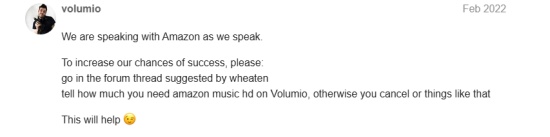
All in all, the new release data of integrating Amazon Music on Volumio is not yet available. However, there still 4 portable ways to permit you to stream Amazon Music on Volumio. Explore the details in Part 2 below.
Part 2. How to Add Amazon Music to Volumio
Amazon Music has already provided HD quality for Unlimited users; however, there is still audio quality loss when it is output from your streaming device. Volumio is designed to transform your Linux or other PCs into a headless Audiophile Music Player. Choose the 4 methods below to follow detailed steps.
Way 1. Connect Amazon Music via Bluetooth
Best for users who purchased the Volumio hard device and want to stream Amazon Music on Motivo.
If you already own Volumio's product, Motivo, or other hardware device that supports Bluetooth connection with your smartphone or tablet, playing Amazon Music on Volumio will be compatible once you pair your phone or tablet with the Volumio device. Follow the steps below to stream Amazon Music on Volumio via Bluetooth:
Step 1 Launch the Volumio app from your computer.
Step 2 After entering the initial Volumio interface, you can click the Menu icon in the top-right corner. The sidebar will then pop up on the left.
Step 3 Scroll down to find the Sources option, and you will see the Bluetooth Input Playback tab on it.
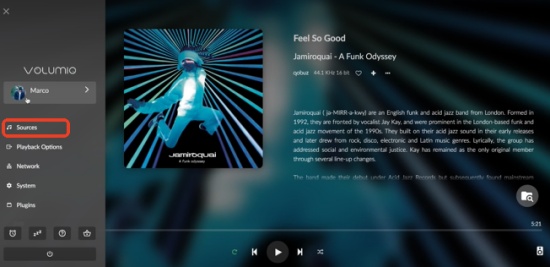
Step 4 Click it to connect your Volumio device to your Bluetooth-enabled device.
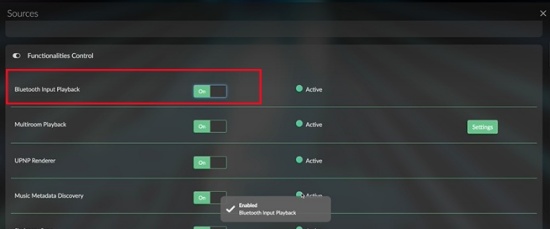
Step 5 Activate the Bluetooth function on your smartphone or tablet device, and pair your device to Volumio by selecting it from the available devices list.
Step 6 Once paired, you can launch the Amazon Music app on your screen and choose the song or playlist you want to stream. And the track will be delivered through the Volumio device.
Way 2. Stream Amazon Music via ViWizard
Best for users who install the Volumio software and wish to enhance the Amazon Music listening experience on their computer.
If you download the Volumio software, you will find that there is an option to stream music locally, which means that you can download tracks from Amazon Music to your computer with Unlimited or buy songs from the Amazon Digital Store. However, Amazon Music has DRM protection, and the purchased music file is in MP3 format, not the best audio quality that Amazon Music provides. At this time, you need a professional music converter to help you rip from Amazon Music with high audio quality. Luckily, ViWizard Amazon Music Converter can do it effortlessly.
ViWizard can convert any content on Amazon Music to MP3, WAV, M4A, M4B, AIFF, and FLAC in lossless quality. ViWizard has multiple music download options with bitrate, sample rate, and stereo selection, allowing you to have a personal music downloading setting. If you want, you can also keep the lyrics with your Amazon Music downloads. Additionally, ViWizard provides original ID3 tags with each download for you to manage your Amazon Music offline library better.

Turn Amazon Music into MP3, WAV, FLAC, AIFF, M4A, M4B, and more. Keep songs offline and listen on demand with full control.
Step 1 Personalize the Output Settings
Install ViWizard Amazon Music Converter from the official website. Once installed, click twice to enter the initial interface, and you can log in with your Amazon Music credentials in the built-in Amazon Music web player. Then, click the three horizontal lines to choose the Preferences tab, the audio output setting is in the Conversion section, and you can choose audio format, sample rate, and bitrate according to your needs. After selecting, click the OK button to save your changes.

Step 2 Personalize the Output Settings
Return to the Amazon Music web player, you can pick your likes from the Amazon Music library, or the recommendations from the Amazon Music Home page. Hit the Add to List icon at the bottom right, and the songs or playlist you select will be added to the conversion list. You can continue to add or move to the next step.

Step 3 Transfer Your Downloads to USB Drive
Once you ensure the conversion list, click the Convert button at the bottom right corner, ViWizard will automatically recognize and match the metadata to download. You can wait for seconds and go to the history screen to check your downloads. Connect your USB drive to the computer, drag or copy the Amazon Music downloads to your USB drive.

Step 4 Stream Amazon Music on Volumio
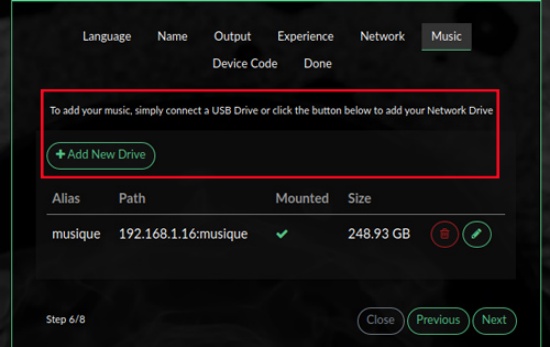
Connect your USB drive to your Volumio device, and enter Volumio's home screen. Volumio wil automatically scan the USB drive, and you can click the My Library option to see your USB drive's folder. Click it, and you can browse the Amazon Music downloads and select tracks to play on Volumio.
Way 3. Play Amazon Music via Chromecast
Best for users who want to stream Amazon Music on Volumio in a simple, app-based solution.
Besides the Bluetooth and USB drive connection, there is another simple way to stream Amazon Music on Volumio. As long as you have a Volumio Rivo+ series product, you can follow the steps below to connect your Volumio to Amazon Music via Chromecast:
Step 1 Ensure your phone or tablet device is set up and connected to the same WiFi as your Volumio Rivo+.
Step 2 Launch the Amazon Music app on your phone or tablet, and then you can select any song you want to play on Volumio.
Step 3 Hit the Now Playing tab at the bottom, then you can find the Cast icon on screen.
Step 4 Hit the Cast icon and choose your Volumio Rivo+ device from the list, wait for a few seconds to allow the Cast bridge to connect.

Step 5 And then your Volumio device will deliver the tracks you stream on Amazon Music. Congratulations, you can enjoy Amazon Music in better audio output.
Way 4. Cast Amazon Music via the AlexaPi Plugin
Best for users who are DIY enthusiasts, retro-audio fans, and tech tinkers who want to control Amazon Music playback on Volumio with voice commands.
Although Volumio has no official Amazon Music application, some users have launched some plugins to place the Amazon Music HD integration. The AlexaPi plugin allows you to play Amazon Music on Volumio with Alexa control. The method is complex and requires technical knowledge. Another notable thing is that it may violate Amazon Music's Terms of Use by connecting Amazon Music to Volumio via AlexaPi.
Step 1 Enter the AlexaPi GitHub page on your Volumio device, like a Raspberry Pi or other device.
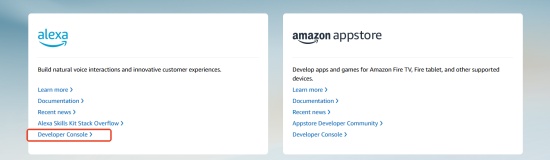
Step 2 Visit the Amazon Developer website to get your Alexa ID by navigating to Alexa > Developer Console > Register Amazon Developer > Agree and Continue. And then you can obtain your Alexa ID and name.
Step 3 Once get the Alexa ID, boot your computer and log in to a command prompt. Make sure you are in /opt by issuing and installing Git on your computer.
Step 4 Clone the following repo and run the setup script, and then you can follow the on-screen instructions to activate the AlexaPi plugin.

Step 5 Once downloaded, you can play Amazon Music on Volumio with voice commands, just say: "Alexa, play [song's name] on Volumio," and then Alexa will control playback on Volumio.
Tip: The plugin was archived by the owner on December 20, 2023. We can only read the information about the plugin and are unable to install it.
Conclusion
Although Volumio does not support Amazon Music integration yet, you can set Volumio as the output device and add Amazon Music to it with the methods we mentioned. If you want an easy way to stream Amazon Music on Volumio, try a Bluetooth or Chromecast connection. Or if you are a music audiophile, try to save tracks from Amazon Music with ViWizard Amazon Music Converter, and enjoy the best quality Amazon Music listening experience.
You May Be Interested


Adam Gorden, the digital media specialist at ViWizard, is dedicated to providing the best solutions for digital media management, including audio and video conversion, file optimization, and media workflow enhancements.

Leave a Comment (0)