


If you find yourself looking for ways to try Apple Music without paying upfront, then it makes sense to check what is available through Target Circle if you already use it. It is the retailer's loyalty program that sometimes includes limited-time digital perks, including access to services like Apple Inc. Music through promotional trials or partner offers.
These offers are not always available. They usually appear during special promotions and only last for a short time. When they do appear, they give eligible members a free trial so they can try Apple Music without commitment.
Because availability changes with each campaign, it is more of a check and see situation than something guaranteed. In this post, we will see whether Target still offers free Apple Music. If it is available, you can claim it, redeem it, and cancel it on time to make the most of the trial. Let's get started.
Part 1. Does Target Offer Free Apple Music? (What You Need to Know)
Yes. Target still offers free Apple Music through limited-time Target Circle promotions. It is not always available, and some users may see it while others do not. When active, it offers 2 to 4 free months for new or eligible returning subscribers, along with promotions for Apple TV+, Apple Arcade, and iCloud+.
Is the Target Apple Music free trial really free?
Yes. Target Circle is free. You just activate the offer in the Target app or website.
Is the Target Apple Music free trial legit or a scam?
Yes. It is legit. It is an official Apple and Target promotion, not a scam, but it is limited-time and not always available to everyone.
How long is the free Apple Music trial from Target?
Usually 2 to 4 months, depending on the current promotion. The exact length changes based on Target's deal with Apple.
Is the Target Apple Music trial better than Apple's direct trial?
It depends. Apple's trial is usually shorter and only for new users. Target offers can be longer, but you still have to meet Apple's rules, and sometimes a new Apple ID is needed. There is no clear A or B answer since both follow Apple's terms.
Part 2. How to Get Free Apple Music with Target Circle Offers
Target does not give Apple Music directly in one click. Access comes through Target Circle promotional offers that must be activated in your account. Sign in to your Target account, find the offer, and save it. Offers are limited to U.S. customers and can vary by account and time, so check the details before claiming.
- New Apple Music users only (some offers may allow eligible returning users)
- Must have a free Target Circle account
- Claim the offer inside Target Circle first
- Redeem through Apple using your Apple ID
- Payment method may be required on Apple ID
- Auto-renewal turns on by default
- Must redeem before the offer expires
- No active Apple Music subscription or trial allowed
- Apple ID region must match the U.S. offer
Claim Free Apple Music from Target Circle
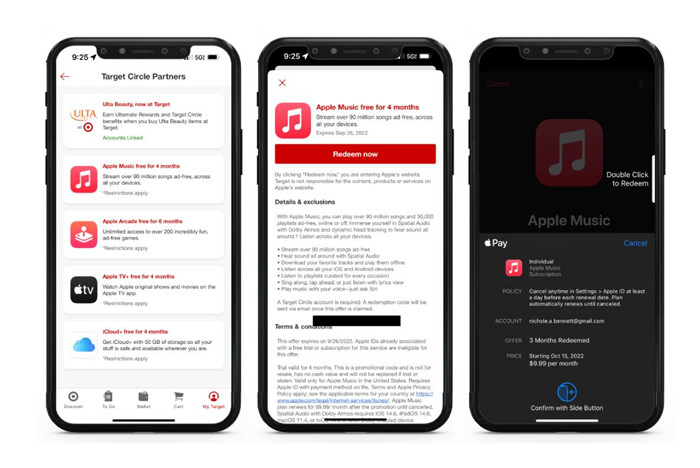
01Go to https://www.target.com or open the Target app.
02Sign in to your Target account, as Apple Music offers only appear for logged-in Target Circle members.
03Join Target Circle if you are not already enrolled.
04Open Target Circle from the navigation menu.
05Browse the available offers section.
06Look for an Apple Music offer card such as "Apple Music free for 2 months," as offers are limited-time and may not always be available.
07Tap Redeem now to claim the promotion.
08If you have used Apple Music before, check the terms carefully, as some offers are only available to new or eligible returning subscribers.
09If eligible, Target sends a redemption code by email, which can be used to activate the Apple Music trial.
Why don't I see the offer?
These offers are not shown to everyone. Target Circle deals depend on your account, timing, and location. Because of this, some users see the offer while others do not.
Why does it say "not eligible" when I redeem it?
The most common reason is Apple's rules. Apple usually only allows free trials for new Apple Music users. If you have used Apple Music before, even a long time ago, you may not qualify. Other reasons include expired offers, invalid codes, or regional limits tied to your Apple ID.
Where is my Target Apple Music offer?
The offer is usually inside the Target Circle "Offers" or "Partner Rewards" section, not sent by email. If you do not see it, try reopening the Target app or checking the offers tab again.
Part 3. How to Redeem a Target Apple Music Free Trial
Redemption is done through Apple, not Target. After saving the offer in Target Circle, open it and follow the link to Apple. Sign in with your Apple ID. Apple reviews your account and starts the trial. Once active, you get Apple Music with full access, no ads, lossless audio, spatial audio with Dolby Atmos, and offline downloads.
Redeem Free Apple Music from Target Circle
01Open the email from Target Circle that contains your Apple Music offer.
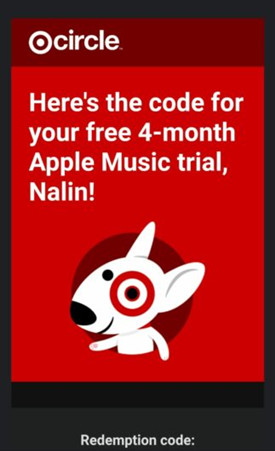
02Click on "Redeem" or the redemption link in the email.

03Open Apple Music or go to Apple ID settings on your device.
04Sign in using your Apple ID used for Apple Music.
05Open "Subscriptions" or the Apple Music activation page.
06Enter the redemption code or follow the activation link.
07Use the same Apple ID for the full process.
08Wait for the confirmation message that Apple Music is active.
Can I use more than one Apple Music trial or reuse it with a new Apple ID?
In most cases, no. Apple usually allows only one free trial per Apple ID, so offers cannot be combined. A new Apple ID may work only if it has never used Apple Music before, but it is not guaranteed.
Part 4. How to Cancel Your Apple Music Free Trial from Target
To avoid renewal, cancel before the billing date. Go to your Apple Account settings and cancel the subscription. You keep access until the trial ends. Cancellation is handled by Apple, not Target, even if the offer came from Target.
Cancel Free Apple Music from Target Circle
01Open the Settings app on your iPhone or iPad.
02Tap your Apple ID name at the top.
03Tap Subscriptions.
04Select Apple Music.
05Review the subscription details and billing date.
06Tap Cancel Subscription.
07Confirm the cancellation when prompted.
08Return to the subscription details page and make sure it shows Expires on [date].
09Continue using Apple Music until the expiration date and look for a confirmation email from Apple.
Do I need to cancel Apple Music after the Target free trial?
Yes. Apple Music will renew into a paid plan after the trial unless you cancel it. You will not be charged during the trial, but billing starts right after it ends if you do not cancel.
Part 5. How to Keep Apple Music for Free After the Target Trial Ends
When the Target free trial ends, Apple Music access stops and your library is no longer available unless you continue the subscription. That's why many users prepare during the trial. A popular option among Apple Music users is ViWizard Apple Music Converter, which lets you download and convert Apple Music songs into formats like MP3, WAV, M4A, M4B, AIFF, or FLAC. These files are not tied to a subscription, so they can be saved as permanent backups and played offline anytime.
After conversion, the files can also be moved to different devices, including USB drives and other unsupported players. This allows users to keep their music and play it anywhere, anytime, even after the trial or subscription ends.

Key Features of ViWizard Apple Music Converter
Free Trial Free Trial* Security verified. 5, 481,347 people have downloaded it.
- Convert Apple Music songs, playlists, albums, and artists
- Export Apple Music in 6 formats for different devices and players
- Preserve metadata and lyrics when creating music collections
- Organize converted music by artist and album
- Batch download large Apple Music collections
 Step 1: Install and sign in
Download and install ViWizard Apple Music Converter on a Windows or Mac computer. Open the program and sign in with your Apple Music account inside the built-in interface. This lets the tool load your full library, including playlists, albums, and songs from your trial.
 Step 2: Set output format
Go to the settings section and choose an output format such as MP3, M4A, WAV, FLAC, or AIFF. You can also adjust basic audio settings like bit rate and sample rate. Keeping metadata enabled helps preserve details like song title, artist, and album for easier organization.
 Step 3: Select songs or playlists
Browse your Apple Music library inside the tool and choose what you want to keep. You can select single songs, full albums, or complete playlists. Everything you add will be prepared for conversion as standard audio files.
 Step 4: Convert and save your music
Click the Convert button to start. The tool will download and convert your selected Apple Music tracks into local files on your computer. After that, you can keep them stored safely or transfer them to other devices for offline use, even after your trial or subscription ends.
Part 6. Final Thoughts
Target Apple Music offers are a real way to get free Apple Music, but they are limited-time and only for eligible U.S. users, so not everyone will see them. If you get the trial, it works like a normal subscription and lets you try Apple Music without paying upfront, but it will renew automatically, so you should cancel if you do not want to continue.
To keep your music longer after the trial, you can use ViWizard Apple Music Converter to download and convert songs for offline use and backup, so you can still access your music after the subscription ends.
You May Be Interested





Adam Gorden is always looking for new ways to explore music and videos. He likes trying different media tools and learning how to manage audio and video files with ease.

Leave a Comment (0)