



There are many good reasons to subscribe to Walmart membership, including grocery delivery, gas discounts, travel rewards, and streaming benefits like Apple Music. This offer can include up to 5 months of Apple Music free when the promotion is active. While Walmart+ membership costs $12.95 per month, the 5-month Apple Music trial is worth about a $55 value based on standard pricing. It is not a permanent perk, but it appears during selected promotional periods, helping users save more as subscription costs keep rising.
The offer is made for new Apple Music users and some qualified returning users, depending on the terms. Not every Walmart+ member can get it today, but it is worth checking, as it can lead to meaningful savings.
Read on to learn how the Walmart Apple Music offer works, how to check if you can get it, how to activate it, and how to manage or cancel it.
Part 1. What Is the Walmart Apple Music Offer?

The Walmart Apple Music offer is a limited-time perk for Walmart+ members.
It previously included Apple services such as Apple Music, Apple TV+, Apple Fitness+, Apple Arcade, Apple News+, and Apple Books for a few free months when users purchased eligible items on Walmart.com or joined Walmart+. However, this has changed and is no longer widely available.
According to Walmart's Apple Services Terms and Conditions, "this promotional offer is valid through qualified transactions made on Walmart.com in the United States. Promotional Offer must be redeemed by 7/1/2026. Offer and terms subject to change."
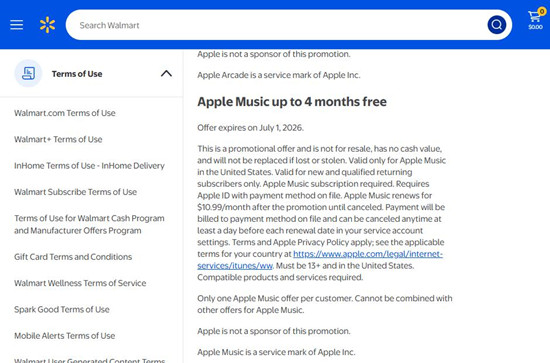
Users who became eligible through a Walmart+ subscription or the purchase of select products before April 15, 2025 may still receive legacy benefits, such as an Apple Music free trial (for example, up to 4 months), valid until July 1, 2026. After the trial ends, it renews as a paid plan at $10.99 per month unless canceled.
Part 2. How to Get Free Apple Music Through Walmart
You must be a new Apple Music user with no active subscription. If you qualify, you buy an eligible item on Walmart (website or app). Walmart then emails you an Apple Music code for a free trial, usually up to 4 months.
You open Apple Music, sign in with your Apple ID, and redeem the code. Then you confirm the trial to start it.
- Not always available anymore, mostly closed for new users
- For new Apple Music users only, no active subscription allowed
- You must redeem before the expiration date (July 1, 2026)
- Apple ID must be U.S. region
- It auto-renews after the free period ends
- Promotional offer only, no cash value
- Lost or expired codes cannot be replaced
01For online orders, open the Walmart app or Walmart.com and sign in.
02Go to Account.
03Tap Purchase History and select the order. Check past orders (before April 15, 2025) for eligible purchases, such as select Apple devices like an iPhone, iPad, or Mac.
04Look for the promo code in the order details or in your confirmation email. For in-store purchases (if included in the promotion), check your receipt for a printed code.

05Make sure your Apple Music status is eligible. It usually works only for new users or expired subscriptions. Active Apple Music users are not eligible.
06Open the redemption link from your code.
07Tap Redeem Now.
08Sign in with your Apple ID.
09Follow the on-screen steps to finish setup. Your Apple Music trial starts automatically after activation.
Part 3. How to Fix Walmart Apple Music Offer Not Working
The Walmart Apple Music offer may not show because availability has changed. The promotion is now mostly closed or very limited. It also will not work if you already have an active Apple Music subscription.
-

Check Offer Eligibility
If you are having issues with the offer, first make sure your purchase is actually eligible from Walmart and that the order is completed. Many codes only appear after the order is fully processed.
-
Check Email and Order Details
If you bought an eligible item online but did not receive a code, check your email inbox first, including spam or promotions folders. Then open your Walmart account and go to Purchase History or Order Details to see if the code appears there.
-
Contact Walmart Support
If the code is missing or not working, try using the help or chat option inside your Walmart account. You can usually find a "Chat with Us" or support button at the bottom of the page to reach customer care for order-related issues.
-
Contact Apple Music Support
If the issue is related to the Apple Music activation itself, contact Apple Music support for help with redemption, login, or subscription problems.
Part 4. How to Cancel the Walmart Apple Music Offer
The Walmart Apple Music offer is managed through your Apple ID, not directly through Walmart. This means you cancel it in your Apple subscription settings, not in Walmart.
01Open Settings on your iPhone or iPad, then tap your Apple ID at the top to access account settings.
02Tap Subscriptions to view all active services linked to your Apple ID.
03Select Apple Music from the list to open its subscription details.
04Tap Cancel Subscription and confirm the action to stop renewal.
Part 5. How to Extend Your Apple Music Access Through Walmart for Free
The Walmart Apple Music promotion can be useful, but it is not permanent. Once the free trial or promotion ends, access to Apple Music is removed unless you continue with a paid plan. Any downloaded music for streaming will also become unavailable.
Because of this limit, some desktop users use tools like ViWizard Apple Music Converter. It lets you download Apple Music songs and convert them into formats like MP3, M4A, WAV, or FLAC on a computer. This helps keep music available for offline use without an active subscription.
 Step 1: Install and Sign In
Download and install ViWizard Apple Music Converter on a Windows or Mac computer. Open the program and sign in with your Apple Music account inside the built-in interface. This allows the tool to load your full library, including playlists, albums, and songs tied to your account.
 Step 2: Choose Output Format
Go to the settings section and select an output format such as MP3, M4A, WAV, FLAC, or AIFF. You can also adjust audio quality settings like bit rate and sample rate. Keeping metadata enabled helps preserve details like song title, artist, and album for easier organization after conversion.
 Step 3: Select Music to Back Up
Browse your Apple Music library inside the tool and choose the content you want to keep. You can pick individual songs, full albums, or entire playlists. Everything selected will be prepared for conversion into standard audio files stored locally on your computer.
 Step 4: Convert and Save Files
Click the Convert button to start the process. The tool will download and convert your selected Apple Music tracks into local files on your device. Once finished, you can store them safely or move them to other devices for offline listening, even after your subscription or trial ends.
Part 6. Final Thoughts
The Walmart Apple Music promotion can be a useful short-term perk, giving Walmart+ members free access to Apple Music for a limited time. Once the promotion ends, access stops unless you continue with a paid plan, so it is important to understand the limits before relying on it long term.
If you want to keep your Apple Music songs after the trial ends, you can also use ViWizard Apple Music Converter. It helps you download and convert tracks into formats like MP3 for offline listening and more flexible use across devices.
You May Be Interested




Adam Gorden is always looking for new ways to explore music and videos. He likes trying different media tools and learning how to manage audio and video files with ease.

Leave a Comment (0)