


We chose Deezer as we want lossless audio. It offers us CD-quality FLAC streaming standard, up to 16-bit, 1411 kbps, while on Spotify we can only enjoy compressed OGG (320 kbps). And Deezer boasts over 120 million tracks, edging out competitors for finding rare, niche, and obscure releases. So, with so many Deezer tracks to enjoy, how can we record our listening habits and get personalized recommendations? Connecting Deezer to Last.fm is necessary. Last.fm functions like a permanent, searchable library, keeping each track we played across different devices.
How do we scrobble from Deezer? After getting a Last.fm account, we log in to Deezer and access the Sharing preference to link Last.fm with Deezer. Once connected, we can scrobble Deezer casually and even disconnect it if you want. This post shows you how to connect, scrobble, and disconnect Deezer to Last.fm on desktop and mobile. Let's dive in.

Part 1. How to Connect Deezer with Last.fm
You can use the web player, mobile, Pano Scrobbler(a third-party app), or a browser extension to connect Deezer to Last.fm for automatic scrobbling. Before you start to connect, make sure you have a Last.fm account and a Deezer account. One thing to note is that the integration method doesn't work for members with a Family or Duo plan.
On Desktop / Web
This is the most reliable way. Once configured in the web browser, it works globally across all devices.
01Open a modern browser you prefer (Chrome, Firefox, Edge, etc.).
02Go to the Deezer website.
03Click your profile picture in the top-right corner.
04Choose Account Settings (or My Account).
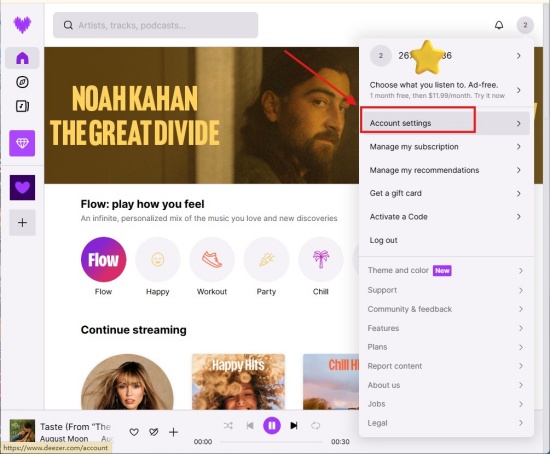
05Click More > Sharing preferences.
06Click Link under the Social Music section to scrobble your favorite tracks and other content.
07Enter your Last.fm username and password to complete the connection.
08Go back to the Sharing preference section, and you can see "Link" is turned to "Last.fm account linked".
On Mobile
To connect Deezer to Last.fm on mobile, you need to use a mobile web browser. First, you enable "Desktop site". Then, access Deezer's account settings and enable scrobbling under Sharing preferences.
01Open your browser on your Android or iPhone, such as Chrome or Firefox.
02Tap the three-dot menu at the top right in Chrome or at the bottom right in Firefox.
03Make sure "Desktop site" is ON.
04Visit deezer.com. Log in to your account.
05Tap Settings > More >Sharing preferences.
06Locate the Last.fm icon and click Link.
07Enter the username of Last.fm, and click Deezer for access.
On Pano Scrobbler (Android Only)
To connect Deezer to Last.fm using Pano Scrobbler on Android, you need to install Pano Scrobbler, allow notification access, and enable Deezer as a monitored app in Pano's settings.
01Download Pano Scrobbler from the Google Play Store.
02Open Pano Scrobbler and sign in to your Last.fm account.
03Tap Android Settings > Apps > Special app access > Notification Access, find Pano Scrobbler in the list and enable it. (Pano Scrobbler will prompt you to grant notification access.)
04Open Pano Scrobbler and ensure Deezer is enabled in the list of displayed apps to get scrobbles.
On Browser Extension
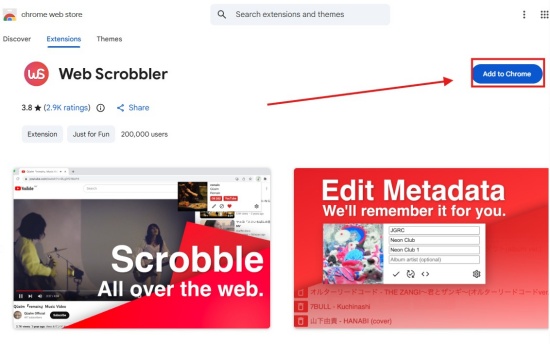
Web Scrobbler is a browser extension that automatically detects the Deezer web player. You can scrobble tracks, favorite music, and edit track information from your browser.
01Navigate to the Chrome Web Store and install the Web Scrobbler extension.
02Visit the Deezer website and play a track.
03Click the Web Scrobbler extension icon in your browser toolbar and choose Connect to Last.fm.
04Sign in to Last.fm and authorize the extension to connect your account.
Part 2. How to Scrobble Deezer with Last.fm
Scrobbling Deezer to Last.fm can be done natively via the Deezer website (works for web & desktop, mobile, and browser extension) or via third-party tools like Pano Scrobbler (Android) for more immediate "Now Playing" tracking.
On Desktop / Web
01Open the Deezer web player in a browser and log in.
02Click your profile picture in the top-right corner.
03Click Account Settings > More> Sharing or Alert & Sharing.
04Locate Last.fm and click Link.
05Enter your Last.fm username and password to authorize.
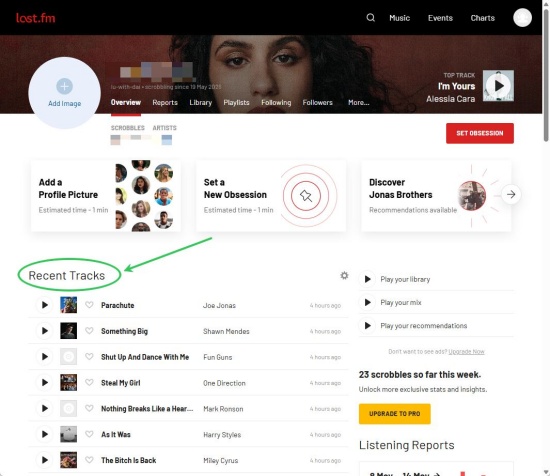
06Play a song or playlist on the website, and you see the tracks on Last.fm.
On Mobile
01Activate your browser on your Android or iPhone, such as Chrome or Firefox.
02Select the three-dot menu at the top right in Chrome or at the bottom right in Firefox, and switch "Desktop site" to ON.
03Navigate to deezer.com and log in to your account.
04Go to Settings > More >Sharing preferences.
05Find the Last.fm icon and click Link / Connect.
06Authorize to access Deezer in Last.fm.
07After connection, Deezer syncs your listening history to your Last.fm profile.
08You can also use the official Last.fm app by opening it, going to the settings, and ensuring it is tracking music on your device.
On Pano Scrobbler (Android Only)
01Open Pano Scrobbler and log in to your Last.fm account.
02Grant Pano Scrobbler Notification Access.
03In Pano Scrobbler, go to Settings > Supported Apps.
04Make sure Deezer is toggled on.
05Open Deezer and play your favorite song.
06Pano Scrobbler immediately detects the "Now Playing" notification and begins scrobbling.
On Browser Extension
This provides instant "Now Playing" updates.
01Add the Web Scrobbler extension from the browser's store.
02Navigate to the extension settings and log in to Last.fm.
03Open the Deezer website and play music.
04The extension will automatically detect and record.
Part 3.How to Disconnect Deezer from Last.fm
To disconnect Deezer from Last.fm, you can operate the on the website, or on your mobile through the browser app or Pano Scrobbler. Also, if you use the web browser extension, you can disconnect it.
On Web
01Open the Deezer website in a web browser.
02Click your profile picture at the top right.
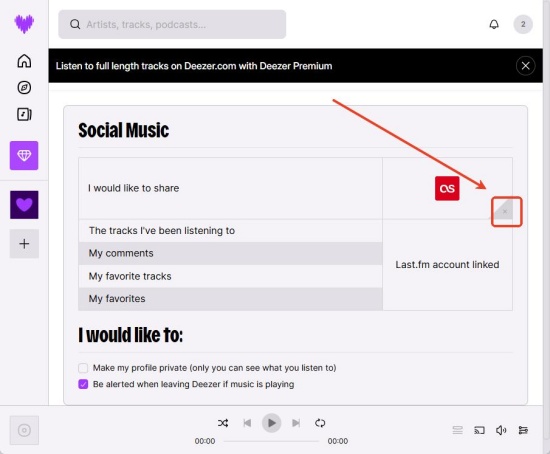
03Choose Account settings > More > Sharing preferences.
04Locate the Last.fm app and click Delete this app (or toggle the Last.fm integration off).
On Mobile
The mobile app doesn't have the setting, so you need to open a browser to disconnect.
01Launch Chrome or Firefox.
02Tap the three-dot menu at the top right in Chrome or at the bottom right in Firefox.
03Make sure "Desktop site" is ON.
04Use the browser to log in to Deezer.com.
05Go to Settings > More > Sharing preferences.
06Find the Last.fm app icon and select Delete the app (or toggle the Last.fm integration off).
On Pano Scrobbler (Android only)
01Open the Pano Scrobbler app on your Android.
02Go to Settings in Pano Scrobbler.
03Disconnect Deezer from the list of monitored music players.
On Browser Extension
01Open the browser.
02Select the Web Scrobbler extension icon in your browser toolbar.
03Go to the extension's Settings or Dashboard.
04Choose Logout or disconnect your Last.fm account.
Part 4. How to Fix Last.fm Deezer Not Working
Deezer's built-in scrobbling stops working primarily due to significant API delay, Family/Duo plan, and so on. Here are some ways to fix the issues:
Quick Relink: Open a desktop web browser and go to Deezer Sharing Preferences. Locate Last.fm and click Disconnect or Unlink. Log in to your Last.fm Application Settings page. Find Deezer and click Revoke Access. In the end, go back to the Deezer Sharing Preferences web page and click Link.
Disable Duplicate Scrobbles: If using both Web Scrobbler and internal settings, turn off one, or you will get double scrobbles.
Family/Duo Accounts: Sometimes, only the admin can connect to Last.fm via the website. Others may need to use Pano Scrobbler.
Clear Cache: Clear the Smart Cache within the Deezer mobile app settings.
Bonus: How to Download Deezer Without Subscriptions
Both Free and Premium users can connect Deezer with Last.fm on mobile and desktop. And clearly, operating it on a web player is the most reliable way. All you need to do is access the Sharing preferences section and connect Deezer with Last.fm. This way, you can get your permanent listening history. What if you want to even keep the tracks you played on Deezer? Can we save Deezer tracks without Premium? Yes, we recommend ViWizard Deezer Music Downloader.
ViWizard Deezer Music Downloader can save your most-streamed Deezer tracks to your local device. Whenever you like, you can pick one or two of your favorite songs of high audio quality to enjoy. Plus, ViWizard offers multiple output formats: FLAC, AIFF, M4A, M4B, WAV, MP3, and the like. You can even customize the bit rate, sample rate, and bit depth according to your demand, up to 24-bit, 320 kbps, 192 kHz. Each track from Deezer will keep the original ID3 tags, which help you manage the music files. Within seconds, ViWizard produces Deezer downloads at 65x speed while preserving the quality.

Ready to build your own Deezer music collection? ViWizard Deezer Music Converter helps Deezer subscribers save songs, albums, playlists, and artists with reliable music conversion. Convert your favorites and create a personal audio library.
How to Download Deezer Music Using ViWizard
 Step 1: Personalize Output Format and Audio Quality
After installing ViWizard Deezer Music Downloader, log in and select the menu icon in the top right corner. Go to Preferences > Conversion, and choose your favorite format, such as MP3, WAV, AIFF, or FLAC. Set audio quality details, such as bitrate and sample rate (up to 24-bit, 320 kbps, 192kHz). Select Save to keep the settings.
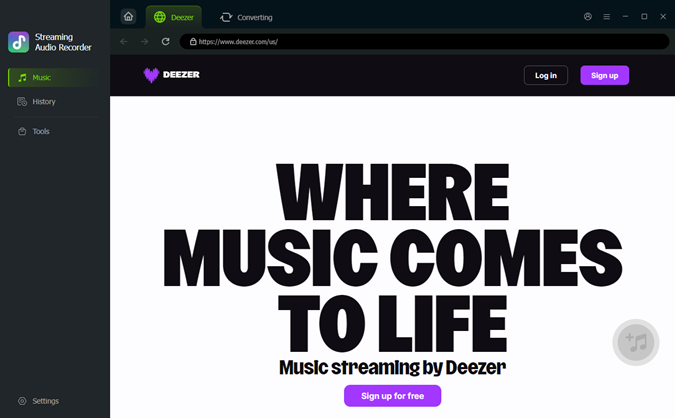 Step 2: Log in to Deezer within ViWizard
Go back to the main screen. Choose Deezer from the supported streaming platforms. Then, the built-in Deezer web player appears. Sign in to it with your account.
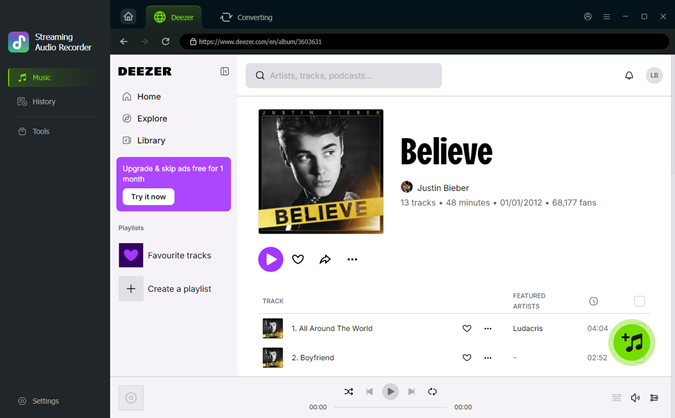 Step 3: Choose Songs, Playlists, and Albums on Deezer
View your albums, playlists, and your liked music on the built-in website. When you find the songs you want to download, open the music page and click the + icon (Add to list). ViWizard then scans and loads all available songs to the download queue.
 Step 4: Convert and Save Deezer Downloads on PC
Ensure all your desired songs are in the conversion page, and then click Convert. ViWizard starts downloading Deezer at a fast speed, and keeps the original quality. After converting, open the converted page to find the downloads. Locate the files in the folder, and play them on any media player.
Conclusion
All in all, this is a simple tutorial bout scrobbling Deezer with Last.fm. Using the web player to connect Deezer with your Last.fm can be the simplest way. Chances are, you spend more time streaming Deezer on Android or iPhone. Don't worry, you can sync your history via apps. But when it comes to listening to Deezer ad-free, ViWizard Deezer Music Downloader is a handy tool. And it even keeps its original quality and metadata. Don't wait, give it a go!
You May Be Interested




Dave Henry, a multimedia technologist at ViWizard, focuses on delivering the best solutions for digital media challenges, including audio and video conversion, media optimization, and troubleshooting.

Leave a Comment (0)