


If you're a music lover, audio quality matters. Deezer offers multiple streaming options, from standard MP3 to lossless FLAC HiFi, but does Deezer truly deliver the best sound? Whether you're streaming on mobile, desktop, or offline, understanding Deezer audio quality can enhance your listening experience.
In this guide, we'll explore how Deezer audio quality works, how to adjust settings for optimal sound, how it compares to other popular music streaming services, and how to save your favorite tracks in the highest quality. Plus, we'll show you how tools like ViWizard Streaming Audio Recorder can help you keep your music forever.
Part 1. How Deezer Audio Quality Works?
Deezer provides different audio quality levels depending on your subscription plan. Deezer Free users can only use Basic or Standard audio quality, while Deezer Premium can enjoy more high audio quality, like Better, High or Hi-Fi.
| Audio Quality | Deezer Free | Deezer Premium |
|---|---|---|
| Basic | Yes | Yes |
| Standard | Yes | Yes |
| Better | No | Yes |
| High Quality | No | Yes |
| High Fidelity | No | Yes |
Despite the subscription to Deezer plan, the device you use only limit your Deezer audio quality setting access. On Deezer app, you can choose 4 levels of audio quality from Basic, Standard, High quality and High Fidelity. While Deezer desktop only provides 3 levels of audio quality: Standard, Better, and High Fidelity. We will show you the detail bit rate and format the Deezer different audio quality level use.
| Deezer Audio Quality | Basic | Standard | High quality | Better | High Fidelity |
|---|---|---|---|---|---|
| Bit rate | 64kbps | 128kbps | 320kbps | 320kbps | 1411kbps |
| Format | MP3 | MP3 | MP3 | MP3 | FLAC |
If you want to stream Deezer with high audio quality, you'd better stream under a stable WiFi connection for the higher bit rate will cause the more mobile data usage. So, consider lowering the streaming audio quality if you stream in cellular data.
Part 2. How to Change Deezer Audio Quality Settings
If you want to adjust your audio quality on Deezer after you subscribe to Deezer Premium, here we will show you the full guide to adjust your audio output settings both on your mobile device and computer.
On Deezer Desktop/Web Player
Step 1 Launch Deezer desktop app or visit Deezer web player on your browser.
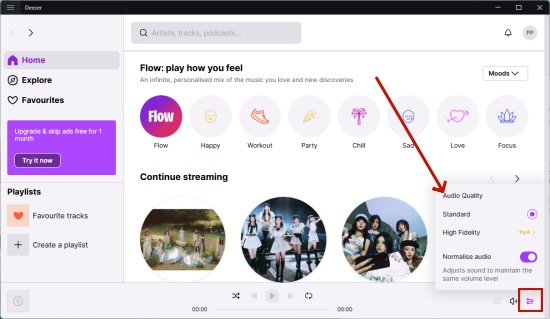
Step 2 After entering, look for the Now Playing bar at the bottom screen, and choose the Audio icon next to the volume.
Step 3 There will a pop-up window show the audio quality settings in bottom right corner.
Step 4 And then you can select the target audio settings from it. Click it and you have changed the streaming audio quality on Deezer.
On Deezer Android
Step 1 Open Deezer app on your phone.
Step 2 Navigate to your profile icon at the top left-hand side of Deezer.
Step 3 Click the Settings cog icon at the top right-hand side of Deezer.
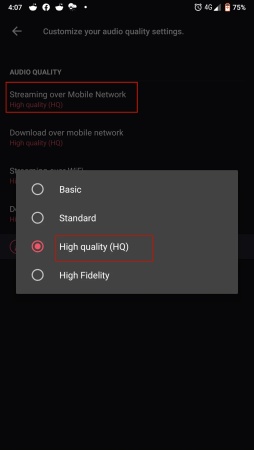
Step 4 Under Streaming quality, select a streaming option from Mobile data, WiFi or Google Cast.
Step 5 Select one of the three audio quality options: Basic, Standard, High quality and High Fidelity.
On Deezer iOS
Step 1 Go to Deezer on your Home screen.
Step 2 Click your profile icon at the top left side on Deezer screen.
Step 3 Select the Settings cog icon at the top right-hand side.
Step 4 Choose Music tab and click Choose audio quality option.
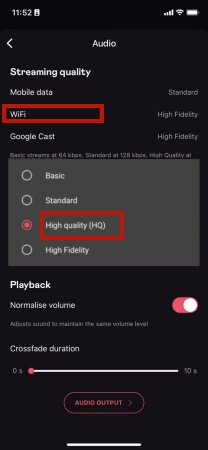
Step 5 Select a streaming option from Mobile data, WiFi or Google Cast.
Step 6 Choose one as your Deezer streaming audio quality: Basic, Standard, High quality and High Fidelity.
Part 3. Deezer Audio Quality vs Other Music Streaming Services
Deezer does have a superior audio quality for its listeners. And some Deezer lovers may curious about Does Deezer have the best audio quality? Typically, other music streaming services also make huge effort on improving the best audio quality they can provide. So, let's compare with other popular platforms though the following chart:
| Music Streaming Services | Max Audio Quality | Audio Format | Lossless/Hi-Res | Best For |
| Deezer | Free: 128kbps Premium: 1411kbps |
MP3, FLAC | ✅ Lossless | CD-quality, balanced sound |
| Spotify | Free: 128 kbps (mobile)/160 kbps (desktop) Premium: 320 kbps |
Ogg | ❌ | Casual listening |
| Apple Music | Up to 24-bit/192 kHz | ALAC | ✅ Hi-Res Lossless | Hi-Res audio fans |
| Tidal | 24-bit/192kHz | FLAC | ✅ Hi-Res | Studio-quality masters |
| Amazon Music | Free: 320 kbps Unlimited: Up to 24 bit, 192 kHz |
FLAC | ✅ Hi-Res | Large catalog + Hi-Res |
| Qobuz | Up to 24-bit/192 kHz | FLAC | ✅ Hi-Res | Audiophiles |
| YouTube Music | Free: 128 kbps Premium: 256 kbps |
AAC | ❌ | Music videos & discovery |
| SoundCloud | Free: Up to 128 kbps Go+: 256 kbps |
AAC | ❌ | Indie & user-generated content |
| Pandora | Free: 64–128 kbps Premium: Up to 192 kbps |
AAC+ | ❌ | Radio-style listening |
Which Music Streaming Service Has the Best Audio Quality?
- Best overall audio quality: Tidal/Qobuz
- Best Hi-Res ecosystem: Apple Music
- Best mainstream lossless streaming: Deezer Premium
- Best for casual listening: Spotify/YouTube Music
If you want true lossless sound without complexity, Deezer Premium is one of the best choices available.
Part 4. How to Save Deezer Tracks with High Audio Quality
From the above comparison, we know that Deezer delivered excellent lossless streaming for its Premium subscribers, for audiophiles, you need to keep on paying for Deezer HiFi to unlock the HiFi audio quality. Here, we will share with you how to break down the limits and listening Deezer in HiFi without Premium.
Use ViWizard Deezer Music Downloader to save your most streamed Deezer songs to local device, and then you can keep the high audio quality listening free forever. ViWizard supports multiple downloads format: FLAC, MP3, WAV, AIFF, M4A, and M4B. You can personalize the bit rate, sample rate and bit depth according to your personal needs (Up to 24-bit, 320 kbps, 192kHz). Each song from Deezer will keep the original ID3 tags, helping you better manage the downloads. Within seconds, you can obtain Deezer downloads in high audio quality with ViWizard's 65x downloading speed.

Download songs, playlists, albums, and your whole music library from 10 major streaming platforms, including Deezer, to MP3, FLAC, WAV, AIFF, M4A, or M4B with original quality and ID3 tags for permanent offline listening.
How to Download Ad-free Deezer Music Using ViWizard
Step 1 Set Output Audio Format and Quality
Download and install ViWizard Streaming Audio Recorder on your computer. Launch the program and click the Menu icon in the upper-right corner. Go to Preferences > Conversion, then select your preferred output format such as MP3, FLAC, WAV, or AIFF. You can also adjust audio quality parameters like bitrate and sample rate before saving the settings.

Step 2 Open Deezer in ViWizard
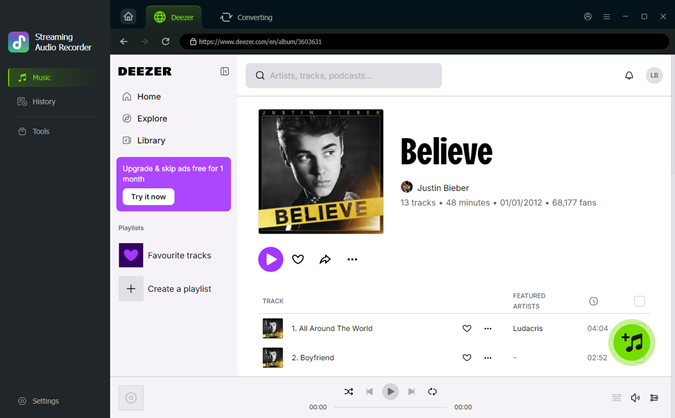
Go back to the main screen and select Deezer from the supported streaming platforms. ViWizard will open the built-in Deezer web player automatically. Sign in to your Deezer account to access your personal music library, including playlists and liked songs.

Step 3 Select Deezer Songs, Albums, or Playlists
Browse Deezer as usual within ViWizard. When you find the songs or playlists you want to download, open the music page and click the Add to List button. ViWizard will scan and load all available tracks into the download queue automatically.
Step 4 Convert and Save Deezer Music Locally
Review the tracks in the conversion list, then click the Convert button. ViWizard will start downloading Deezer music at high speed while preserving the original audio quality. After conversion, go to the Converted tab to locate and manage your saved Deezer music files on your computer.

Conclusion
Deezer offers one of the best audio experiences in music streaming services, especially with its Premium subscription. You can adjust the Deezer streaming audio quality settings to suit you every Deezer stream. If you want to keep your favorite track in crisp, clear, and permanently accessible, just using ViWizard Deezer Music Downloader!
You May Be Interested


From new releases to old favorites, Matt Smith is always on the lookout for good music. He follows the latest in digital entertainment and shares songs and media he thinks are worth checking out.

Leave a Comment (0)