


Are you looking for a way to download high-quality music from Qobuz or Tidal? If so, you have probably come across SQUID.WTF. It is a popular web tool that promises free, high-resolution FLAC downloads with just a few clicks.
But a few important questions remain: Is SQUID.WTF still working in 2026? More importantly, is it safe for your computer and your streaming accounts?
In this review, we take a deep dive into SQUID.WTF. We tested the tool to evaluate its download efficiency and output quality. We also analyzed whether it is safe and legitimate, along with the common reasons why it may stop working. Because this site often goes offline or becomes unstable, we will also introduce the best and most reliable alternative for stable, high-resolution music downloads.

Part 1. What Is SQUID.WTF?
SQUID.WTF is a web-based "music ripper" designed to help users download lossless audio directly from premium streaming platforms like TIDAL, Qobuz, Amazon Music, and SoundCloud.
The site gained massive attention in online music communities because it offers something many platforms do not: free access to high-quality local files from subscription-based catalogs. For listeners who want to build a personal music library or use local media players like MusicBee or foobar2000, SQUID.WTF is naturally very appealing.
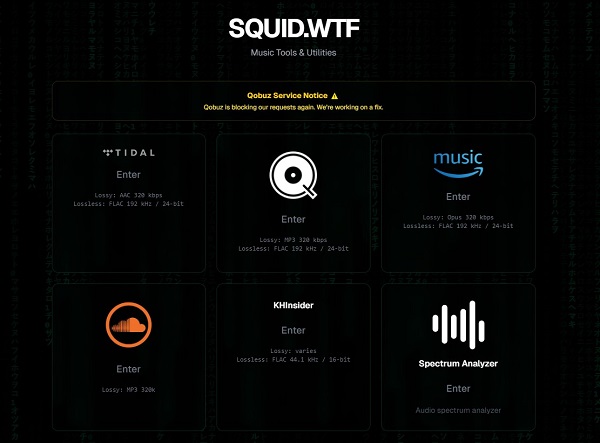
SQUID.WTF Supported Services and Audio Formats
SQUID.WTF claims to support TIDAL, Qobuz, Amazon Music, SoundCloud, and KHInsider. However, the output quality varies depending on the service:
- TIDAL: AAC 320kbps or FLAC 192kHz / 24-bit.
- Qobuz: MP3 320kbps or FLAC 192kHz / 24-bit.
- Amazon Music: Opus 320kbps or FLAC 192kHz / 24-bit.
- SoundCloud: MP3 320kbps.
- KHInsider: FLAC 44.1kHz / 16-bit.
SQUID.WTF Subdomains
One unique feature of SQUID.WTF is that it is not a single website; it is a network of subdomains. Each service has its own dedicated link:
- https://tidal.squid.wtf/ (TIDAL)
- https://qobuz.squid.wtf/ (Qobuz)
- https://amz.squid.wtf/ (Amazon Music)
- https://sc.squid.wtf/ (SoundCloud)
- https://khinsider.squid.wtf/ (KHInsider)
As of our 2026 update, SQUID.WTF currently only supports TIDAL and KHInsider. The Qobuz service is frequently blocked, while the Amazon Music and SoundCloud links are currently broken. The developers are working on fixes, but stability remains an issue.
Key Features of SQUID.WTF
Why do users choose SQUID.WTF over other tools? Here are the features that make it stand out:
- No Login Required: You do not need to provide your own Qobuz or TIDAL credentials. This keeps your personal subscription safe from being flagged or banned.
- High-Resolution Album Art: When you download a track, it usually includes the original, high-quality cover art (often 1400x1400 pixels).
- Automatic Metadata: Files come pre-tagged with the correct artist name, album title, and release year.
- Completely Free: There are no subscription fees. The tool uses "shared tokens" provided by the community to fetch the music files.
- Customizable Audio Quality: Unlike simple converters, SQUID.WTF allows you to choose your preferred format. You can select Lossless FLAC for the best sound or high-quality MP3/AAC to save storage space.
Part 2. How Does SQUID.WTF Work?
SQUID.WTF works like a specialized search engine for music files. It uses "shared tokens" provided by the community to fetch raw audio data directly from official streaming servers. In most cases, you can simply search using a keyword or paste a direct track/album URL into the search bar.
How to Download Music from SQUID.WTF
To show you how it works, let's use TIDAL as an example:
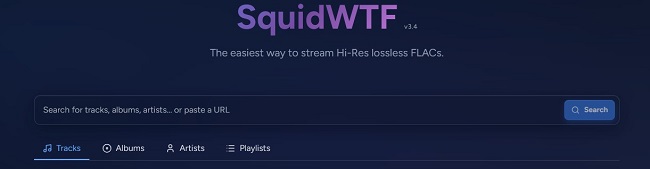
Step 1 Search: Go to tidal.squid.wtf. Enter the artist name or album in the search bar, or paste a TIDAL link directly. Click Search.
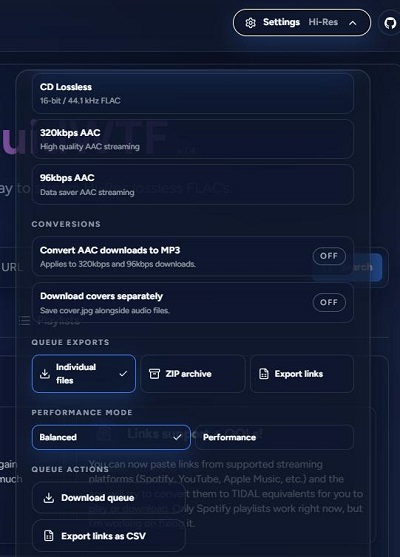
Step 2 Customize Quality: Before downloading, click the Settings icon in the upper right.
For the best sound, select FLAC (Hi-Res).
To save storage, you can choose AAC 96kbps.
You can also choose to download tracks as individual files or a single ZIP file.
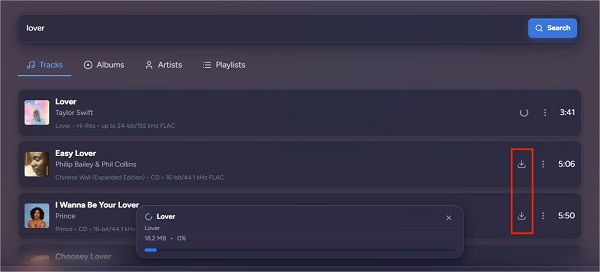
Step 3 Preview: Once you find the track, you can click the album art to listen to a preview for free.
Step 4 Download: Click the arrow-down button. The site will fetch the file from TIDAL's servers and save it to your device.
How to Check SQUID.WTF Download Quality
A standout "expert" feature of SQUID.WTF is its built-in Spectrum Analyzer. This tool allows you to verify if your file is a "True FLAC" or a fake "upsampled" MP3. Check out these steps to analyze your audio quality results.
Go to the main SQUID.WTF homepage.
Find the Spectrogram Analyzer section and click Enter.
Click the "Choose Audio File" area or drag and drop your downloaded file.
Click Analyze Audio. The tool will generate a colorful graph showing the sound frequencies.
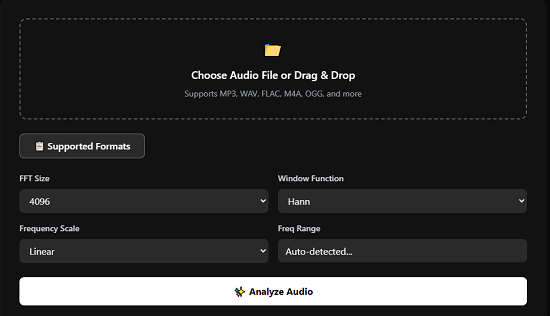
Once you get the graph, here's a simple guide on how to read it:
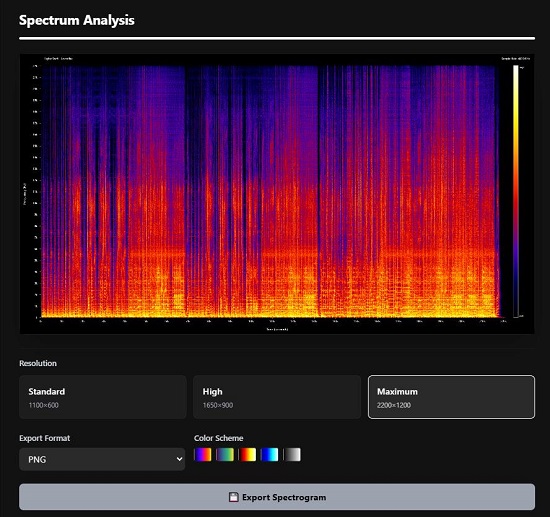
- True FLAC: The colors should reach all the way to the top of the graph (above 22kHz). This means no data was lost, providing studio-quality sound.
- Fake FLAC (Upsampled MP3): If the graph has a "hard cut" at 16kHz or 20kHz (like a flat ceiling with nothing above it), the file was originally a low-quality MP3. Even if the file says ".flac," it is not truly lossless.
Verdict: Is SQUID.WTF Quality Truly Lossless?
Our technical analysis of a TIDAL track downloaded from SQUID.WTF shows impressive results. The spectrogram reveals that the energy distribution reaches up to about 22kHz.
The blue and purple areas in the high-frequency section appear naturally distributed. You can easily spot the vertical lines without any blocky artifacts or odd smoothing. This confirms that TIDAL tracks from SQUID.WTF are genuine lossless files, so you can confidently add them to your FLAC library.
Part 3.Is SQUID.WTF Safe and Legit to Use?
When using a site like SQUID.WTF, safety and legitimacy are the top concerns. Based on our research, here is the current status of the platform.
Is SQUID.WTF Safe?
From a technical standpoint, SQUID.WTF isn't always seen as dangerous, but its safety isn't guaranteed. Reputation scanners usually rate the site with a medium trust score around 60/100. This indicates it's not obviously harmful, but some risks exist due to unclear ownership and lack of transparency.
The platform also doesn't clearly explain how it handles user activity or data, which might raise privacy concerns for some users. On the plus side, SQUID.WTF allows you to use it without logging in with your streaming accounts like TIDAL or Qobuz, and you don't need to create a SQUID.WTF account. This anonymity is a significant advantage over traditional software.
Is SQUID.WTF Legit?
This is a "grey area." SQUID.WTF offers useful music tools, but it doesn't connect with official streaming services like TIDAL or Qobuz. Downloading copyrighted music without a license is usually illegal.
If you choose to use SQUID.WTF, we highly recommend following these guidelines to minimize your legal and account risks:
- Check Local Laws: Research copyright regulations in your country.
- Personal Use Only: Don't sell, redistribute, or upload the downloaded files to public sites.
- Support the Artists: Use these downloads as a backup. Keep paying for your streaming subscriptions or buy physical vinyl/CDs to support the artists.
The Pros and Cons of SQUID.WTF
To help you decide if this is the right tool for you, here is a quick summary of its strengths and weaknesses.
- Pros
- True lossless quality
- No login required
- Built-in audio analyzer
- High-res metadata
- Completely free
- Cons
- Frequent downtime
- Limited services
- No batch downloading
- Broken links for Qobuz, SoundCloud, and Amazon Music
Part 4. Why Is SQUID.WTF Not Working?
One of the most common complaints about SQUID.WTF is that it often stops working without warning. Currently, if you try to open the sections for SoundCloud or Amazon Music, you will see a note saying the page is "blocked" or "broken" and that the team is working on a fix.
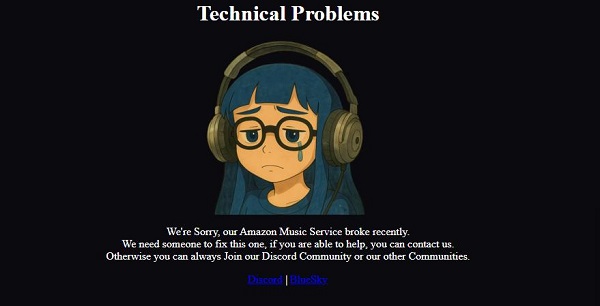
Because SQUID.WTF is an unofficial web service, its reliability changes frequently. Here are the most common reasons why it might not work for you:
-

1. Service Blocking (Qobuz)
Streaming platforms like Qobuz do not want people downloading their music for free. They frequently block the "shared tokens" or IP addresses that SQUID.WTF uses to fetch files. You might see a message that says: "Recently Qobuz started blocking our requests again, we are working on that." When this happens, the developers need time to find new tokens or update their code to bypass the block.
-
2. "Broken" Subdomains
As we mentioned before, SQUID.WTF is a network of different links. Sometimes the main homepage works, but a specific "branch" is down. Right now, sc.squid.wtf (SoundCloud) and amz.squid.wtf (Amazon Music) are reported as broken. Since the developers need time to fix these links, you should check the main squid.wtf page or join their Discord group for live updates.
-
3. Region Locking & IP Bans
Some music is only licensed for certain countries, such as the U.S. or the UK. SQUID.WTF uses shared accounts from specific regions. If the account is from the U.S., but the song you want is only available in the UK, the download will fail. You might see the album in the search results, but the download button will not do anything when you click it.
Part 5. Best SQUID.WTF Alternative That Still Works
If you are tired of SQUID.WTF being "broken" or blocked, you may need a more reliable tool. While online downloaders are free, they are often unstable. A more stable solution is ViWizard All‑in‑One Music Downloader.
ViWizard is a true all‑in‑one downloader that lets you save songs, albums, liked tracks, playlists, and podcast episodes from 10 streaming services, including:
- Hi‑Fi services: TIDAL, Qobuz, Deezer
- Popular platforms: Spotify, Apple Music, Amazon Music
- Other sources: YouTube Music, SoundCloud, Pandora, LINE Music
You can also customize the output format and audio quality, with support for up to 24‑bit/192 kHz. Available formats include MP3, FLAC, WAV, AIFF, M4A, and M4B.
Another major advantage is batch downloading. Instead of copying links one by one like many online tools, ViWizard can download entire playlists, albums, or collections at once, saving a lot of time. All downloaded files are also well organized. Important metadata is preserved, including album artwork, track title, artist name, release year, and even lyrics when available.

Download playlists, albums, and your whole music library from 10 major streaming platforms to MP3, FLAC, WAV, AIFF, M4A, or M4B with original sound quality and full song info and keep your music forever.
How to Download High‑Quality Music with ViWizard
Step 1 Set Your Lossless Output Format
Launch ViWizard and go to Menu > Preferences > Conversion. To match the high quality of SQUID.WTF, select FLAC or WAV as your output format. For true audiophile sound, set the bit depth to 24-bit and the sample rate to 192kHz. Then select an output folder on your computer where the downloaded music will be saved. Click OK to confirm your settings.

Step 2 Open the Built‑in Music Web Player
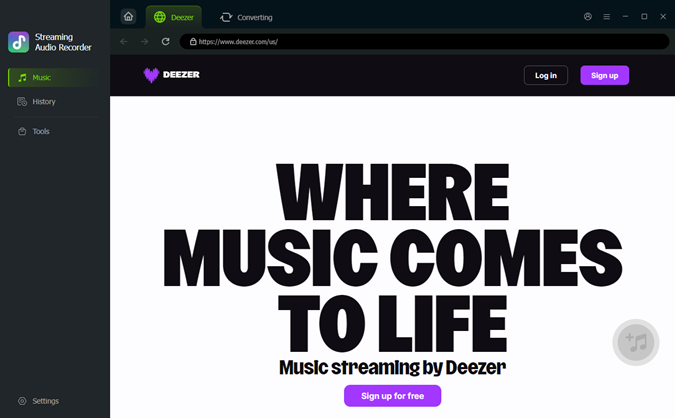
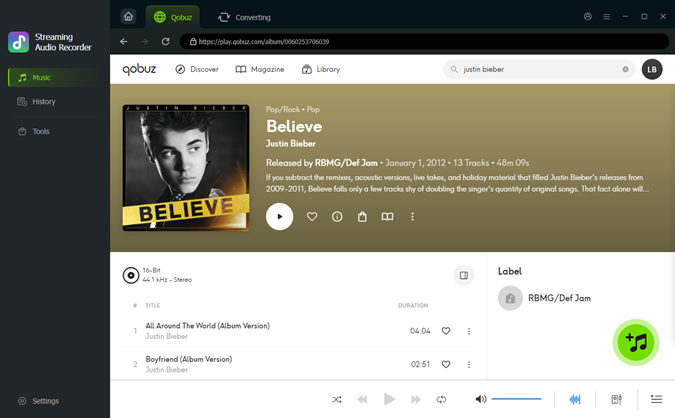
On the main interface, choose the streaming platform you want to download from, such as TIDAL or Qobuz. ViWizard will open the built‑in web player. Log in to your music account to access your library, playlists, albums, and liked songs.
Step 3 Add Songs, Albums, or Playlists
Browse the web player and open the song, album, or playlist you want to download. Click the + Add button in the lower right corner. ViWizard will automatically detect all available tracks on that page. You can select individual songs or all tracks at once, which makes it easy to download entire playlists or albums in batch.
Step 4Download and Save the Music
Click the Convert button at the bottom right. The tool will download the music directly to your computer while preserving all ID3 tags, high-resolution album art, and lyrics. Once the process is finished, open the output folder to find your downloaded music ready for offline listening.

If you're looking for more sites or tools like SQUID.WTF, check out the review of FLAC music downloaders below. This review highlights 11 effective tools that help you download Hi-Res FLAC audio.

"Explore 11 free and paid FLAC downloaders to get music in true lossless quality on Windows, Mac, and mobile.
Part 6. SQUID.WTF vs. Its Best Alternative: Full Comparison
While both SQUID.WTF and ViWizard All-in-One Music Downloader allow you to download high-quality music, they offer very different experiences. SQUID.WTF is a quick, free web tool, while ViWizard is a professional desktop application built for serious music collectors. Here is a side-by-side comparison to help you choose the right one for your needs:
| Feature | SQUID.WTF | ViWizard All-in-One Music Downloader |
| Supported Services | TIDAL, Qobuz (Often blocked), KHInsider, SoundCloud, Amazon Music (Now unavailable) | TIDAL, Qobuz, Amazon Music, SoundCloud, YouTube Music, Pandora, Spotify, Apple Music, Deezer, LINE Music |
| Output Formats | FLAC, MP3, AAC, OPUS | FLAC, MP3, WAV, AIFF, M4A, M4B |
| Max Audio Quality | Up to 24-bit / 192kHz | Up to 24-bit / 192kHz |
| Download Method | Manual Search for Songs (One-by-One) | Batch Download (Entire Playlists & Albums) |
| Metadata & Lyrics | Basic ID3 Tags & Album Art | Full ID3 Tags, Hi-Res Art, and Lyrics |
| Service Stability | Unstable | Stable |
| Customer Support | No Support (Community Discord only) | 24/7 Professional Support & Free Updates |
| Installation | No Install Required (Web-based) | Desktop Software Installation Required |
| Price | $0 (Free) | Paid (Free Trial Available) |
Which One Should You Choose?
Choose SQUID.WTF if: You only need to download single tracks or albums occasionally and don't mind waiting for the site to be "fixed" when it goes down. If you only want to download from TIDAL, SQUID.WTF is currently a working option for you.
Choose ViWizard if: You want to build a permanent, high-quality music library without any errors. It is the best choice if you need to download hundreds or thousands of songs from different streaming services at once, or if you need a tool that works reliably every time you open it.
Part 7. FAQs About SQUID.WTF
Is SQUID.WTF compatible with iPhone or Android?
Yes, SQUID.WTF is a web-based tool, so it works on mobile browsers like Safari and Chrome. However, downloading high-res FLAC files on a phone can be difficult. These files are very large and often come in ZIP folders, which can be hard to manage on a mobile device. For the best experience, we recommend using a desktop computer.
Can I download full albums or playlists with SQUID.WTF?
SQUID.WTF allows you to download single tracks or entire albums as a ZIP file. However, it does not support downloading full playlists. If you want to download a playlist with hundreds of songs, you will have to search for each album manually. For large playlist downloads, a professional tool like ViWizard All-in-One Music Downloader is much faster.
Does SQUID.WTF collect user data?
According to the site's design, SQUID.WTF is quite private because it does not require you to sign up or log in with an email address. However, like most websites, it may see your IP address when you connect. Because the site lacks a clear privacy policy and has hidden ownership, it is a good idea to use a VPN while browsing to keep your location private.
What are the best online alternatives to SQUID.WTF?
If SQUID.WTF is down, you can try other free online tools like Lucida.to or Doubledouble.top. However, just like SQUID.WTF, these sites often stop working or get blocked by streaming services. For a slightly more reliable online option, you can try Flac Music Finder, which also offers free FLAC downloads. But keep in mind that the songs on that site are user-uploaded. This means the music library is much smaller than SQUID.WTF.
Final Thoughts
SQUID.WTF offers a fast way to get individual tracks from services like TIDAL or Qobuz, but it has major drawbacks. The site frequently experiences instability, blocks, or downtime. If you need a dependable and professional solution, try ViWizard All-in-One Music Downloader. It supports 10 streaming services and lets you download entire playlists in batches, saving you time. Plus, it manages metadata and different output formats more effectively, making it ideal for users who want to create a large, permanent offline library without the hassle of site issues.
You May Be Interested




Nick Orin often turns to tech forums to see what apps people are talking about. He likes testing different software, comparing features, and finding out which tools are worth a try.

Leave a Comment (0)