


- Part 1. What Is the Glomatico Gamdl Apple Music Downloader?
- Part 2. How Does Gamdl Work to Download Apple Music?
- Part 3. Gamdl Features, Pros, and Cons
- Part 4. Is Gamdl Safe and Legal to Use?
- Part 5. How to Install and Use the Glomatico Gamdl Apple Music Downloader
- Part 6. Best Gamdl Alternatives for Downloading Apple Music

Many Apple Music users eventually run into the same situation. You find a song, album, or playlist you really like and want to keep it available offline beyond the app. However, Apple Music tracks are protected by strict DRM (Digital Rights Management), so downloads still require an active subscription or purchase to keep access.
Because of these limits, many users start searching for tools like Apple Music downloaders. The problem is that it is not always easy to find a free and reliable tool that actually works.
One option is Gamdl, also known as the Glomatico Gamdl Apple Music Downloader. It is an open source tool designed to download Apple Music in MP3 with some added benefits. In this guide, we will explore what Gamdl is and how it works for downloading Apple Music content. If Gamdl feels too technical, we will also introduce a simpler alternative called ViWizard Apple Music Converter, which offers an easier way to download and convert Apple Music for offline listening.

Need Apple Music in more flexible audio formats? ViWizard Apple Music Converter helps Apple Music subscribers create a personal music library with seamless music backup. Build your collection and keep your music beyond the Apple Music app.
Part 1. What Is the Glomatico Gamdl Apple Music Downloader?
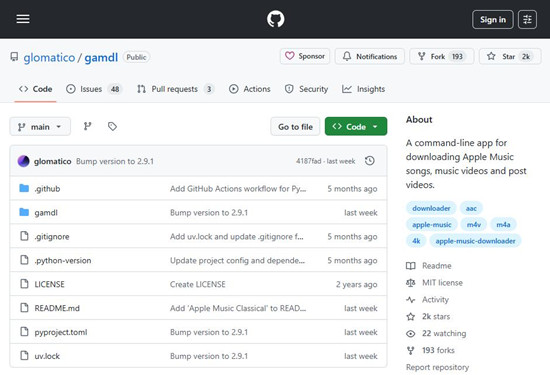
Open source tools often appear from nowhere but gain attention once users discover what they can actually do. Gamdl, developed by Glomatico, is one of those tools written in Python and distributed through GitHub. Gamdl, short for Glomatico's Apple Music Downloader, is an open source command line Apple Music downloader you install and run on your Windows PC or Linux system. It helps download Apple Music songs, music videos, and post videos directly to your computer.
At its core, Gamdl is not a simple "one click" app like ViWizard Apple Music Converter. Instead, it works as a Python CLI tool, which means command line interface. Users install it through pip or Homebrew and run it in a terminal with the required dependencies. These tools help process Apple Music streams or music videos, decode and encode audio in supported formats, and sometimes improve download speed.
Common prerequisites include the following:
FFmpeg: Required for ffmpeg music video remux mode, combines separate audio and video streams into one file.
mp4decrypt: Required for mp4box music video remux mode, decrypts protected MP4 streams so they can be played.
MP4Box: Required for mp4box music video remux mode, combines decrypted audio and video segments into a single MP4 file.
N_m3u8DL‑RE: Required for nm3u8dlre download mode, downloads HLS or M3U8 segments faster than the default downloader.
Wrapper: Used for downloading songs in ALAC and other experimental codecs without API limits
Because Gamdl is open source, many developers and tech savvy users explore it as a flexible Apple Music downloader that can be customized and extended through its command line setup.
Part 2. How Does Gamdl Work to Download Apple Music?
Unlike many traditional Apple Music downloaders that rely on recording audio while it plays, Gamdl works by accessing Apple Music streams through a logged in account session and saving the media files locally. To explain more clearly, Gamdl downloads Apple Music content from Apple's web service using a track, album, or playlist URL together with exported browser cookie files.
Because of this method, Gamdl can preserve much of the original Apple Music stream and metadata, including track titles, artist names, and album information.
Gamdl relies entirely on command line operations. While this approach provides strong technical control, some users may find the setup process a bit demanding. It often requires installing dependencies, exporting cookies, and running commands manually.
For users who prefer a simpler method, many people also consider traditional Apple Music downloaders like ViWizard Apple Music Converter. This software includes a built in Web Player that allows users to connect their Apple Music library directly to the program by logging in. From there, they can select songs, albums, or playlists and download Apple Music tracks in supported formats such as MP3, M4A, M4B, WAV, AIFF, and FLAC. The workflow is much simpler and can be completed in only a few steps, and it is free to try.
A full-featured Apple Music converter that easily converts Apple Music songs, albums, playlists—including iCloud Music Library content, personalized recommendations, and curated playlists—into MP3, M4A, M4B, WAV, AIFF, and FLAC so you can keep your Apple Music forever or transfer it to any device without restrictions.
Part 3. Gamdl Features, Pros, and Cons
Like many open source projects, the Glomatico Gamdl Apple Music Downloader comes with a mix of powerful features and a few practical limitations.
Key Features:
- Music video downloads - Can download Apple Music music videos, sometimes reaching resolutions up to 4K, which is uncommon for many music downloaders.
- Metadata preservation - Automatically embeds detailed information into downloaded files, including album artwork, artist names, track numbers, release dates, and synced lyrics.
- Lyrics export - Allows users to export lyrics in formats like LRC or SRT, making it easier to use songs with lyric-supported players or karaoke apps.
- Pros
- Free and open source, with the code available on GitHub
- Downloads Apple Music songs in usually 256 kbps AAC
- Can download songs, albums, playlists, and music videos
- Keeps useful metadata like album art, track titles, and lyrics
- Flexible settings for file names, folders, and other details
- Active development with updates and community discussions
- Cons
- Command line tool that can feel technical for beginners
- Requires extra setup such as Python, FFmpeg, and cookies
- No built‑in graphical interface
- Initial installation and configuration may take some time
- Can stop working if Apple changes how its system works
Bottom Line:
In practice, Gamdl is widely used and offers strong control over downloads, file naming, and metadata, making it ideal for managing large music collections.
The setup can be challenging for beginners, requiring dependencies, browser cookies, and a command-line environment. Overall, Gamdl is a powerful Apple Music downloader best suited for users comfortable with terminal commands and open source tools, valued for its control.
Part 4. Is Gamdl Safe and Legal to Use?
Free tools that interact with streaming platforms often raise questions about safety and legality. Community discussions around Gamdl usually focus on account safety, privacy, and whether downloading music from Apple Music fits within acceptable use.
The answer is both yes and no. Gamdl itself is generally considered safe because it downloads Apple Music streams directly from the official Apple Music service using the user's own subscription credentials rather than relying on unknown third party converters.
However, downloading Apple Music content in this way may still violate Apple’s terms of service. Because of this, most discussions suggest using Gamdl only for personal use. In practice, some users see this as acceptable for keeping offline copies of Apple Music tracks they already have access to through their subscription.
Part 5. How to Install and Use the Glomatico Gamdl Apple Music Downloader
In practice, users configure Gamdl through command line arguments or a configuration file. After the setup is complete, they run the tool in a terminal and provide an Apple Music link for a song, album, or playlist. Gamdl then analyzes the link, retrieves the associated media streams, and downloads the content automatically to the computer.
The Glomatico Gamdl Apple Music Downloader currently works on Windows PCs and Linux systems. Mac users may need to follow updates on its GitHub page or consider alternatives that support macOS, such as ViWizard Apple Music Converter.

Components Required:
- Python installed on the system
- FFmpeg for processing media files
- Browser cookies from a logged in Apple Music account, which allow Gamdl to authenticate with the Apple Music Web Player and access the media streams
- An active Apple Music subscription
Step 1: Install Python on Your Computer
- Open your browser and download Python 3.10 or newer from the official Python website.
- Run the installer and make sure Add Python to PATH is enabled before finishing the setup.
Step 2: Install FFmpeg
- Download an FFmpeg build for your system.
- Extract the downloaded folder.
- Add the FFmpeg bin folder to your system PATH so the command line can recognize FFmpeg.
Step 3: Install Gamdl
Open Command Prompt or PowerShell on Windows, then install Gamdl:
- Option 1: Install with pipx (recommended)
pipx install gamdl

- Option 2: Install with pip
pip install gamdl
Step 4: Export Apple Music Cookies
- Open the Apple Music Web Player in your browser.
- Sign in with your Apple Music account.
- Install a browser extension that can export cookies in Netscape format.
- Export the Apple Music cookies and save the file as:
cookies.txt
Step 5: Provide an Apple Music Link
- Move the cookies.txt file to the folder where you plan to run Gamdl.
- Open Apple Music and get the link to the content you want to download. Gamdl supports:
- Individual songs
- Full albums
- Entire playlists
- Artist discographies (all available albums)
- Music videos
- Apple Music video posts
Step 6: Run the Gamdl Download Command
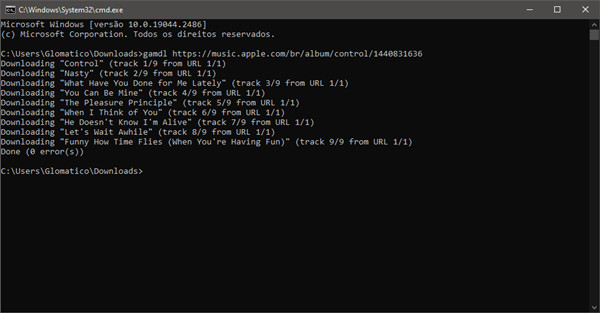
- Open Command Prompt or Terminal in the folder where you want the downloads to appear.
- Run the following command with the Apple Music link:
gamdl "APPLE_MUSIC_URL"
- Gamdl reads the link, retrieves the media streams, and starts downloading the tracks.
- The downloaded files are saved to the output folder in the current directory.
Step 7: Select Tracks from Albums or Artists (Interactive Mode)
- When downloading an album or playlist, Gamdl may open an interactive selection menu.
- Use the keyboard to control the selection.
- Arrow keys move between tracks
- Space selects or deselects songs
- Ctrl + A selects all tracks
- Enter confirms the download
Step 8: Customize Output Settings (Optional)
To save music to another location, run the command with an output path:
Part 6. Best Gamdl Alternatives for Downloading Apple Music
Because Gamdl is a CLI tool, it mainly appeals to users who are comfortable working with terminal commands and installing software dependencies. While it is powerful and flexible, it may not be the most convenient option for everyone.
That is why many users look for GUI-based alternatives. One popular option is ViWizard Apple Music Converter. This dedicated Apple Music downloader is much easier to install on Windows PCs and Macs and provides a more straightforward workflow. Users can drag and drop Apple Music tracks into the Add area, where the program analyzes the links and downloads and converts them in batches at speeds up to 20 times faster.
The software also supports lossless audio and preserves important metadata such as track title, artist name, album artwork, and even available lyrics. For better organization, users can customize output rules to rename tracks and sort them by artist, playlist, album, and more.
Key Features of ViWizard Apple Music Converter
Free Trial Free Trial* Security verified. 5, 481,347 people have downloaded it.
- Convert Apple Music songs, albums, playlists, and artists into MP3 for easy access
- Preserve lossless audio, high-resolution lossless, and Dolby Atmos quality
- Strip DRM from Apple Music for unrestricted offline listening
- Save converted audio files while retaining full ID3 tag details
Step 1Install and Launch the Program
Download and install ViWizard Apple Music Converter on your Windows PC or Mac. After opening the program, log in with your Apple Music account through the built-in web player. Once connected, your music library, including albums and playlists, will appear inside the program.
Step 2Set the Output Format
Open the settings menu and choose an output format for saving your music files. The converter supports several popular formats such as MP3, M4A, WAV, FLAC, and AIFF. You can also adjust audio settings like bit rate or sample rate if needed, while keeping important metadata like song titles, artists, and album artwork.

Step 3Select Songs or Playlists
Browse your Apple Music library directly in the program. Select the songs, albums, or playlists you want to save to your computer. Multiple tracks can be added at once for batch conversion.

Step 4Start the Conversion
Click the Convert button to begin downloading and converting the selected tracks. After the process finishes, open the output folder to access your saved music files. The converted songs can now be played locally on your Windows or Mac computer or transferred to other devices for offline listening.

For many people, ViWizard Apple Music Converter becomes a set-it-and-forget-it solution that continues to work smoothly over time, supported by regular updates and reliable customer service.
Conclusion:
Gamdl has become a popular open source Apple Music downloader among developers and advanced users who prefer flexible command line tools. By connecting to Apple Music through a logged in session and retrieving streams directly from the web service, it can download songs, albums, and music videos while preserving much of the original audio quality and metadata.
However, Gamdl may not be the easiest option for everyone because the command line setup, dependency installation, and cookie export process can be complicated. For this reason, some users also consider easier alternatives such as ViWizard Apple Music Converter, which offers a simpler interface and a more straightforward way to download and convert Apple Music songs.
You May Be Interested

6 Free Apple Music Downloaders You Can Try in 2026

Soundloader Apple Music Downloader Review: Apple Music Online to MP3
AAPLMusicDownloader Review: Download Apple Music to MP3 Online

TuneFab Apple Music Converter Review: Features, Pros and Cons, and the Best Alternative

Full Review: Is NoteBurner Apple Music Converter Worth It in 2026?

Sidify Apple Music Converter Review: Is It the Right Choice?

Nick Orin often turns to tech forums to see what apps people are talking about. He likes testing different software, comparing features, and finding out which tools are worth a try.

Leave a Comment (0)