


When it comes to the best Apple Music downloaders, NoteBurner Apple Music Converter is one of the top choices. It's a popular option for good reason. While there are other similar tools like TunePat and Sidify, NoteBurner has managed to stay ahead, even if only by a small margin. In the world of Apple Music converters, the differences are subtle, and the best choice depends on what matters most to you: ease of use, conversion speed, or the number of output formats.
Currently, ViWizard and NoteBurner Apple Music Converter are two of the best options available. NoteBurner is solid, but its interface may be confusing for beginners. ViWizard Apple Music Converter, on the other hand, offers a simpler interface while still providing full functionality, including DRM removal, audio conversions, ID3 tag preservation, and more.
While this post focuses on NoteBurner Apple Music Converter, we will also compare it with ViWizard to help you make a better decision. It's important to note that neither tool is fully free if you want all features. However, both offer a free trial, giving you a converter that makes your Apple Music library more flexible and easier to use.
Part 1: What Is NoteBurner Apple Music & iTunes Audio Converter?
I spent quite a bit of time testing NoteBurner Apple Music Converter (Mac) and NoteBurner iTunes Audio Converter (Windows) to assess its performance in key areas like ease of use, speed, format options, advanced features, batch downloading, and overall value for backing up an Apple Music collection.
So, what is NoteBurner iTunes Audio Converter (or Apple Music Converter)?
- Core function: Convert Apple Music, iTunes M4P songs, and audiobooks while removing DRM
- Format: MP3, AAC, WAV, FLAC, AIFF, or ALAC
- Output quality: Preserves original sound quality
- Conversion speed: Up to ten times faster than real time
- Platforms: Windows 7/8/10/11 and macOS 10.15 or later
- Free trial: Yes, converts one minute per file in the trial version
- Pricing:
- $49.95–$59.95 per year
- $89.90–$129.90 lifetime
- Extra features: Polished interface, light-dark theme, multi-language support
Let's start with the basics. NoteBurner Apple Music Converter (also called NoteBurner iTunes Audio Converter) is a desktop audio conversion tool for Windows and macOS. Like other Apple Music converters, it helps Apple Music subscribers download and convert their favorite tracks into standard audio formats that Apple Music doesn't officially allow, such as MP3, AAC, FLAC, WAV, AIFF, and ALAC. NoteBurner Music One, a newer all-in-one streaming music converter similar to ViWizard Streaming Audio Recorder, supports Apple Music and other music services.
In the latest version of NoteBurner Apple Music Converter, there are two recording modes: working with the iTunes or Apple Music app (App Mode) or the Apple Music Web Player (Web Mode). This allows unprotected downloads of Apple Music tracks, M4P files, audiobooks, and podcasts.
Part 2: How Does NoteBurner Apple Music Converter Work?
NoteBurner Apple Music Converter detects your Apple Music library or iTunes collection through the Apple Music app, iTunes, or the Web Player. You need an Apple ID to log in, which authorizes access and sets up the recording process. Then you can use the free trial or register the full version, select tracks, choose a format, and start converting. The free trial converts one minute per song, while the full version has no limits.
Like similar converters, NoteBurner does not pull files directly from Apple's servers. Instead, it records the audio as it plays in the Apple Music or iTunes app and outputs it in the desired format, preserving metadata such as ID3 tags and album artwork. The output is very close to the original streams.
The process is straightforward, and the interface is intuitive. Most users on Trustpilot report positive experiences. One user noted they have used NoteBurner since 2017 and appreciate how well it integrates with their library. Some report occasional login or activation issues, and many still compare it with ViWizard Apple Music Converter to see which works best for them.

Need Apple Music in more flexible audio formats? ViWizard Apple Music Converter helps Apple Music subscribers create a personal music library with seamless music backup. Build your collection and keep your music beyond the Apple Music app.

Key Features of NoteBurner Apple Music Converter:
- Batch Conversion: Convert multiple tracks or playlists at once
- Customizable Outputs: Adjust format, quality, and other settings
- Built-in Music Player: Preview and play audio files in the app
- One-Click Clear Cache: Remove temporary files quickly
- AA/AAX Converter: Convert local AA or AAX audiobooks to M4A, M4B, or MP3
- AI Audio Splitter: Separate vocals from music using AI
- Audio Editor: Trim and edit audio files
- Format Converter: Convert local files to various audio formats
- Burn CD: Burn converted audio to a CD
- Tag Editor: Edit and organize metadata for your library
Open NoteBurner Apple Music Converter on your computer. On Windows, double-click the desktop icon. On Mac, open it from the Applications folder or the Dock.
When prompted, sign in with your Apple ID. This authorizes NoteBurner to access your Apple Music library, playlists, and albums.

Click the Add button at the top of the interface to browse your Apple Music library. You can select individual songs, entire albums, or playlists to convert.

After selecting your tracks, click the Settings icon. Choose the audio format you want, such as MP3, AAC, WAV, or FLAC. You can also set the output folder, adjust file names, and decide whether to include lyrics.
Once your settings are confirmed, click the Convert button. NoteBurner will start recording and converting your selected tracks. Tracks added in batches will be processed in order, and you can monitor progress in the conversion list.
When the conversion is complete, click History at the top right to locate your converted files. You can now play them on any device that supports the chosen format, including iPhone, iPad, Android devices, MP3 players, car players, or DJ software.
Part 3: Complete Review of NoteBurner Apple Music Converter
Based on its key features, I take a closer look at NoteBurner Apple Music Converter. In addition to my own experience, I focused on how it performs in real-world scenarios, such as playing converted Apple Music tracks on non-Apple devices or storing them locally on iPhone, iPad, Android devices, MP3 players, car players, or DJ software, freeing you from Apple's FairPlay limits.
User Interface: Intuitive, but Could Use Simplicity

During my testing, I found the user interface to be fairly intuitive, though it can feel a bit overwhelming due to some unexpected sections, like "Tools," in addition to the usual "Music" and "Converter." It would be great to see a more simplified layout. You might also need to toggle between dark and light modes to adjust the interface (this option can be found later in the "General" settings, where the appearance is customizable).
As mentioned earlier, NoteBurner provides access to both the iTunes (or Music app) and Web Player. The interface also includes a basic tutorial to guide users in navigating the Web Player if you're unfamiliar with how to use it to start conversions. If you're not already signed in, signing in with your Apple ID is essential. The software works with the "Music" note icon, which automatically detects your music tracks.
The Conversion Limitations: A Potential Frustration
I tried setting up NoteBurner right from the start, and things went smoothly. When I clicked the "Add" button in the center of the screen, my iTunes library appeared automatically, without any prompts for sign-in or access, even though iTunes wasn't running initially. I then switched to the Web Player, and the app launched iTunes and loaded the library. From there, I navigate a compact interface to select tracks, audiobooks, or playlists to convert. Once selected, users can click "OK" to add more, delete items, or proceed with conversion.
When I clicked the "Converter" button, it prompted me to continue with the free trial or purchase a license for full access. The free trial lets you convert the first minute of a song, and the conversion itself was satisfying - the files were successfully converted and saved to my output folder in File Explorer.
Read More: 5 Methods to Download All Apple Music Songs at Once
This was my first experience. I then went further by exploring the settings it offers. You can select the output format directly from the conversion interface or music settings, along with other options like the output file name (e.g., "05{Track Number} Hard to Love {Title}" in the default setting). The output format options range from the flexible MP3 to lossless formats like ALAC or FLAC. By default, MP3 is selected for auto settings if users haven't adjusted the format tab.
The music filters are handy for long-time subscribers, allowing them to filter out previously converted music and avoid potential duplicates. For the converted list, you can search and sort by categories like "All Converted," "Today," "Recently (7 Days)," and "Last 30 Days," so users can effortlessly navigate their growing music collection. You can also delete or locate files directly from the converted list.
Cost: Subscription Plans that Balance Value

NoteBurner's subscription plans are competitively priced, offering good value for the features provided. Pricing is as follows:
$59.95 per year
$129 for lifetime access (one license per computer)
In addition to these options, NoteBurner comes bundled with the All-in-One Streaming Music Converter, which includes converters for other popular music streaming platforms.
Part 4: Legal Considerations & Terms of NoteBurner Apple Music Converter
For those who want to keep their Apple Music account and library safe, it is important to consider the rules behind the scenes.
Tools like NoteBurner Apple Music Converter capture audio from subscription streaming services and remove digital rights management (DRM), which normally limits how music can be used outside official apps. This may violate the service's terms of use. NoteBurner does not access Apple's servers directly or host music files; it only makes personal copies. In some regions, this is allowed for personal backup, while in others, circumventing DRM is prohibited by law. You should be aware of the rules and terms you agreed to with Apple Music. In most cases, personal use works fine, but potential risks like account suspensions should be considered.
Part 5: Pros and Cons of NoteBurner Apple Music Converter
No software is perfect, and NoteBurner Apple Music Converter is no exception. Now that you have a sense of how it works, the question is whether it is a good fit or not.
- Pros
- Converts Apple Music and iTunes songs
- Removes DRM and converts local files
- Preserves metadata, artwork, and lyrics
- Batch-convert playlists and albums at once
- Fast, intuitive, and easy to use
- Supports both dark and light mode
- Cons
- Free trial limits conversion to one minute per track
- Legal or terms restrictions in some regions
- Windows and Mac licenses are separate
- Occasional activation or registration issues
- Customer support can be slow at times
- Minor differences from original audio quality
Part 6: Best Alternatives to NoteBurner Apple Music Converter

If NoteBurner doesn't meet your needs, ViWizard Apple Music Converter is a strong alternative. It is beginner-friendly, easy to set up, and supports most formats offered by NoteBurner, including MP3, M4A, M4B, WAV, AIFF, and FLAC. ALAC support is still in progress, but most users stick with MP3 or WAV for flexible use on USB drives, MP3 players, DJ software, or other devices. MP3 outputs can reach 320Kbps, and ViWizard retains 100% lossless audio by default.
ViWizard Apple Music Converter focuses on simplicity. The built-in Apple Music Web Player lets you add tracks, albums, playlists, or your entire library with just a few clicks. Already converted tracks can be filtered out, and conversion is fast, up to 20 times faster than manual recording. Files are saved directly to your Windows or Mac computer and organized by playlist, album, or artist, keeping metadata such as title, artist, album art, and lyrics intact.
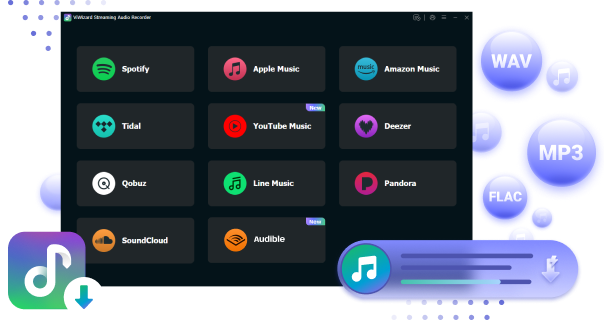
ViWizard Apple Music Converter is a practical, low-risk option for anyone who wants a simple tool to convert Apple Music and enjoy offline listening without a Premium subscription. If you are also interested in ViWizard Streaming Audio Recorder, also known as ViWizard All-In-One Music Converter, it supports Apple Music and other streaming services, giving you another alternative to NoteBurner to see which works best for your needs.
Key Features of ViWizard Apple Music Converter
Free Trial Free Trial* Security verified. 5, 481,347 people have downloaded it.
- Convert Apple Music songs, albums, playlists, and artists into MP3 for easy access
- Preserve lossless audio, high-resolution lossless, and Dolby Atmos quality
- Strip DRM from Apple Music for unrestricted offline listening
- Save converted audio files while retaining full ID3 tag details
Part 7: NoteBurner Apple Music Converter Compared to Other Converters
It's one thing to know a tool works, and another to see how it stacks up. Comparisons with other converters show where NoteBurner shines and where it lags.
| Feature / Aspect | NoteBurner Apple Music Converter | NoteBurner Music One Converter | ViWizard Apple Music Converter | ViWizard Streaming Audio Recorder |
|---|---|---|---|---|
| Purpose | Convert Apple Music tracks | Convert music from multiple streaming services | Convert Apple Music & iTunes audio | Download/record audio from multiple streaming platforms |
| Supported Input | Apple Music, iTunes | Apple Music, Spotify, Amazon Music, YouTube Music, Tidal, Deezer, Pandora, SoundCloud | Apple Music, iTunes | Apple Music, Spotify, Amazon Music, Tidal, Deezer, Pandora, YouTube Music, Qobuz, SoundCloud |
| Output Formats | MP3, AAC, FLAC, WAV, AIFF, ALAC | MP3, AAC, FLAC, WAV, AIFF, ALAC | MP3, M4A, M4B, WAV, FLAC, AIFF | MP3, M4A, M4B, WAV, FLAC, AIFF |
| Batch Conversion & Metadata | ✔️ | ✔️ | ✔️ | ✔️ |
| Scope | Apple Music only | Multi-service music | Apple Music only | Multi-service music, podcasts, radios, audiobooks |
| Free Trial Limit | 1 min per song | 1 min per track | 30 seconds per track | 30 seconds per track |
| Best For | Simple Apple Music downloads | Users with multiple streaming subscriptions | Easy Apple Music conversion | One-stop offline access for various platforms |
Part 8: Should You Use NoteBurner Apple Music Converter?
If you want to play Apple Music or iTunes tracks on devices that don't support them, or have DRM-free copies for personal use, NoteBurner Apple Music Converter is worth considering. It can convert Apple Music, iTunes M4P songs, and audiobooks to formats like MP3, AAC, WAV, FLAC, AIFF, or ALAC. Batch conversion and a simple interface make it easy to handle playlists and albums, and the conversion is fast and reliable for creating offline, DRM-free copies.
There are some limitations. The free trial only converts the first minute of each track, licenses are platform-specific, and occasional bugs or conversion issues can occur. NoteBurner removes DRM by recording playback, which may go against Apple Music's terms or local laws depending on where you live.
Whether it is worth it depends on your needs, how much music you want to convert, and your comfort with the legal aspects. The free trial is a good way to see if it fits your workflow. It is also helpful to try other similar converters, such as ViWizard Apple Music Converter, to compare features and performance and make the best choice for your needs.
You May Be Interested
NoteBurner YouTube Music Converter Review: Is It Safe and Worth Using?

NoteBurner Spotify Music Converter Review: Advanced Features and Solid Performance

NoteBurner Tidal Music Converter Review: Download TIDAL Music and Best Alternatives
Is TunePat Apple Music Converter Worth It? Full Review
AudiFab Apple Music Converter Full Review and Guide
DRmare Apple Music Converter Review and Best Alternative


Nick Orin, a software developer at ViWizard, focuses on providing solutions for software-related challenges, including reviews, troubleshooting, and optimization tips.

Leave a Comment (0)