


Converting Apple Music to local audio files is one thing; finding a workflow that feels convenient is another. AudiFab Apple Music Converter is a desktop tool for converting Apple Music content into local audio files in formats such as MP3, AAC, WAV, FLAC, AIFF, and ALAC. It also supports Apple Music tracks, iTunes M4P music, podcasts, and audiobooks.
The conversion workflow, platform experience, pricing, and trial limits are just as important when deciding whether the tool suits you. This review takes a closer look at how AudiFab works in practice and what to consider before using it.
Part 1. AudiFab Apple Music Converter Overview

AudiFab Apple Music Converter is a desktop tool for downloading Apple Music content and saving it as local audio files. AudiFab says it supports Apple Music tracks, iTunes M4P music, podcasts, and audiobooks, with output formats including MP3, AAC, WAV, FLAC, AIFF, and ALAC. It is intended for personal use only.
The software provides iTunes App Mode and Apple Music Web Player Mode. AudiFab recommends App Mode for Windows and Web Player Mode for Mac. App Mode works with the library in iTunes or the Music app, while Web Player Mode uses an integrated Apple Music web interface.
Part 2. AudiFab Apple Music Converter Features
Multiple output formats are a core feature of AudiFab Apple Music Converter. In Settings, users can choose MP3, AAC, WAV, FLAC, AIFF, or ALAC. AudiFab also supports batch conversion and advertises speeds of up to 10×, although actual speed varies by content and computer.
Other built-in tools include a local audio format converter, CD burner, ID3 tag editor, audio editor, and AI Audio Splitter. An AA/AAX audiobook converter is also available as a paid function. Converted files can be accessed through the Converted section or the selected output folder.
- Convert Apple Music songs, albums, playlists, and radio to local audio files for easier playback and management;
- Convert Apple Music to MP3, AAC, WAV, FLAC, AIFF, or ALAC for playback on different devices and players;
- Batch-convert tracks and playlists at up to 10X speed;
- Keep the original audio quality, including supported Apple Music Lossless quality;
- Keep song metadata such as titles, artists, albums, artwork, and track numbers;
- Save lyrics with converted Apple Music tracks;
- Use the built-in web player to access and convert Apple Music directly;
- Save converted files to your computer and transfer them to compatible phones, tablets, SD cards, USB drives, and portable music players;
- Manage converted audio with tools such as a format converter, ID3 tag editor, and CD burner.
Part 3. How to Use AudiFab Apple Music Converter
AudiFab currently lists version 3.4.3 for Windows and Mac, supporting Windows 7 through 11 and macOS 11 through 26.
First, launch AudiFab Apple Music Converter and select an access mode. AudiFab recommends iTunes App Mode for Windows and Apple Music Web Player Mode for Mac. Then open Settings at the bottom-left to choose the conversion mode, output format, output path, file naming, and folder organization. Available formats include MP3, WAV, FLAC, AIFF, ALAC, and AAC. For example, AudiFab recommends Playlist Index for file names and None for output organization.
Click + Add to select the content you want to convert, then start the conversion. AudiFab uses its recording core in App Mode and its integrated Apple Music web interface in Webplayer Mode. After conversion, open Converted or the selected output folder to access the files.
Step 1Launch AudiFab Apple Music Converter
Download and install AudiFab, then open it and choose App or Webplayer download. AudiFab recommends iTunes App Mode for Windows and Apple Music Webplayer Mode for Mac. WebPlayer mode can also offer up to 10× faster conversion.
Step 2Add Apple Music Songs to AudiFab
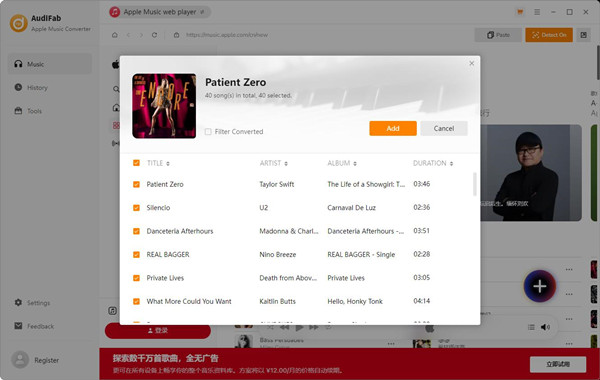
Click "+ ADD" on the main interface. Select the songs, playlists, podcasts, or audiobooks you want from your Apple Music Library, then click "OK" or "Add" to import them.
Step 3Choose the Output Settings
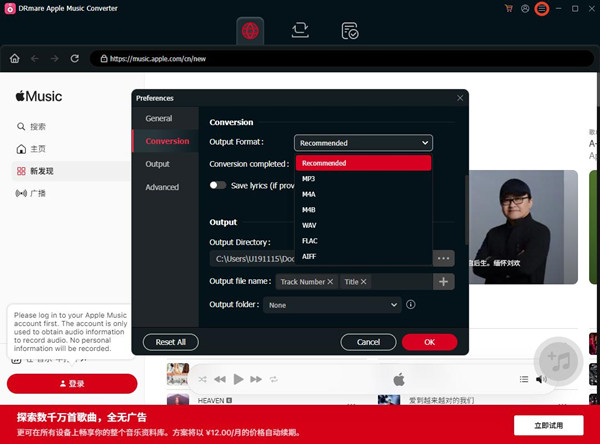
Click "Settings" or the gear icon to open the settings window. Choose MP3, AAC, WAV, FLAC, AIFF, or ALAC as the output format. You can also adjust the output quality, sample rate, output path, file name, and folder organization. To save all converted tracks in one folder, select "None" under "Output Organized."
Step 4Start the Conversion
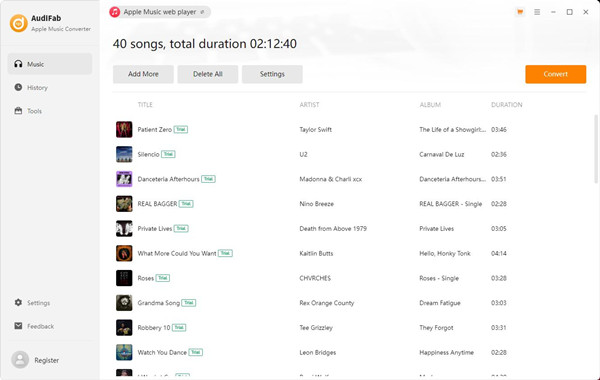
Return to the Home interface and click "Convert." AudiFab will convert the selected Apple Music tracks into local files. Conversion time depends on the number of tracks and your network connection. In App mode, do not use iTunes or Music while the conversion is running, as AudiFab advises against it.
Step 5Find Your Converted Files
AudiFab can open the output folder after conversion. You can also click "Converted" on the left, hover over a file, and click the folder icon to open its location.
Part 4. AudiFab Apple Music Converter Pricing
AudiFab is a paid Apple Music converter, starting with an annual plan at $44.95. It also has a lifetime plan at $89.90. The annual license auto-renews, while the lifetime license includes lifetime upgrade service. Prices may change with promotions. Both plans cover one computer and include free updates and support.
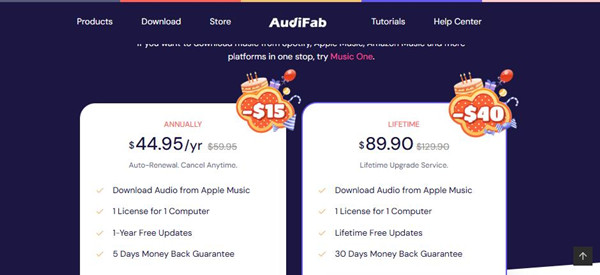
| Plan | Price | Renewal | License | Updates | Money-Back Guarantee |
| Annual | $44.95 $59.95 | Auto-renewal; cancel anytime | 1 computer | 1-year free updates | 5 days |
| Lifetime | $89.90 $129.90 | No renewal; lifetime upgrade service | 1 computer | Lifetime free updates | 30 days |
AudiFab also offers Music One, a separate multi-service converter supporting multiple streaming platforms, similar to ViWizard Streaming Audio Recorder.
Part 5. AudiFab Apple Music Converter Pros and Cons
- Supports MP3, AAC, FLAC, WAV, AIFF, and ALAC, so you have plenty of output options.
- Batch conversion lets you convert entire playlists and albums at once.
- Up to 10× speed helps get through large music libraries faster.
- Keeps metadata and lyrics, and lets you edit ID3 tags to keep files organized.
- Comes with extras like CD Burner, Audio Editor, Format Converter, and AA/AAX Converter.
- The free trial only converts the first minute of each track.
- You need an active Apple Music subscription to convert Apple Music content.
- Some conversion or library-reading issues may require changes to Apple Music or iTunes settings.
- There were only 29 Trustpilot reviews at the time of research, so the overall rating offers a limited view of the wider user experience.
- The extra audio tools may be more than you need if you just want a simple Apple Music downloader.
Overall, AudiFab gives you multiple output formats, batch conversion, fast processing, and extra audio tools. Its simple interface and positive user feedback make it easy to get started, but limited independent reviews and occasional setup issues may matter if you just want a straightforward Apple Music downloader.
If you want a simpler way to convert Apple Music, ViWizard Apple Music Converter is another option to check out. It supports batch conversion, multiple output formats, metadata and lyrics preservation, and a built-in Apple Music Web Player. Next, let's see what ViWizard offers and how it compares with AudiFab.
Part 6. AudiFab Apple Music Converter Alternatives
Looking for an alternative to AudiFab Apple Music Converter? ViWizard Apple Music Converter is another desktop option with a built-in Apple Music Web Player.
AudiFab and ViWizard have the same basic purpose: converting Apple Music content into local audio files. Both support batch conversion and multiple output formats, while AudiFab also includes extras such as CD burning, ID3 editing, audio editing, and audiobook conversion.
ViWizard offers a more direct Apple Music workflow through its built-in Apple Music Web Player. You can select your music, adjust the output settings, and start converting without leaving the app. It supports MP3, M4A, M4B, WAV, FLAC, AIFF, and Lossless output, with speeds of up to 20×. If you mainly want a simple Apple Music downloader, ViWizard is a straightforward alternative to AudiFab. Its clean desktop UI keeps things focused on selecting Apple Music content, adjusting the output settings, and converting it.
| Feature | AudiFab Apple Music Converter | ViWizard Apple Music Converter |
|---|---|---|
| Main use | Convert Apple Music songs, playlists, albums, iTunes music, audiobooks, and podcasts | Convert Apple Music songs, albums, playlists, artists, and other Apple Music content |
| Platform | Windows and Mac | Windows and Mac |
| Apple Music workflow | Apple Music/iTunes-based conversion with recording features | Built-in Apple Music Web Player |
| Output formats | MP3, AAC, FLAC, WAV, AIFF, ALAC | MP3, M4A, M4B, WAV, FLAC, AIFF, Lossless |
| Batch conversion | Yes | Yes |
| Conversion speed | Up to 10× | Up to 20× |
| Audio settings | Multiple formats and customization options | Bitrate, sample rate, bit depth, channel, and other settings |
| Metadata & lyrics | Preserves ID3 tags and lyrics; ID3 tags can be edited | Preserves metadata and lyrics; supports file organization |
| Extra tools | CD Burner, ID3 Tag Editor, Audio Editor, Format Converter, AA/AAX Converter, and more | Built-in Apple Music Web Player and local media player |
| Customer support | Technical support and free updates | Customer support and free updates during the license period |
| Annual price | $44.95/year | $49.95/year |
| Lifetime price | $89.90 | $89.95 |

Key Features of ViWizard Apple Music Converter
Free Trial Free Trial* Security verified. 5, 481,347 people have downloaded it.
- Convert Apple Music songs, playlists, albums, and artists
- Export Apple Music in 6 formats for different devices and players
- Preserve metadata and lyrics when creating music collections
- Organize converted music by artist and album
- Batch download large Apple Music collections
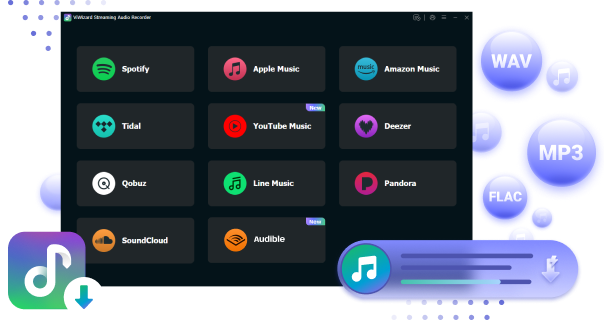
 Step 1: Install and Sign In
Download and install ViWizard Apple Music Converter on your Windows PC or Mac. Launch the program and sign in to your Apple Music account through the built-in web player. Once signed in, your Apple Music library, including songs, albums, and playlists, will appear in the program.
 Step 2: Choose MP3 as the Output Format
Open Preferences and select MP3 as the output format. ViWizard also supports M4A, WAV, FLAC, and AIFF if you need another format. You can adjust the audio quality and choose to keep basic metadata such as the song title, artist, and album.
 Step 3: Select Apple Music Songs to Convert
Browse your Apple Music library and select the songs, albums, or playlists you want to save as MP3 files. You can select multiple items at once, so you can convert a larger collection in one batch.
 Step 4: Start Converting Apple Music to MP3
Click Convert to start the conversion. ViWizard will download the selected Apple Music tracks and save them as MP3 files in your chosen output folder. Once finished, open the folder to access the MP3 files for offline playback or transfer them to other devices.
Part 7. Conclusion
AudiFab Apple Music Converter is a capable option for converting Apple Music content into local audio files. It supports multiple output formats, batch conversion, metadata retention, and two access modes, plus extras such as CD burning, ID3 editing, and audio editing. Its workflow differs between Windows and Mac, so some users may prefer a more focused Apple Music converter.
If you want to convert Apple Music tracks in a few steps, ViWizard Apple Music Converter is a practical choice. Its Apple Music-focused workflow, clean UI, broad format support, batch conversion, and customer support provide a straightforward experience. ViWizard currently lists annual and lifetime plans at $49.95 and $89.95, with a 30-day money-back guarantee for both.
Ready to try a simpler Apple Music converter? Download ViWizard Apple Music Converter and start converting your tracks today.
You May Be Interested
NoteBurner YouTube Music Converter Review: Is It Safe and Worth Using?
Is TunePat Apple Music Converter Worth It? Full Review

NoteBurner Tidal Music Converter Review: Download TIDAL Music and Best Alternatives
AAPLMusicDownloader Review: Download Apple Music to MP3 Online
DRmare Apple Music Converter Review and Best Alternative
Gamdl Apple Music Downloader: 2026 Guide and Review

Nick Orin often turns to tech forums to see what apps people are talking about. He likes testing different software, comparing features, and finding out which tools are worth a try.

Leave a Comment (0)