


YouTube Music is a great place to discover new tracks. But its offline mode has a big limitation: you don't actually own the files. If you cancel your subscription, all those downloaded songs disappear with it. That's why tools like NoteBurner YouTube Music Converter exist. They claim to help you turn streaming tracks into permanent files you can keep.
Of course, that raises an obvious question. Many "free" converters online come with hidden risks like malware, poor audio quality, or unreliable downloads. So is NoteBurner YouTube Music Converter actually safe? And can it really keep the original audio quality, or is it basically just recording the sound while it plays?
In this review, we'll take a closer look at NoteBurner YouTube Music Downloader. We'll test its conversion speed, check the audio quality, and see how well it handles details like ID3 tags. By the end, you'll have a clear idea of whether it's a solid option for downloading YouTube Music or just another tool that overpromises.
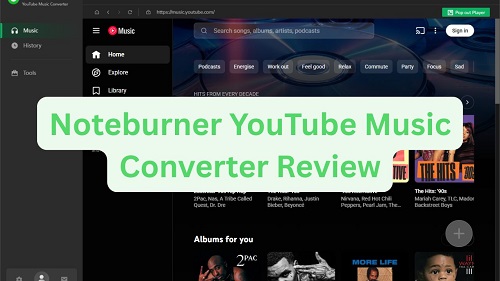
Part 1. What Is NoteBurner YouTube Music Converter?
NoteBurner YouTube Music Converter is a desktop software tool works on Windows and Mac computers. After installing the software, you can access YouTube Music through a built-in web player, search for songs or playlists, and download them as audio files that can be stored on your computer. These files can then be transferred to other devices such as smartphones, tablets, USB drives, MP3 players, or media servers.
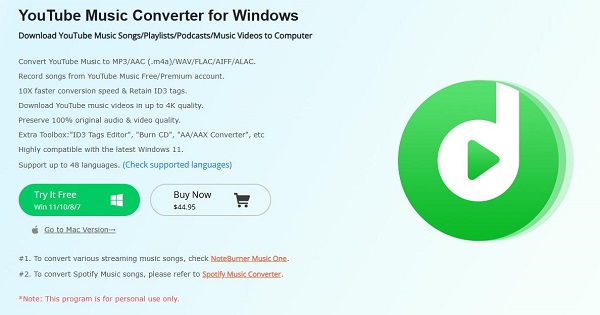
Basic Information of NoteBurner YouTube Music Converter
| Feature | Details & Supported Formats |
| Supported Input (Audio) | YouTube Music tracks, Artists, Albums, and Playlists |
| Supported Input (Video) | YouTube Music Videos |
| Output Audio Formats | MP3, AAC (.m4a), WAV, FLAC, AIFF, ALAC (.m4a) |
| Output Video Formats | MP4 |
| Conversion Speed | Up to 10X faster (Windows) |
| System OS (Windows) | Windows 7, 8, 10, 11 (32-bit & 64-bit) |
| System OS (Mac) | macOS 10.15, 11, 12, 13, 14 (Sonoma) |
| Hardware Req. | 1GHz processor or above; 512MB RAM or higher |
When to Use NoteBurner YouTube Music Converter
This converter is useful in several everyday situations, for example:
- Building a personal offline music collection.
- Playing YouTube Music tracks on devices that do not support the YouTube Music app.
- Transferring music to car audio systems, MP3 players, or external storage.
- Backing up favorite songs or playlists for long-term access.
Is NoteBurner YouTube Music Converter Free?
However, NoteBurner YouTube Music Converter isn't completely free. It offers a free trial, but you can only convert the first one minute of each track. To unlock the full features of this YouTube Music downloader, you'll need to upgrade to one of its two licensing plans:
- 1-Year Plan: $44.95 per year
- Lifetime Plan: $89.90 (one-time payment)

Note: The exact pricing may vary depending on promotions or regional offers, but in general, users must purchase a license to remove trial restrictions and download full-length songs without limits.
Part 2. Key Features of NoteBurner YouTube Music Converter
NoteBurner YouTube Music Converter includes a range of tools and options that make downloading and converting music from YouTube Music simple and flexible. Some of its key features include:
Key Features of NoteBurner YouTube Music Converter:
- Work with both YouTube Music Free and Premium accounts
- Download songs, albums, playlists, and music videos from YouTube Music
- Save content as MP3, AAC (.m4a), WAV, FLAC, AIFF, ALAC (.m4a) audio files or MP4 videos
- Convert YouTube Music up to 10× faster than real‑time playback
- Customize audio or video quality while preserving the original details
- Keep complete and accurate ID3 tags, including artist, album, and artwork
- Offer built‑in tools such as an ID3 Tag Editor, Format Converter, CD Burner, and Audio Editor
Together, these features make NoteBurner YouTube Music Converter a versatile option for anyone who wants more control over their YouTube Music library offline. Next, we'll look at how these features perform in real‑world use.
Part 3. My Hands-On Test of NoteBurner YouTube Music Downloader
To give you an honest and practical perspective, we spent several hours testing the latest version of NoteBurner YouTube Music Converter. For our test environment, we used a Windows 11 desktop and a YouTube Music Free account. We also made sure to test the Free Trial version, so we could see exactly what you can expect before spending any money.
Installation and Setup
You can visit the official NoteBurner website and click the "Try It Free" button to download the installer. If you're using macOS, there's also a clear "Go to Mac version" link on the same page.
In our test, the download and installation process took about 3–4 minutes. When you launch the program for the first time, it automatically opens its built‑in YouTube Music web player.
Before downloading any music, you'll need to log in to your own YouTube Music account (either Free or Premium). This step is important because the conversion process may fail if you try to download tracks without signing in.
How to Download YouTube Music with NoteBurner (Step‑by‑Step)
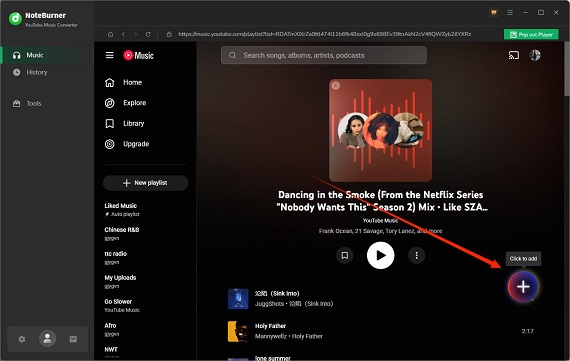
Step 1Select Your Music: Use the built‑in player to browse for the playlist, song, or album you want to download. Then click the "+" (Add) button in the bottom‑right corner.
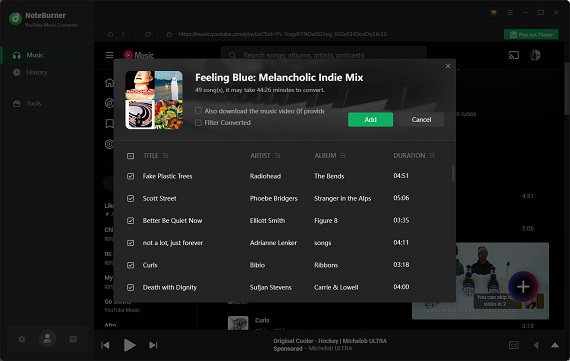
Step 2Filter the List: A pop‑up window will appear showing all available tracks. You can select specific songs or keep the default "Select All" option. Click "Add" to confirm.
Step 3Configure Settings: Click the Settings (gear icon) in the bottom‑left corner and open the "Music" tab. Here you can choose the output format. We selected MP3 for our test. You can also choose the audio bitrate (128 kbps to 320 kbps) and set the sample rate to 44.1 kHz or 48 kHz. We also customized the output folder and file naming format.
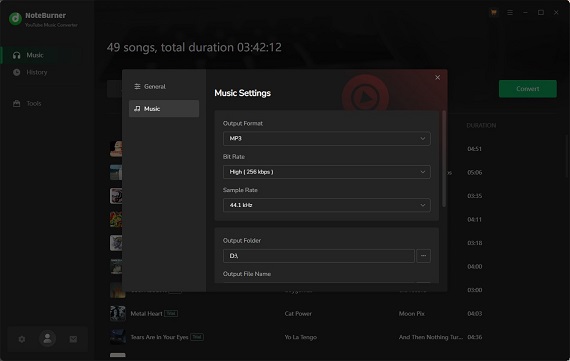
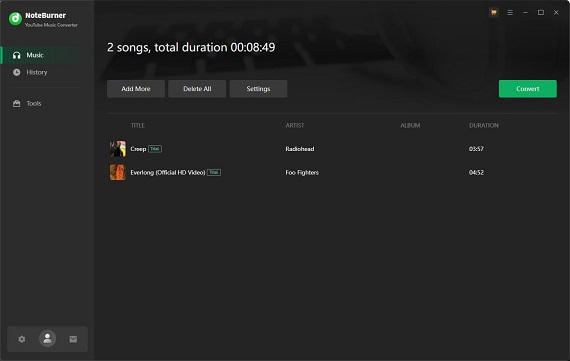
Step 4Start Conversion: Click "Convert." Because we were using the Free Trial, a pop‑up window appeared explaining that trial users can only convert the first minute of each song. After clicking "Free Trial," the conversion started immediately.
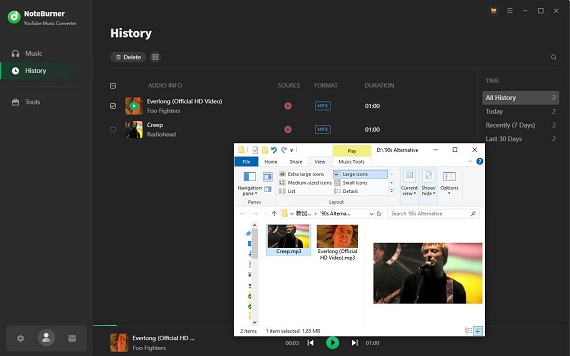
Step 5Review Files: When the conversion finishes, open the "History" tab. From there, you can play the music directly in NoteBurner or click the Folder icon to locate the files on your computer.
NoteBurner YouTube Music Converter Test Results
1. Download Speed and Performance Test
We tested the software by converting two songs with a combined duration of about 8 minutes. The conversion process took roughly 3 minutes to complete. However, we did run into a "Failed 1707" error while converting the second track. We had to re‑add the song and start the process again before it completed successfully. Also, make sure you're logged into your YTM account on the internal web player, or you might run into that 1707 error.
Because of this issue, the overall speed didn't feel quite as fast as advertised. That said, the software still exported the files correctly in the format we selected.
2. Output Audio Quality
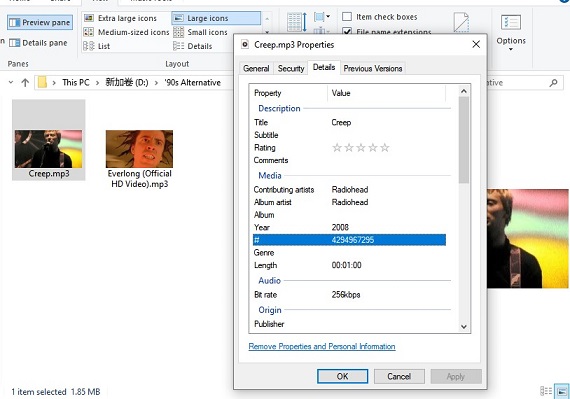
We set the output quality to 256 kbps, and the exported files matched those settings exactly. One thing we appreciated was that the software preserved all metadata, including the song title, album artwork, artist name, and album title. Everything appeared correctly in our music library.
3. User Experience & Interface
The interface is clean and easy to understand. You can click the settings gear to switch between Light and Dark modes or change the language to one of the many supported options. If you're using the program for the first time, there's also a built‑in tutorial guide that walks you through the basic workflow, which makes the whole process very beginner‑friendly.
Summary of Hands‑On Test
After putting NoteBurner through a full test, here's our overall impression:
- Ease of Use: 9.5 / 10
- Audio Quality: 10 / 10
- Stability & Speed: 7.0 / 10 (mainly due to the 1707 error)
- Overall Rating: 8.5 / 10
NoteBurner is a great tool for saving your YouTube Music tracks as permanent files. It converts quickly and delivers excellent audio quality. Be aware that you might need to retry a download if an error occurs. From our experience, converting songs one at a time or in smaller batches usually gives the best results.
Part 4. Is NoteBurner YouTube Music Converter Safe to Use?
From a technical standpoint, NoteBurner YouTube Music Converter appears safe to use.
We tested it with VirusTotal and several antivirus programs like Windows Defender and Malwarebytes during installation, and it came back 100% clean. There's no annoying bloatware, harmful plugins, or pop-up ads. The installation is straightforward and doesn't sneak in extra toolbars or change your browser settings. Just make sure to download it from the official NoteBurner website for safety. Avoid using cracked versions from third-party sites.
Will Your YouTube Account Get Banned?
In most cases, your account won't be banned for using NoteBurner.
That's because the software doesn't directly hack or manipulate YouTube's servers. Instead, it captures the playback output, which makes it harder for platforms like Google to detect compared to older ripping tools that interact directly with streaming servers.
To reduce any potential risk, it's still a good idea to avoid converting hundreds of songs in a short period of time. Spacing out your downloads makes your activity look more like normal listening behavior.
Note: From a legal standpoint, it's safest to use tools like this for personal offline listening or for royalty‑free tracks. This helps ensure your usage stays within reasonable boundaries and avoids potential conflicts with YouTube Music's terms.
What Users Say About NoteBurner
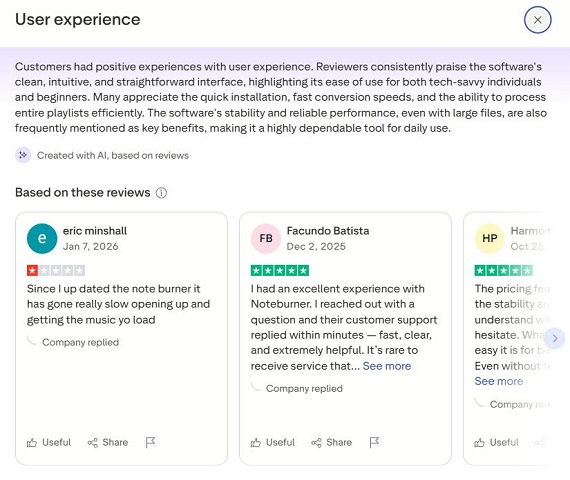
User feedback online is generally positive. On Trustpilot, NoteBurner currently holds an average rating of about 4.5 out of 5.
Many reviewers say the software is stable and reliable for downloading and converting music. There are also very few complaints related to malware or security concerns. Most users highlight the fast conversion speeds and overall efficiency as the main advantages of the tool.
Part 5. Pros and Cons of NoteBurner YouTube Music Converter
Before you make a final decision, it's worth weighing the strengths of NoteBurner YouTube Music Converter against its limitations. Based on our hands-on testing, here's a quick look at what we liked and what could be improved:
- Pros
- Supports up to 320kbps MP3 and lossless FLAC/ALAC formats.
- Automatically preserves ID3 tags
- Handles songs, full albums, playlists, and even music videos
- Built-in YouTube Music web player
- Allows batch download and conversion
- Supports both Free and Premium YouTube Music accounts
- Supports extra features like a CD burner and ID3 tag editor
- Cons
- Free trial only allows first 1 minute of each song
- Conversion errors may occur
- Speed is moderate, not the fastest for large playlists
- No mobile app version is available for iOS or Android
Part 6. Best Alternative to NoteBurner YouTube Music Converter
If you are a music lover who doesn't stick to just one platform, ViWizard YouTube Music Converter is the ultimate "all-in-one" solution. Unlike NoteBurner, which focuses primarily on the YouTube ecosystem, ViWizard is a a powerful all-in-one music downloader supports downloading music from 10 music platforms, like YouTube Music, Apple Music, Spotify, SoundCloud, Tidal, Amazon Music, Deezer, Pandora, and more. In addition, ViWizard starts at a lower price of $29.95 and also offers a monthly subscription plan for users who prefer a more flexible pricing option.
To help you better understand the differences between the two tools, the following table compares NoteBurner YouTube Music Converter and ViWizard YouTube Music Converter.
| Feature | NoteBurner YouTube Music Converter | ViWizard YouTube Music Converter |
| Primary Focus | Dedicated YouTube Music Downloader | All-in-One Music Converter (10+ Platforms) |
| Supported Platforms | YouTube Music | YouTube Music, Spotify, Apple Music, Amazon Music, SoundCloud, TIDAL, Pandora, Deezer, LINE Music, Qobuz |
| Output Audio Formats | MP3, AAC, WAV, FLAC, AIFF, ALAC | MP3, FLAC, WAV, AIFF, M4A, M4B |
| Video Download | Supported (MP4) | Not Supported |
| Download Method | Built-in Web Player | Built-in Web Player |
| Conversion Speed | Up to 10× Faster | Up to 30× Faster |
| Supported Content | Songs, Albums, Playlists, Music Videos | Songs, Albums, Playlists, Podcasts |
| Batch Download | Yes | Yes |
| Metadata Preservation | Yes (ID3 Tags) | Yes (Full ID3 Tags) |
| Starting Price | $44.95 | $29.95 |
| Best For | Users focused only on YouTube Music | Users who download music from multiple streaming platforms |

Download songs, playlists, albums, and your whole music library from 10 major streaming platforms, including YouTube Music, to MP3, FLAC, WAV, AIFF, M4A, or M4B with original sound quality and full song info and keep your music forever.
Want to try out ViWizard YouTube Music Converter? Just download it to your computer and follow these steps to grab music from YouTube Music.
Step 1Set Output Preferences
Open ViWizard YouTube Music Converter and click the menu icon (☰) to open Preferences. Under the Conversion tab, choose your desired output format such as MP3, FLAC, WAV, AIFF, M4A, or M4B. You can also adjust settings like audio quality, bitrate, sample rate, and select the output folder where downloaded files will be saved. Once finished, click OK to confirm the settings.

Step 2Open the Built-in YouTube Music Player
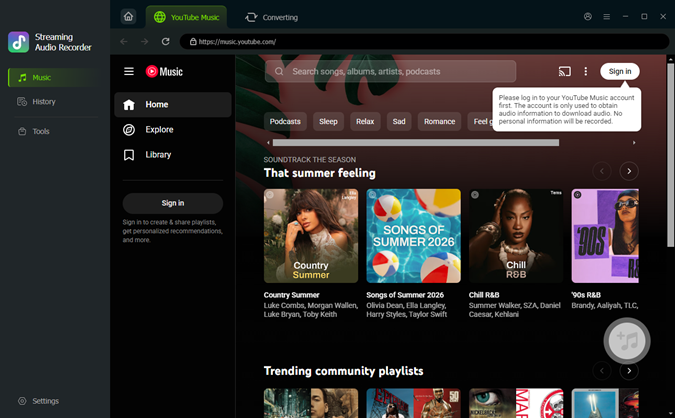
Return to the main interface and click the YouTube Music icon. This will open the built‑in YouTube Music web player inside the program. Sign in to your YouTube Music account so you can browse and access your playlists, albums, songs, and podcasts directly within the app.
Step 3Add Songs or Playlists
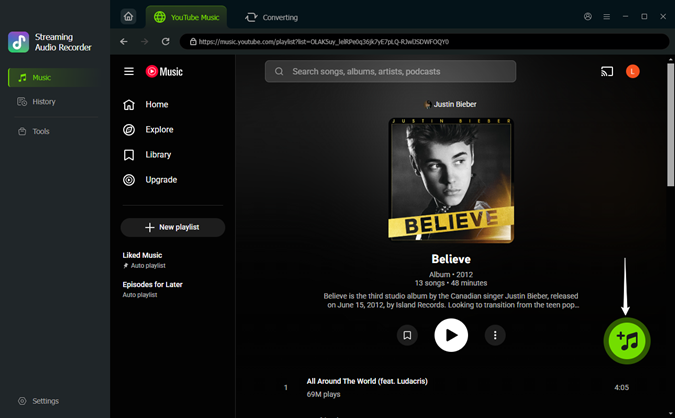
Find the song, album, playlist, or podcast you want to download. Then click the green Plus (+) button in the corner. A pop‑up window will display all available tracks. You can select specific songs or choose Select All, then click Add to List to import them to the conversion queue.
Step 4Convert and Download
Open the conversion list and click Convert to start downloading and converting the selected tracks. Once the process is complete, you can play the music directly inside the app or click the folder icon to locate the files on your computer.

Looking for more alternatives to NoteBurner YouTube Music Converter? Check out this full review of 17 YouTube Music downloaders available right now!

Looking for the best YouTube Music downloader? Follow this post to have a quick review of up to 17 kinds of YouTube Music downloaders.
Part 7. FAQs About NoteBurner YouTube Music Downloader
Can I use NoteBurner with a YouTube Music Free account?
Yes. NoteBurner YouTube Music Converter works perfectly with both Free and Premium YouTube Music accounts.
Where are the downloaded files saved?
By default, NoteBurner creates a folder named "NoteBurner YouTube Music Converter" in your computer's Documents or Music library. However, you can fully customize this. Simply click the Settings (gear icon) at the bottom left of the app, go to the Output Folder section, and choose any location on your local drive or an external hard drive.
Can I transfer converted songs to my iPhone or Android?
Yes. Once the songs are converted to formats like MP3, WAV, or FLAC, they become regular audio files. You can transfer them to your iPhone, Android phone, tablet, MP3 player, USB drive, or other devices using common methods such as a USB cable, cloud storage, or file transfer apps.
Why does NoteBurner sometimes fail to convert songs?
Common reasons for issues include not being logged into your YouTube Music account on the web player, using a Free Trial version, or songs being unavailable in your region. Plus, if your playlist has hundreds of songs, managing them all at once can be tricky.
Can I use NoteBurner on more than one computer?
You can use a standard NoteBurner license on just one computer. If you try to activate it on a second machine, it probably won't work. Also, remember that the Windows and Mac versions are sold separately, so a license for a PC won't work on a MacBook.
Final Verdict: Should You Buy NoteBurner?
If you only need a basic YouTube Music downloader and are okay with purchasing a license, NoteBurner is worth considering. We tested it, and it really delivers on downloading and converting music from YouTube Music.
It only has a 1-year plan and a lifetime plan, though. We recommend trying the free trial first to make sure it works well on your computer before you buy. If you want access to a bigger music library and prefer cheaper, flexible subscription options, ViWizard YouTube Music Converter is a better choice.
You May Be Interested

How to Download Music from YouTube to Computer (MP3 & Free Methods)

How to Download YouTube Music Library Entirely on Mobile/Desktop
How to Download YouTube Music to MP3

NoteBurner Tidal Music Converter Review: Download TIDAL Music and Best Alternatives

Full Review: Is NoteBurner Apple Music Converter Worth It in 2026?

Nick Orin often turns to tech forums to see what apps people are talking about. He likes testing different software, comparing features, and finding out which tools are worth a try.

Leave a Comment (0)