


Can you download YouTube Music songs as MP3 files? Yes, but YouTube Music does not offer a direct way to export songs in MP3 format. To save YouTube Music tracks as MP3 files, you need third-party tools or other methods. In this guide, we will show you 7 easy ways to convert YouTube Music to MP3, including the official YouTube Audio Library, desktop converters, online converters, and open-source tools like yt-dlp. Let's get started.
Part 1. Can You Convert YouTube Music to MP3?
Yes, you can convert YouTube Music to MP3. YouTube Music does not provide a built-in option to export songs as MP3 files. Even with a YouTube Music Premium subscription, downloaded songs are saved only inside the YouTube Music app and cannot be transferred as regular audio files.
If you want to save YouTube Music songs as MP3 files for offline playback on any device, you will need a third-party tool or workaround. Popular options include desktop audio downloaders, streaming audio recorders, online converters, and open-source tools like yt-dlp.
Each method has its own advantages and limitations. Official options are safer but offer limited flexibility, while third-party converters can provide more control over output formats, audio quality, and device compatibility. In the following sections, we will introduce different ways to convert YouTube Music to MP3 and help you find the method that works best for you.
Part 2. How to Convert YouTube Music to MP3 with Official Audio Library
If you want a legal and free way to get MP3 files from YouTube-related content, the YouTube Audio Library is one of the easiest options. However, the YouTube Audio Library does not convert songs from YouTube Music into MP3 files. Instead, it provides a collection of free music tracks and sound effects that creators can download and use in videos, podcasts, and other projects.
The downloaded files are available in MP3 format, so it can be a good choice if you need royalty-free music rather than saving songs from YouTube Music. Here is the step-by-step guide.
2.1 Download YouTube Music to MP3 with Official Audio Library
01Go to YouTube and sign in with your Google account.
02Click your profile picture in the top-right corner and select YouTube Studio.
03Click Audio Library from the left sidebar menu.
04Use the search bar or filters to find a song by title, genre, mood, or duration.
05Click the play button to listen to the track.
06Click the Download button next to the track to save the MP3 file.
- Completely free to use
- Provides high-quality MP3 downloads
- Safe and officially supported by YouTube
- Includes many royalty-free tracks and sound effects
- Cannot download songs from YouTube Music
- Limited music selection compared with YouTube Music's catalog
- Mainly designed for content creators, not personal music libraries
- Some tracks require attribution when used in projects
Part 3. How to Convert YouTube Music to MP3 with Desktop Downloaders
If you want more flexibility over YouTube Music, you can choose desktop downloaders. Unlike the YouTube Audio Library, these tools can capture or download audio from YouTube Music and save it as common audio files that can be played on different devices. Besides, you can customize the settings and then start conversion. Also, they are more stable than online converters, especially when processing a long playlist.
Here we recommend two of them: ViWizard YouTube Music Converter and ViWizard Audio Capture. Both tools can help you download YouTube Music tracks to MP3. Pick your preferred tool and start with us.
3.1 Download YouTube Music to MP3 with ViWizard YouTube Music Converter
ViWizard does more than download from YouTube Music. It also supports 11 other music streaming platforms, including Spotify, Apple Music, Tidal, and more. For YouTube Music, ViWizard allows both Free and Premium users to download songs in MP3, FLAC, WAV, AIFF, M4A, or M4B formats. It preserves full ID3 tags and supports batch downloads at speeds up to 30× faster. Once downloaded, you can listen offline, transfer files to other devices or players, or use royalty-free tracks in your videos.

Need YouTube Music for offline listening? ViWizard YouTube Music Converter helps YouTube Music users save songs, playlists, albums, and artists with convenient music conversion. Start converting and enjoy your music beyond the app.
 Step 1: Launch ViWizard YouTube Music Converter
Launch ViWizard YouTube Music Converter on your computer. Click Settings in the bottom-left corner and select Conversion. Choose your preferred output format, such as MP3, FLAC, WAV, AIFF, M4A, or M4B, and adjust the bitrate and sample rate based on your needs. Then, select the output folder and customize file organization settings if needed. Once the settings are ready, click Music from the left sidebar to start converting YouTube Music songs.
 Step 2: Open YouTube Music in ViWizard
In the Music section, choose YouTube Music as the source platform. ViWizard will open the built-in YouTube Music web player. Sign in to your YouTube Music account, then search for and browse your favorite songs, albums, playlists, or artists directly within the program.
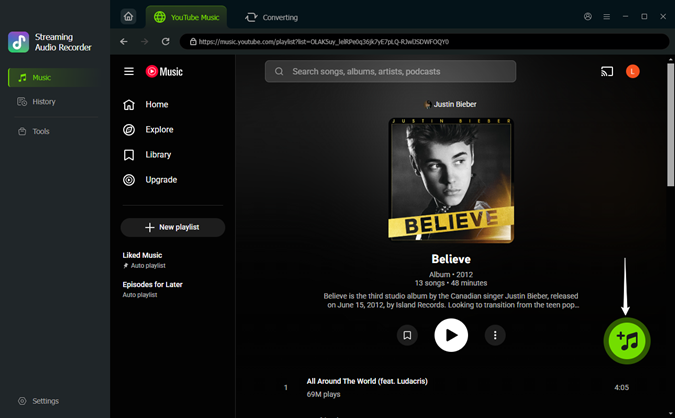 Step 3: Select YouTube Music Songs to Download
Open the song or playlist page and click the green + button. ViWizard will analyze the page and show all available tracks in a pop-up window. Select the songs you want to convert and click Add to list.
 Step 4: Convert YouTube Music to MP3
Click Converting at the top of the window to check the selected songs. Then, click Convert at the bottom-left corner to start the conversion. Once the process is finished, open History from the left sidebar to view your converted files. You can play the songs directly or click the folder icon to open the output location.
Read More : How to Download Music to MP3 Player from YouTube Music
- Download YouTube Music to MP3 at up to 320 kbps
- Supports multiple output formats
- Allows downloading full YouTube Music playlists
- Supports batch downloads
- Works for both YouTube Music Free and Premium users
- Preserves complete ID3 tags
- Offers download speeds of up to 30× faster
- Downloads music from YouTube Music and other streaming services
- Requires software installation
- Available for desktop use only
3.2 Download YouTube Music to MP3 with ViWizard Audio Capture
Unlike online converters, ViWizard Audio Capture works by capturing system audio, which means you can use it with YouTube Music in a browser or desktop app. Besides MP3, it supports other formats such as FLAC, WAV, M4A, and AIFF. It also provides tools to edit recordings, remove unwanted parts, and organize recorded audio files.

An audio recorder that captures any sound on your computer, including YouTube Music, live radio, or game audio. It can split, edit, and save recordings in MP3, WAV, and other formats, keeping high quality and adding track details.
 Step 1: Open ViWizard Audio Capture and Add YouTube Music
Install and launch ViWizard Audio Capture on your computer. Click the + icon to add the browser you use to access YouTube Music or select the YouTube Music app directly. If your browser is not shown in the list, you can drag and drop it into the interface or add it manually.
 Step 2: Adjust Output Settings
Click the Format button in the bottom-left corner to customize the recording settings. Choose your preferred output format, such as MP3, and adjust options like sample rate, bitrate, audio channel, and codec.
 Step 3: Play and Capture YouTube Music Audio
Go to the Capturing section and click Start to open YouTube Music in the selected browser or app. Play the song, album, or playlist you want to save. ViWizard will automatically detect and record the audio while a recording window appears.
 Step 4: Save YouTube Music as MP3
After the recording finishes, return to ViWizard and click Stop. You can edit the recording by clicking the edit icon to trim unwanted parts. Then click Save to export the audio file. Open the History section to view and play your recorded YouTube Music files.
- Supports multiple audio formats
- Customizable audio quality
- Allows editing and trimming of tracks
- Supports batch recording
- Works with any audio from YouTube Music
- Simple recording process
- Requires software installation
- Windows and Mac only
- Real-time recording
- Recording speed depends on playback length
Part 4. How to Convert YouTube Music to MP3 with Online Converters
Online converters are another simple way to convert YouTube Music content to MP3 without installing desktop software. Most online tools work directly in a web browser: you copy a YouTube or YouTube Music link, paste it into the converter, and download the converted audio file.
These tools are usually free and convenient for quick conversions. However, they may come with limitations, such as lower audio quality, limited download options, pop-up ads, or restrictions on playlist conversions. Also, many online converters are designed for YouTube videos rather than YouTube Music, so availability and performance may vary.
Below are three popular online converters that can help you save YouTube content as MP3 files.
4.1 Download YouTube Music to MP3 with Y2Mate
Y2Mate is a popular online converter. You can use it to convert YouTube videos to MP3 files. It works through a browser and does not require additional software installation. You only need to paste a video link, select MP3 as the output format, and download the converted file.
01Open YouTube Music and copy the URL of the song or video you want to convert.
02Visit the Y2Mate website in your browser.
03Paste the copied URL into the search box.
04Choose MP3 as the output format and start the conversion.
05Click the download button to save the MP3 file.
- Easy to use with no software installation
- Supports MP3 conversion
- Works on most browsers
- Bit rates including 64kbps, 128kbps, 192kbps, 256kbps and 320kbps
- May contain ads and pop-ups
- Limited control over audio quality
- Mainly works with individual videos
4.2 Download YouTube Music to MP3 with YTMP3
YTMP3 is another browser-based YouTube converter that focuses on quick MP3 downloads. It provides a simple interface where users can paste a YouTube link and convert it into an audio file within a few clicks.
01Copy the link of the YouTube Music track you want to download.
02Go to the YTMP3 website.
03Paste the YouTube Music link into the input box.
04Click the convert button and wait for the process to finish.
05Click the download option to save the converted audio.

- Simple conversion process
- No account required
- Fast for single-track downloads
- Limited output options
- Not suitable for large playlists
- Audio quality depends on the source video
4.3 Download YouTube Music to MP3 with OnlyMP3
OnlyMP3 is an online YouTube-to-MP3 converter that focuses on extracting audio from YouTube links. It can quickly convert videos into MP3 files without downloading extra programs.
01Open YouTube Music and find the song you want to download.
02Copy the song's URL from the address bar.
03Visit the OnlyMP3 website.
04Paste the link into the input box.
05Click Convert MP3 and wait while the site extracts the audio.
06Once finished, click Download to save the MP3 file to your device.
- Quick and straightforward
- No software installation needed
- Suitable for occasional downloads
- Limited customization settings
- May not support batch downloads
- Depends on website availability

Looking for the best YouTube Music downloader? Follow this post to have a quick review of up to 17 kinds of YouTube Music downloaders.
Part 5. How to Convert YouTube Music to MP3 with Open-Source Tools
If you prefer free and flexible tools, you can choose open-source YouTube to MP3 tools. They provide more control over downloading, audio formats, and customization settings. We recommend yt-dlp. It supports YouTube and many other websites. Combined with FFmpeg, yt-dlp can extract audio from a YouTube video and save it as MP3. The drawback is that this method is not so beginner-friendly.
5.1 Download YouTube Music to MP3 with yt-dlp
yt-dlp lets you download media from YouTube and other supported platforms. With the right commands, it can extract audio from YouTube Music links and convert it into MP3 format. It also supports options for audio quality, playlists, and embedding metadata.
01Download and install yt-dlp and FFmpeg on your computer.
02Activate your terminal or command prompt.
03Enter the extraction command using the audio flag: yt-dlp -x --audio-format mp3 [URL].
04Replace the [URL] with the link you get from the YouTube Music track.
05Hit Enter to download the file as an MP3.
06Wait for the process to complete, then find the converted MP3 file in the output folder.
- Completely free and open-source
- Supports many websites, including YouTube
- Offers advanced customization options
- Can download individual tracks or playlists
- Requires command-line knowledge
- Setup can be complicated for beginners
- Needs additional tools like FFmpeg for MP3 conversion
- Commands may need updates when websites change
Part 6. What Is the Best Way to Download YouTube Music to MP3
Each method for getting YouTube Music to MP3 has its own strengths and is suited for different needs. The table below summarizes the main differences to help you decide which one works best for you:
| Method | Best For | Ease of Use | Output Quality | Batch Download | Pros | Cons |
|---|---|---|---|---|---|---|
| YouTube Audio Library | Free royalty-free music | ⭐⭐⭐⭐⭐ | High | Limited | Official, safe, free MP3 downloads | Cannot download YouTube Music songs |
| ViWizard YouTube Music Converter | Saving YouTube Music songs/playlists | ⭐⭐⭐⭐⭐ | High | ✅ | Supports multiple formats, keeps metadata, easy to use | Requires desktop installation |
| ViWizard Audio Capture | Recording audio from YouTube Music and other sources | ⭐⭐⭐⭐ | High | Limited | Works with various audio sources, customizable settings | Requires real-time playback |
| Y2Mate | Quick online conversions | ⭐⭐⭐⭐⭐ | Medium | ❌ | No installation required, simple process | Ads and limited options |
| YTMP3 | Single-track MP3 downloads | ⭐⭐⭐⭐⭐ | Medium | ❌ | Fast and beginner-friendly | Limited features |
| OnlyMP3 | Occasional downloads | ⭐⭐⭐⭐⭐ | Medium | ❌ | Easy browser-based conversion | Fewer customization options |
| yt-dlp | Advanced users | ⭐⭐⭐ | High | ✅ | Free, powerful, highly customizable | Requires technical knowledge |
Summary
The best method to convert YouTube Music to MP3 depends on what you need. If you only want free music for projects, YouTube Audio Library is a simple option. Online converters are convenient for quick downloads but may have limitations.
If you want to save YouTube Music songs, albums, or playlists as MP3 files with better quality and more settings, desktop tools are a better choice. ViWizard YouTube Music Converter and ViWizard Audio Capture offer more stable performance and flexible audio options, while yt-dlp is suitable for advanced users who prefer command-line tools. Choose the way you like and enjoy your music!
You May Be Interested
7 Best YouTube Audio Rippers to Rip Music from YouTube

Best YouTube to FLAC Converters to Preserve Audio Quality
9 Best YouTube to WAV Converters That Actually Work in 2026 (Free & Paid)
How to Record Music from YouTube Using Audacity

How to Download Music from YouTube to Computer (MP3 & Free Methods)

From new releases to old favorites, Matt Smith is always on the lookout for good music. He follows the latest in digital entertainment and shares songs and media he thinks are worth checking out.

Leave a Comment (0)