


YouTube is one of the largest platforms for discovering music. From official releases and live performances to remixes and podcasts, millions of videos contain audio that listeners may want to save for offline playback. Because of this, you may want to know how to rip music from YouTube.
This is where a YouTube audio ripper becomes useful. These tools allow you to extract the audio track from YouTube videos and convert it into common formats like MP3. Once the audio is saved, you can listen to it on your computer, phone, or music player without needing an internet connection.
In this guide, we will introduce the 7 best YouTube audio rippers that can help you rip YouTube music to MP3 or other audio formats easily. Some tools support lossless quality, some are completely free, and others work on mobile devices. Keep reading to find the YouTube music ripper that best fits your needs.
Part 1. How to Rip Music from YouTube
Unlike some social media apps that provide a direct save button for videos, YouTube does not offer a native feature to download or extract audio files for local storage. This is exactly why a YouTube audio ripper is necessary. These tools record audio from YouTube and convert it into a playable file format on your device.
To keep it simple, there are four main ways to rip music from YouTube:
- Desktop YouTube Music Converters: These are dedicated software programs you can install on your PC or Mac. They let you download audio or music from YouTube Music directly, whether it's single tracks, entire playlists, or albums, all in high-bitrate conversions. Plus, they don't have the stability issues that web browsers do.
- Online YouTube Music Converters: These are web-based services where you just paste the URL of a YouTube video to get an MP3. They're perfect for quick downloads since they require no installation and work on all devices, including smartphones.
- GitHub and Open-Source Downloaders: If you're tech-savvy, check out command-line tools like yt-dlp on GitHub. They're free, super powerful, and the community frequently updates them to get past YouTube's latest blocks.
- Audio Recorders: Instead of downloading files directly, these tools record the internal audio of your computer while the YouTube video plays. This method is a reliable backup that works even when traditional downloaders are blocked or the content you want isn't available with the other tools.
Is it Legal to Rip Music from YouTube?
The legality of ripping audio from YouTube depends on how you plan to use it. We don't recommend extracting audio from music videos that you don't own or that aren't copyright‑free. However, if you're ripping audio only for personal offline listening, it may fall into a legal gray area. To stay on the safe side, it's best to use YouTube audio rippers responsibly and only download content that you have the right to use.
Part 2. Best Desktop YouTube Audio Rippers
Desktop tools usually provide the most reliable way to rip audio from YouTube. They tend to be more stable and come with advanced features like batch downloading, giving you greater control over the output. In this section, we'll dive into two desktop YouTube audio rippers. One focuses on ripping music from YouTube Music, while the other targets audio from YouTube videos. Both tools convert audio into various output formats.
Tool 1: ViWizard YouTube Music Ripper
ViWizard YouTube Music Ripper is a desktop tool that downloads and converts audio directly from YouTube Music. Unlike many free online rippers that only support standard YouTube videos, it works with the full YouTube Music library, including official tracks, albums, playlists, and podcasts.
The software includes a built‑in YouTube Music web player, so you can browse and search the catalog directly in the program. Simply find a song, album, or playlist, add it to the download list, and start the conversion. It even supports batch downloads at up to 30× speed, making it easy to save large playlists or entire albums quickly.
Plus, the exported files retain the original audio quality and all the metadata, like title, artist, album, and cover art. You can export your audio in formats like MP3, FLAC, WAV, AIFF, M4A, and M4B.

Download songs, playlists, albums, and your whole music library from 10 major streaming platforms, including YouTube Music, to MP3, FLAC, WAV, AIFF, M4A, or M4B with original sound quality and full song info and keep your music forever.
How to Rip Music from YouTube Music via ViWizard YTM Ripper
Step 1 Configure Your Output Preferences
Launch the program and navigate to Menu > Preferences > Conversion. Select your preferred format, such as MP3, FLAC, or WAV. For the best listening experience, adjust the bitrate to 320 kbps and set the sample rate to your liking. Choose a destination folder on your computer where you want the final files saved, then click OK to apply your settings.

Step 2 Access the Built-in YouTube Music Player
Return to the main interface and click the YouTube Music icon. This opens the software's internal web player. Sign in to your account using the browser window so the tool can access your personal playlists, albums, and liked songs.
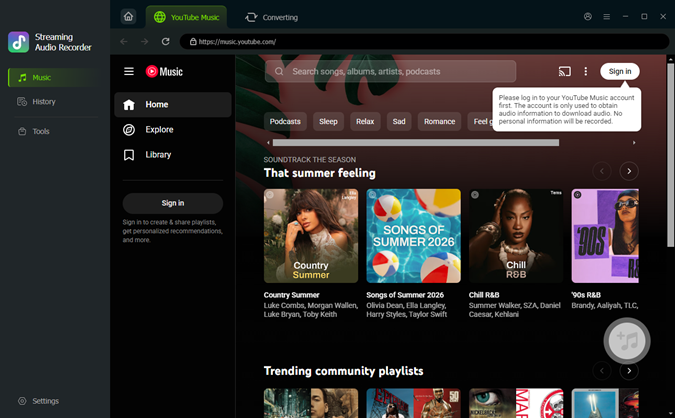
Step 3 Select the Music You Want to Rip
Browse your library or search for the specific songs, albums, or playlists you wish to download. When you find the content you want, click the green Plus (+) button. A pop-up window will appear displaying all the tracks in that selection. You can either pick specific songs or click Select All to download the entire collection. Finally, click Add to List to prepare them for conversion.
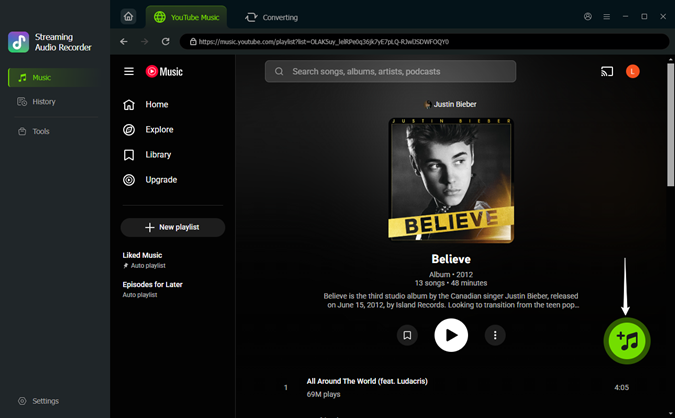
Step 4Start Ripping Music from YouTube Music
Open the conversion list and click Convert. The software will download and convert the selected tracks at high speed. When the process is finished, you can find the MP3 or other audio files in the output folder and play them offline on any device.

Tool 2: ViWizard Audio Capture
ViWizard Audio Capture is a flexible tool that records and extracts audio directly from your computer. Instead of downloading audio from a video link, it captures the sound playing on your system.
It is useful for ripping audio that only exists on YouTube, such as user‑uploaded music, rare recordings, live sessions, or background tracks that are not available on major streaming platforms. The program can detect different audio sources and separate them automatically, allowing it to capture clean audio even when multiple sounds are playing on your computer.
ViWizard Audio Capture also supports up to 16 output formats, including MP3, WAV, FLAC, AAC, and more. This makes the recorded audio easy to use on different devices and media players.

Record audio playing from YouTube, streaming sites, apps, or system sounds and save it in multiple formats like MP3, WAV, and FLAC for easy offline playback.
How to Extract Audio from YouTube Music via ViWizard Audio Capture
Step 1 Launch ViWizard Audio Capture and select the web browser you use to watch YouTube (such as Chrome or Safari) from the list of applications.

Step 2 Click the Format icon to choose the output format for the recorded audio. You can export the captured YouTube audio as MP3, M4A, FLAC, WAV, and other formats. You may also adjust audio quality settings such as bitrate or sample rate if needed.

Step 3 Open YouTube in your browser and play the video that contains the music or audio you want. Click the Start button and ViWizard Audio Capture will automatically begin recording the sound while the video is playing.

Step 4 Once the audio is finished, click the Stop button. You can use the built-in Edit tool to trim away unwanted silence or ads and customize the ID3 tags. Click Save to export the final file to your computer for permanent offline use.

Part 3. Best Free Online YouTube Audio Rippers
When you want to extract audio from YouTube without the hassle of installing software, online converters are your best bet. These browser-based tools work on any platform, so you can rip music from YouTube on Windows, Mac, or even mobile devices. Sure, they might not have the advanced batch-processing features of desktop software, but they shine when it comes to quick, one-time conversions.
Tool 1. TubeRipper
TubeRipper is a free web tool that lets you rip audio from YouTube, TikTok, Vimeo, and more sites. It can download both video and audio, so you have the flexibility to grab the full MP4 video file when you need it.
With TubeRipper, you can easily convert YouTube videos into audio formats like MP3 (up to 320kbps) or WAV. Just remember, it only supports one video URL at a time, so you'll need to copy and paste the link for each video you want to rip. After conversion, you may need to check the ID3 tags, as the metadata may need some adjustment.
How to Rip Audio from YouTube Using TubeRipper
Step 1 Go to the TubeRipper website in your browser.
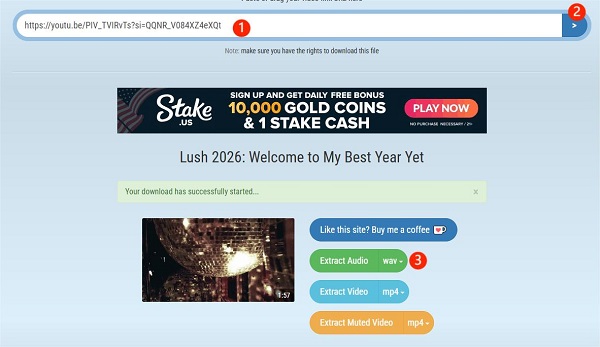
Step 2 Copy the URL of the YouTube video you want to extract audio from. Paste the link into the input box on the website.
Step 3 click the > button.
Step 4 Select your audio format from the Extract Audio dropdown menu.
Step 5 Click on Extract Audio to download the audio from YouTube.
- Pros
- Supports both video and audio downloads
- No software installation and registration required
- Supports multiple platforms
- Cons
- Frequent pop-up ads
- No batch downloading
- Metadata is not always preserved
Tool 2. Loader.to
Loader.to is another well known online YouTube music ripper that allows users to convert YouTube videos into audio files. It stands out from many competitors by supporting a range of formats like MP3, FLAC, WAV, and M4A. While it claims to deliver 320kbps quality, users have reported mixed results. Plus, it can handle videos up to 2 hours long, making it a solid option for podcasts, lengthy DJ sets, or lectures.
How to Rip Audio from YouTube Using Loader.to
Step 1 Open the Loader.to website.
Step 2 Copy the link of the YouTube video. Paste the link into the conversion box.
Step 3 Select MP3 or another audio format from the format menu.
Step 4 Click Download, wait for the progress bar, and then click the final download button.

- Pros
- Supports lossless WAV/FLAC
- Handles long-duration videos
- Cons
- Conversion speed can vary
- Metadata may not be fully preserved
- No support for playlist and batch downloading
Tool 3. YTMP3
YTMP3 is perhaps the most iconic YouTube music ripper because it's super easy to use and converts quickly. This online tool mainly focuses on converting YouTube videos into MP3 files. You usually get 192kbps MP3s, but it doesn't keep the ID3 tags. It also lets you download videos in MP4 format using the URL. In our opinion, it's perfect for casual ripping or snagging audio from short YouTube videos.
How to Rip Audio from YouTube Using YTMP3
Step 1 Visit the YTMP3 website.
Step 2 Copy the YouTube video link you want to convert. Paste the link into the search box.
Step 3 Select MP3 as the output format.
Step 4 Click Convert and download the audio file once it is ready.

- Pros
- Very simple and fast conversion process
- Works on desktop and mobile browsers
- No registration required
- Cons
- Only for MP3/MP4 output
- Max video length is usually 90 minute
- No support for batch downloads or playlists
- Virtually no support for ID3 tags or album covers
Tool 4. CnvMP3
CnvMP3 positions itself as a more professional online tool. It rips audio not just from YouTube, but also from social media platforms like Reddit, Instagram, Facebook, X, and more. Even though it's free, it offers some advanced desktop features, like customizable bitrate from 96kbps to 320kbps. Just keep in mind that it only supports conversion to MP3 for audio.
How to Rip Audio from YouTube Using CnvMP3
Step 1 Open the CnvMP3 website.
Step 2 Copy the YouTube video link you want to convert. Paste the link into the converter field.
Step 3 Select MP3 as the output format. Choose the bitrate from the dropdown menu.
Step 4 Click Convert and download the file when the process finishes.

- Pros
- Quick and simple interface
- No ads
- Customizable bitrate options
- Supports videos from most social media platforms
- Cons
- Metadata preservation is minimal
- Only supports MP3 for audio
- No support for batch downloads or playlists
Tool 5. EzMP3
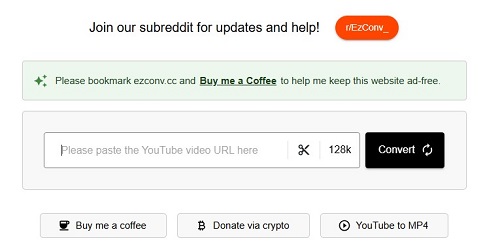
EZMP3 makes it super easy to rip music from YouTube to MP3 right on your mobile. Its lightweight design is perfect for extracting audio on the go. You can set specific start and end points for your audio files, which is awesome for making ringtones or custom samples. Plus, you can pick your MP3 quality from 64kbps, 128kbps, 192kbps, 256kbps, and 320kbps.
How to Rip Audio from YouTube Using EzMP3
Step 1 Go to the EzMP3 website.
Step 2 Copy the YouTube video URL. Paste the link into the converter box.
Step 3 Click the scissor icon to set the start and end times if you only want part of the audio.
Step 4 Choose the audio quality and click Save.
Step 5 Click Convert.
- Pros
- Very easy to use
- Less ads
- Works perfect on mobile devices
- Includes a useful audio trimming tool
- Cons
- Lacks support for lossless formats like FLAC
- Does not guarantee ID3 metadata accuracy
- Only for MP3
- No batch downloads
Part 4. FAQs About Ripping Music from YouTube
Are there mobile apps to rip music from YouTube?
Yes, but they are rarely found on the Apple App Store or Google Play Store due to copyright policies. Android users often turn to open-source APKs like NewPipe or Seal, which allow you to extract audio from YouTube directly on your phone. iPhone users typically rely on browser-based tools like EzMP3 to download files to their Files app.
How can I safely download YouTube audio without viruses?
When you want to download or rip audio from YouTube safely, stick with trusted tools like ViWizard YouTube Music Ripper. Stay away from shady ads or fake download buttons on ripping sites. If you're still worried about the downloads, just scan the files with antivirus software.
Can I rip entire playlists from YouTube?
Yes, but this feature is usually reserved for desktop YouTube audio rippers like ViWizard YouTube Music Ripper. With ViWizard, you can easily browse for the music you want to rip using the built-in YTM web player. Just add all the tracks from your playlist and hit convert for a quick bulk conversion. This approach saves you hours of manual work and keeps the metadata for the entire album or curated list neat and organized.
Can I rip audio from YouTube Shorts?
Absolutely. Since Shorts are technically just short-form YouTube videos, any YouTube audio ripper that supports standard URLs will work. Simply copy the Share link from the Short and paste it into a tool like TubeRipper or CnvMP3 to save the audio.
Final Thoughts
Picking the right YouTube audio ripper really depends on what you value most: speed, quality, or convenience. If you are a casual listener looking to grab a single track, free online audio rippers like YTMP3 or TubeRipper offer the fastest path to an offline file without any installations.
However, for those building a high-quality music library, desktop software is the clear winner. Tools like ViWizard YouTube Music Ripper offer the stability, 320kbps quality, and batch download options that online tools just can't compete with. No matter which method you pick, always keep copyright in mind and use these tools for your personal offline listening.
You May Be Interested
9 Best YouTube to M4A Converters Free Online for 2026

Best YouTube to FLAC Converters to Preserve Audio Quality
9 Best YouTube to WAV Converters That Actually Work in 2026 (Free & Paid)
How to Record Music from YouTube Using Audacity

How to Download Music from YouTube to Computer (MP3 & Free Methods)
How to Download a YouTube Music Playlist to PC and Phone

From new releases to old favorites, Matt Smith is always on the lookout for good music. He follows the latest in digital entertainment and shares songs and media he thinks are worth checking out.

Leave a Comment (0)