


YTMP3 Converter has become one of the most popular tools for turning YouTube videos into MP3 files. Millions of users rely on it to quickly download music, podcasts, and other audio content. But with its free service, ads, and unofficial status, many people wonder: is YTMP3 safe to use?
In this article, we'll take a close look at what YTMP3 is, its key features, pros and cons, and how to use it online or via browser add-ons. We'll also explore safer alternatives that let you download YouTube to MP3 without the risks. By the end, you'll know exactly how to enjoy your favorite YouTube content securely and efficiently.
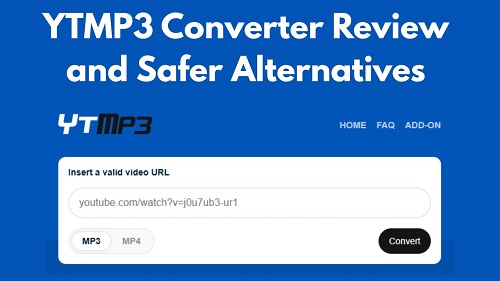
Part 1. What Is YTMP3 Converter?

YTMP3 Converter is a long-standing, web-based tool that lets you extract audio from YouTube videos and save it as MP3 or MP4 files. What makes it popular is its simplicity: just paste a YouTube link into the site, or use the YTMP3 add-on for Firefox or Opera, choose your format, and download the converted file directly to your device. Another big plus is accessibility: it works on almost any device like Windows, macOS, Android, or iOS, as long as you have a web browser and an internet connection.
Current Working YTMP3 Site Addresses:
Because of frequent domain shutdowns due to copyright and DMCA actions, YTMP3's official site often changes. The domains that are currently working include:
- ytmp3.cc (the most well-known and widely used)
- ytmp3.as
- ytmp3.ai
- ytmp3.nu
- ytmp3.plus
- ytmp3.mobi
If one of these is down, you can either try another from the list or simply search for "YTMP3" in your search engine. Usually, the official site will redirect you to a working version.
Key Features of YTMP3 Converter:
- No installation required: Works entirely in web browsers on PCs, tablets, and smartphones.
- MP3 and MP4 support: Convert videos to either audio (MP3) or video (MP4).
- Free to use: No subscriptions, accounts, or payments needed.
- Unlimited conversions: Convert as many videos as you like, unlike some paid tools.
- Browser add-ons: Firefox, Edge, Opera YTMP3 add-ons let you add the YouTube video URL to YTMP3 directly from the YouTube page.
- Pros
- Easy to use
- Fast conversions
- Mobile-friendly
- Works across devices
- Completely free
- Cons
- Frequent redirects and intrusive ads
- Only supports MP3 and MP4
- No option to select quality
- Domains can be unstable
- Videos longer than 60–90 minutes often can't be converted
- No batch or playlist downloads
Part 2. How to Use YTMP3 YouTube to MP3 Converter Online
YTMP3 makes it simple to convert YouTube videos into MP3 files. You can do this directly on the website or by using the YTMP3 browser extension. Here's how:
2.1 How to Use YTMP3 YouTube to MP3 Converter Online

Step 1Copy the URL: Go to YouTube or YouTube Music and find the video or track you want. Copy the link from the browser's address bar or the "Share" button.
Step 2Visit YTMP3: Open a working YTMP3 site, like YTMP3.cc.
Step 3Paste and Choose Format: Paste your link into the conversion box and make sure the format is set to MP3.
Step 4Convert: Hit the Convert button. The server will process the video and extract the audio.
Step 5Download: When the conversion is finished, a Download button will appear. Click it to save the MP3 to your device.
Note: If any new tabs pop up after clicking download, just close them, they're usually ads.
2.2 How to Use YTMP3 Converter via Browser Add-on
If you convert videos often, the browser add-on can save time by putting a Convert button directly on YouTube pages. Currently, the add-on works with Firefox, Edge, and Opera. Here's how to use it on Firefox:
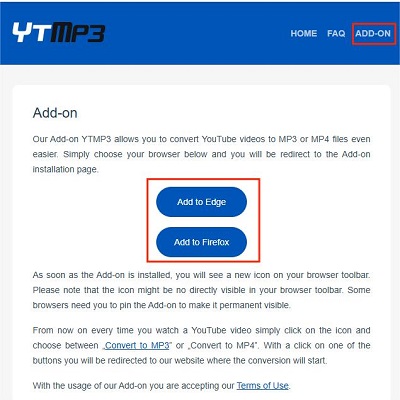
Step 1Install the Add-on: Go to the YTMP3 page, click the ADD-ON tab, and select Add to Firefox. Confirm installation in the Firefox Add-ons store.
Step 2Open YouTube: Navigate to any video or track on YouTube or YouTube Music.
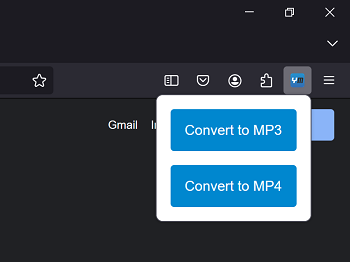
Step 3Start Conversion: Click the extension icon.
Step 4Select Format: A small menu will appear, choose Convert to MP3. This sends the video URL to YTMP3, which automatically starts processing it.
Step 5Download: Once the conversion is complete, click Download to save the MP3 file to your device.
Using the add-on streamlines the process, so you don't have to switch back and forth between tabs every time.
Part 3. Is YTMP3 Safe to Use?
While YTMP3 still works, it is widely considered unsafe by cybersecurity experts in 2025. The website's core code may not be inherently malicious, but the servers hosting it and the advertising networks it relies on are often used to deliver harmful content.
The Main YTMP3 Security Risks
If you choose to use YTMP3, you may encounter three specific types of threats:
- Malicious Redirects: Clicking the Download button can open a sponsored tab. Sometimes this leads to scareware pages, though most of the time it's just ads.
- PUPs (Potentially Unwanted Programs): The MP3 you download from YTMP3 may be bundled with a hidden installer. Always check the file extension to ensure it's .mp3 or the format you selected before opening it.
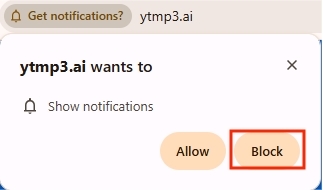
- Push Notification Scams: After clicking the Convert button, YTMP3 may ask for permission to "Show Notifications." If granted, it can send spam alerts directly to your desktop or phone, even when your browser is closed.
How to Use YTMP3 Safely (If You Must)
If you decide to proceed, it's essential to have some "digital armor" in place:
- Use a robust ad-blocker: Tools like uBlock Origin block most of the invisible "click layers" that trigger redirects.
- Never enable notifications: Always click Block if the site asks to send notifications.
- Check file extensions: Make sure the downloaded file ends with .mp3 (or your chosen format). If it ends with .exe, .apk, or anything else, delete it immediately without opening it.
- Use Incognito/Private mode: Running YTMP3 in an Incognito or Private window helps prevent persistent tracking cookies from sticking to your browser.
Part 4. Safer YouTube to MP3 Alternatives to YTMP3
That said, YTMP3 is not always dangerous. In many cases, it works fine. We tested it with around 10 downloads and did not run into any obvious issues. Still, if you want a safer, more reliable way to download YouTube music as MP3 without worrying about ads, redirects, or security risks, this part is for you.
4.1 Reliable Software Alternatives to YTMP3
The most reliable option, in our opinion, is ViWizard YouTube Music Converter. Why? Because it actually avoids the risks that come with many free online tools and gives you many premium features. With ViWizard, you can:
- ✔️ Download tracks, playlists, albums, and podcasts from YouTube Music
- ✔️ Save music in MP3, FLAC, WAV, M4A, M4B, and AIFF formats
- ✔️ Choose your audio quality, up to lossless
- ✔️ Download music in batches at up to 30x faster speed
- ✔️ Download your entire music library with one click
- ✔️ Use the built-in YouTube Music player to browse and play music
- ✔️ Keep full metadata tags like title, artist, and album
- ✔️ Use a clean, safe, and ad-free program
ViWizard also supports music downloads from other 9 platforms, including Spotify, Apple Music, Amazon Music, Tidal, Deezer, Pandora, SoundCloud, Qobuz, and LINE MUSIC. That is why it is a better option than tools like Loader.to if your main goal is downloading music rather than videos.

Download songs, playlists, albums, and your whole music library from 10 major streaming platforms, including YouTube Music, to MP3, FLAC, WAV, AIFF, M4A, or M4B with original sound quality and full song info and keep your music forever.
Step 1 Launch ViWizard and open Preferences from the menu. Under the Conversion section, choose MP3 or another output format. You can fine-tune settings like bitrate, sample rate, and audio channels if needed. Set your output location and save the changes.

Step 2 Return to the main screen and scroll down to find the YouTube Music icon. Click it to open the built-in player, then sign in to your account to access your music library.

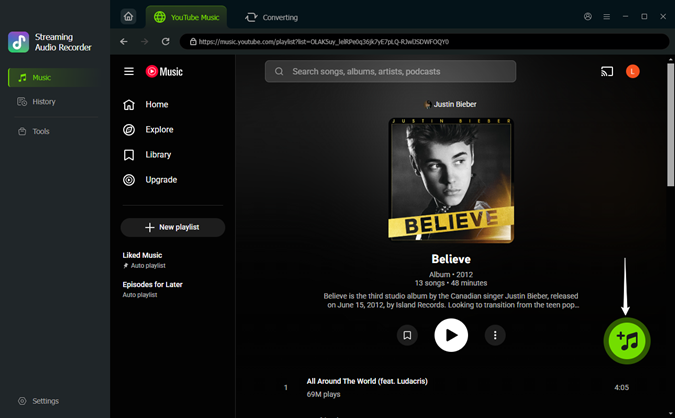
Step 3 Browse or search for the songs, playlists, albums, or podcasts you want to download. When you find what you need, click the green + button to add them.
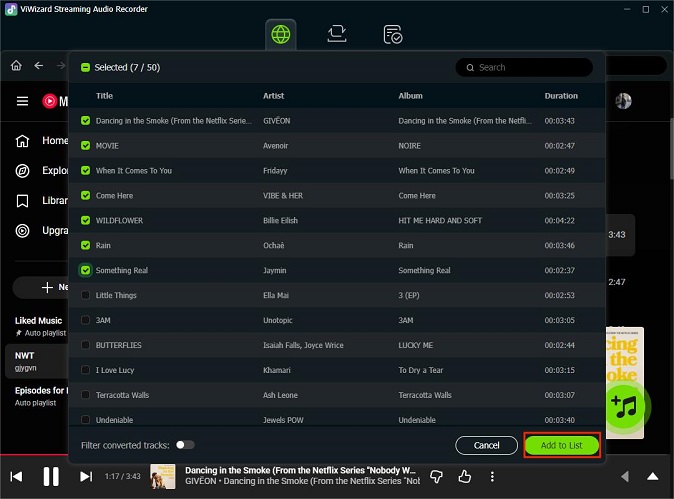
Step 4 A selection window will appear. Choose all tracks or only specific ones, then confirm by clicking Add to List.
Step 5 Open the conversion queue and click Convert to start downloading. When the process finishes, use the folder icon next to any track to locate your files. From there, you can play them locally or move them to other devices.

4.2 Free Online YTMP3 Alternatives
If you prefer not to install software, there are 4 free online tools that work similarly to YTMP3. They are generally cleaner, faster, and offer features that the "old-school" YTMP3 simply doesn't have.
| Tool | Supported Sources | Standout Features | Best For | Why It's Better Than YTMP3 | Link |
|---|---|---|---|---|---|
| Y2Mate | YouTube, Facebook, TikTok, Instagram, Dailymotion | Multiple output formats, stable conversions, broader platform support | Users who download from multiple platforms | Offers higher bitrates and handles longer videos more reliably | https://y2mate.es |
| OnlyMP3 | YouTube | Save to Dropbox integration | Mobile users and cloud storage | Fewer redirects | https://onlymp3.to |
| CnvMP3 | YouTube, TikTok, Reddit, Instagram, Facebook, Twitch, X | Fast conversion, lightweight site, minimal steps | Grabbing audio from social media clips | Works with dozens of sites; no ads | https://cnvmp3.com |
| EzMP3 | YouTube | Built-in Audio Trimmer | Making ringtones or custom clips | Cut out intros/outros before downloading, saving time | https://ezmp3.co |

Looking for the best YouTube Music downloader? Follow this post to have a quick review of up to 17 kinds of YouTube Music downloaders.
Part 5. FAQs about YTMP3
Is YTMP3 legal?
It's a bit of a gray area. It all depends on what you download. Converting your own videos or public-domain content is generally fine, but downloading copyrighted music or videos without permission is illegal in most countries.
Is YTMP3 down?
YTMP3 itself usually isn't down, but it does change domains often because of legal pressure. If you can't access the site, try one of its other working addresses, such as ytmp3.as, ytmp3.ai, ytmp3.nu, or ytmp3.plus.
Why is YTMP3 not working?
If the site opens but won't convert your video, there are a few common reasons:
- YouTube updates: YouTube frequently updates its code to block converter sites. When that happens, YTMP3 may stop working until it's updated.
- Video length limits: Many versions of YTMP3 fail when the video is longer than about 90 minutes.
- Browser extensions: Ad blockers or security extensions can sometimes prevent the site's scripts from running properly.
Is there a YTMP3 app?
No. There is no official YTMP3 app available on the Apple App Store or the Google Play Store.
Final Thoughts
YTMP3 is a simple and convenient tool for converting YouTube videos to MP3 or MP4, but it comes with security and reliability risks. Free online alternatives offer safer options, though they also have limitations. For frequent or high-quality downloads, dedicated software like ViWizard YouTube Music Converter is a more reliable and secure choice. Always consider legality and safety before downloading any content.
You May Be Interested
EzMP3 Review and the Best Alternatives for YouTube to MP3
Loader.to Tested: Review and Safer YouTube MP3 Downloaders
CnvMP3 Review: Is It Safe? Fix CnvMP3 Not Working & Best Alternatives
17 Best Free/Paid YouTube Music Downloaders in 2026

How to Download Music from YouTube to Computer (MP3 & Free Methods)


Nick Orin, a software developer at ViWizard, focuses on providing solutions for software-related challenges, including reviews, troubleshooting, and optimization tips.

Leave a Comment (0)