


Found a YouTube track you want to save as an MP3? That's where online converters like Loader.to come in. It lets you paste a video link, choose an output format, and convert content from YouTube and other platforms right in your browser. No desktop software to install, and it supports formats including MP3, MP4, and WEBM. On paper, it sounds pretty convenient.
But does Loader.to work as smoothly as it promises? Slow conversions, failed downloads, audio quality, and intrusive ads can turn a quick task into a frustrating one. In this review, we'll put Loader.to to the test, examine its safety and limitations, and compare 4 alternatives to help you decide whether it deserves a spot in your bookmarks. Let's dive in.
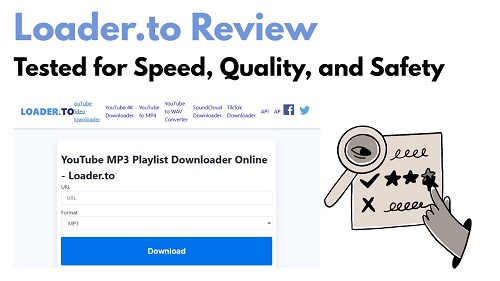
Part 1. What Is Loader.to?
Loader.to is a free online tool for downloading YouTube videos as MP3 audio or converting online videos into other media formats. You paste a video link, select an output format, and start the conversion in your browser. It also supports links from platforms such as Vimeo, SoundCloud, Facebook, and TikTok. With no desktop software to install or account required for basic use, Loader.to is mainly aimed at people who want a quick way to save online audio or video files.
The process sounds simple, but the experience can be less predictable. Ads and redirects may interrupt downloads, conversions can fail or time out, and the available audio quality or video resolution depends on the source and conversion options. If you're considering Loader.to for regular YouTube-to-MP3 downloads, here's a closer look at its main features, advantages, and drawbacks.
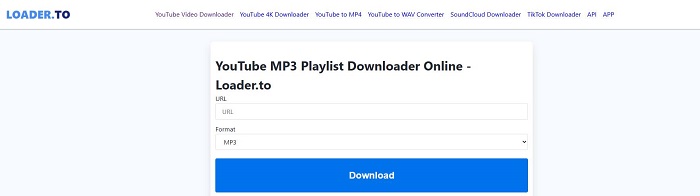
- Free online conversion: Convert supported media links without paying for basic use.
- YouTube-to-MP3 conversion: Extract audio from supported YouTube videos and save it as an MP3 file.
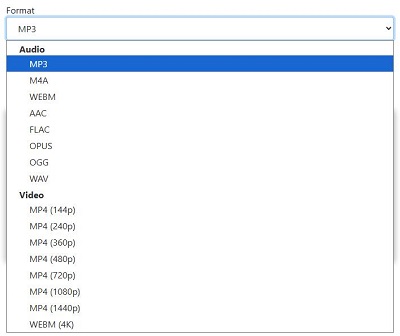
- Multiple output formats: Supports audio formats such as MP3, M4A, FLAC, WAV, AAC, OPUS, and OGG, as well as video formats such as MP4 and WEBM.
- Support for multiple platforms: Accepts supported links from services such as Vimeo, SoundCloud, Facebook, and TikTok.
- Browser-based access: Convert files online without installing a desktop program or creating an account for basic use.
- Video resolution options: Offers video quality options that may range from 144p to 1440p, depending on the source and available settings.
- Playlist support: Lets you download entire YouTube playlists at once.
- Unlimited downloads: No strict limits on downloads.
Read More : How to Convert YouTube Videos to MP3 Safely [PC & Mobile]
- Free to use
- Provides true 320kbps MP3s and Ultra-HD video options
- No account or payment required
- Supports 8 different sites
- Multi-language interface
- Preserves metadata information
- Website contains ads and redirects
- Download speed can be unstable
- User interface is not very intuitive
- Batch playlist downloads require software installation
- The source may limit output quality and resolution
Part 2. How to Use Loader.to to Convert YouTube to MP3
You don't need a paid subscription or desktop software to get started with Loader.to. All you need is a supported YouTube video link and a web browser. The basic process is simple: copy the video's URL, open Loader.to, paste the link, select MP3 as the output format, and start the conversion. Once processing finishes, you can download the resulting audio file to your device. However, options and success rates may vary, and ads or redirects can sometimes interrupt the process.
Use Loader.to to Convert YouTube to MP3
01Go to YouTube and find the video you want. Copy the URL from your browser's address bar.
02Open your browser and go to https://en.loader.to/.
03Paste the YouTube URL into the box labeled "URL."
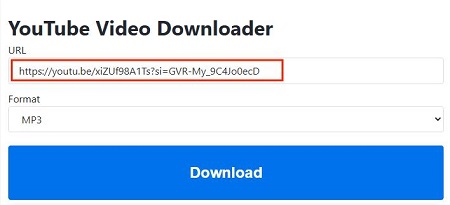
04Use the "Format" dropdown menu to choose MP3. You can also pick another audio format if you prefer.
05Click the blue Download button to begin processing the video. This step may open a new tab for a redirect; just close it and stay on the Loader.to page.

06When the conversion is done, a second "Download" button will appear. Click it to save the MP3 to your device. Be ready to close any pop-up tabs that appear during this step.
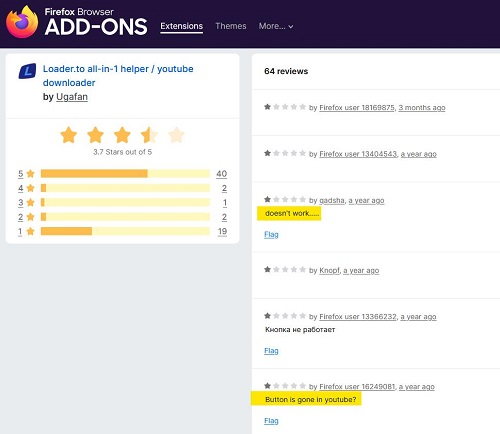
Important: The Loader.to browser extension no longer appears to work reliably. It promises to add a download button below YouTube videos, but the Firefox version reportedly fails to generate buttons, while the Chrome and Opera download links return 404 errors.
For now, stick with the Loader.to website or consider an alternative like ViWizard YouTube Music Converter. It supports downloading tracks, playlists, albums, and podcasts from YouTube and nine other music platforms, with batch downloading to save time.

Need YouTube Music for offline listening? ViWizard YouTube Music Converter helps YouTube Music users save songs, playlists, albums, and artists with convenient music conversion. Start converting and enjoy your music beyond the app.
Part 3. Loader.to Performance Test Results
Loader.to can convert short YouTube videos to MP3 in under a minute, so it's handy when you only need one or two tracks. But speed isn't the whole story. Conversion times can vary, and server errors or failed downloads may interrupt the process. We looked at its main performance factors to see where Loader.to works well and where it falls short.
01 Conversion and Download Speed
The platform is fast. In our tests:
- Short Tracks: Music videos under 5 minutes took about 15–30 seconds to convert and prepare for download.
- Long-form Content: Videos around 1 hour finished in under 2 minutes.
The speed stayed consistent across multiple tests, making Loader.to one of the quicker web-based converters available.
02 MP3 Audio Quality
Loader.to advertises MP3 output at up to 320 kbps, but that doesn't guarantee better sound. The result depends on the quality of the original YouTube audio and how Loader.to processes it. Some users have also reported audio distortion or synchronization problems, so it's worth checking the downloaded file rather than assuming the conversion went perfectly.
03 The Playlist Download "Catch"
Loader.to heavily markets its ability to download entire YouTube playlists, but our tests showed this feature is highly misleading:
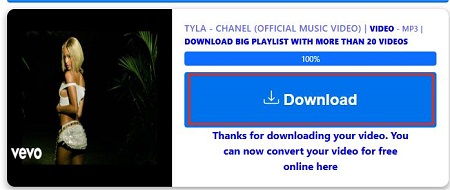
If you paste a playlist link into the main converter, it usually only processes the first video. Above the download button, there's a line that says, "Download big playlist with more than 20 videos."

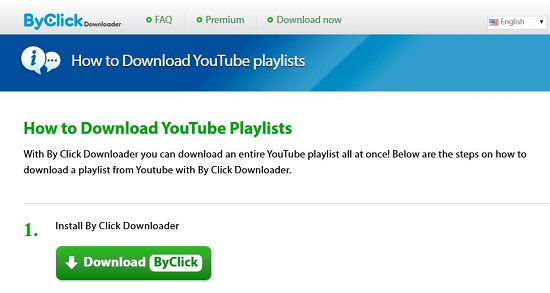
Clicking this link redirects you to a third-party tool named ByClick, which requires a software installation and a paid subscription. We do not recommend installing this software. Redirected installers from unknown sites can contain malware or adware. Essentially, Loader.to cannot download full playlists directly on its website.
04 Incomplete ID3 Metadata
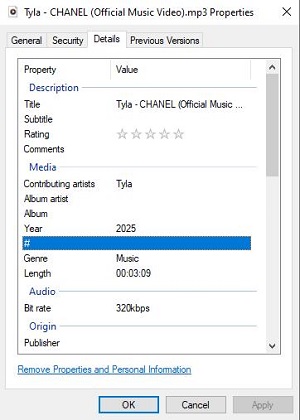
If you care about keeping your music library organized, Loader.to can be disappointing. The downloaded MP3s often lack key ID3 tags such as Album Title and Album Artist. Usually, the metadata only includes the video title and a generic thumbnail.
05 Intrusive Ads and Redirect Risks
The biggest drawback is the aggressive advertising. Every click, whether on the "Download" button or the search bar, can trigger pop-up redirects to external sites, many of which look suspicious. To stay safe, you need to be vigilant: close any new tabs immediately and avoid clicking on "Software Update" or "System Alert" messages that appear during these redirects.
Part 4. Top 4 Loader.to Alternatives for Converting YouTube to MP3
If Loader.to keeps throwing errors, try one of these four alternatives. ViWizard YouTube Music Converter is useful for batch-converting songs and playlists to MP3MP3, FLAC, and other formats. YouTube Premium supports offline listening in its app, while CnvMP3 works for occasional online conversions. If you're comfortable with command-line tools, yt-dlp is another option. Let's take a closer look.
Tool 1. ViWizard YouTube Music Converter
If you regularly save music and want more control over the output files, ViWizard YouTube Music Converter is a desktop alternative to consider. Unlike a browser-based converter, it includes a built-in YouTube Music web player, so you can browse music and add tracks without repeatedly copying video links from another browser. It supports MP3, FLAC, WAV, AIFF, M4A, and M4B, with options for audio quality, ID3 tags, and cover art. Batch conversion is also available, which means you can handle multiple tracks, albums, or playlists. Here is how to use ViWizard.
Key Features of ViWizard YouTube Music Converter
Free Trial Free Trial* Security verified. 5, 481,347 people have downloaded it.
- Convert YouTube Music songs, albums, playlists, and artists
- Export YouTube Music in 6 formats for different devices and players
- Download complete playlists without saving tracks individually
- Preserve song information when creating music collections
- Batch download YouTube Music playlists and large libraries
 Step 1: Customize the Output Settings
Open ViWizard YouTube Music Converter on your computer. Click Settings in the bottom-left corner and select Conversion. Choose an output format, such as MP3, FLAC, WAV, AIFF, M4A, or M4B. You can also adjust the bitrate, sample rate, output folder, and file organization settings.
 Step 2: Open YouTube Music in ViWizard
Click Music in the left sidebar and select YouTube Music. The built-in YouTube Music web player will open. Sign in to your account, then find the songs, albums, playlists, or artists you want to save.
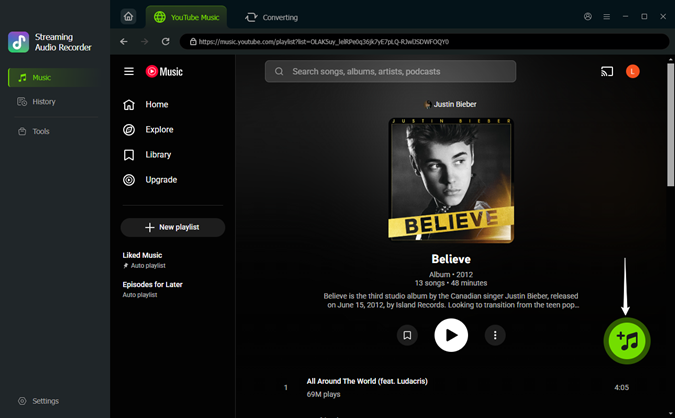 Step 3: Add the Songs You Want to Convert
Open a song or playlist and click the green + button. ViWizard will analyze the page and display the available tracks. Select the songs you want and click Add to List.
 Step 4: Convert and Find Your MP3 Files
Click Converting at the top to review your selected songs, then click Convert in the bottom-left corner to start. Once the conversion finishes, open History in the left sidebar and click the folder icon to locate your converted files. You can then transfer them to a compatible MP3 player or another device for offline playback
Tool 2. YouTube Premium
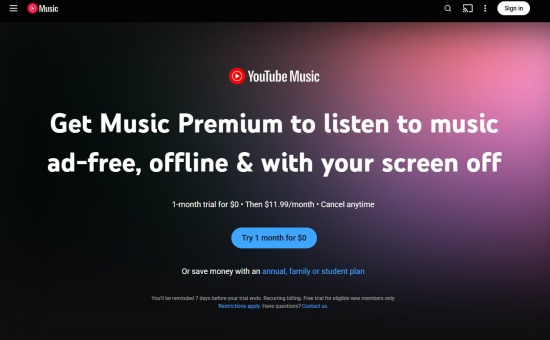
If your main goal is listening offline rather than building a separate MP3 library, YouTube Premium is the official option to consider. It supports offline downloads through the YouTube app and offers ad-free playback across supported YouTube experiences. YouTube Music Premium also lets you download music for offline listening. The important distinction is that these downloads stay within YouTube's supported apps and are not standalone MP3 files you can freely move to other players.
01Subscribe to YouTube Premium or the applicable YouTube Music Premium plan.
02Open the YouTube or YouTube Music app and sign in to your account.
03Find the video or song you want to listen to offline.
04Tap Download if the option is available for that content and device.
05Open the Downloads section in the app to play your saved content without an internet connection.
Read More : Where Does YouTube Music Download to? Find Here!
Tool 3. CnvMP3

If you prefer not to install desktop software, CnvMP3 offers another browser-based way to convert online videos. It supports MP3 audio downloads at up to 320 kbps, and MP4 video downloads at up to 1080p, depending on the source. Besides YouTube, it accepts links from platforms such as TikTok, Instagram, Facebook, Reddit, and Twitch. There's also an Android app with extras like an offline music player, an equalizer, and a sleep timer.
01Find the YouTube video you want and copy its URL.
02Go to cnvmp3.com and paste the link into the input field.
03Select MP3 and pick your preferred bitrate, like 320kbps for the best sound.

04Click Convert. When the progress bar finishes, the file will download automatically to your device.
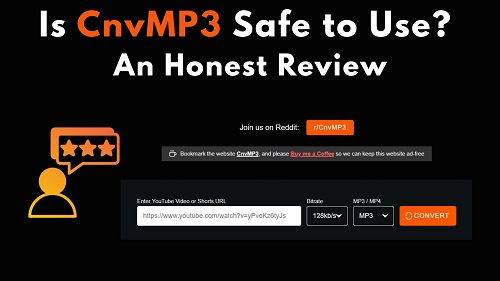
An honest CnvMP3 review covering safety, output quality, common problems, and the best alternatives for downloading YouTube music.
Tool 4. yt-dlp

For users comfortable with command-line tools, yt-dlp is a free, open-source media downloader. It supports many websites and provides more control over format selection, output templates, metadata, and batch processing than most basic online converters. Audio extraction typically requires FFmpeg to be installed as well. Unlike Loader.to's point-and-click interface, yt-dlp takes some setup and command-line experience, but it can be a flexible choice for repeat tasks.
01Install yt-dlp using the instructions for your operating system on its official GitHub page.
02Install FFmpeg and make sure it is available to yt-dlp. FFmpeg is needed for audio extraction and MP3 conversion.
03Copy the video URL you want to process.
04Open a terminal or command prompt and run the following command:

Replace VIDEO_URL with the actual URL of the video you are authorized to download.
05Check the output folder for the converted MP3 file. You can consult yt-dlp's documentation for additional options, including output locations and playlist handling.
Part 5. Loader.to vs. Alternatives: Comparison Table
Still not sure which tool to pick? The biggest differences come down to output formats, download methods, and how much control you get. Here's a quick comparison of Loader.to and its four alternatives.
| Feature | Loader.to | ViWizard YouTube Music Converter | YouTube Premium | CnvMP3 | yt-dlp |
|---|---|---|---|---|---|
| Tool Type | Online converter | Desktop software | Subscription service and mobile/desktop apps | Online converter | Command-line tool |
| Price | Free | Paid; trial available | Paid subscription | Free | Free |
| Formats | MP3, M4A, FLAC, WAV, MP4, WEBM, etc. | MP3, FLAC, WAV, AIFF, M4A, M4B | In-app downloads | MP3, MP4 | MP3 and other formats |
| Output Quality Options | Up to 320 kbps | Up to 320 kbps | Up to 256 kbps (audio, depending on service and settings) | Up to 320 kbps | Depends on source and selected settings |
| ID3 Tags | ⚠️ | ✅ | ❌ | ⚠️ | ✅ |
| Batch downloads | ⚠️ | ✅ | ❌ | ❌ | ✅ |
| Safety | ⭐⭐☆☆☆ | ⭐⭐⭐⭐☆ | ⭐⭐⭐⭐⭐ | ⭐⭐⭐☆☆ | ⭐⭐⭐⭐☆ |
| Ease of use | ⭐⭐⭐⭐☆ | ⭐⭐⭐⭐☆ | ⭐⭐⭐⭐⭐ | ⭐⭐⭐⭐⭐ | ⭐⭐☆☆☆ |
| Best for | Occasional conversions | Batch music conversion | Official offline listening | Quick online conversions | Advanced users |
Part 6. FAQs about Loader.to
Is Loader.to safe to use?
Loader.to carries some risks, mainly from ads, pop-ups, redirects, and potentially misleading download buttons. That doesn't automatically mean every file downloaded through the site is unsafe, but you shouldn't assume files are safe just because the site provides them. Keep your security software enabled, avoid unfamiliar installers or apps, and don't grant unnecessary browser permissions.
Why can't I download a full playlist on Loader.to?
Playlist downloads may not work consistently on Loader.to. Depending on the current version of the site, the source link, and its processing limits, it may handle only some videos or fail to complete a large playlist. If the site asks you to install an external program to download more videos, check the installer and its source carefully before proceeding. If playlist downloads keep failing, consider an alternative with batch-download support.
Why is the Loader.to "Download" button not working?
This usually happens for one of two reasons: your ad-blocker might be blocking the site's scripts, or the server is overloaded. If the button doesn't work, try refreshing the page or clearing your browser cache. Be cautious, though, sometimes the "Download" button is actually a fake ad designed to redirect you elsewhere.
Can I use Loader.to on my iPhone or Android?
Yes. As a web-based service, Loader.to works in Safari or Chrome on mobile devices. On Android, downloads go straight to the "Downloads" folder. On iPhone, you'll need to save the file to the "Files" app after downloading.
Conclusion
Loader.to is worth a try for quick YouTube-to-MP3 conversions, but its ads, playlist limitations, and missing music tags can get in the way. If you often download music and want a more reliable way to convert playlists and organize your tracks, ViWizard YouTube Music Converter is worth a look. Whichever option you choose, get your favorite songs ready, sit back, and enjoy the music!
You May Be Interested


Nick Orin often turns to tech forums to see what apps people are talking about. He likes testing different software, comparing features, and finding out which tools are worth a try.

Leave a Comment (0)