


CnvMP3 is one of those tools you usually find when you want to grab a song from YouTube quickly. It's free, web-based, and promises fast MP3 downloads without installing any software. For casual use, that sounds perfect.
But if you've tried it recently, you may have noticed some problems. In certain regions, the site is blocked. Sometimes it doesn't load, or CnvMP3 not working or downloading. Don't worry. This review will show you how to use CnvMP3 to convert YouTube videos to MP3 on both computer and mobile, check its output, and explore fixes and better alternatives when the site isn't working. Let's dive in!
Part 1. What Is CnvMP3?

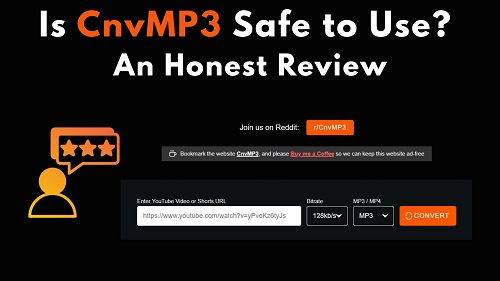
CnvMP3 is a free online tool that lets you convert YouTube videos into MP3 audio or MP4 video. Beyond YouTube, it also supports downloads from TikTok, Instagram, Facebook, X, Reddit, and Twitch.
What makes CnvMP3 stand out is its clean, ad-free interface. Unlike most free tools that are full of pop-ups and redirects, CnvMP3 relies on a donation-based system called Buy Me a Coffee to keep the site professional and easy to use.
Key Features of CnvMP3 Converter:
- No Registration: You don't need an account or email to start downloading.
- Multi-Platform Support: Works with YouTube, TikTok, Instagram, Facebook, X, Reddit, and Twitch.
- Customizable Quality:
- Audio: choose from 96 kbps, 128 kbps, 192 kbps, or 320 kbps.
- Video: resolutions from 144p up to 1080p, depending on the original source.
- Long Video Handling: Can process videos up to 180 minutes long.
- Ad-Free Experience: No pop-ups or redirects, reducing the risk of accidental malware downloads.
- Cross-Device Compatibility: Works in any browser on Windows, macOS, iOS, and Android, no apps required.
Part 2. How to Use CnvMP3 on Desktop and Mobile
On both computers and mobile devices, CnvMP3 is accessible directly through a browser. Below, we'll show you step by step how to convert YouTube videos to MP3 using a URL.
How to Use CnvMP3 on Desktop (Windows & Mac)
01 Copy the URL: Open the YouTube website, go to the video you want, and copy the link from the address bar.
02 Access CnvMP3: Visit the official CnvMP3 website (https://cnvmp3.com).
03 Paste and Configure: Paste the video link into the search box on the homepage. Select MP3 as the format.
04 Select Quality: Click the quality dropdown and choose your preferred bitrate. For the best audio, select 320 kbps.

05 Convert: Click Convert. The site will process the video, usually in a few seconds to a minute, depending on the length.
06 Download: Once conversion is complete, CnvMP3 will automatically download the MP3 to your browser's default download folder.

07 Locate the File: Click the download arrow in the top corner of the browser and then open the folder containing the MP3 file.
How to Use CnvMP3 on Mobile (Android & iOS)
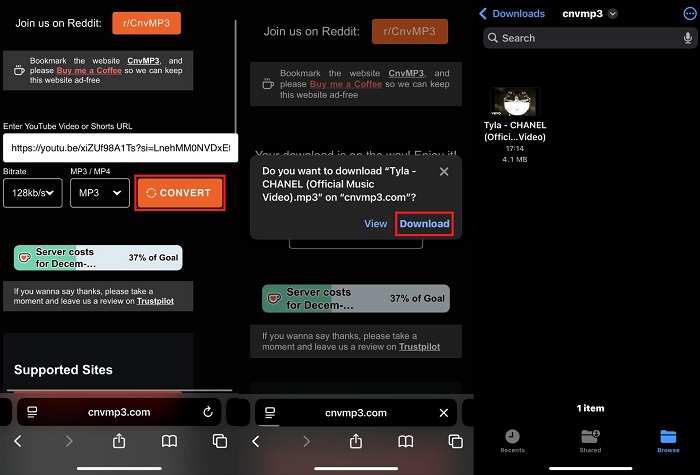
01 Get the Link: Open the YouTube app. Tap the Share button under the video and select Copy Link.
02 Open Mobile Browser: Launch Safari (iPhone) or Chrome (Android) and go to the CnvMP3 site.
03 Paste the Link: Tap the input field, long-press, and select Paste.
04 Choose Format: Select MP3 as the format and pick your preferred audio quality.
05 Start Conversion: Tap Convert. Wait for the process to finish.
06 Save the File: The browser will display a pop-up asking if you want to download the file. Tap Download, then choose a folder to save it.
Part 3. Is CnvMP3 Safe to Use?
Unlike many "trashy" converters that bombard you with aggressive pop-ups or shady links, cnvmp3.com is surprisingly clean. The interface is minimalist, and it uses HTTPS encryption, which means your basic connection to the site is secure. For a quick, one-off conversion, it's one of the better free options out there.
The Risks: What to Watch Out For
Even with a clean UI, no free online tool is 100% risk-free. You should keep two things in mind:
- Privacy Traces: Most online converters log user data, including your IP address and download history. If you're a privacy-conscious user, relying on a browser-based tool for the long term isn't the best move.
- Domain Stability & Hijacking: Right now, the CnvMP3 site lives at its official address(https://cnvmp3.com/), but free services often run into copyright hurdles. If they lose their domain and it gets "snapped up" by scammers, you could unknowingly land on a phishing site in the future.
Is CnvMP3 Trustworthy?
In short: Yes, for occasional use. If you just need to grab a single track now and then, CnvMP3 is safe enough.
Part 4. Why Is CnvMP3 Not Working or Failed to Download?
If CnvMP3 isn't working or keeps failing to download, it's usually due to server issues, YouTube updates, ad-blocker conflicts, or regional restrictions.
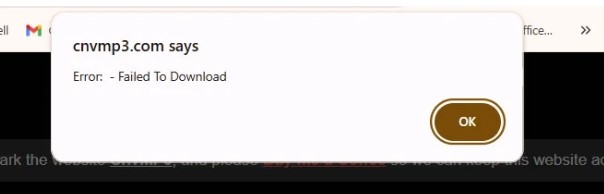
Personally, I haven't run into these problems myself, but many users report various errors. Based on feedback from Reddit and other communities, here are the main reasons CnvMP3 might fail:
- The video is too long for the converter to handle reliably
- YouTube updates its system, which can temporarily break third-party converters
- The video is private, age-restricted, region-locked, or otherwise protected
- CnvMP3.com is blocked by your ISP, school, work network, or mobile carrier
- The site is overloaded, causing server errors or stalled conversions
- CnvMP3 hasn't reached its monthly donation goals. Being a free public site, its servers and funding are limited
- The developers aren't able to maintain the site consistently
Part 5. How to Fix CnvMP3 Errors
If you're staring at a CnvMP3 error or the site is simply not working, don't give up just yet. Most of these glitches come down to browser hiccups or minor connection blocks. Follow these steps to get things moving again:
Fix 1. The "Standard" Browser Reset
Most CnvMP3 failed to download issues are caused by bad cache. You can try these fixes:
- Force Refresh: Hit Ctrl + F5 (or Cmd + Shift + R on Mac). It forces the site to reload from scratch.
- Go Incognito: Open a Private/Incognito window. If the site works there, one of your extensions (like an Ad-blocker) is likely causing the cnvmp3 not working glitch.
- Clear Site Data: Wipe your cookies specifically for cnvmp3.com in your browser settings.
Fix 2. Bypass Connection Blocks
Seeing a CnvMP3 blocked message? Your network is likely filtering the site.
- Ditch the Ad-blocker: These sites run on specific scripts that Ad-blockers often "kill" by mistake. Disable it for a minute and try again.
- Use a VPN: If your ISP has blacklisted the domain, a quick IP swap via VPN usually fixes the access problem instantly.
Fix 3. Verify the YouTube Link
If CnvMP3 not downloading persists, the problem might be the video itself.
- Public Access: Make sure the video isn't set to "Private" or "Age Restricted."
- Check the Length: Many online converters crash on videos longer than 2 hours. If you're trying to grab a massive playlist, that's likely the culprit.
Fix 4. The Permanent Fix
When manual fixes don't work, it usually means YouTube updated its code and the site hasn't caught up. Instead of waiting for a patch that might never come, it's better to use other online free YouTube Music downloaders.
Or, try a dedicated downloader like ViWizard YouTube Music Downloader, which doesn't rely on shaky browser scripts, meaning you won't deal with the "failed to download" loop. It's the most reliable way to download YouTube Music to MP3 in bulk and keep your entire YouTube Music library offline permanently.
Part 6. CnvMP3 Reviews: Output Quality, Pros, and Cons
When you use a free tool like CnvMP3, the first question most people ask is: "How good does it actually sound?" The site is well-known for being easy to use, but there's a gap between what it promises and what it delivers.
Output Quality: The 320kbps Myth
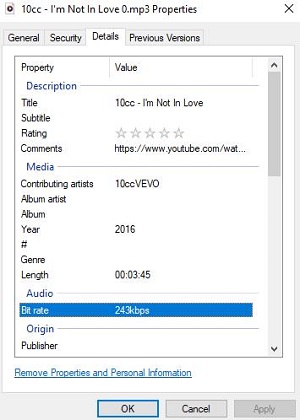
CnvMP3 lets you choose audio quality from 96 kbps up to 320 kbps. While 320 kbps is considered high-quality for MP3s, it can't magically improve the original audio. Most YouTube videos stream at around 128 kbps, or 256 kbps for Premium content. Selecting 320 kbps usually just creates a larger file without noticeable improvement in sound. Other users on Trustpilot have noticed the same.
We tested a YouTube video on CnvMP3 using the 320 kbps option. The actual output was only about 243 kbps. This shows that the final quality depends on the source video. That said, if you mostly listen on your phone or standard headphones, the difference is barely noticeable.
Pros and Cons of CnvMP3
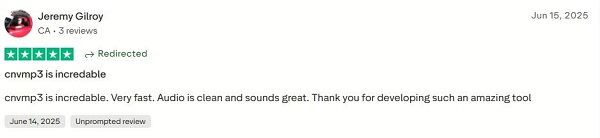
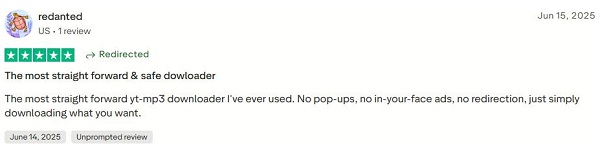
Based on our testing and user reviews on Trustpilot, CnvMP3 is an incredible YouTube downloader. Users like that it's fast, ad-free, and produces clean audio.
- Pros
- Ad-free interface
- No registration required
- Supports multiple social media platforms
- Fast conversion (a few seconds for a 3–5 minute video)
- Completely free
- Works on both desktop and mobile browsers
- Cons
- No batch or playlist downloads
- Output quality is limited by the original video
- Very long videos may fail or take longer to process
- The site can be blocked in some regions
Part 7. Best Safe CnvMP3 Alternatives (Desktop & Online)
Besides CnvMP3, there are actually many tools to download music from YouTube and YouTube Music. In the following sections, we'll introduce you to a professional desktop software and some free online tools. Keep reading.
Option 1: ViWizard YouTube Music Downloader
ViWizard YouTube Music Downloader is a all-in-one Windows/Mac program that supports downloading music from 10 music services, including YouTube Music, Spotify, Apple Music, Tidal, Deezer, SoundCloud, Amazon Music, Qobuz, Pandora, and Line Music. It downloads music to common formats such as MP3, FLAC, WAV, AIFF, M4A, and M4B. Most importantly, it solves almost every limitation found in CnvMP3.
Why Choose ViWizard over CnvMP3?
- Lossless Quality: ViWizard lets you customize the bitrate from 64 kbps to 320 kbps and the sample rate from 22 kHz to 48 kHz.
- Batch Conversion: ViWizard adds a download button for all tracks on the page, so you don't need to download songs one by one.
- Built-in ID3 Tag Editor: ViWizard automatically detects and saves metadata, including the song title, artist, album art, and year.
- No "Failed to Download" Errors: Because it is a desktop program, it isn't affected by browser-based blocks or server overloads that frequently take CnvMP3 offline.
- Beyond YouTube Music: ViWizard works with almost all popular music platforms, not just YouTube Music. It acts more like a hub for all your music streaming needs.

Need YouTube Music for offline listening? ViWizard YouTube Music Converter helps YouTube Music users save songs, playlists, albums, and artists with convenient music conversion. Start converting and enjoy your music beyond the app.
How to Download YouTube Music to MP3 Using ViWizard
 Step 1: Set Output Settings
Open ViWizard and go to Menu (☰) > Preferences. In the Conversion tab, you can pick your preferred format. MP3 is the safest choice for most devices, but if you're a stickler for quality, go for a lossless format. You can also choose exactly which folder on your computer the files will be saved to. Click OK to save your settings.
 Step 2: Head to the YouTube Music Tab
Back on the main screen, you'll see icons for various streaming services. Click the YouTube Music icon. This opens a dedicated window inside ViWizard that lets you browse YouTube Music just like in a regular browser. No need to switch between apps or tabs.
 Step 3: Find Your Favorites and Queue Them Up
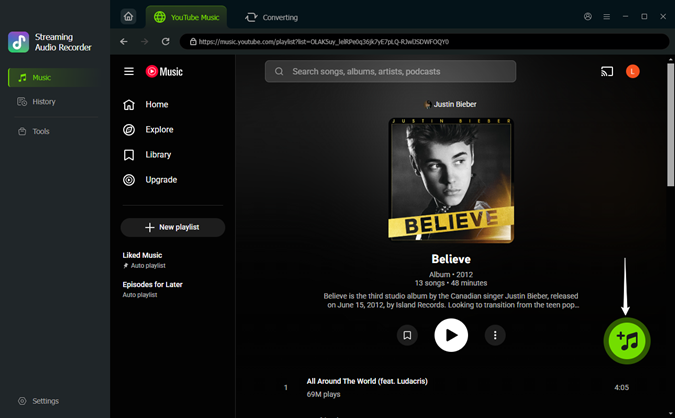
Search for the song, album, or playlist you want. Once you find it, you'll see a bright green Plus (+) button in the corner, click it. A list of tracks will pop up. You can select specific songs or tick Select All to grab the entire album at once. Click Add to List to prepare them for conversion.
 Step 4: One Click and You're Done
Switch to your conversion queue and click the Convert button. ViWizard will download and tag everything at high speed. When it's finished, you can find your music by clicking the small folder icon next to any track. Your music is now yours to keep, transfer to your phone, or play anywhere.
- Pros
- Customizable audio quality
- Batch downloading
- Automatic metadata
- Built-in YouTube Music player
- 100% stable and safe
- Versatile format support
- Cons
- Requires software installation
- Not free (offers a free trial)
Option 2: Alternative Free Online Converters
Here are several other free web-based tools that offer similar functionality to CnvMP3. To help you choose the right one, here is a comparison of the top five free online YouTube converters that have been working reliably for a long time, so you can pick one without worries.
| Feature | YT1s | EzMP3 | Loader.to | MP3Juice | Y2Mate |
|---|---|---|---|---|---|
| Supported Formats | MP3, MP4 | MP3, MP4 | MP3, M4A, AAC, FLAC, OPUS, OFF, WAV, MP4, WEBM | MP3, MP4 | MP3, MP4 |
| Audio Quality | Up to 320 kbps | Up to 320 kbps | Up to 320 kbps | Up to 320 kbps | Up to 320 kbps |
| Ad Level | Medium | Low | Medium | Medium | Low |
| Workflow | Paste URL > Convert > Download | Paste URL > Select Bitrate > Download | Paste URL > Choose Format > Download | Search Artist/Song > Download | Paste URL > Pick Quality > Download |
| Key Highlights | Extremely fast cloud processing and mobile-friendly interface. | Includes a built-in audio trimmer to cut songs before saving. | Best for YouTube playlists and high-resolution video formats. | Built-in search engine, no need to copy links. | Known for the "pp" shortcut (adding "pp" after "youtube" in the URL). |
Part 8. FAQs about CnvMP3
Is CnvMP3 down?
Is CnvMP3 legit?
Why is CnvMP3 blocked in my region?
Final Verdict
After testing its speed, safety, output quality, and analyzing its pros and cons, the verdict is clear: the CnvMP3 converter is currently the best "emergency" tool for casual users. If you just want to grab a song, podcast, or a playlist video under three hours, it gets the job done. However, if you care about true 320 kbps quality or more efficient batch download speeds, ViWizard YouTube Music Downloader is the better option.
You May Be Interested
YTMP3 Converter Review and Safer Alternatives for 2026
Loader.to Tested: Review and Safer YouTube MP3 Downloaders
EzMP3 Review and the Best Alternatives for YouTube to MP3

Best 8 MP3 Free Download Sites to Grab Your Favorite Songs

How to Download Music from YouTube to Computer (MP3 & Free Methods)

MP3Paw Free MP3 Download Guide and Best Alternative

Nick Orin often turns to tech forums to see what apps people are talking about. He likes testing different software, comparing features, and finding out which tools are worth a try.

Leave a Comment (0)