


If you've ever wanted to turn a YouTube video into an MP3, EzMP3 might already be on your radar. It's a free online converter that lets you convert YouTube videos to MP3 or MP4 by pasting a video URL. No software to install, and just a few clicks to get started.
But the experience isn't always that smooth. EzMP3 may stop working, its website address can change, and pop-ups or suspicious download links can leave you wondering whether it's safe to use. So, is EzMP3 reliable, and what can you do when it doesn't work? In this guide, we'll look at its features, safety, and common problems, show you how to use it, and compare alternatives such as ViWizard YouTube Music Converter to help you find the right option for your needs. Let's dive in.
Part 1. What Is EzMP3?
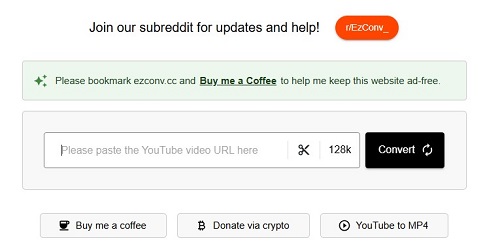
EzMP3 is a free online YouTube converter that lets you turn videos into MP3 audio files without installing software or creating an account. Simply paste a YouTube link, choose your preferred audio bitrate, and download the converted file. Depending on the version, you may also find options for MP4 downloads and audio trimming.
Finding the right EzMP3 website can be confusing, though. Some reviews list ezmp3.co as a current domain and ezconv.cc as a related service, while the older ezmp3.cc has reportedly experienced downtime. The exact relationship between these sites isn't clearly verified, so don't assume every site using the EzMP3 name is official. Check the domain carefully before downloading files.
- Free online conversion: Convert supported YouTube links in your browser without installing a desktop app or registering for an account.
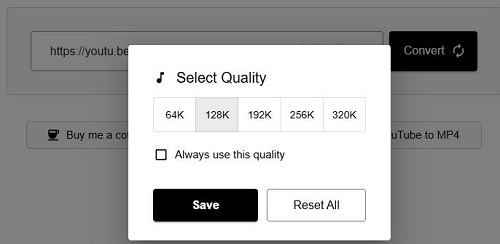
- Adjustable MP3 bitrate: Available settings reportedly range from 64 kbps to 320 kbps, allowing you to choose between smaller files and higher-bitrate output. However, selecting 320 kbps won't improve audio beyond the quality of the source.
- Audio trimming: Some versions let you set start and end times, so you can save a specific section of a video instead of converting the entire track.
- Support for long videos: Some reviews report support for videos up to 12 hours long, although the actual limit may vary by site and can change over time.
- Browser-based access: You can use the service on supported devices with a web browser, without taking up space with another application.
- No File Limits: Allows unlimited downloads of videos up to approximately 12 hours in length.
- Free to use, with no account required
- Works directly in a browser
- Offers bitrate choices and audio trimming
- Useful for quick, occasional conversions
- No desktop installation needed
- No batch downloading
- URL frequently changes
- Lacks lossless formats like FLAC or WAV
- Track information and cover art may need manual correction
- Lookalike sites, misleading download buttons, and pop-ups can create security concerns
If you want to download YouTube videos in more formats, higher quality, or with batch downloading, consider ViWizard YouTube Music Converter. It's a professional, secure tool with full tech support.
Part 2. Is EzMP3 Safe and Legit?
Free online converters can come with pop-ups, suspicious download buttons, and security risks. Is EzMP3 any different? Here's what you should know before using it.
Is It Safe?
EzMP3 may be safe for basic conversions, but it isn't risk-free. Some users report a smooth, ad-free experience, while others encounter downtime, verification prompts, or access issues. Domain changes also make it harder to know whether you're visiting the intended site or a copycat. Avoid suspicious pop-ups, never install unknown software, and check downloaded files before opening them.
Is It Legit?
EzMP3 works as a YouTube-to-MP3 converter, but that doesn't mean every download is legal. It's not an official YouTube service, and downloading copyrighted music without permission may violate YouTube's Terms of Service and copyright law.
What if it's just for personal use? Personal use doesn't automatically make a download legal. The rules depend on your location and whether you have permission to download the content. To avoid copyright issues, stick to your own videos, authorized downloads, or content that's legally available for reuse.

Looking to get YouTube Music Premium for free? Discover how to claim 1 to 6 months of free trials and explore a method to enjoy YouTube Music Premium forever at no cost.
Part 3. How to Convert YouTube to MP3 with EzMP3
Using EzMP3 is fairly simple. You don't need to install software or create an account. The basic process is to copy a YouTube link, paste it into the converter, choose your settings, and download the audio.
Convert YouTube to MP3 with EzMP3
01Go to https://ezconv.cc/ in your browser. The site works on Windows, macOS, Linux, Android, and iOS, so you can use almost any device.
02Open the video you want to download. On desktop, copy the URL from your browser's address bar. On mobile, tap the Share button under the video and select Copy link.
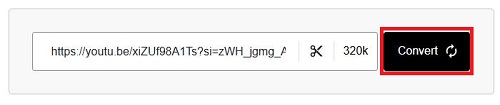
03Paste the copied YouTube URL into the search box on EzMP3.
04Click the quality dropdown menu and select your preferred bitrate, such as 64 kbps, 128 kbps, 192 kbps, 256 kbps, or 320 kbps.
05Optional: If you only need part of the audio, click the scissor icon to set a specific start and end time for extraction.
06Click the Convert button. EzMP3 will begin parsing the video and preparing your file.
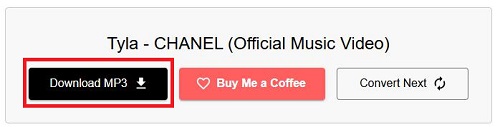
07When the conversion is complete, a Download MP3 button will appear. Click it to save the file to your device's default download folder.
Read More : YTMP3 Converter Not Working? Full Review & Safer Alternatives in 2026
Part 4. How to Fix EzMP3 Not Working
We've all been there: you paste your link, hit Convert, and… nothing. Or worse, the progress bar gets stuck at 99%, just mocking you. Since EzMP3 relies on scraping data from YouTube, which constantly updates its code to block tools like this, hiccups are bound to happen.
If EzMP3 is giving you the cold shoulder, here's a quick "sanity check" list to get it working again:
-

Check the website address.
EzMP3 domains may change or become unavailable. Verify the address before trying another site, and avoid suspicious mirror pages..
-
Refresh and Try a Different Video
YouTube occasionally places regional blocks or age restrictions on videos, which can prevent EzMP3 from accessing them. Try pasting a link to a different, public video. If that one works, the issue is with the first video's permissions, not the tool itself.
-
Clear Your Browser Cache
If the Convert button feels frozen, your browser might be stuck on an old version of the site's script. Press Ctrl + F5 (Windows) or Cmd + Shift + R (Mac) to force a hard refresh.
-
Try another browser.
Open the site in an updated browser or a private window to see whether cached data or extensions are causing the problem.
-
Check your internet connection.
A weak or unstable connection can prevent the site from loading or the file from downloading.
-
Watch for regional restrictions.
If EzMP3 won't open in your location, the service may be blocked or unavailable there. Don't download unknown apps or follow suspicious links claiming to fix the issue.
-
Try Alternatives
If you've tried the steps above and EzMP3 still doesn't work, it's time to consider other YouTube to MP3 converters. For the most stable experience, we recommend ViWizard YouTube Music Converter, a desktop program that ensures reliable, long-term use. If you prefer free options, keep reading for some solid alternatives.
Part 5. Best EzMP3 Alternatives to Download YouTube to MP3
If you need a backup for EzMP3, these 5 YouTube music converters are solid options. Some let you save YouTube Music tracks as MP3 files, some record audio as it plays, and others offer official offline listening. We've used them for months and find them more stable, and you can check them out!
Tool 1. ViWizard YouTube Music Converter
If you regularly save YouTube Music tracks, albums, or playlists, ViWizard YouTube Music Converter is a more suitable option than a basic online converter. It's a desktop program for Windows and Mac with a built-in YouTube Music web player. You can sign in, browse your music, select tracks, and convert them into MP3, FLAC, WAV, AIFF, M4A, or M4B files. It also supports batch conversion, customizable audio settings, and song metadata and cover art when available.
Why choose it over EzMP3? You don't have to process every song separately through a browser, and you get more control over the output format and audio settings. It's particularly useful if you're building a music library. Here is how to use it.

Need YouTube Music for offline listening? ViWizard YouTube Music Converter helps YouTube Music users save songs, playlists, albums, and artists with convenient music conversion. Start converting and enjoy your music beyond the app.
 Step 1: Launch ViWizard YouTube Music Converter
Launch ViWizard YouTube Music Converter on your computer. Click Settings in the bottom-left corner and select Conversion. Choose your preferred output format, such as MP3, FLAC, WAV, AIFF, M4A, or M4B. Adjust the bitrate and sample rate based on your needs. Then, select the output folder and customize file organization settings if needed. Once the settings are ready, click Music from the left sidebar to start converting YouTube Music songs.
 Step 2: Open YouTube Music in ViWizard
In the Music section, choose YouTube Music as the source platform. ViWizard will open the built-in YouTube Music web player. Sign in to your YouTube Music account, then search for and browse your favorite songs, albums, playlists, or artists directly within the program.
 Step 3: Select YouTube Music Songs to Download
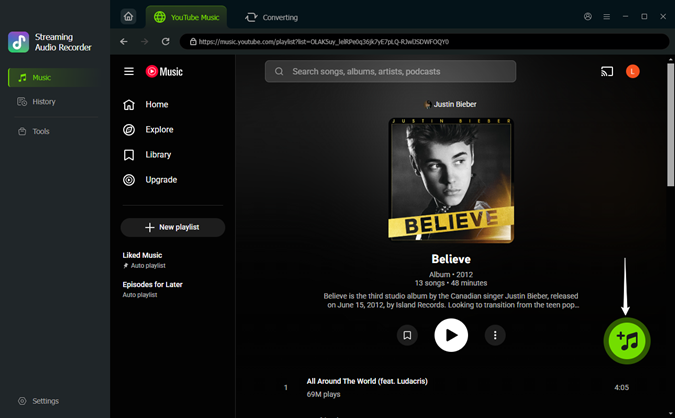
Open the song or playlist page and click the green + button. ViWizard will process the page and show all available tracks in a pop-up window. Check the songs and click Add to list.
 Step 4: Convert YouTube Music to MP3
Click Converting at the top to review your selection, then click Convert in the bottom-left corner. When the process finishes, open History in the sidebar and click the folder icon to locate your files.
- Batch download multiple videos at once
- High-quality audio, including lossless formats
- 100% safe
- Preserves full metadata, including cover art
- No ads or misleading pop-ups
- Supports Windows and Mac
- Requires desktop installation
- Some features may depend on the software version
Tool 2. ViWizard Audio Capture
Unlike EzMP3, ViWizard Audio Capture is a desktop tool that captures audio from supported browsers and applications. It supports formats such as MP3, FLAC, WAV, AIFF, M4A, and M4B, with options to customize audio settings and edit track information. Best of all, it captures YouTube audio or audio from other supported sources, but remember that recording takes as long as the content plays.

An audio recorder that captures any sound on your computer, including YouTube Music, live radio, or game audio. It can split, edit, and save recordings in MP3, WAV, and other formats, keeping high quality and adding track details.
 Step 1: Open ViWizard Audio Capture and Add YouTube Music
Open ViWizard Audio Capture on your computer. Click the + icon to add the browser you use to access YouTube Music or select the YouTube Music app directly. If your browser is not shown in the list, you can drag and drop it into the interface or add it manually.
 Step 2: Adjust Output Settings
Click the Format button in the bottom-left corner to customize the recording settings. Customize your preferred output format, such as MP3, and adjust options like sample rate, bitrate, audio channel, and codec.
 Step 3: Play and Capture YouTube Music Audio
Go to the Capturing section and click Start to open YouTube Music in the browser or YouTube app. Play the song, album, or playlist you want to save. ViWizard will automatically scan and record the audio while a recording window appears.
 Step 4: Save YouTube Music as MP3
After the recording finishes, return to ViWizard and click Stop. You can trim the recording or edit its ID3 tags if needed, then click Save. To find your saved files later, open History.
- Multiple audio sources: YouTube, Telugu, TikTok, Spotify, etc.
- Offers several output formats
- Customizable recording settings
- Includes audio trimming
- Preserve ID3 tags
- Requires real-time playback
- Long tracks take longer to record
- Recording quality depends on the source and settings
Tool 3. YouTube Premium
If you only need offline listening, YouTube Premium is the official option. It lets subscribers download supported songs, albums, and playlists in the YouTube Music app without using third-party converter websites. The catch? Your downloads stay inside the app rather than becoming regular MP3 files you can move to other music players.
Subscribe to YouTube Premium, open the app, find a song or playlist, and tap Download. You'll find your saved music in the app's library.
- Official offline listening
- Safe and reliable experience
- Convenient playlist downloads
- No third-party converter website required
- Requires a paid subscription
- Downloads stay inside the app
- No direct MP3 export
Tool 4. YTMP3

YTMP3 is another free, browser-based YouTube converter. It lets you paste a video URL and convert it to MP3 without installing desktop software. Some versions also offer MP4 downloads, but available features and website reliability vary, so check the domain carefully before using it.
Copy the URL of a YouTube video you're authorized to download, open a YTMP3 website, and paste the link into the input box. Select MP3 if available, click Convert, and download the finished file using the genuine download link.
- Free to use
- No desktop installation required
- Simple conversion process
- MP3/MP4 Formats
- Domains may change or stop working
- No reliable batch conversion across versions
- Potential pop-ups and misleading download buttons
Tool 5. MP3 Juice

MP3 Juice is a free online converter for downloading YouTube videos as MP3s, but it works a little differently. Instead of only pasting a link, you can type the name of a song or artist directly into the site, and it will search for the audio from various sources across the web. This makes it a handy tool if you don't have the video URL handy.
Go to mp3juice.as. Type the song title, artist, or paste a YouTube video URL into the search bar. Click Search to see the results. Click Play to preview the song and make sure it's the correct version. Once confirmed, click the MP3 Download button to start downloading.
- No need to visit YouTube first
- Free and quick
- Works on any device with a browser
- No registration needed
- Cannot customize MP3 audio quality
- Can be cluttered with fake download buttons
- Search results may include unofficial covers instead of the original
- Ads and pop-ups
- No batch download
- URL changes frequently

Looking for the best YouTube Music downloader? Follow this post to have a quick review of up to 17 kinds of YouTube Music downloaders.
Part 6. EzMP3 vs. Alternatives: Comparison Table
The table below highlights the differences between the 6 YouTube to MP3 converters to help you choose the option that fits your needs.
| Tool | Output Format | Batch Download | Audio Quality | Ads & Pop-ups | Safety | ID3 Tags |
|---|---|---|---|---|---|---|
| EzMP3 | MP3, MP4 | ❌ | Up to 320 kbps | Varies by site | ⭐⭐⭐ | ❌ |
| ViWizard YouTube Music Converter | MP3, FLAC, WAV, AIFF, M4A, M4B | ✅ | Customizable settings | ❌ | ⭐⭐⭐⭐ | ✅ |
| ViWizard Audio Capture | MP3, FLAC, WAV, AIFF, M4A, M4B | ❌ | Depends on source and settings | ❌ | ⭐⭐⭐⭐ | ✅ |
| YouTube Premium | In-app downloads | ✅ | Up to available streaming quality | ❌ | ⭐⭐⭐⭐⭐ | ❌ |
| YTMP3 | MP3, MP4 | ❌ | Varies by version | Varies by site | ⭐⭐ | ❌ |
| MP3Juice | Usually MP3 | ❌ | Varies by source | Varies by site | ⭐⭐ | ❌ |
Part 7. FAQs about EzMP3
Is EzMP3 free to use?
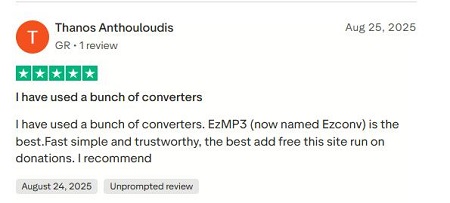
Yes, EzMP3 is completely free. You don't need to sign up for an account or pay for a subscription. The site stays running through a few ads or voluntary donations rather than charging you for your downloads.
What happened to EzMP3?
EzMP3 has experienced website downtime and domain changes. Some users have turned to related sites such as EzConv (ezconv.cc), while older EzMP3 links may no longer work. The official relationship between these sites isn't clearly confirmed, so check the domain carefully and avoid suspicious copies.
Does EzMP3 support downloading YouTube playlists?
Unfortunately, no. EzMP3 only works for single-video conversions. To download an entire playlist, you'd need to paste each video URL individually or use a desktop alternative like ViWizard YouTube Music Converter.
What is the maximum video length EzMP3 can convert?
EzMP3 can handle fairly long videos, sometimes up to 12 hours. This makes it useful for long podcasts, ambient music, or live-stream archives. However, the longer the video, the higher the chance of running into errors or timeouts.
Conclusion
EzMP3 is fine for quick conversions, but if it keeps changing domains or stops working, you have other options. For downloading multiple tracks and choosing from more audio formats, give ViWizard YouTube Music Converter a try. Pick the tool that works best for you, save your favorite music, and enjoy listening!
You May Be Interested
Loader.to Tested: Review and Safer YouTube MP3 Downloaders
CnvMP3 Review: Is It Safe? Fix CnvMP3 Not Working & Best Alternatives

How to Convert YouTube Videos to MP3 Safely [PC & Mobile]

How to Download Music to MP3 Player from YouTube Music

How to Download Music from YouTube to Computer (MP3 & Free Methods)

Nick Orin often turns to tech forums to see what apps people are talking about. He likes testing different software, comparing features, and finding out which tools are worth a try.

Leave a Comment (0)