


Streaming music subscriptions just keep climbing in price. You might be wondering how much YouTube Music costs per month in 2026. The good news is that, unlike many other streaming services, YouTube Music has kept its standard subscription price steady. But that raises another question: is YouTube Music Premium really worth it, or are there better ways to enjoy similar features at a lower cost? That's exactly what this guide will explore, so let's dive in.
Part 1. How Much Does YouTube Music Cost?
According to the official YouTube Music website, YouTube Music uses a tiered pricing structure designed for individuals, families, and students.

1. YouTube Music Premium (Individual Plan)
In the U.S., the individual plan costs $10.99 per month or $109.99 for an annual subscription, saving you 15% compared to the monthly rate. This plan removes ads, allows background play on mobile devices, and lets you switch between audio-only and music video modes. You can also download songs and playlists for offline listening and stream directly on supported Google Nest smart speakers.
Read More : Latest Guidance to Get YouTube Premium for Free Forever
2. YouTube Music Family Plan
The family plan costs $16.99 per month and supports up to five additional family members aged 13 and older. Each member gets their own account with full Premium features, making this plan more cost-effective for households that listen regularly.
Read More : How to Set Up and Share a YouTube Music Family Plan
3. YouTube Music Student Plan
Eligible students can subscribe for $5.49 per month and receive the same features as the individual Premium plan. Student status must be verified periodically to keep the discounted price.
Read More : How to Get YouTube Music Premium Student Discount 2026
4. YouTube Premium (Includes YouTube Music)
This plan costs $13.99 per month or $139.99 per year. You get YouTube Music and ad-free videos on all of YouTube. You also get all the perks of the music plan, including ad-free streaming, background play, and offline downloads for over 100 million songs, along with an ad-free experience for any video on the main YouTube app, including YouTube Kids.
Part 2. YouTube Music Premium vs. Free Plan
Many listeners wonder if upgrading to YouTube Music Premium is really worth it. The free plan gives you access to the full music library, but it comes with limitations that can affect your listening experience. Here's a quick rundown of the main differences:
| Feature | Premium Plan | Free Plan |
|---|---|---|
| Ad-free | ✔️ | ❌ |
| Background Play | ✔️ | ❌ |
| Offline Listening | ✔️ | ❌ |
| Audio & Video Modes | ✔️ | ❌ |
| Device Compatibility | Standard devices plus Google Nest smart speakers | Standard devices |
| Cost | $10.99/month (individual) | Free |
When you pay for YouTube Music Premium, you're really paying for the freedom to stream music on your phone without interruptions while doing other things. That's pretty standard for most music streaming services.
So, deciding whether to upgrade is simple. Ask yourself: do I often listen to YouTube Music on my phone? If the answer is yes, the Premium plan is likely the better choice.
Of course, you can also compare subscriptions from other services like Spotify, Tidal, or Apple Music. If you want, here are some reviews that might help you decide:
Part 3. YouTube Music Premium vs. YouTube Premium
Choosing between the standalone Music plan and the YouTube Premium bundle comes down to how you comsume audio and video content.
YouTube Premium combines everything in the music plan with an ad-free experience on the main YouTube platform. Here's a quick look at what these two Premium plans offer:
| Feature | YouTube Music Premium | YouTube Premium |
|---|---|---|
| Ad-free Music | ✔️ | ✔️ |
| Background Play (Music) | ✔️ | ✔️ |
| Ad-free YouTube Videos | ❌ | ✔️ |
| Background Play (Video) | ❌ | ✔️ |
| Offline Downloads | Music Only | Music & All Videos |
| Cost | $10.99/mo | $13.99/mo |
For just $3 more per month, YouTube Premium gives you great value. If you watch a lot of YouTube videos and want to skip the ads, Premium is the better choice. If you mainly listen to music and are fine with the free video experience, YouTube Music Premium is a solid option.
Part 4. Is the YouTube Music Family Plan a Better Deal?
If you've got a household with multiple music lovers, the YouTube Music Family Plan is the best way to enjoy ad-free tunes without breaking the bank. One family subscription lets up to six people use all the Premium features at the same time.
Think about it: a single YouTube Music Premium subscription costs $10.99. If you add just one more person to the family plan, it's already cheaper than two separate accounts. And if you fill the plan with six members, it drops to around $2.83 per person each month. That's a steal for a premium streaming library!
For solo listeners, the YouTube Music annual plan at $109.99 is your best option for savings. But for couples, roommates, or big families, the Family Plan is definitely the way to go!
Part 5. Is YouTube Music Premium Still Worth It?
You've probably figured out the costs and benefits of each plan by now. The real question is whether YouTube Music Premium is still worth the price. Here's a quick rundown of the pros and cons of the Premium plan for YouTube Music:
Pros of YouTube Music Premium:
- Ad-Free Experience: Listen to your favorite tracks without any interruptions.
- Background Play: Keep the music running while using other apps or with your screen locked.
- Offline Listening: Download music directly to your mobile device for travel.
- Smart Discovery: Access Google's advanced AI algorithms for highly personalized music recommendations.
- Audio-Only Mode: Save data by streaming audio without loading the full music video.
Cons of YouTube Music Premium:
- Recurring Monthly Cost: The price adds up to over $130 per year, which may lead to subscription fatigue.
- In-App Limitations: Your downloads only work within the official app and cannot be exported.
- Low Value for Casuals: If you don't listen daily, the premium features may not justify the price.
- Lack of Ownership: All downloaded content becomes inaccessible immediately if your subscription expires.
YouTube Music Premium still packs some great benefits, but whether it's worth the price really depends on how you listen. If you want uninterrupted, offline music, then Premium is a good option. If not, the free plan may be enough for your needs.
Just a heads-up: when you download YouTube music offline, you don't actually own it. Those downloads are stored in the app's cached folder. To keep enjoying the music, you'll need to keep paying for Premium. This can be frustrating for anyone on a budget. That's why we recommend ViWizard YouTube Music Downloader, which lets you download YouTube Music tracks directly to your device for permanent offline listening without needing a Premium subscription.
Part 6. A Smarter Alternative for YouTube Music Premium Offline Listening
ViWizard YouTube Music Downloader works with a YouTube Music Free account. It lets you download songs, playlists, albums, and podcasts in popular formats like MP3, FLAC, WAV, AIFF, M4A, and M4B. Once downloaded, you can play them on any device, ad-free, offline, and with background play. Because these are real audio files, they never expire and remain accessible forever.

Download music from 10 popular streaming platforms like YouTube Music and save it in formats like MP3, FLAC, WAV, AIFF, M4A, or M4B while keeping the original sound quality.
How to Download YouTube Music with ViWizard
Step 1 Set the Output Format
Launch ViWizard YouTube Music Downloader and open the Menu, then go to Preferences and the Conversion tab. Choose a widely supported format like MP3, FLAC, WAV, AIFF, M4A, or M4B. Select a folder on your device to save the downloaded files and click OK to confirm. These settings ensure your music can be played on any device.

Step 2 Access YouTube Music
On the main screen, click the YouTube Music icon to open the integrated web player. Sign in with your YouTube Music account to access all your playlists, albums, and favorite tracks. You can even use a free account for this step.

Step 3 Choose the Songs, Playlists, or Albums
Browse your library and select the music you want to download. Click the Add button to add individual tracks or entire playlists to your download list.
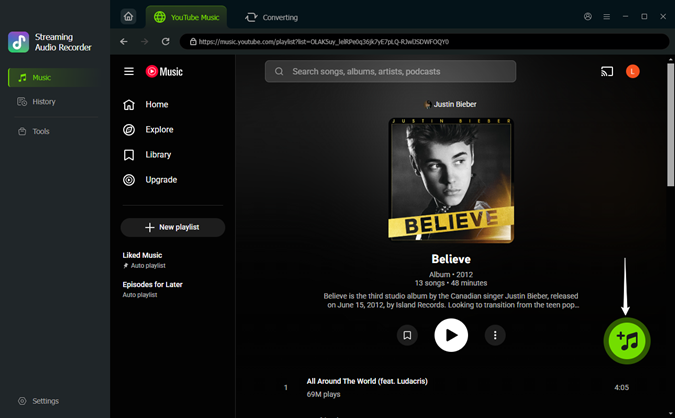
Step 4 Download and Save Locally
Click the Convert button to start downloading. Once the process is complete, click the folder icon to locate your music files. These are real audio files that you can play offline, ad-free, and on any device without relying on a Premium subscription.

Part 7. FAQs About YouTube Music Subscription Cost
How has the price of YouTube Music Premium changed recently?
Early YouTube Music Premium users paid $7.99 monthly, but the price increased to $9.99 in 2018. By July 2023, individual plans reached $10.99. In late 2023, the Student Plan went up from $4.99 to $5.49, and the Family Plan rose from $14.99 to $16.99.
Is there an annual plan for YouTube Music?
Yes, there is a YouTube music annual plan available for individual subscribers. Currently priced at $109.99/year, this option allows you to pay upfront for 12 months and save roughly 15% compared to the monthly billing cycle.
Can I use YouTube Music Premium on multiple devices?
Yes, but it only works with a Family plan. With the Individual plan, you can stream music on just one device at a time. If you try to play music on a second phone or smart speaker, the first stream will cut off.
How can I change my YouTube Music Premium plan?
- Go to https://www.youtube.com/paid_memberships on your browser.
- Locate your current subscription and click Manage membership.
- Select your active plan and choose the option to Deactivate or Switch.
- Click on your desired plan.
- Click Upgrade.
- If you are switching to a Family plan, follow the prompts to set up your Google Family Group and invite up to five household members.
- The changes typically take effect at the start of your next billing cycle.
Can I use my YouTube Music Premium account while traveling abroad?
Yes, your membership benefits travel with you. You can stream music and access your offline downloads in any country where YouTube Music is available. However, if you are traveling to a region where the service isn't supported, you will only be able to play songs you have already downloaded.
Final Thoughts
YouTube Music Premium is totally worth it if you love its variety and smart recommendation algorithm, which many other platforms lack. Casual listeners might be fine sticking with the free plan, while families and students can take advantage of family or discounted plans for better value. If you want offline music without subscribing to Premium, tools like ViWizard YouTube Music Downloader let you save tracks as real audio files so you can listen freely.
You May Be Interested

Which Music Streaming Service Is Best for Offline Listening?

17 Best Free/Paid YouTube Music Downloaders in 2026

YouTube Music Premium APK: 2026 Review & Alternative
YTMP3 Converter Review and Safer Alternatives for 2026
How to Download and Install ReVanced YouTube Music APK
How to Cancel YouTube Music Subscription in 2026

Nick Orin often turns to tech forums to see what apps people are talking about. He likes testing different software, comparing features, and finding out which tools are worth a try.

Leave a Comment (0)