


Want to listen to YouTube Music without ads, and play songs in the background without paying $10.99 per month? ReVanced YouTube Music is the solution for Android users. It is a modified APK that unlocks features like ad-free playback, background listening, and unlimited skips without a paid subscription.
For beginners who are not familiar with modded APKs, downloading and installing ReVanced YouTube Music can be confusing. This guide walks you through how to install and use it, how to fix common issues, and the best alternatives when it no longer works.
Part 1. What Is ReVanced YouTube Music?
ReVanced YouTube Music is a community-led project that continues the idea of the original YouTube Vanced project. It is a modified version of the official YouTube Music app, created by applying custom patches through ReVanced Manager.
Unlike older modded apps, ReVanced YouTube Music does not require root access. These patches are designed to unlock premium features such as ad-free playback and background listening, while also adding additional features that are not available in the standard app.
Key Features of ReVanced YouTube Music:
- Ad-free Listening: Completely removes video and audio advertisements.
- Background Playback: Keep songs playing while using other apps or when your screen is locked.
- Audio-only Mode: Stream just the audio to save data.
- UI Customizations: Includes options to remove the "Upgrade" button, hide shorts, or change the theme to a true "Amoled" black.
- MicroG Integration: Sign in with your Google account to sync your playlists and liked songs.
- SponsorBlock: Skip intros, outros, and non-music segments automatically.
Is ReVanced YouTube Music Safe to Use?
ReVanced YouTube Music is widely considered safe because it is an open-source project, meaning anyone can inspect the code. However, whether it is truly safe depends on a two factors.
- Sourcing: It is only safe if you patch it yourself using the official ReVanced Manager and an APK from a trusted source like APKMirror.
- Terms of Service: Using ReVanced violates Google's Terms of Service. While there have been no widespread reports of account bans, you'd choose to use a secondary or "dummy" Google account to be safe.
Or, a better choice is ViWizard YouTube Music Downloader, a reputable and reliable desktop music tool. It goes beyond what ReVanced YouTube Music offers by letting you download real audio files in MP3, enjoy ad-free playback, perform batch downloads, and transfer music to any device. Even better, it supports downloads from 10 popular music services, including Spotify, Apple Music, and more.
Part 2. How to Download and Install ReVanced YouTube Music APK
Downloading and installing ReVanced YouTube Music requires caution because it matters to your device's security. So, please make sure to follow these steps carefully and stick to the recommended sources.
Step 1. Prepare Your Android Device
01 Make sure your device runs Android 8.0 or above.
02 Go to Settings > Security and enable Install from Unknown Sources for the browser or file manager you will use.
Step 2. Download ReVanced Manager
01 Visit the official ReVanced Manager page and download the APK.
02 Install it on your device and allow permissions for unknown sources if prompted.
Step 3. Download the YouTube Music APK
01 Open ReVanced Manager and go to the Patcher tab.
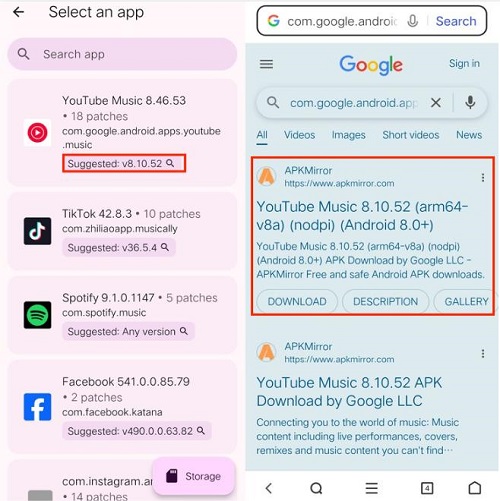
02 Tap Select an App and search for YouTube Music. You will see a Suggested Version under the app name.
03 Tap the version number or search manually on APKMirror to find the compatible version.
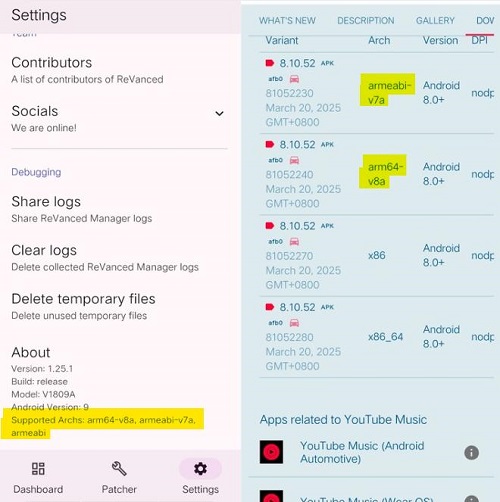
04 To check compatibility, go to ReVanced Manager > Settings > About > Supported Archs (for example, arm64-v8a or armeabi-v7a). Download the matching APK. Only download the APK and DO NOT install it yet.
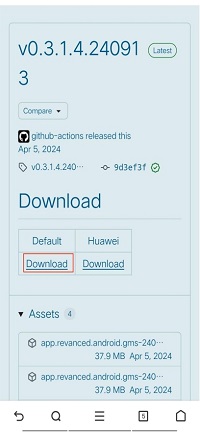
Step 4. Install ReVanced GmsCore
01 Open the downloaded YouTube Music APK. It will direct you to the GmsCore GitHub page.
02 Download and install the GmsCore APK.
Note: If Google Play Protect blocks it, temporarily disable it via Play Store > Profile Icon > Play Protect > Settings > Scan apps with Play Protect.
Step 5. Patch and Install ReVanced YouTube Music APK
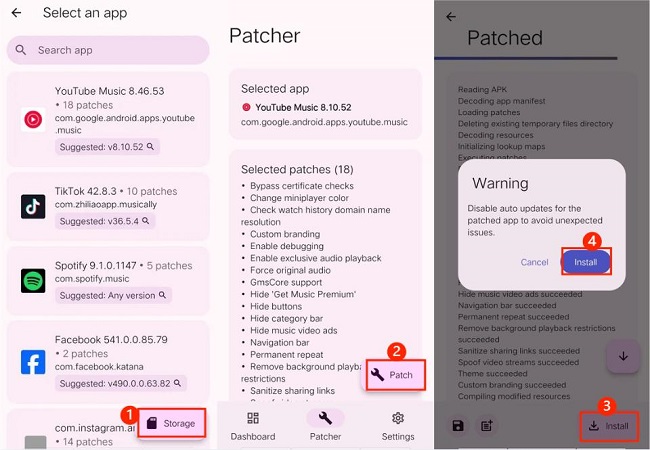
01 Go back to ReVanced Manager > Patcher.
02 Tap Select an App, then tap the Storage button at the bottom right.
03 Find and select the YouTube Music APK you downloaded.
04 Tap Patch. This usually takes 1–3 minutes.
05 When it says Patched, tap Install to complete the setup.
Step 6. Final Setup and Login
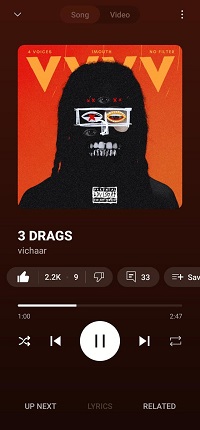
01 Open YouTube Music ReVanced.
02 Sign in via GmsCore by tapping the profile icon and adding your Google account. For safety, you can use a secondary account.
03 Once logged in, you can stream music just like a Premium user with ad-free playback and background listening.
- Step 1. Open ReVanced Manager and update the Manager itself if prompted.
- Step 2. Check the "Suggested Version" in the Patcher. Download that specific version of the YouTube Music APK from APKMirror.
- Step 3. Select the new APK in ReVanced Manager. Apply patches and tap Install. You don't need to uninstall the old app; the new one will cover it and keep your data.
Part 3. How to Fix ReVanced YouTube Music Not Working
Even with a perfect installation, YT Music ReVanced app can sometimes run into problems because of Google server updates or system conflicts. If your music stops playing, the app crashes, or you see a loading circle that never ends, don't worry. Most issues can be fixed with a few simple adjustments.
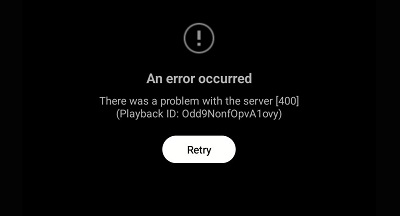
1. Fix ReVanced YouTube Music Error 400
- Re-login: Go to your phone's Settings > Passwords & Accounts, remove your MicroG/GmsCore account, then reopen ReVanced and sign in again.
- Clear Cache: Long-press the YouTube Music ReVanced icon, go to App Info, and select Clear Cache and Clear Data.
2. Fix App Not Working
If the app won't open, it might need an update.
01 Open ReVanced Manager and go to the Dashboard. If there's an Update button, tap it to refresh the patches.
02 Go to the Patcher tab, tap Select an App, and find the YouTube Music ReVanced APK.
03 Download and install the latest version, following the steps in Part 2.
3. Fix App Crashing
- If the app crashes after installing GmsCore: Open GmsCore first, then launch YouTube Music ReVanced.
- If crashes continue, check Battery Optimization: Go to your phone's Settings > Apps > GmsCore > Battery and set it to Unrestricted.
4. Fix Missing MicroG/GmsCore Notification
01 Open ReVanced Manager > Patcher > Select an App > YouTube Music APK > Selected Patches.
02 Look for GmsCore Support and make sure the checkbox is checked.
5. Fix Infinite Buffering or Playback Stopping
- Enable Spoofing: Open the ReVanced app, go to Settings > ReVanced Settings > Miscellaneous, and toggle Spoof Player Parameter on.
- Switch Clients: If buffering persists, use Spoof Client in the same menu and switch to iOS TV or Android VR. This often fixes persistent playback issues.
6. Fix "Not Available in This Country" Error
If YouTube Music ReVanced says content isn't available in your region, simply use a VPN to access it.
If the YouTube Music ReVanced app still isn't working after these fixes, you might want to try other YouTube Music APK Premium options. Check out the list included in this guide below.
Read More : YouTube Music Premium APK: 2026 Review & Alternative
Or, keep scrolling to discover an even better alternative to YouTube Music ReVanced!
Part 4. The Best ReVanced YouTube Music Alternative
While YouTube Music ReVanced lets you enjoy premium features like ad-free streaming and background play, it only works for streaming. You cannot download songs for offline use, and it doesn't allow saving YouTube Music as MP3 files. For more flexible use cases, ViWizard YouTube Music Downloader is a better choice.

Need YouTube Music for offline listening? ViWizard YouTube Music Converter helps YouTube Music users save songs, playlists, albums, and artists with convenient music conversion. Start converting and enjoy your music beyond the app.
ViWizard YouTube Music Downloader is a professional tool that lets you download and convert music from YouTube Music and over 9 other platforms, including Spotify, Apple Music, and Tidal, into real audio files like MP3. These files are saved directly on your computer or phone, so you can keep them forever, transfer them to any device, and play them even if you don't have a subscription or the YouTube Music app isn't installed.
Why Choose ViWizard Over ReVanced?
| Feature | ViWizard YouTube Music Downloader | ReVanced YouTube Music |
|---|---|---|
| Ads | Completely Removed | Blocked |
| Offline Playback | ✅ | ❌ |
| File Format | MP3, FLAC, WAV, M4A, M4B, AIFF | Encrypted (locked to app) |
| Batch Downloading | ✅ | ❌ |
| Device Support | Any device (PC, Mac, iPhone, MP3 players) | Android only |
| Platform Support | 10+ platforms (Spotify, Tidal, etc.) | YouTube Music only |
| Installation | Simple (one-click desktop install) | Complex (manual patching) |
| Stability | Highly stable with professional support | May break after YouTube updates |
How to Use ViWizard YouTube Music Downloader
 Step 1: Set Output Settings
Open ViWizard, go to Menu > Preferences > Conversion, and choose the output format like MP3. You can also adjust the bitrate, sample rate, or audio channels if needed. Pick a folder where you want the downloaded files to be saved and confirm your settings.
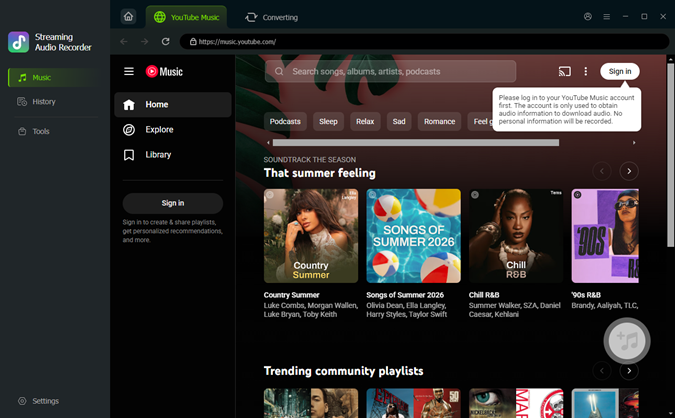 Step 2: Open YouTube Music in ViWizard
From the main screen, click the YouTube Music icon to open the built-in web player. Sign in to your account to access your library, playlists, and favorite tracks.
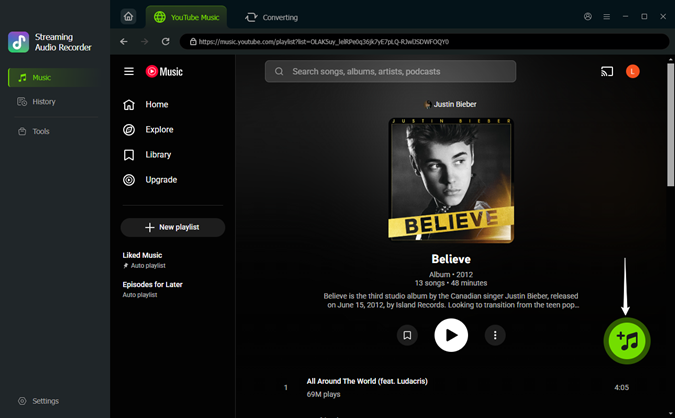 Step 3: Find and Add Your Favorites
Browse YouTube Music and open the song, playlist, album, or podcast you want to download. Click the green Plus button to add it to ViWizard.
 Step 4: Select Tracks and Convert
Select individual songs or choose all of them, then click Add to List. Finally, go to the conversion list and click Convert. Once finished, click the folder icon to find your MP3 files ready for offline playback.
Part 5. FAQs About ReVanced YouTube Music
Is ReVanced available for iPhone or iPad?
No, ReVanced is strictly for Android because it relies on installing and modifying APK files. If you're on an iPhone, your options are limited. You could try alternatives like uYou+ or sideload apps via AltStore, but these are harder to maintain and not as straightforward as the Android version.
Can I download songs for offline listening with ReVanced?
No, you can't. The app's download button still requires a YouTube Premium subscription. If you want permanent offline music, you can use ReVanced YouTube Music Extended (a community fork with extra patches) or ViWizard YouTube Music Downloader to save songs as real MP3 files.
Why does my music stop playing after one minute?
This is a common issue caused by Google's anti-tamper measures. You can usually fix it by going to Settings > ReVanced Settings > Miscellaneous and enabling Spoof Player Parameter or Spoof Client.
Is ReVanced the same as the old YouTube Vanced?
Not exactly. Unlike YouTube Vanced, which distributed a modified app, ReVanced provides patches that you apply to the official app yourself. This is a safer and more legal approach.
Does YouTube Music ReVanced support Android Auto?
Yes, but it requires an extra step. To make ReVanced appear on your car's dashboard, open the Android Auto app, enable Developer Settings, and check Unknown Sources.
Final Thoughts
YouTube Music ReVanced is a great tool for anyone who wants ad-free listening and background play on Android. But the setup can be tricky, and it sometimes needs updates or fixes. If you want a more stable way to keep your music offline, ViWizard YouTube Music Downloader is a better choice. It lets you save songs as real files, download in batches, and use them on any device.
You May Be Interested
How to Use YTMusicAPI to Manage Your YouTube Music Library

ReVanced Spotify Not Working? Try These Alternatives Instead

Why Does YouTube Music Keep Pausing? 15 Easy Fixes

Latest Guidance to Get YouTube Premium for Free Forever

17 Best Free/Paid YouTube Music Downloaders in 2026
How to Get YTMusicUltimate in 2026


Nick Orin, a software developer at ViWizard, focuses on providing solutions for software-related challenges, including reviews, troubleshooting, and optimization tips.

Leave a Comment (0)