


As YouTube Music maintains its stronghold in the music streaming industry in 2026, users are drawn to its impressive song library, personalized recommendations, and dynamic features. However, the subscription fee for YouTube Music Premium may be out of reach for some, prompting many to search for alternative options like the YouTube Music Premium APK.

In this article, we'll explore the YouTube Music Premium APK, its features, and how to get it. More importantly, we'll provide safer alternatives to help you stream music without interruptions or security concerns.
Part 1. What Is YouTube Music Premium APK
YouTube Music Premium APK is a modified version of the official YouTube Music app that unlocks Premium features for free, such as ad-free listening, background playback, and offline downloads.
Unlike the official version, it doesn't require a subscription. However, since it is not released by Google and comes from third-party sources, it may involve risks related to security and account safety.
Official vs MOD APK: What's the Difference?
Here's a quick comparison to help you understand how the MOD version differs from the official YouTube Music app:
| Feature | Premium MOD APK | Official YouTube Music |
|---|---|---|
| Source | Third-party websites | Google Play / App Store |
| Cost | Free | Subscription required |
| Ads | Removed | Removed (Premium only) |
| Background Play | Yes | Yes (Premium) |
| Offline Downloads | Often unlocked | Yes (Premium) |
| Account Safety | Risky | High |
| Updates | Unstable or delayed | Regular & stable |
What Can I Get with YouTube Music Premium APK?
Using YouTube Music Premium APK provides access to a plethora of premium features, including:
- Ad-Free Experience: Say goodbye to interruptions and enjoy uninterrupted music streaming.
- Background Playback: Continue listening to music while using other apps or when your screen is off, which helps save battery life.
- Offline Downloads: Download your favorite songs and playlists for offline listening—perfect for travel or when internet access is limited.
- High-Quality Audio: Enjoy crisp, clear audio with enhanced sound quality, delivering an immersive music experience.
- Unlimited Skips: Skip any track without restrictions, giving you more control over your playlist.
- Exclusive Content: Some modded versions offer access to region-specific or premium-only content that's not available in the standard version.
Part 2. How to Get YouTube Music Premium Mod APK
If you're still looking to try YouTube Music Premium Mod APK, you can go to a reliable website to get the YouTube Music Premium APK source. Here we list some for you to choose.
| YouTube Music Premium APK | Requires | Size | Updated on | Rating |
| apkymody YouTube Music MOD APK (Premium Unlocked) | Android 7.1+ | 38MB | 04/15/2025 | 3/5 |
| MODSMANIAC YouTube Music MOD v7.33.51 | / | 86.38MB | 04/22/2025 | 4.1/5 |
| Getmodsapk YouTube Music v7.33.51 MOD APK [Premium Unlocked/Background Play] | Android 5.1+ | 72MB | 04/21/2025 | 4.2/5 |
| Apkpure YouTube Music | Android 8.0+ | 58.9MB | 04/22/2025 | 7.6/10 |
| ReVanced YouTube Music | / | 58.63MB | 04/22/2025 | / |
Steps to Get YouTube Music Premium APK:
01 Find a Trusted Source: Search for reputable websites that offer the YouTube Music Premium APK. Be extra cautious and ensure the site is trustworthy to avoid downloading malware.
02 Enable Installation from Unknown Sources: Go to your device's Settings → Security, and toggle on the option that allows you to install apps from unknown sources. This will allow the APK to be installed on your phone.

03 Download the APK: Once you've found a reliable source, download the YouTube Music Premium APK file to your device.
04 Install the APK: Open the downloaded file and follow the on-screen instructions to install the app. After the installation is complete, open the app to access premium features.
Part 3. Does YouTube Music Premium MOD APK Really Work?
Yes, most YouTube Music Premium MOD APKs work, but with some limitations.
Users on Reddit have shared their experiences with YouTube Music MODs like ReVanced:
These comments highlight two common issues with MOD APKs: limited audio quality and unstable offline downloads.
What We Observed in Testing
In our tests, we installed YouTube Music ReVanced to evaluate how it performs as a YouTube Music Premium APK mod. Here's what we found:
- Ad-free playback
- Background play while using other apps
- Unlimited skips
- Access to most music content
- Offline downloads often fail after a few days
- Some tracks play at lower quality than official Premium
- Google account login can be unstable
- App crashes or stops loading tracks occasionally
For a more stable MOD APK experience, many users recommend tools like OuterTune, a GitHub project. Keep in mind, though, that it's not completely safe or stable. It needs technical setup and regular maintenance, plus there's always a risk of account issues or security problems.
If your main goal is to listen to YouTube Music without ads and download tracks for offline listening, a safer alternative is to use ViWizard YouTube Music Downloader. Unlike MOD APKs, it does not interfere with your account, provides consistent downloads, and ensures stable, ad-free playback, even with just a Free YouTube Music account.
Part 4. Is YouTube Music Premium APK Safe?
While YouTube Music Premium APK may seem like an attractive option for accessing premium features without paying a subscription fee, there are several reasons why users should reconsider using it. Here are the main risks associated with using modded APKs:
1. Legal and Ethical Concerns
Using modded APKs violates YouTube's terms of service and is illegal. It bypasses the paid subscription model, depriving creators of their deserved revenue and risking penalties like account suspension or banning.
2. Security Risks
Modded APKs are not verified by YouTube, and they can contain malware, spyware, or viruses. These threats could compromise your personal data or harm your device, leading to privacy breaches or identity theft.
3. Poor User Experience
Since modded APKs lack official support, they may have bugs, crashes, or compatibility issues. Without regular updates, you'll miss important security patches and feature improvements.
4. Data Privacy Issues
Malicious modded APKs may request unnecessary permissions, like access to your contacts or location. This can expose sensitive information and jeopardize your privacy.
5. Lack of Updates
You won't receive official updates with modded APKs, meaning your app could become outdated or prone to bugs, affecting performance and security.
Part 5. A Safer Way to Get YouTube Music Premium Features
For users concerned about security risks or legal implications, opting for safer alternatives is recommended. One of the best alternatives is ViWizard YouTube Music Downloader.
Why Choose ViWizard YouTube Music Downloader?
ViWizard YouTube Music Downloader is a Windows and Mac software that lets you download music from YouTube and save it as MP3 or other standard formats. You don't need a Premium account. Once you download your songs with ViWizard, you get all the Premium perks, like ad-free listening, unlimited skips, offline playback, and background play.
It gives you more features. Since your music is converted to universal formats, you can play it anywhere, on your car stereo, smart TVs, or any speaker. ViWizard also works with Spotify, Apple Music, TIDAL, SoundCloud, and more. That means you get Premium features for 10 music apps in one tool, which makes it a really good deal.

Download songs, playlists, albums, and your whole music library from 10 major streaming platforms, including YouTube Music, to MP3, FLAC, WAV, AIFF, M4A, or M4B with original quality and ID3 tags for permanent offline listening.
How to Access YouTube Music Premium Contents with ViWizard
 Step 1: Customize Output Format and Audio Quality
After installing ViWizard YouTube Music Downloader on your Windows or Mac, open the app and go to Preferences. Choose the output format you want, such as MP3, WAV, or FLAC. You can set the audio quality to Lossless, so you will download the track with its original audio quality.
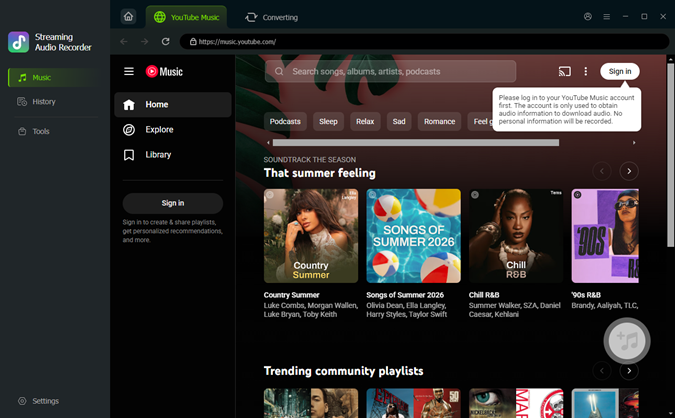 Step 2: Access YouTube Music
Open the built-in YouTube Music player in ViWizard and sign in with your account. You can browse your library, playlists, albums, or liked songs directly in the app.
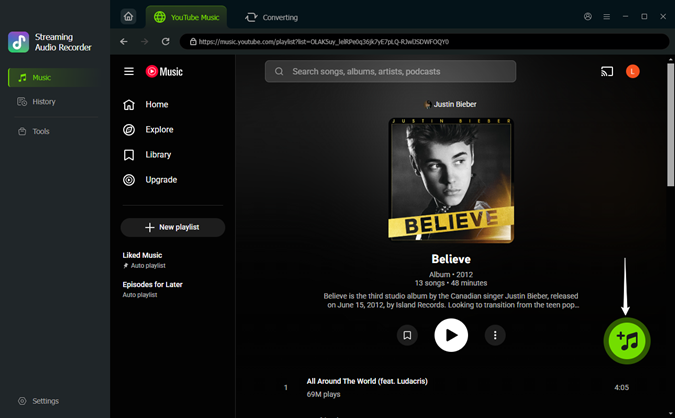 Step 3: Add Songs to Download
Find the songs, playlists, or albums you want. Click the Plus button. The downloader will begin fetching the songs on the current page. A setup window will appear, allowing you to select all the songs with one click. Then, click Add to List to prepare all the chosen tracks for conversion.
 Step 4: Download and Enjoy
Click Convert to start downloading. ViWizard saves your music at high quality while keeping all Premium features, such as ad-free listening, background playback, and offline access. Once finished, you can play your songs on any media player or device.
Part 6. FAQs about YouTube Music Premium APK
Is Using YouTube Music Premium APK Legal?
No, using modded APKs is considered illegal as it bypasses the payment system of the official app. It violates YouTube's terms of service and may result in account suspension. While this option may seem appealing, it's important to remember that it undermines the efforts of developers and artists who rely on the subscription model for revenue. Users caught using modded APKs risk facing penalties such as restricted access or permanent account bans.
Are YouTube Music Premium Mod APK Safe?
Modded APKs come with inherent risks such as malware, data breaches, and device vulnerabilities. It's crucial to download from verified sources, though this doesn't guarantee complete safety. Many unauthorized APKs are altered by third parties who may embed malicious code, compromising your device's security and exposing sensitive information. Additionally, modded APKs lack official updates and bug fixes, leaving users vulnerable to performance issues or cybersecurity threats.
Can I Listen to YouTube Music Offline Without Premium?
Yes, there are legitimate ways to listen offline, such as using YouTube Music's free trial or tools like ViWizard YouTube Music Downloader to record and save your favorite tracks. With a free trial, users can explore premium features temporarily, and services like ViWizard YouTube Music Downloader provide a safe, legal, and permanent method to save music offline. By choosing these options, you avoid the risks associated with modded APKs while enjoying high-quality music on the go.
Conclusion
Although the YouTube Music Premium APK may seem like a tempting solution for accessing premium features for free, the risks it poses to your device's security and legal standing outweigh the benefits. For a safer and fully legal alternative, ViWizard YouTube Music Downloader offers all the premium features you want—ad-free listening, offline playback, and more—without the need for risky APKs.
Choose the smarter, safer way to enjoy your music, and protect your device and personal data. By opting for ViWizard, you can have an uninterrupted, high-quality music experience without compromising on safety or legality.
You May Be Interested


Matt Smith, a digital entertainment industry enthusiast at ViWizard, is dedicated to providing insightful commentary and solutions for music and media-related topics, including industry trends, analysis, and recommendations.

Leave a Comment (0)