


YouTube Music has millions of songs, but keeping track of all that music can feel overwhelming. If you're a developer or a power user, the YTMusicAPI Python library makes it easy to automate your library management, like organizing playlists and getting song details directly.
In this guide, I'll show you how to set up and use YTMusicAPI to manage your YouTube Music data. Plus, I'll highlight its limits and share a simple one-click solution that lets you download high-quality music from the YTM library without any coding.
Part 1. What Is YTMusicAPI and Why Use It?
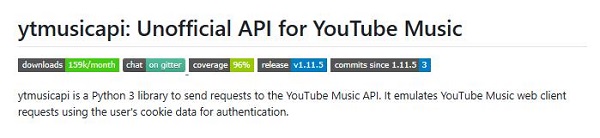
If you've ever tried using the Official YouTube Data API to manage your music, you probably ran into some issues. This API mainly focuses on general video data and often limits access to specific YouTube Music features, like managing your private library or accessing your "Liked Songs." That's where YTMusicAPI steps in.
YTMusicAPI is an unofficial, open-source Python wrapper that connects with the YouTube Music web interface. It mimics the requests your browser makes, letting you do tasks that usually require a lot of manual clicking. Think of it as a bridge between your Python scripts and your music library.
Here's what you can do with YTMusicAPI:
Key Features of YTMusicAPI:
- Library Management: Automate making, editing, and deleting playlists or managing your "Liked Songs."
- Search & Metadata: Filter your search for songs, albums, and artists to grab IDs, durations, and high-res album art.
- User History: Use get_history() to pull up your playback history and create personalized listening reports.
- Lyrics & Discovery: Fetch song lyrics and generate "Related" or "Up Next" song suggestions.
- Uploads Support: Take care of your personal cloud music library, including listing and removing uploaded tracks.
- Secure Authentication: Use Browser Headers and Google OAuth for safe account access.
Why Choose YTMusicAPI for Library Management?
If you're a developer or data lover, YTMusicAPI is a game-changer:
- Automate Tasks: Instead of manually moving hundreds of songs from one playlist to another, you can write a few lines of code to do it in seconds.
- Smart Sorting: Easily identify and remove "Unavailable" videos or duplicates. Sort playlists by genre or mood, and get "Recap" stats anytime, whether for the past month or your entire history.
- Extract Metadata: It allows you to pull detailed information about your listening history, most-played artists, and song credits for personal data projects.
- Manage Uploads: YTMusicAPI lets you handle private uploaded files, something the official Google APIs generally ignore.
Part 2. How to Install and Set Up YTMusicAPI
To set up YTMusicAPI, you need to follow two simple steps: install the Python package and authenticate your account.
Step 1 Install the Library
First, make sure you have Python 3.10 or higher on your computer. Open your terminal or command prompt and run this command to install the latest version of YTMusicAPI from PyPI:

Step 2 Choose Your Authentication Method
You can authenticate in two main ways. Most users should go with OAuth since it's the easiest and most secure option.
Option A: OAuth Authentication (Recommended)
- This method keeps your sensitive cookies safe. Just run this command in your terminal:
- A URL will appear. Open it in your browser and log into your Google account.
- Enter the code displayed on your screen back into the terminal.
- The library will generate an oauth.json file in your current folder. Keep this file safe, it is your "key" to your library.
Option B: Browser Headers (Advanced)
If OAuth doesn't work for you or you prefer the older method, you can manually copy your browser headers:
- Open YouTube Music in Google Chrome.
- Open Developer Tools (press F12) and go to the Network tab.
- Refresh the page.
- Find a request (like /browse), right-click it, and select Copy -> Copy as cURL (bash).
- Run
ytmusicapi setupin your terminal, paste the copied data, and it will create aheaders_auth.jsonfile.
For more details on both methods, check out the YTMusicAPI Setup Guide.
Part 3. How to Use YTMusicAPI to Manage Your YouTube Music Library
Once you have completed the setup, you can begin automating your library. The power of YTMusicAPI lies in its ability to perform "batch actions" that would take hours to do manually in the app.
To start interacting with your library in Python, initialize the YTMusic object:
ytmusic = YTMusic( "headers_auth.json")
If your auth file is valid, you now have full access to functions like fetching playlists, searching for songs, and more. Below are the most common scenarios and ways to use the the YTMusicAPI:
1. Searching for Content
First, you need to locate what you want to add or manage. The search() method is your entry point to the library and public catalog. Check out this example:
2. Automating Playlist Management
Playlist automation is one of the most useful features of YTMusicAPI. You can easily move playlists or manage your own music without doing everything by hand.
For example, here's how to create a new playlist:
title="My Playlist",
description="Chill tracks for work",
privacy_status="PRIVATE",
video_ids=[ "videoId1", "videoId2" ],
source_playlist="PLxxxxxxxxxxxx"
)
Once the playlist is created, YTMusicAPI also lets you:
- 1. Get Playlist Details:
YTMusic.get_playlist( playlistId: str, limit: int | None = 100, related: bool = False, suggestions_limit: int = 0 ) → dict[ str, Any ]
- 2. Edit Playlist Details:
YTMusic.edit_playlist( playlistId: str, title: str | None = None, description: str | None = None, privacyStatus: str | None = None, moveItem: str | tuple[ str, str ] | None = None, addPlaylistId: str | None = None, addToTop: bool | None = None ) → str | dict[ str, Any ]
- 3. Delete Playlist:
YTMusic.delete_playlist( playlistId: str ) → str | dict[ str, Any ]
For a full list of available functions and usage details, see the YTMusicAPI playlist reference.
3. Managing Your "Liked Songs" and History
If you want to back up your favorites or analyze your taste, you can access your private library data:
- 1. Get Liked Songs:
YTMusic.get_liked_songs( limit = 100 ) # returns your most recent likes
- 2. Get Your Play History:
YTMusic.get_history() → list[ dict[ str, Any ]]
For more ways to manage your YouTube Music library, see the official YTMusicAPI Library reference.
4. Managing Your Uploads
If you've uploaded your own music to YouTube Music, YTMusicAPI allows you to view, upload, and remove those files programmatically.
- 1. Get Uploaded Songs Details:
YTMusic.get_library_upload_songs( limit: int | None = 25, order: Literal[ 'a_to_z', 'z_to_a', 'recently_added' ] | None = None ) → list[ dict[ str, Any ]]
- 2. Upload Music to YouTube Music:
YTMusic.upload_song( filepath: str ) → ytmusicapi.enums.ResponseStatus | requests.models.Response
- 3. Delete Uploaded Music:
YTMusic.delete_upload_entity( entityId: str ) → str | dict[ str, Any ]
For more methods and detailed parameter explanations, see the official YTMusicAPI Uploads reference.
Part 4. Limitations of YTMusicAPI You Should Know
YTMusicAPI is super powerful, but it has several critical drawbacks that might make it impractical for non-developers:
- No Download Feature: It only handles metadata like titles, playlists, and history. You can't download audio files or get around DRM for offline listening.
- Coding Skills Needed: You need to know your way around Python, terminal commands, and JSON files to use it.
- Maintenance Headaches: Since it's an unofficial library, it can break whenever YouTube updates its site. You'll often have to tweak your code or re-authenticate your tokens.
- Account Risks: If you act too quickly, you might trigger YouTube's anti-spam filters and risk your account.
- Tricky Authentication: Setting up oauth.json or browser headers is a hassle compared to a regular login.
Part 5. The Best Alternative: ViWizard YouTube Music Converter
If you aren't a programmer, or if you simply want to listen to your YouTube music offline and grab ID3 tags for songs, playlists, albums, and episodes without dealing with JSON tokens and broken scripts, you need ViWizard YouTube Music Converter.
Unlike the API that just connects to the data, ViWizard actually delivers the music. It converts tracks into audio files that play on any device. This lets you grab the metadata for each song, set your own file naming rules, and edit the tags however you like.
| Feature | ViWizard YouTube Music Converter | YTMusicAPI |
|---|---|---|
| Primary Purpose | Download YouTube Music for offline use | Manage library metadata via API |
| Requires Coding | No (GUI-based) | Yes (Python required) |
| Downloads Audio Files | ✅ | ❌ |
| ID3 Tagging | ✅ | ❌ |
| Setup Time | 1 minute (30x faster) | 15-30 mins |
| Reliability | Stable & Regularly Updated | Breaks with YouTube UI updates |

Download music from 10 popular streaming platforms like YouTube Music and save it in formats like MP3, FLAC, WAV, AIFF, M4A, or M4B while keeping the original sound quality.
How to Use ViWizard to Get Your YouTube Music
Step 1 Set the Output Format
Open the ViWizard YouTube Music Converter. Head to Menu > Preferences > Conversion. Pick your favorite format and file naming style. Choose a folder for your converted music and hit OK.

Step 2 Sign in to YouTube Music
On the main screen, click the YouTube Music icon to launch the web player. Log in to your YouTube Music account to reach your playlists, albums, and saved tracks.

Step 3 Choose Music to Download
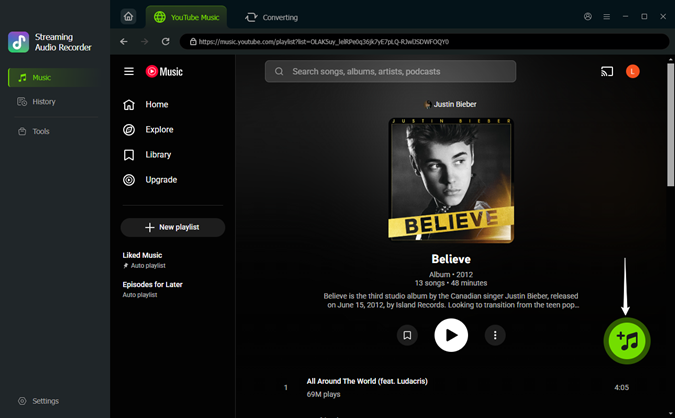
Browse your library and find the song, playlist, or album you want to save. Hit the Add (+) button for individual tracks or the whole playlist. Then click Add to List to get them ready for conversion.
Step 4 Convert and Save Music Locally
Click the Convert button to start downloading and converting your chosen tracks. Once it's done, click the folder icon to find your new local music files. These files will include the title, artist name, cover art, track number, and all the original info from YTM, and you can tweak them if you want.

Part 6. FAQs About YTMusicAPI
How does YTMusicAPI compare to the official YouTube Data API v3?
The YouTube Data API v3 is a Google service for video data, but it's too limiting for music management. It doesn't support private YouTube Music features like "Liked Songs" or cloud-uploaded music.
On the flip side, YTMusicAPI is an unofficial Python library that mimics the web client. It gives you better access to music content, lyrics, and private library data that the official API misses.
Why is my YTMusicAPI authentication failing?
Authentication failures usually happen because:
- The browser header or OAuth token used is outdated or invalid.
- You logged out of YouTube Music or changed your account password.
- The copied headers are incomplete or have formatting issues.
- You're using an outdated Python version, older than 3.10.
Can I transfer my Spotify playlists to YouTube Music using YTMusicAPI?
No, YTMusicAPI itself is not a standalone transfer tool. It's a Python library that helps you build one. To transfer playlists, use a tool like Spotipy to read data, then YTMusicAPI to write it. You can also try open-source tools like spotify-to-ytmusic.
Can I access my private playlists and liked songs using YTMusicAPI?
Yes. As long as you are properly authenticated, you can fully manage your private content. Simply use get_liked_songs() to retrieve your favorite tracks.
Are there limits on how many requests I can make with YTMusicAPI?
YTMusicAPI does not have a formal fixed quota. However, because it emulates a human user, sending too many requests too quickly can lead to temporary rate-limiting or your account being flagged for bot-like behavior.
Final Thoughts
YTMusicAPI is great for managing and automating your YouTube Music library, letting you fetch playlists, liked songs, and metadata with Python. However, it is not designed for Python beginners or users who want to build a music library with actual audio files.
For exporting YouTube Music tracks along with metadata, ViWizard YouTube Music Converter is the perfect complement. Its one-click interface, batch processing, and fast conversion make it easy to take full control of your YouTube Music collection.
You May Be Interested
How to Get the YouTube Music Desktop App on Your Computer

17 Best Free/Paid YouTube Music Downloaders in 2026
How to Download a YouTube Music Playlist to PC and Phone
9 Best YouTube to WAV Converters That Actually Work in 2026 (Free & Paid)
How to Download and Install ReVanced YouTube Music APK
How to Download and Use YTMDesktop in 2026

Dave Henry loves movies and all things video. He likes checking out different video formats and trying new media players to see how they change the viewing experience.

Leave a Comment (0)