


Previously, we tested and compiled a list of 17 YouTube Music downloaders for free downloading, but we heard that many users also want to convert videos to WAV for higher audio quality. Converting YouTube to WAV is a great choice because it preserves the full sound quality. However, finding a reliable YouTube to WAV converter can be challenging. Many online tools are slow, filled with ads, or produce low-quality audio.
To save you the frustration of trial and error, we have picked out 9 best YouTube to WAV converters that actually work. From powerful desktop software for batch processing to fast and free online tools, this guide covers the pros, cons, and key features of each option to help you find the perfect match for your workflow.
Want to skip ahead? Check out our Comparison Table and Choosing Guide for a quick overview.
Part 1. Our Top Pick: The Most Reliable YouTube to WAV Converter
ViWizard All-in-One Music Converter is a reliable desktop software for converting audio from YouTube to WAV, MP3, FLAC, AIFF, M4A, and M4B formats. You can batch download unlimited songs, soundtracks, albums, podcasts, and playlists from YouTube Music. In addition to YouTube Music, this powerful tool supports nine other music services, including Spotify, Apple Music, SoundCloud, Tidal, Amazon Music, Deezer, Qobuz, Pandora, and Line Music. This makes it the perfect all-in-one YouTube to WAV downloader for all your music.

Download songs, playlists, albums, and your whole music library from 10 major streaming platforms, including YouTube Music, to MP3, FLAC, WAV, AIFF, M4A, or M4B with original sound quality and full song info and keep your music forever.
| ViWizard YouTube to WAV Conversion | Details |
|---|---|
| Supported Platforms | Windows, Mac |
| Download Link | https://www.viwizard.com/streaming-audio-recorder/ |
| Supported Formats | WAV, MP3, FLAC, AIFF, M4A, M4B |
| Audio Quality | Customizable sample rate (22kHz–192kHz) and bit depth (16-bit, 24-bit) |
| Batch Download | ✅ Yes |
| Max Video Length | No limit |
| Speed | Up to 30x faster |
| Ads / Popups | None |
| Safety | Safe and secure, no ads, no malware, privacy protected |
How to Convert YouTube to WAV Using ViWizard Software
Step 1 Open ViWizard and go to Menu > Preferences > Conversion. Choose WAV as the audio format. Adjust the bit depth and sample rate if needed. Select an output folder and click OK to save your settings.

Step 2 On the main interface, click the YouTube Music logo to open the built-in web player. Log in with your YouTube Music account. Your account and information are fully protected and safe.

Step 3 Browse songs, playlists, podcasts, or music videos in the player. When you find what you want, click its title, then click the + button in the bottom right corner to fetch the audio on the page. In the pop-up, click Select All or choose individual tracks, then click Add to List to queue them for WAV conversion.
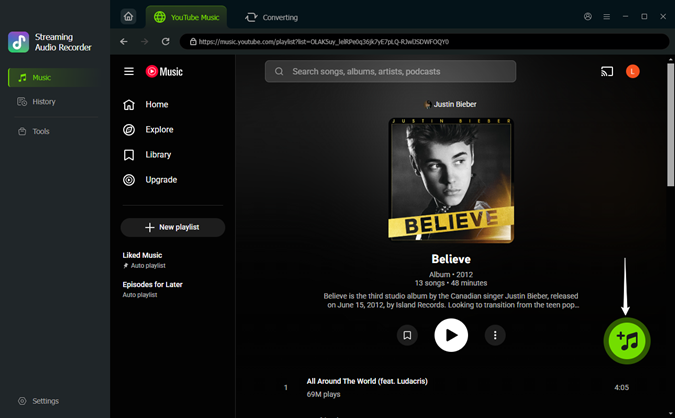
Step 4 Click Convert. The software will download the selected audio in high-quality WAV format to your chosen folder. All files will keep full ID3 tags, including artwork, title, track number, artist, and lyrics if enabled. You can now play the WAV audio in your media player or transfer it to other devices for easy playback.

- Pros
- High-quality, customizable WAV output
- Supports 6 audio formats
- Batch download in one click
- No ads or popups
- Full ID3 tags
- Supports 10 popular music platforms
- Safe and secure
- Up to 30× conversion speed
- Cons
- Desktop only
- Requires a paid license after the free trial
Part 2. Best Free Online YouTube to WAV Converters
To help you find the most efficient tools, we have personally tested 8 online YouTube to WAV converters that are free to use. Most of these tools are web-based and should work in any browser. However, since we tested them using Google Chrome, we recommend using Chrome for the best experience and stability.
#1. Loader.to
Loader.to is an online YouTube downloader designed for long videos, making it perfect if you want to convert a podcast episode or an hour-long playlist. What impresses us is that it supports various audio formats, including WAV, as well as video formats like MP4. Compared with most online converters, Loader.to is very stable and rarely changes its domain, so we recommend it if you are looking for a long-term solution.

| Loader.to YouTube to WAV Conversion | Details |
|---|---|
| Supported Platforms | Web (Windows, Mac, Linux, mobile browsers) |
| Access Link | https://en.loader.to/4/ |
| Supported Formats | WAV, MP3, M4A, WebM, AAC, FLAC, OPUS, OGG, MP4 |
| Audio Quality | Up to 320 kbps |
| Batch Download | ❌ No |
| Max Video Length | Not stated, typically single video only |
| Speed | Fast |
| Ads / Popups | High (Expect redirects when clicking download) |
| Safety | Generally safe when redirects are closed promptly |
How to Use Loader.to for YouTube WAV Conversion
Step 1 Copy the URL of the YouTube video you want to convert.
Step 2 Go to the Loader.to website and paste the link into the URL box.
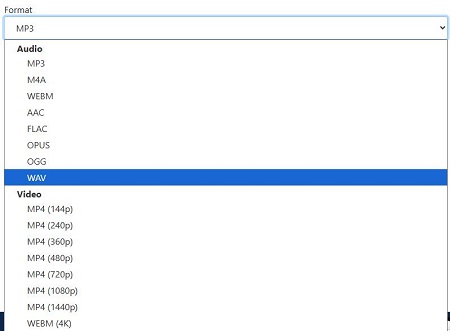
Step 3 Click the Format dropdown menu and select WAV.
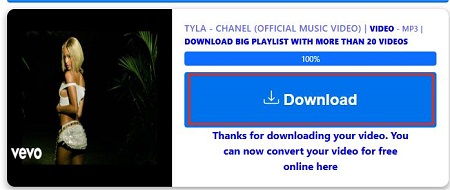
Step 4 Click the blue Download button. A new tab will open for redirect, close it.
Step 5 Stay on the orginal page and you will see a progress bar show the conversion status.
Step 6 Once the bar reaches 100%, click the new Download button that appears to save the file.
- Pros
- Free to use
- No registration or account is required
- Simple and easy interface
- Supports WAV output
- Works in any browser
- Cons
- Only one video per conversion
- Some pop-up redirects can appear
#2. Y2WAV
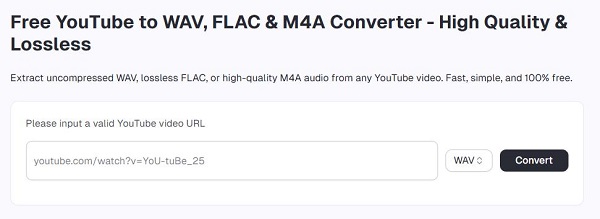
Y2WAV is a free online YouTube to WAV converter that allows you to extract WAV audio directly from YouTube video links. While you cannot adjust the audio quality like with ViWizard, Y2WAV maintains 128–256 kbps quality. Another thing you should know about this tool is that it supports videos up to about 2 hours long, and there is no limit on the number of conversions.
| Y2WAV YouTube to WAV Conversion | Details |
|---|---|
| Supported Platforms | Web browsers (Chrome, Safari, Firefox, Edge) on Windows, macOS, Android, and iOS |
| Access Link | https://y2wav.com/ |
| Supported Formats | WAV, FLAC, OGG, M4A, MP3, MP4 |
| Audio Quality | Typically 128-256 kbps and wraps it in a lossless WAV container |
| Batch Download | ❌ No |
| Max Video Length | Up to 2 hours |
| Speed | Fast conversion for short videos |
| Ads / Popups | Moderate (Fewer than Loader.to but some redirects exist) |
| Safety | Generally safe with normal web browsing caution |
How to Use Y2WAV to Convert YouTube to WAV
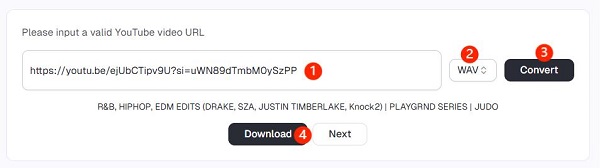
Step 1 Open your browser and go to y2wav.com.
Step 2 Find the YouTube video you want to convert and copy its URL.
Step 3 Paste the YouTube video link into the input box on the Y2WAV site.
Step 4 Choose WAV as the output format.
Step 5 Click Convert and wait for the process to finish.
Step 6 When the WAV file is ready, click Download to save it to your device.
- Pros
- Free to use
- No registration or software required
- Works in any browser
- Supports high quality WAV output
- Mobile friendly
- Cons
- Source quality limited
- Max video ~120 minutes
- Misleading redirects
- No batch download
#3. YT1D
YT1D lets you download YouTube WAV audio directly from the web in just a few clicks. It stands out because it can also download YouTube videos in up to 4K and 8K MP4, while still offering audio conversion to formats like WAV. This makes it a good choice if you want both high-quality audio and video downloads from YouTube.
| YT1D YouTube to WAV Conversion | Details |
|---|---|
| Supported Platforms | Web (Windows, Mac, Linux, mobile) |
| Access Link | https://en.yt1d.app/ |
| Supported Formats | WAV, MP3, MP4, WebM, AAC, FLAC, OGG, OPUS |
| Audio Quality | Depends on the original YouTube source quality |
| Batch Download | ❌ No |
| Max Video Length | Not stated, single video at a time |
| Speed | Medium |
| Ads / Popups | 3-4 redirects for 1 conversion |
| Safety | Generally safe with caution on redirects and ads |
How to Use YT1D to Convert YouTube to WAV
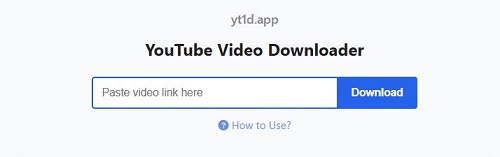
Step 1 Open your browser and go to https://en.yt1d.app/.
Step 2 Find the YouTube video you want and copy its URL.
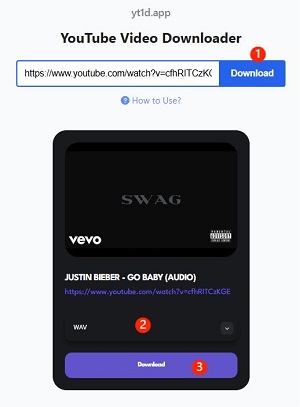
Step 3 Paste the YouTube link into the conversion box on YT1D.
Step 4 Select WAV as the output format.
Step 5 Click the Download button.
Step 6 A small box will appear with a purple Download button. Click it to save the WAV file to your device.
- Pros
- Free with no daily download caps
- Works perfectly on mobile browsers
- Supports wide variety of formats beyond just WAV
- Cons
- No playlist support
- No batch download
- Many redirect tabs
- Medium download speed
#4. CutYT
CutYT is an online tool for converting YouTube videos to WAV format. It offers a "cut" feature that lets you select specific segments for conversion. This allows you to obtain high-quality, lossless WAV audio from only the necessary parts of a YouTube video.
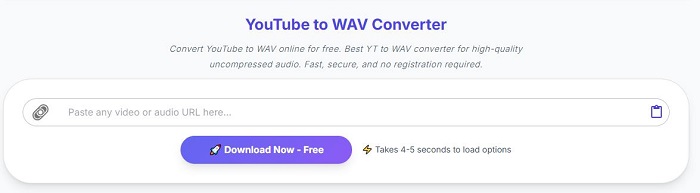
Note that "lossless" here means the original audio details are preserved, but it does not create true studio-quality audio from YouTube. YouTube audio is usually 256 kbps AAC, so converting to WAV only changes the container without increasing quality. Most online converters work this way, but it is important to know even if a tool claims to support lossless.
| CutYT YouTube to WAV Conversion | Details |
|---|---|
| Supported Platforms | Web (Windows, Mac, Linux, mobile) |
| Access Link | https://www.cutyt.com/yt-wav |
| Supported Formats | MP3, AAC, FLAC, WAV, M4A, OPUS, ALAC, Vorbis, MP4, MKV, WebM, MOV, and AVI |
| Audio Quality | Depends on the original YouTube video quality |
| Batch Download | ❌ No |
| Max Video Length | Not specified, single video only |
| Speed | Medium |
| Ads / Popups | No |
| Safety | Generally Safe to use |
How to Use CutYT to Convert YouTube to WAV
Step 1 Open your browser and go to https://www.cutyt.com/yt-wav.
Step 2 Find the YouTube video you want and copy its URL.
Step 3 Paste the video link into the input box on CutYT.
Step 4 Click the Download Now button.
Step 5 Click the WAV option on the left panel.
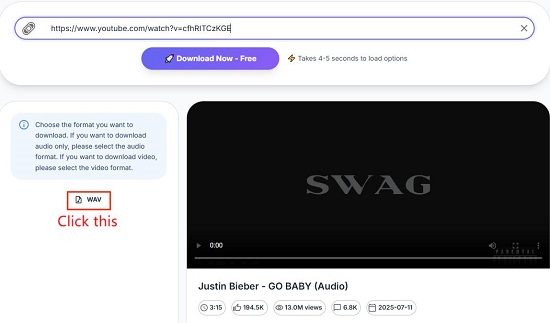
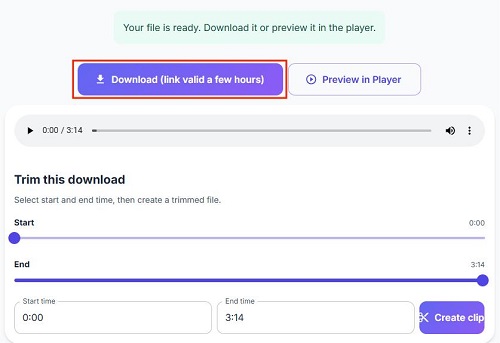
Step 6 Set the start and end points to trim the audio if needed.
Step 7 Click Download. The WAV file will be saved to your device.
- Pros
- Free to use with no account needed
- Built-in trim tool for cutting long videos
- Supports both audio and video formats
- No forced ads or pop-up redirects
- Cons
- No playlist or batch downloading
- Conversion and download can be slow
- Interface changes between steps can confuse new users
#5. Y2Down
Y2Down is an online YouTube downloader that helps you convert YouTube videos to WAV audio easily. It focuses on high-resolution video downloads and lossless audio extraction. Another reason many users like it is its stability, since it keeps working even when other online converters stop after YouTube updates.
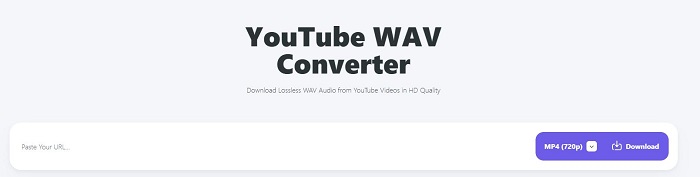
| Y2Down YouTube to WAV Conversion | Details |
|---|---|
| Supported Platforms | Web (Windows, Mac, Linux, mobile) |
| Access Link | https://y2down.cc/enJv/youtube-wav |
| Supported Formats | WAV, MP3, M4A, WebM, AAC, FLAC, OPUS, OGG, MP4 |
| Audio Quality | 16-bit/24-bit and 44.1kHz-192kHz for WAV format |
| Batch Download | ❌ No |
| Max Video Length | Not stated, single video at a time |
| Speed | Medium |
| Ads / Popups | 2-3 redirects for 1 conversion |
| Safety | Safe if you close redirects promptly |
How to Use Y2Down to Convert YouTube to WAV
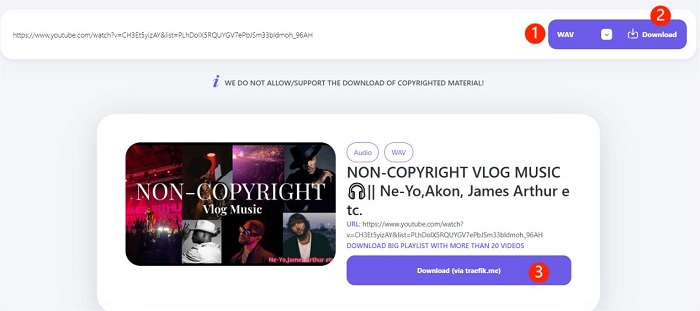
Step 1 Open your browser and go to https://y2down.cc/enJv/youtube-wav.
Step 2 Find the YouTube video you want and copy its URL.
Step 3 Paste the video link into the input box on Y2Down.
Step 4 Choose WAV as the output format.
Step 5 Click Download. Close any newly opened tabs and stay on the original Y2Down page.
Step 6 A small box will appear with a Download button. Click it.
Step 7 Wait a few seconds and the WAV file will start downloading to your device.
- Pros
- Simple and clear interface
- More stable than many free converters
- Keeps the original YouTube audio quality
- Preserves full metadata
- Cons
- No one-click playlist download
- Download button may trigger redirects
- Slow to start downloading for long videos
#6. TubeRipper
TubeRipper is a fast and simple online tool that lets you turn YouTube videos into WAV audio files. While many other websites focus mostly on video, TubeRipper has a special engine just for sound. This helps you get high-quality audio that has not been squashed or compressed.

| TubeRipper YouTube to WAV Conversion | Details |
|---|---|
| Supported Platforms | Web (Windows, Mac, Linux, mobile) |
| Access Link | https://tuberipper.cc/66/ |
| Supported Formats | WAV, MP3, M4A, FLAC, OGG, OPUS, WebM, MP4, 3GP |
| Audio Quality | 48kHz WAV |
| Batch Download | ❌ No |
| Max Video Length | Not specified, single video only |
| Speed | Fast |
| Ads / Popups | Many ads |
| Safety | Safe when using an ad-blocker |
How to Use TubeRipper to Convert YouTube to WAV
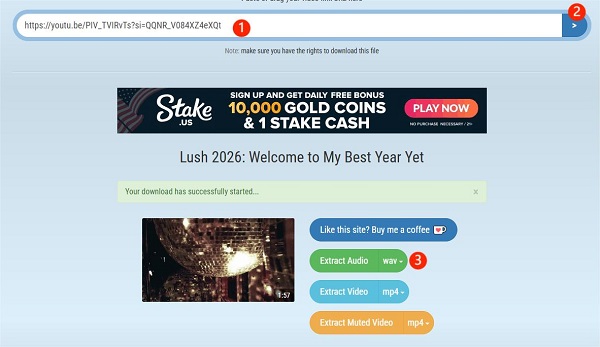
Step 1 Open your browser and go to https://tuberipper.cc/66/.
Step 2 Find the YouTube video you want and copy its URL.
Step 3 Paste the link into the conversion box on TubeRipper.
Step 4 Wait for the conversion to finish, then navaigate to the Extract Audio button.
Step 5 Select WAV from the dropdown menu. The site will automatically download the WAV file to your device.
- Pros
- Supports a wide range of audio formats
- No registration or account needed
- Reliable for long audio files
- Converts files quickly
- Cons
- Too many ads and redirects, even when clicking blank spaces
- No playlist or batch download
- No options to customize download settings
#7. Yout
Yout is a "format-shifting" tool that allows you to download audio or video from almost any website, including YouTube, in high-quality formats like WAV. Unlike basic converters, it lets you clip or crop audio segments before downloading. You can also rename files, remove silence, and adjust loudness before conversion.
| Yout YouTube to WAV Conversion | Details |
|---|---|
| Supported Platforms | Web (Windows, Mac, Linux, mobile) |
| Access Link | https://yout.com/ |
| Supported Formats | WAV, MP3, MP4, GIF |
| Audio Quality | Up to source quality (varies by video) |
| Batch Download | ❌ No |
| Max Video Length | Not stated, one video at a time |
| Speed | Fast |
| Ads / Popups | No ads and popups |
| Safety | High |
How to Use Yout.com to Convert YouTube to WAV
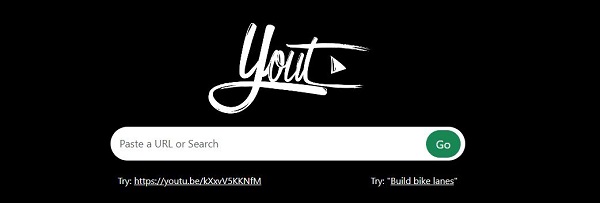
Step 1 Open your browser and go to https://yout.com/.
Step 2 Find the YouTube video you want and copy its URL.
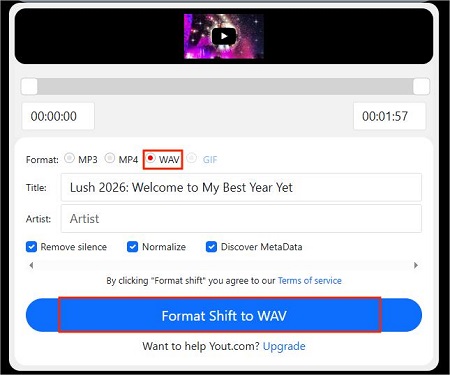
Step 3 Paste the link into the search box on Yout.com and click Go.
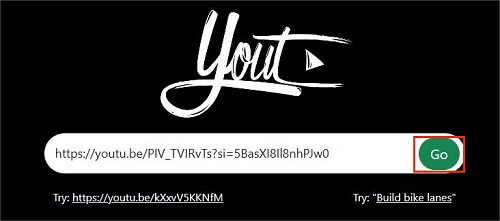
Step 4 On the conversion page, select WAV as the output format.
Step 5 Adjust clipping range or metadata if needed.
Step 6 Click the Format Shift to WAV button and wait.
Step 7 Yout site will download the YouTube WAV audio file to your device.
- Pros
- Includes built-in tools to trim and edit clips
- Zero annoying ads or pop-ups
- Saves files in professional lossless WAV format
- Cons
- High-quality WAV or long videos may need PRO subscription
- Complex metadata may not be fully preserved
- No batch download
#8. Vollume Sampler Chrome Extension
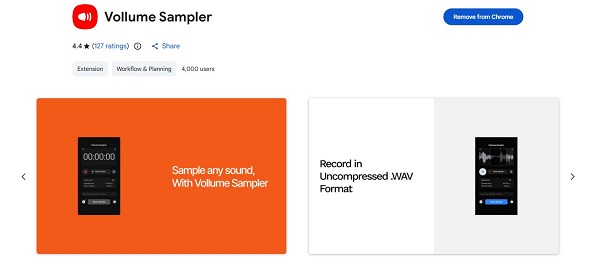
Vollume Sampler is a Chrome extension that lets you record and export any sound playing in your browser as a WAV file. Instead of taking a YouTube link and converting it like typical online converters, this tool works by capturing the audio that plays in your YouTube tab and saving it in uncompressed WAV format.
| Vollume Sampler Extension YouTube to WAV Conversion | Details |
|---|---|
| Supported Platforms | Chrome and Chromium-based browsers (Windows, Mac, Linux) |
| Access Link | Chrome Web Store: Vollume Sampler |
| Supported Formats | WAV (primary), MP3 |
| Audio Quality | Same as browser output (lossless capture) |
| Batch Download | ❌ No |
| Max Video Length | Depends on manual recording duration |
| Speed | Real-time capture |
| Ads / Popups | None (extension itself) |
| Safety | Generally safe but requires audio access permissions |
How to Use Vollume Sampler to Capture YouTube to WAV
Step 1 Install Vollume Sampler from the Chrome Web Store.
Step 2 Open a YouTube video in Chrome and play the part you want to record.
Step 3 Click the Vollume Sampler icon in the browser toolbar.
Step 4 Start recording while the audio plays in the YouTube tab.
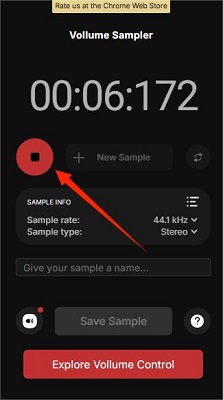
Step 5 Stop recording when you've captured the part you want.
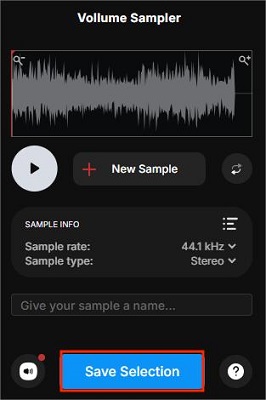
Step 6 Trim the audio and adjust the sample rate or type if needed inside the extension.
Step 7 Click Save Selection to export the recording as a WAV file to your device.
- Pros
- Records actual browser audio in WAV format
- No ads or popups in the extension itself
- Built‑in basic editing like trim and reverse
- Works without linking a downloader site
- Cons
- Chrome only
- Needs manual recording (no batch or auto conversion)
- Quality depends on browser playback level
Part 3. Comparison Chart: Find the Right YouTube to WAV Converter
Below is a detailed comparison to help you see how the top tools stack up against each other.
| Aspect | ViWizard All-in-One Music Converter | Loader.to | Y2WAV | YT1D | CutYT | Y2Down | TubeRipper | Yout.com | Vollume Sampler (Chrome Extension) |
|---|---|---|---|---|---|---|---|---|---|
| Price | Paid (free trial) | Free | Free | Free | Free | Free | Free | Free / PRO for high-quality | Free |
| Supported Platforms | Windows, Mac | Web | Web | Web | Web | Web | Web | Web | Chrome / Chromium browsers |
| Supported Audio Formats | WAV, MP3, FLAC, AIFF, M4A, M4B | WAV, MP3, M4A, AAC, FLAC, OPUS, OGG | WAV, FLAC, OGG, M4A, MP3 | WAV, MP3, AAC, FLAC, OGG, OPUS | MP3, AAC, FLAC, WAV, M4A, OPUS, ALAC, Vorbis | WAV, MP3, M4A, AAC, FLAC, OPUS, OGG | WAV, MP3, M4A, FLAC, OGG, OPUS | WAV, MP3 | WAV, MP3 |
| Audio Quality | Lossless, customizable bit rate/sample rate | High | 128–256 kbps | Good | Lossless-like | Lossless-like | Good | Up to source quality | Browser output quality |
| Batch Download | ✔️ Yes, unlimited | ❌ | ❌ | ❌ | ❌ | ❌ | ❌ | ❌ | ❌ |
| Max Video Length | Unlimited | Not stated (one video at a time) | ~2 hours | Not stated | Not stated | Not stated | Not stated | Not stated | Depends on recording duration |
| Speed | Up to 30x | Fast | Fast | Medium | Medium | Medium | Fast | Fast | Real-time |
| Ads / Popups | None | Many | Some redirects | Many | None | Many | Many | None | None |
| Safety | ✔️ | ⚠️ Varies | ⚠️ Varies | ⚠️ Varies | ✔️ | ⚠️ Varies | ⚠️ Varies | ✔️ | ✔️ |
| Stability and Support | High, professional updates | Medium | Medium | Medium | Medium | Medium | Medium | Medium | Medium |
| Editing / Metadata Support | ✔️ Full ID3 tags, artwork, lyrics | ❌ | ❌ | ❌ | ❌ Trim Editing Only | ✔️ Full metadata | ❌ | ✔️ Rename/metadata editing | ✔️ Trim, reverse, sample rate |
| Ratings | ★★★★★ | ★★★ | ★★★ | ★★★★ | ★★★ | ★★★ | ★★ | ★★★★ | ★★★ |
How to Choose the Right YouTube to WAV Converter
Choosing the right YouTube to WAV downloader depends on whether you need a quick one-time download or a professional solution for a large music library.
- For batch, high-quality, and reliable conversion, go with ViWizard All-in-One Music Converter. It handles a list of YouTube music videos all in one click, supports any video length, preserves full metadata, and offers lossless WAV output.
- For quick single-video online conversion, try Loader.to for long videos, Y2Down or YT1D for decent quality, or CutYT if you only need to trim and convert a specific segment.
- For browser-based audio capture, the Vollume Sampler Chrome Extension is ideal. It lets you record YouTube audio directly without copying links and works well when other online converters fail.
Part 4. YouTube to WAV Converter FAQs
Does converting a YouTube video to WAV actually improve the audio quality?
No. YouTube audio is already compressed, and converting it to WAV won't restore original studio quality. It just puts the audio in a lossless format to prevent further loss. Using ViWizard with high sample rate and bit depth gives the best possible quality.
Why should I choose WAV over MP3 for YouTube downloads?
WAV is uncompressed and better for editing. Unlike MP3, it keeps all audio data, so it works best in video editors or music software without compression artifacts.
Is it legal to convert YouTube videos to WAV files?
It depends. Downloading copyrighted music without permission breaks YouTube's rules. Converting your own uploads or Creative Commons content for personal or educational use is usually okay.
Can I convert an entire YouTube playlist to WAV at once?
Most free online converters, like Y2WAV or TubeRipper, cannot download playlists. ViWizard All-in-One Music Converter can grab an entire playlist and convert it to WAV in just one click.
Will the converted WAV files keep metadata like song title and artist?
Yes, some converters keep full metadata like song title, artist, album, and even artwork, but it depends on the tool. ViWizard All-in-One Music Converter, for example, preserves all ID3 tags, so your WAV files stay fully organized. Most free online converters, however, do not keep metadata, so you might need to edit it manually after conversion.
Summary
In this guide, we looked at the best YouTube to WAV converters, including free online tools and professional software. We also showed how to use each one, their pros and cons, and tips to help you choose the right tool.
If all the options feel overwhelming, you can try ViWizard All-in-One Music Converter for free. It's the most efficient YouTube Music converter we've tested, and we think it's definitely worth trying.
You May Be Interested
9 Best YouTube to M4A Converters Free Online for 2026

YouTube Music to WAV: How to Convert & Download WAV Files Losslessly
How to Download YouTube Music to MP3

Best YouTube to FLAC Converters to Preserve Audio Quality

9 Best Streaming Audio Recorders Review in 2026
How to Record Music from YouTube Using Audacity

Top 9 YouTube to MP3 Telegram Bots

Nick Orin often turns to tech forums to see what apps people are talking about. He likes testing different software, comparing features, and finding out which tools are worth a try.

Leave a Comment (0)