


Want to convert YouTube to M4A for free? You're in the right place. In this guide, we tested several free YouTube to M4A converters online and picked 9 free converters that actually work. We also highlight the best option if you need to convert multiple videos at once.
So why choose M4A? The main reason is the balance between sound quality and file size. M4A uses AAC (Advanced Audio Coding) compression, which usually delivers clearer audio than the older MP3 format while keeping the file size smaller. It's also widely supported across many devices, especially Apple products like iPhone, iPad, and Mac.
Note: If you're curious about how M4A compares with other Apple audio formats like M4B or M4P, you can check out this detailed comparison: M4A vs M4B vs M4P vs M4R – A Comprehensive Comparison
Now, let's take a look at the first YouTube to M4A converter on our list.
Part 1. Best YouTube to M4A Converter for Batch Conversion (Top Pick)
If you want a reliable tool that can handle a large music library, ViWizard YouTube Music Converter is our top pick. Unlike many online converters that only process one file at a time, ViWizard lets you download full YouTube Music playlists, albums, official tracks, or even user-uploaded audio in batches.
Although it works great as a YouTube to M4A converter, it also supports several other formats, including MP3, FLAC, AIFF, WAV, and M4B. This gives you more flexibility when building your offline music library. Before converting, you can adjust settings like bitrate and sample rate to get the audio quality you want. After you convert YouTube to M4A, the program keeps all the original metadata, such as artist name, album artwork, and release year, so organizing your music on your device is much easier.

Download songs, playlists, albums, and your whole music library from 10 major streaming platforms, including YouTube Music, to MP3, FLAC, WAV, AIFF, M4A, or M4B with original sound quality and full song info and keep your music forever.
Bonus tip: If you want to extract audio from a regular YouTube video, Just copy the video link, then open ViWizard's built-in YouTube Music web player. Change the www.youtube.com part of the URL to music.youtube.com. If the creator allows an audio version of that content, you can download it directly inside the app and convert it to M4A right away.
How to Convert YouTube to M4A Using ViWizard Converter
Step 1 Set M4A as Your Output Format
Open ViWizard and navigate to Menu > Preferences > Conversion. Under the "Format" dropdown, select M4A. Here, you can also customize the audio bitrate and sample rate to ensure the highest sound fidelity. Click OK to save your settings and choose your preferred output folder.

Step 2 Open the Built-in YouTube Music Web Player
Return to the main interface and click the YouTube Music logo to open the built-in YouTube Music web player. Log in with your YouTube Music account so you can access your playlists, albums, and liked songs directly inside the software.
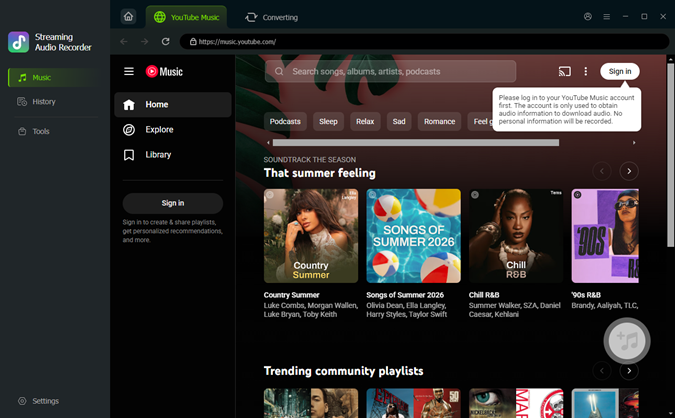
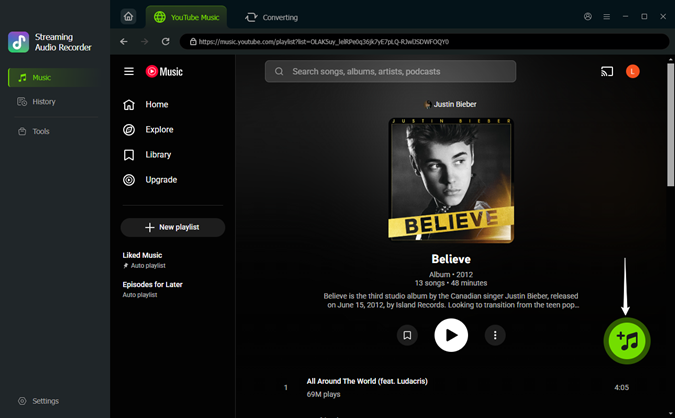
Step 3 Add Songs or Playlists for Batch Download
Browse for the official songs, albums, or user-uploaded audio content you want to convert. You can also grab the URL from YouTube, just swap "www.youtube" with "music.youtube" in the link. Once you find what you want, click on it and hit the + (Add) button in the bottom right corner. A window will pop up where you can choose individual tracks or just click Select All to get your whole playlist ready for batch conversion.
Step 4Convert YouTube to M4A at 30x Speed
Click the Convert button to start the process. The software will download and convert the selected tracks to M4A at up to 30× speed. After conversion, the files will be saved to your selected folder with full ID3 tags preserved, including title, artist, album, and artwork. You can then play the M4A files offline or transfer them to any device.

- Pros
- Preserves high audio quality
- Up to 30× faster conversion speed
- Supports batch downloads and conversions
- Keeps full ID3 tags automatically
- Exports to multiple formats: M4A, MP3, FLAC, AIFF, WAV, and M4B
- Also supports downloading from 9 other music platforms like Spotify
- Clean and easy-to-use interface
- Reliable customer support with free updates
- Cons
- Paid software (free trial available)
- Only available for Windows and Mac
- Mainly designed for downloading audio from YouTube Music, not regular YouTube videos
Part 2. 9 Free Online YouTube to M4A Converters
TIf you prefer not to install any software, an online YouTube to M4A converter can be a quick and convenient option. These web tools usually let you paste a YouTube link, pick your desired audio format, and download the converted file straight from your browser.
That said, online converters often come with limitations. They can be slower, show ads, lack batch download options, or strip out metadata. Some even limit the length of videos you can convert. To help you choose, we tested several popular online converters, checking their speed, supported content, audio quality, and how well they handle metadata.
Note: Most online tools don't preserve advanced ID3 tags like album art or lyrics, and they can sometimes fail when YouTube updates its anti-scraping measures.
#1. AM4A
🔗 Link: https://am4a.cc/
AM4A is a simple online tool that converts YouTube videos to M4A audio. You can also use it to convert videos to MP3 and MP4 formats. One cool feature is that it supports YouTube playlist links, and you can choose specific start and end times for your audio clips.
However, during our testing, we noticed a message saying AM4A is working on some YouTube conversion issues. When we tried to convert, it told us the queue was full and to try again in a minute. Even though our conversion didn't go through, it might be worth keeping AM4A as a backup and checking its performance from time to time.
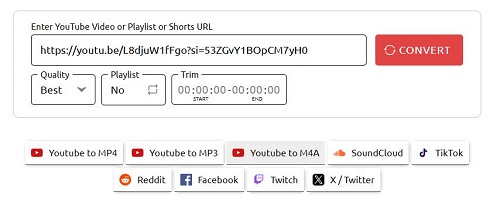
How to Use AM4A to Convert YouTube to M4A:
Step 1 Head over to the AM4A website in your browser. Scroll down and click on the YouTube to M4A tab.
Step 2 Copy the URL of the YouTube video you want to convert and paste it into the converter box.
Step 3 Choose Best from the Quality dropdown.
Step 4 Hit Convert and download your audio file.
- Pros
- No aggressive pop-up ads
- Native M4A encoding
- Supports playlist download
- Can select start and end times for the audio clip
- Cons
- Frequent server maintenance downtime
- Metadata is usually not preserved
- Conversion speed can vary depending on server load
#2. TubeRipper
🔗 Link: https://tuberipper.net
TubeRipper is a super flexible YouTube audio downloader that handles multiple formats like M4A, MP3, WAV, FLAC, and more. It quickly extracts audio streams, even from high-res 4K videos. Just keep in mind, it prioritizes speed over tagging, so don't count on perfect ID3 tags. You might have to edit them manually later.
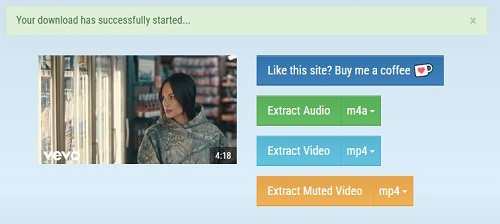
How to Use TubeRipper to Convert YouTube to M4A:
Step 1 Go to the TubeRipper website.
Step 2 Copy a YouTube video URL and paste it into the search box. Hit the > button to start processing the link.
Step 3 Check out the dropdown menu next to Extract Audio and pick m4a. You can select either m4a 44kHz or m4a 22kHz quality.
Step 4 Hit the Extract Audio button again, and the site will save the YouTube M4A file to your device.
- Pros
- Supports several audio formats including M4A
- No registration required
- Highly stable connection
- High M4A audio quality
- Cons
- Only supports single video downloads
- ID3 tags are usually missing
- Limited customization options
#3. CutYT
🔗 Link: https://www.cutyt.com/yt-m4a
CutYT is an online tool that converts YouTube videos into popular audio formats like MP3, M4A, FLAC, and WAV. The site has a clean and simple design, making the process easy to navigate. However, it offers only basic features. If you need advanced customization, this isn't the best choice. It works well for quick conversions of one or two songs but isn't ideal for downloading in bulk. You may also encounter some redirects and misleading download buttons while using the site, so it's important to click carefully.
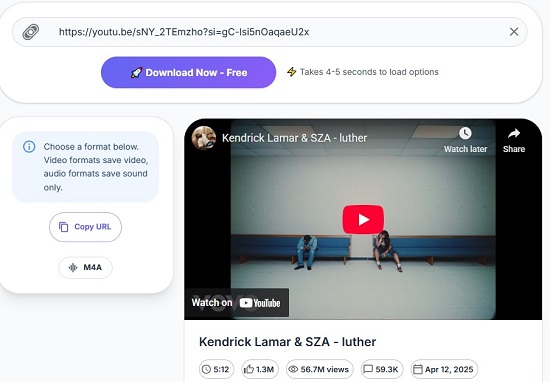
How to Use CutYT to Convert YouTube to M4A:
Step 1 Open the CutYT YouTube to M4A Converter page.
Step 2 Paste the YouTube video link into the input box.
Step 3 Click Download Now - Free button.
Step 4 Click M4A button. Your download will start now.
- Pros
- Simple interface
- Supports multiple output formats for both video and audio
- No registration required
- No limits on the number of conversions
- Cons
- Redirects may appear on the website
- Does not support batch downloads
- Not suitable for converting long videos
#4. Ytb.rip
🔗 Link: https://ytb.rip/en7/youtube-to-m4a
Ytb.rip is a lightweight online YouTube converter that supports output formats like M4A, MP4, and WEBM. While the tool is mainly focused on video downloads, it also allows you to convert YouTube videos to M4A audio.
The interface is simple and easy to use, making it suitable for quick conversions. However, compared with other free YouTube to M4A converters, Ytb.rip doesn't perform as well in terms of speed and overall efficiency. Because of this, it's better to treat it as a backup option rather than your first choice when converting YouTube videos to M4A.
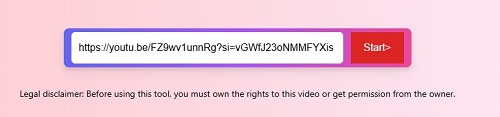
How to Use Ytb.rip to Convert YouTube to M4A:
Step 1 Visit the Ytb.rip YouTube to M4A page.
Step 2 Paste the YouTube video URL into the input field.
Step 3 Click Start to analyze the video.
Step 4 Choose M4A from the audio format list.
Step 5 Download the converted file.
- Pros
- Easy for mobile users
- Minimalist design
- Works with most YouTube videos
- Cons
- No playlist download support
- Limited to a few audio formats
- Metadata is limited
#5. Loader.to
🔗 Link: https://en.loader.to
Loader.to is a well-known online YouTube converter that supports several output formats, including M4A, MP3, and AAC. The process is very straightforward, just paste the video link, choose the format, and in a few clicks your download should be ready.
However, the site contains quite a few ads and redirects. In particular, when you click the Download button, you may be redirected to another page. If that happens, simply close the new tab and return to the main page to click the real download button.
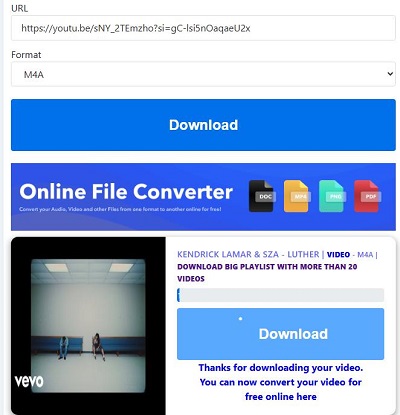
How to Use Loader.to to Convert YouTube to M4A:
Step 1 Open the Loader.to website.
Step 2 Paste the YouTube video or playlist link.
Step 3 Select M4A as the output format.
Step 4 Click Download.
Step 5 Wait for the conversion and download the audio file.
- Pros
- Multiple audio format options
- Simple conversion process
- Cons
- Heavily ad-supported
- Do not support playlist or batch download
#6. Dubs.io
🔗 Link: https://dubs.io/youtube-to-m4a
Similar to CutYT, Dubs.io is another powerful all-in-one online converter. It can convert YouTube videos not only to audio formats but also to various video formats. In addition to YouTube, it also supports downloading video or audio from other social media platforms such as Instagram, TikTok, Facebook, and more.
However, this wider support also comes with a drawback. Because the tool handles content from multiple platforms, the conversion speed can sometimes be slower than other free tools or community-driven converters that focus only on YouTube.
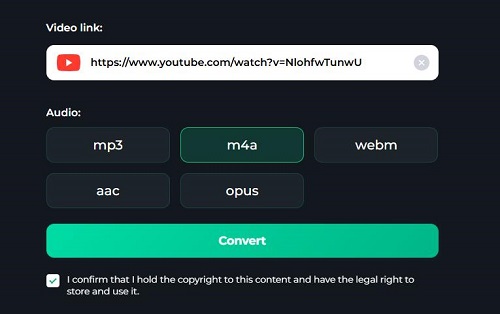
How to Use Dubs.io to Convert YouTube to M4A:
Step 1 Open Dubs.io and paste a YouTube video link.
Step 2 Click Convert.
Step 3 Click the Download button.
Step 4 Choose a location on your device and click Save to download the M4A file.
- Pros
- Multiple audio format options
- Unlimited conversions and downloads
- Supports multiple platforms
- Cons
- Not designed purely as a YouTube converter
- You cannot change the bitrate
- Conversion process is slower than simple tools
#7. AnyUkit
🔗 Link: https://anyukit.com/youtube-to-m4a/
AnyUkit is a browser-based tool that lets you download and convert YouTube videos. It supports audio formats like M4A and MP3, and video in MP4. Plus, it prioritizes your privacy by deleting all converted files from its servers within an hour. Another useful feature is the ability to choose the audio quality before downloading. For M4A files, the output is typically around 129 kbps, depending on the quality of the original YouTube source.
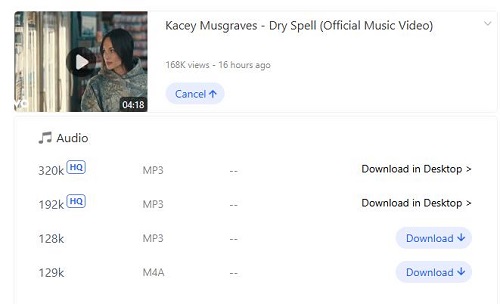
How to Use AnyUkit to Convert YouTube to M4A:
Step 1 Visit the AnyUkit YouTube to M4A page.
Step 2 Copy and paste a YouTube video link.
Step 3 Click Download.
Step 4 Click the Download button again to open the quality menu.
Step 5 Find the M4A quality you want and click the Download button next to it.
Step 6 Your download will start now.
- Pros
- Supports multiple formats
- No tracking cookies or intrusive data collection
- You can choose the audio quality
- Cons
- No playlist download support
- Occasional redirects
- Slow for users with multiple files to download
#8. YT1D
🔗 Link: https://www.yt1d.app
YT1D is a modern YouTube audio downloader that works great on both mobile and desktop. It lets you convert videos into M4A audio files with good quality. The site grabs links fast and usually gives you the download link in seconds. Just a heads up: when you hit download, it often opens a new tab. Just close those tabs and stick to the original page to finish your download.
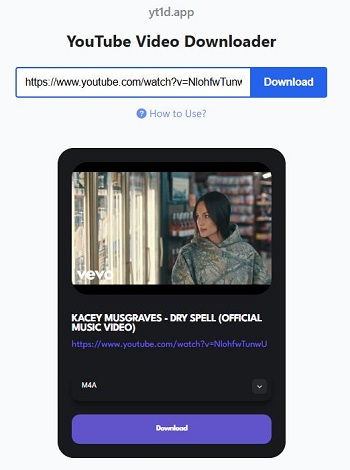
How to Use YT1D to Convert YouTube to M4A:
Step 1 Open YT1D in your browser.
Step 2 Paste a YouTube video URL.
Step 3 Click Download.
Step 4 Choose M4A format in the format dropdown menu.
Step 5 Click Download button to download the audio file.
- Pros
- Fast link processing
- Mobile-friendly interface
- Cons
- Domain often changes
- A lot of redirects
- The download button sometimes does not work
#9. X2Convert
🔗 Link: https://x2convert.xyz
X2Convert is a long‑running online YouTube converter that supports both audio and video downloads. It's free and handles videos up to 3 hours long, which is great for longer content. However, it has basic features and can be a bit annoying with all the redirects after you click a button.
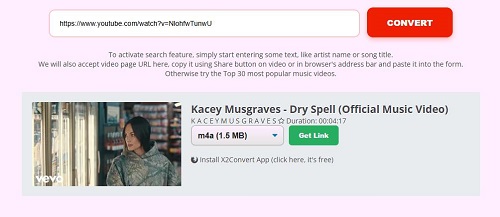
How to Use X2Convert to Convert YouTube to M4A:
Step 1 Open the X2Convert website.
Step 2 Paste the YouTube video URL into the search box.
Step 3 Click Download.
Step 4 Select M4A as the output format.
Step 5 Click Get Link.
- Pros
- Handles long YouTube videos
- Supports multiple formats such as MP3, MP4, M4A, WebM, and more
- Unlimited downloads with no preset limits
- Cons
- Contains intrusive ads and redirects
- No batch download or advanced editing features
- Cannot download private or age-restricted videos
Check out this complete review of 17 free YouTube to M4A downloaders to find more options!
Read More : 17 Best Free/Paid YouTube Music Downloaders in 2026
Part 3. Comparison of the Best YouTube to M4A Converters
When picking between a professional desktop app and a free online service, the best tool really depends on what you care about most. Do you want top-notch audio and security, or just a fast, one-time download? Use the table below to compare the top-rated ViWizard YouTube Music Converter against the most popular online alternatives.
| Aspect | ViWizard YouTube Music Converter | AM4A | TubeRipper | CutYT | Ytb.rip | Loader.to | Dubs.io | AnyUkit | YT1D | X2Convert |
|---|---|---|---|---|---|---|---|---|---|---|
| Type | Desktop Software | Web | Web | Web | Web | Web | Web | Web | Web | Web |
| Supported Input | YouTube Music songs, playlists, albums | Single YouTube videos | Single YouTube videos | Single YouTube videos | Single YouTube videos | Single YouTube videos | YouTube videos | Single YouTube videos | Single YouTube videos | Single YouTube videos |
| Output Format | M4A, MP3, FLAC, WAV, AIFF, M4B | M4A | M4A, MP3, WAV | M4A, MP3 | M4A, MP3 | M4A, MP3, AAC | M4A and other exports | M4A, MP3 | M4A, MP3 | M4A, MP3 |
| Audio Quality | Original quality, customizable bitrate | Good | Good | Medium | Good | Medium | Medium | Medium | Medium | Good |
| Conversion Speed | Up to 30× | Medium | Medium | Fast (short clips) | Medium | Medium | Slow | Medium | Medium | Medium |
| Batch Conversion | ✔️ | ❌ | ❌ | ❌ | ❌ | ❌ | ❌ | ❌ | ❌ | ❌ |
| Metadata (ID3 Tags) | ✔️ Full tags preserved | ❌ | ❌ | ❌ | ❌ | ❌ | ❌ | ❌ | ❌ | ❌ |
| Ads / Pop-ups | ❌ None | ⚠️ Some | ⚠️ Many | ⚠️ Some | ⚠️ Some | ⚠️ Many | ⚠️ Some | ⚠️ Some | ⚠️ Many | ⚠️ Many |
| Best For | High‑quality batch downloads | Simple M4A conversion | Extracting audio from long videos | Clipping short audio segments | Quick single video downloads | Ripping audio from YouTube | Simple browser conversion | Simple browser conversion | Mobile-friendly downloads | Fast basic conversions |
If you need to download YouTube to M4A for an entire library with perfect organization, ViWizard is the only tool that supports one-click batch downloading and full ID3 tags.
If you are on a mobile device and need a single song quickly, Loader.to, TubeRipper, and YT1D are excellent online YouTube to M4A converter choices.
Part 4. FAQs About YouTube to M4A Conversion
Is it legal to convert YouTube videos to M4A?
It depends on how you use the converted file and the copyright status of the video. In general, downloading or converting copyrighted YouTube content without permission may violate YouTube's Terms of Service. However, converting videos that are public domain, royalty‑free, or your own uploaded content is usually acceptable. And if you convert YouTube to M4A for personal, fair use, which is also legal in many countries.
Is it safe to use free online YouTube to M4A converters?
It really depends on the site. Lots of online YouTube to M4A converter websites rely on aggressive ads. While the conversion might be fine, those Download buttons can lead to annoying pop-ups, fake alerts, or tracking cookies. To keep things safe, use an ad-blocker, quickly close any tabs that open automatically, or think about using professional software like ViWizard YouTube Music Converter for a safer experience.
Why does my converter say URL not supported or fail to work?
This error usually happens because the converter cannot properly process the YouTube link. There are several common reasons:
- Unsupported link format (for example, shortened URLs or playlist links).
- The video is age‑restricted, private, or region‑locked.
- The converter's system has not been updated to match YouTube's latest changes.
- Temporary server overload or network issues.
To fix the issue, try copying the standard video URL directly from the browser address bar, refreshing the page, or switching to another converter that supports more types of YouTube links.
Can I play M4A files on my Android or Windows device?
Yes. M4A is a widely supported audio format, so most modern devices can play it without any problem. On Android phone, most native music players and third-party apps like Poweramp or Pulsar support M4A perfectly. On Windows, you can open and play M4A using Windows Media Player, VLC, or Groove Music.
Final Thoughts
Converting YouTube videos to M4A is a convenient way to enjoy audio offline. If you need a single song quickly and don't mind a few ads, an online converter like AM4A or TubeRipper is perfect for a one-time task.
However, if you are an audiophile building a high-quality library, ViWizard YouTube Music Converter is the clear winner. Its 30x batch speed, original sound quality, and automatic ID3 tagging provide a level of professional organization that free websites simply can't match.
You May Be Interested
9 Best YouTube to WAV Converters That Actually Work in 2026 (Free & Paid)
How to Download YouTube Music to MP3

Best YouTube to FLAC Converters to Preserve Audio Quality
7 Best YouTube Audio Rippers to Rip Music from YouTube

How to Download YouTube Music Library Entirely on Mobile/Desktop

Top 9 YouTube to MP3 Telegram Bots

Nick Orin often turns to tech forums to see what apps people are talking about. He likes testing different software, comparing features, and finding out which tools are worth a try.

Leave a Comment (0)