


Choosing between Apple Music and YouTube Music is not always easy. Although they come from different ecosystems, both support a wide range of devices. Apple Music works across Apple devices as well as Android, Windows, and the web, while YouTube Music connects closely with Google and YouTube services but is also available on iPhone, iPad, and other platforms.
The two services offer different listening experiences. Apple Music focuses on official releases, curated playlists, lossless audio, and Apple ecosystem integration. YouTube Music combines music streaming with the wider YouTube library, offering music videos, covers, remixes, and live content.
In this comparison, we will explore the key differences between Apple Music and YouTube Music, including music libraries, user experience, audio quality, device support, pricing, and features. Whether you are choosing a new music service or switching platforms, this guide will help you find the option that best fits your needs.
Part 1. Apple Music vs YouTube Music: Overview
Apple Music and YouTube Music offer similar streaming experiences but focus on different areas. Apple Music emphasizes audio quality and a traditional music library, while YouTube Music combines streaming with YouTube's wider collection of music content.
What Is Apple Music?

Apple Music is a subscription-based music streaming service developed by Apple and launched in 2015. It replaced Beats Music and became Apple's main music platform. The service gives users access to over 100 million songs, albums, playlists, music videos, live radio stations, and exclusive artist content. Unlike iTunes, which focused on buying individual songs, Apple Music is designed for streaming and music discovery. It works across Apple devices, including iPhone, iPad, Mac, Apple Watch, Apple TV, HomePod, and CarPlay, as well as Android and other supported platforms. Today, Apple Music is known for its large catalog, curated content, lossless audio, and integration with the Apple ecosystem.
What Is YouTube Music?

YouTube Music is a music streaming service developed by Google and launched in 2015. It became Google's main music platform after replacing Google Play Music in 2020. The service combines official songs and albums with YouTube's wider music library, including music videos, live performances, covers, remixes, and other music content. With recommendations powered by YouTube and Google technologies, YouTube Music focuses on music discovery and content variety. Today, it is known for combining traditional music streaming with the wider YouTube experience.
Part 2. Apple Music vs YouTube Music: Main Differences
The differences between Apple Music and YouTube Music become clearer in everyday use. From music discovery and interface to audio quality, device support, and pricing, each service offers different advantages depending on how you listen.
01Apple Music vs YouTube Music: Music Library and Discovery
Apple Music gives subscribers access to over 100 million songs, including albums, playlists, music videos, live radio stations, and exclusive artist content. Its catalog covers most mainstream listening needs, while editor-curated playlists and personalized recommendations help users discover new music. Features such as personalized mixes and Discovery Station make it easier to explore artists and genres based on listening habits. Users who prefer full albums may also find it easier to save releases, browse artists, and manage playlists.

Instead of focusing only on a traditional music catalog, YouTube Music combines official releases with YouTube's wider music library. Users can find not only songs and albums, but also music videos, live performances, covers, remixes, and other versions of tracks that may not be available on other services. Its recommendations use listening activity and YouTube data, making it a strong option for discovering different types of content.

02Apple Music vs YouTube Music: User Experience and Interface
Apple Music feels more like a traditional music library built around albums, artists, and personal collections. The app focuses on your library, recommendations, and curated playlists rather than videos or trending content. Its interface also works smoothly across Apple devices, including iPhone, Mac, and other Apple products. Features such as synchronized lyrics and AutoMix help create a smoother listening experience.
YouTube Music follows a more YouTube-style interface, so it feels more like a combination of a streaming app and YouTube. Its interface focuses more on recommendations, videos, and music discovery. Since many songs have both audio and video versions, users can easily switch between a track, official video, live performance, or other available versions.
03Apple Music vs YouTube Music: Listening Experience and Audio Quality
Apple Music stands out for its audio quality, supporting Lossless Audio, Hi-Res Lossless Audio, and Spatial Audio with Dolby Atmos without an extra subscription. Standard tracks already sound good on regular headphones, but compatible headphones or speakers can reveal more detail and a wider sound experience with these features enabled.
YouTube Music focuses more on convenience and content variety than high-resolution audio. It does not offer lossless audio, but it provides access to different versions of songs, including live recordings, covers, remixes, and music videos. For example, searching for a track may show the official audio, music video, live performance, or fan upload in one place. Its audio quality ranges from lower bitrate streams to up to 256 kbps depending on the codec and settings, with support for AAC and Opus formats.
04Apple Music vs YouTube Music: Device and Platform Support
Apple Music works best within the Apple ecosystem. It is built into devices such as iPhone, iPad, Mac, Apple Watch, Apple TV, HomePod, and CarPlay, while also supporting Android, Windows, and other platforms.
YouTube Music is available across smartphones, computers, smart TVs, smart speakers, and car systems. Its biggest advantage is its connection with Google and YouTube services. If you already spend a lot of time on YouTube or use Google devices, YouTube Music fits naturally into that experience.
05Apple Music vs YouTube Music: Pricing and Subscription Plans
Apple Music and YouTube Music use different subscription models. Apple Music requires a paid plan for full access and does not offer a permanent free tier.
Apple Music Plans:
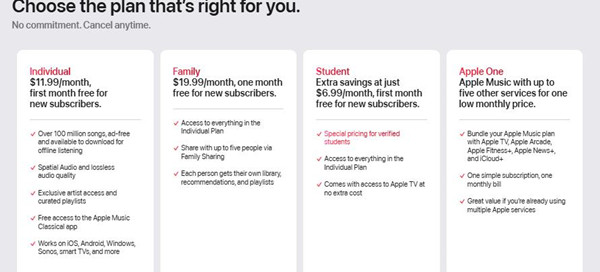
| Plan | Price (US) | Price (UK) | Price (EU approx.) |
| Individual | $11.99/month | £11.99/month | €11.99/month |
| Student | $6.99/month | £6.99/month | €6.99/month |
| Family (up to 6 users) | $19.99/month | £19.99/month | €19.99/month |
| Free Trial | 1 to 3 months (varies) | 1 to 3 months | 1 to 3 months |
Notes:
- No free ad-supported plan is available.
- Available through Apple One bundles.
YouTube Music Plans:
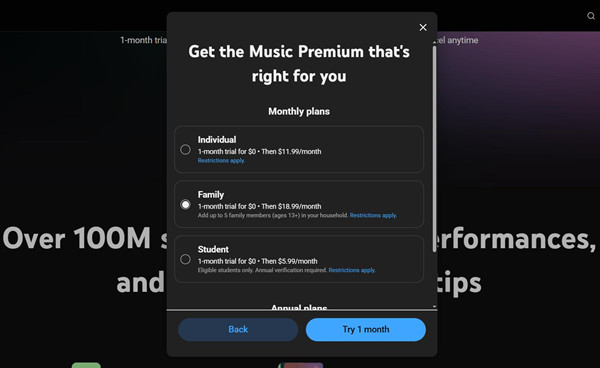
| Plan | Price (US) | Price (UK) | Price (EU approx.) |
| Individual | $11.99/month | £11.99/month | €11.99/month |
| Student | $5.99/month | £5.99/month | €5.99/month |
| Family (up to 6 users) | $18.99/month | £18.99/month | €18.99/month |
| Free Plan | Free (with ads) | Free (with ads) | Free (with ads) |
Notes:
- Free users can stream with ads and limited features.
- YouTube Music Premium is included with YouTube Premium.
Overall, Apple Music is better suited for listeners who value sound quality and an organized music library, while YouTube Music is a better choice for users who prefer flexibility, discovery, and YouTube's wider content ecosystem. Since both premium plans have similar prices, the final choice depends on whether you prefer a higher-quality audio experience or a broader music discovery platform.
06Apple Music vs YouTube Music: Features and Benefits
Apple Music Features:
- Apple Music Sing for karaoke-style singing
- Apple Music Classical for classical music discovery
- AutoMix for smoother song transitions
- Apple Music Radio with live stations
- Lossless Audio and Spatial Audio with Dolby Atmos
YouTube Music Features:
- Samples for discovering new songs
- Personalized mixes based on listening habits
- Switching between audio and video versions
- Music videos, live performances, covers, and remixes
- Offline downloads and background music with Premium
Part 3. Apple Music vs YouTube Music: Which One Is Better?
Apple Music and YouTube Music are built for different listening habits. One focuses on a more polished music experience, while the other offers more flexibility and content variety. The better choice depends on what matters most to you.
| Feature | Apple Music | YouTube Music |
|---|---|---|
| Free Option | No permanent free plan | Yes (ad-supported) |
| Premium Pricing | $10.99/month (Individual) $5.99/month (Student) $16.99/month (Family) |
$10.99/month (Individual) $5.49/month (Student) $16.99/month (Family) |
| Music Library | 100+ million songs | Songs plus YouTube music content |
| Music Discovery | Curated playlists, personalized recommendations, Discovery Station | Personalized mixes, Samples, YouTube recommendations |
| Offline Listening | Yes (subscription required) | Yes (Premium only) |
| Supported Devices | Apple devices, Android, Windows, web | iOS, Android, Windows, web, smart devices |
| Sound Quality | Lossless Audio, Hi-Res Lossless, Dolby Atmos | Up to 256 Kbps AAC/Opus |
| Music Content | Songs, albums, playlists, radio, music videos | Songs, videos, live performances, covers, remixes |
| Unique Features | Apple Music Sing, Apple Music Classical, AutoMix | Samples, audio/video switching, YouTube integration |
| Free Trial | 1 to 3 months (varies) | Usually 1 month (varies) |
Apple Music Is Better If You:
Apple Music is a better choice if you want a more polished listening experience with better organization and sound quality. It works well for Apple users, as your music library and playlists stay connected across devices through Sync Library. Features like Lossless Audio, Spatial Audio with Dolby Atmos, and Apple Music Classical make it easier to enjoy a more focused music experience.
YouTube Music Is Better If You:
YouTube Music is a better choice if you like finding new music and exploring different versions of songs. Since it connects with YouTube, you can discover not only official releases, but also music videos, live performances, covers, remixes, and other content that may be harder to find elsewhere. Its free plan also gives you an easy way to try the service before subscribing.
Overall, Apple Music is a better fit if you want a more polished music experience with better audio quality, while YouTube Music is a better fit if you prefer flexible discovery and a wider range of content. Since both premium plans cost about the same, the better choice comes down to what matters more to you: sound quality or music variety.
Part 4. How to Transfer Between Apple Music and YouTube Music

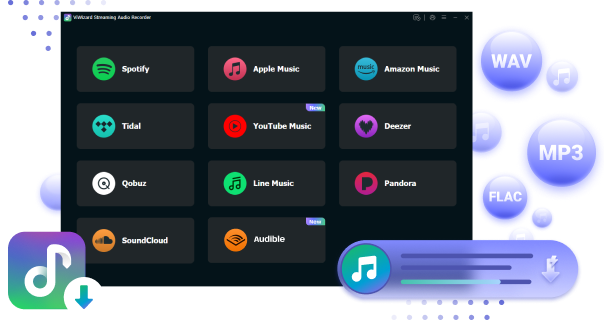
Switching between Apple Music and YouTube Music can be inconvenient when you need to rebuild playlists manually. ViWizard Streaming Audio Recorder offers an easier way to manage music across streaming platforms with its built-in Free Playlist Transfer tool.
The tool connects supported music services, automatically matches songs, and transfers playlists, albums, and tracks between Apple Music and YouTube Music while keeping your music organized. It also supports batch transfers, making it easier to move larger music collections without searching for every song again.
In addition to online playlist transfer, ViWizard can create DRM-free music copies from streaming services. These local audio files can be moved to compatible devices or apps that support local playback, including Apple Music. This gives you more flexibility to manage your music library beyond a single platform.
Whether you are switching between Apple Music and YouTube Music or creating a more flexible offline music collection, ViWizard Streaming Audio Recorder helps simplify the process with convenient transfer and audio management features. Try ViWizard Streaming Audio Recorder today for free!

Are you eager to transfer Apple Music to YouTube Music? Check here, and this piece will show you the best way to sync Apple Music to YouTube Music.
You May Be Interested


Adam Gorden is always looking for new ways to explore music and videos. He likes trying different media tools and learning how to manage audio and video files with ease.

Leave a Comment (0)