


Choosing between Apple Music and TIDAL often depends on what matters most to you. Some listeners prefer a service that works smoothly across devices, helps discover new music, and fits into everyday use. Others want the best listening experience with high-end audio equipment.
Launched in 2015, Apple Music has become one of the leading music streaming services, offering a large catalog, curated playlists, and strong integration with Apple devices. TIDAL, launched in 2014, takes a different approach by focusing on lossless and Hi-Res audio for listeners who want a more detailed sound experience.
Choosing between the two is not always straightforward. Both services have expanded over time with large music libraries, offline listening, and high-quality audio options. This comparison looks at Apple Music and TIDAL in terms of catalog size, lossless audio, Hi-Res sound, pricing, and features to choose the right music streaming service.
Part 1. Apple Music vs TIDAL: Overview
Apple Music and TIDAL are both major music streaming services, but they focus on different listening experiences.
What Is Apple Music?

Apple Music is a subscription-based music streaming service launched by Apple in 2015. It combines music streaming, radio, music discovery, and exclusive artist content in one platform, replacing Apple's previous focus on digital music purchases through iTunes.
With a catalog of more than 100 million songs, Apple Music offers albums, playlists, music videos, live radio, and exclusive releases in over 160 countries and regions. It also works closely with Apple devices, including iPhone, iPad, Mac, Apple Watch, Apple TV, and CarPlay.
What Is TIDAL?
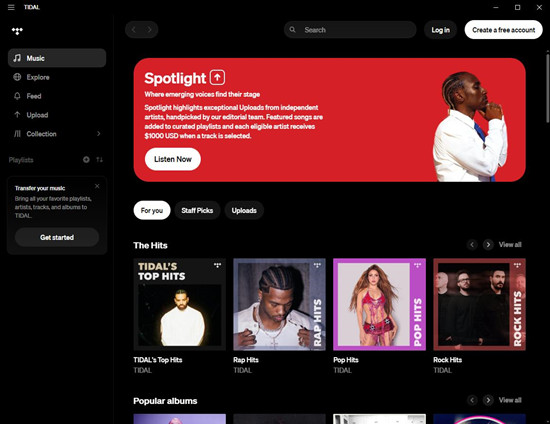
TIDAL is a subscription-based music streaming service launched in 2014 that focuses on high-fidelity audio, artist content, and premium listening experiences. It provides access to more than 180 million tracks, including lossless audio, Hi-Res FLAC, and Dolby Atmos content. The platform also offers features such as offline listening, personalized mixes, editorial playlists, and music discovery across different devices.
Part 2. Apple Music vs TIDAL: Key Differences
Both services offer large music libraries and lossless audio, but they differ in pricing, features, device support, and overall user experience.
01Apple Music vs TIDAL: Music Catalog and Supported Content
Apple Music and TIDAL both have large music libraries, but they focus on different experiences.
Apple Music gives you access to more than 100 million songs, covering everything from major releases and independent artists to soundtracks, music videos, live radio, and exclusive content. It also includes Apple Music Classical, which gives classical music listeners a dedicated place to explore works, composers, and recordings. Instead of relying only on algorithms, Apple Music also uses playlists created by its own editors, helping balance personalization with human music curation.
TIDAL goes even further in terms of catalog size, with more than 110 million tracks available. Besides regular albums and songs, it includes playlists, personalized mixes, music videos, and exclusive artist content. You may also find rarer tracks, such as early album releases from independent artists. While Apple Music is built around helping users discover music through a mix of recommendations, TIDAL's artist-first curation feels more like exploring a deeper music world with an extra layer of personality.
In short, Apple Music is designed as an all-around music service with strong discovery tools, while TIDAL is built more around music enthusiasts who want a deeper listening experience.
02Apple Music vs TIDAL: User Experience and Interface
Apple Music is built for a smooth and familiar experience for Apple users. Its interface is simple to navigate, with easy access to your library, recommendations, playlists, radio stations, and new releases. Switching between Apple devices, such as iPhone, Mac, and HomePod, feels seamless thanks to its ecosystem integration.
TIDAL takes a more music-focused approach with a cleaner and more minimal design. It puts more attention on albums, artists, playlists, and music discovery rather than the wider device ecosystem. Personalized mixes and editorial recommendations are available, but the overall experience feels more targeted toward users who actively explore music.
For everyday listening, Apple Music feels more connected and convenient, especially if you already use Apple products. TIDAL offers a more focused music experience, though its interface may feel less seamless compared with Apple Music.
03Apple Music vs TIDAL: Lossless, Hi-Res Audio, Dolby Atmos, and FLAC
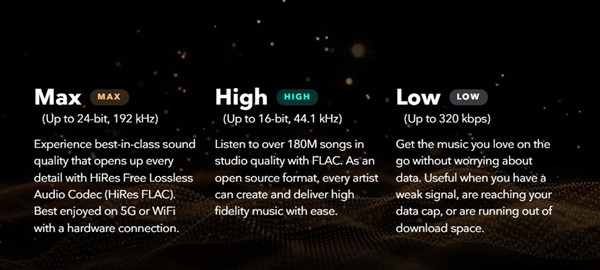
Both Apple Music and TIDAL have moved beyond standard streaming quality by supporting lossless and high-resolution audio. Apple Music includes Lossless Audio, Hi-Res Lossless audio, and Spatial Audio with Dolby Atmos at no extra cost. Its lossless tracks use Apple Lossless Audio Codec (ALAC), allowing listeners to hear more detail from supported recordings.
TIDAL has built much of its reputation around audio quality. It supports lossless FLAC and Hi-Res FLAC playback up to 24-bit/192 kHz, along with Dolby Atmos content. Since FLAC preserves audio details and is widely supported, TIDAL remains a popular choice among audiophiles and users with high-end headphones or audio equipment.
Then came the real test: sound. We started with a track we know well, Radiohead's Everything In Its Right Place. On Apple Music, it sounded clean and crisp, with each electronic note fitting together perfectly. But switching to TIDAL revealed something different. The low end felt more present and grounded, with bass that added more texture and made the track feel warmer, fuller, and almost immersive.
The difference mainly comes down to approach. Apple Music treats high-quality audio as part of a broader ecosystem, while TIDAL makes audio quality one of its main reasons to choose the service.
04Apple Music vs TIDAL: Device and Platform Support
Apple Music naturally works best with Apple hardware. It is deeply integrated with iPhone, iPad, Mac, Apple Watch, Apple TV 4K, HomePod, and CarPlay, making it easy to move between devices while keeping your music experience connected. It is also available on Android, Windows, smart TVs, gaming consoles, and other supported platforms.
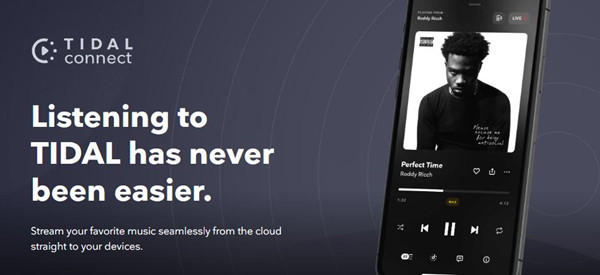
TIDAL is available on most major platforms as well, including iOS, Android, Windows, Mac, web browsers, smart TVs, wireless speakers, and compatible car audio systems. It also supports many high-end audio setups, making it appealing to users who want the best possible sound from their equipment.
Both platforms now support DJ apps, although TIDAL offers wider support. However, while Apple Music supports offline listening on both desktop and mobile apps, TIDAL limits offline downloads to its mobile app. This means desktop users need to use mobile devices to download music offline or rely on tools like ViWizard TIDAL Music Converter to convert TIDAL tracks into common formats such as MP3.

Ready to take your TIDAL music offline? ViWizard TIDAL Music Converter helps TIDAL subscribers save songs, albums, playlists, artists, podcasts, and audiobooks with reliable music conversion. Start converting and keep your TIDAL library within reach.
If you already use Apple devices, Apple Music is the more natural fit. If your priority is connecting to dedicated audio gear, TIDAL may have more appeal. The catch is that getting the most from TIDAL's high-fidelity sound often requires the right equipment, such as a specialized DAC or high-resolution audio player. Apple Music works smoothly with standard devices like an iPhone or MacBook, while TIDAL needs additional hardware to fully show its strengths.
05Apple Music vs TIDAL: Pricing and Subscription Plans
Apple Music and TIDAL both require paid subscriptions and do not offer a permanent free plan. Apple Music provides Individual, Family, and Student plans, starting at $11.99/month, $19.99/month, and $6.99/month in the US. It is also available through Apple One bundles, which combine Apple Music with other Apple services.
TIDAL Plans
| Plan | Price (US) | Price (UK) | Price (EU approx.) |
| Individual | $11.99/month | £11.99/month | €11.99/month |
| Student | $6.99/month | £6.99/month | €6.99/month |
| Family (up to 6 users) | $19.99/month | £19.99/month | €19.99/month |
| Free Trial | 1 to 3 months (varies) | 1 to 3 months | 1 to 3 months |
Notes:
- All plans include Lossless Audio and Dolby Atmos at no extra cost.
- No free ad-supported tier is available.
TIDAL follows a similar subscription model, with Individual, Family, and Student plans starting at $11.99/month, $19.99/month, and $6.99/month in the US. It also offers a DJ Extension for users who need additional DJ features.
Apple Music Plans
| Plan | Price (US) | Price (UK) | Price (EU approx.) |
| Individual | $11.99/month | £11.99/month | €11.99/month |
| Student | $6.99/month | £6.99/month | €6.99/month |
| Family (up to 6 users) | $19.99/month | £19.99/month | €19.99/month |
| Free Trial | Varies | Varies | Varies |
Notes:
- All plans include lossless audio and Hi-Res FLAC support.
- No permanent free ad-supported tier is available.
- DJ features are available through the DJ Extension.
Overall, Apple Music offers better value for users already using Apple services, while TIDAL is aimed at listeners willing to pay more for a premium audio experience.
06Apple Music vs TIDAL: Features and Extras
Apple Music
Apple Music stands out with its Apple ecosystem integration and unique music features, including:
- Apple Music Classical for classical music discovery
- Apple Music Radio with live stations
- Siri, CarPlay, and Apple device integration
- Personal music library support
- Spatial Audio with Dolby Atmos and Lossless Audio
- AI-powered playlists and personalized recommendations
TIDAL
TIDAL focuses on premium listening features for music enthusiasts, including:
- Hi-Res FLAC and lossless audio playback
- Dolby Atmos support
- TIDAL Connect for compatible audio devices
- Artist-focused content and exclusive releases
- High-end audio support
- DJ features and integrations
The two services take different directions. Apple Music is best known for combining music streaming with a seamless device experience and curated discovery features. TIDAL stays closer to its original identity as a premium music platform built around advanced audio support, and a more dedicated music experience.
Part 3. Apple Music vs TIDAL: Which One Is Better for You?
The better choice depends on your listening habits, devices, and what you value most from a music streaming service.
| Feature | Apple Music | TIDAL |
|---|---|---|
| Free Option | No free plan | No free plan |
| Individual Plan | $10.99/month | $11.99/month |
| Student Plan | $5.99/month | $5.99/month |
| Family Plan | $16.99/month | $19.99/month |
| Music Library | 100+ million songs | 180+ million tracks |
| Music Discovery | Curated playlists, recommendations, Apple Music Classical | Personalized mixes, playlists, artist content |
| Offline Listening | Yes | Yes |
| Supported Devices | Apple devices, Android, Windows, web | iOS, Android, Windows, Mac, web, audio devices |
| Sound Quality | Lossless, Hi-Res Lossless, Dolby Atmos | Lossless FLAC, Hi-Res FLAC, Dolby Atmos |
| Music Content | Songs, albums, playlists, radio, music videos | Songs, albums, playlists, music videos, artist content |
| Unique Features | Apple Music Classical, Radio, Apple ecosystem integration | TIDAL Connect, DJ features, high-end audio support |
| Best For | Apple users and everyday listeners | Audiophiles and sound quality fans |
| Free Trial | 1 to 3 months (varies) | Varies by offer |
Apple Music Is Better If You:
Apple Music is the easier choice if you already use Apple devices. If you have an iPhone, Mac, Apple Watch, AirPods, or HomePod, everything feels connected from the start. Your playlists, library, and listening history stay synced across devices, allowing you to switch between them without extra setup.
It is also a better fit if you enjoy discovering music without spending too much time searching. Apple Music combines personalized recommendations with playlists created by music editors, giving you both smart suggestions and human-curated picks. If you want a simple and organized music app that works smoothly every day, Apple Music is likely the better choice.
- Over 100 million songs, including albums, playlists, radio, and exclusive content
- Lossless Audio and Dolby Atmos included at no extra cost
- Strong integration with iPhone, Mac, Apple Watch, AirPods, and CarPlay
- Curated playlists, personalized recommendations, and Apple Music Classical
- Easy library syncing across Apple devices
- Best experience requires Apple devices
- No free version, only paid plans
- Hi-Res Lossless needs compatible audio equipment
- Less focused on social features and music sharing
- Some features are mainly useful within the Apple ecosystem
TIDAL Is Better If You:
TIDAL makes more sense if sound quality is your top priority. While Apple Music also offers lossless audio and Dolby Atmos, TIDAL puts more focus on high-quality playback with Hi-Res FLAC support and compatibility with advanced audio equipment.
It is also a better choice if you enjoy exploring albums, artists, and deeper music content instead of relying mainly on recommendations. For listeners with high-end headphones, speakers, or a strong interest in HiFi audio, TIDAL provides a more focused listening experience. If you want more detail from your music and do not mind paying for a more specialized streaming experience, TIDAL is worth considering.
- Lossless FLAC, Hi-Res FLAC, and Dolby Atmos support
- Over 180 million tracks, including albums, playlists, and artist content
- Strong choice for audiophiles and high-end audio setups
- TIDAL Connect support for compatible devices
- Artist-focused content and exclusive releases
- Slightly more expensive than Apple Music
- No free version, only paid plans
- Best sound quality requires good headphones or speakers
- Fewer ecosystem features than Apple Music
- More suitable for music enthusiasts than casual listeners
Part 4. How to Transfer Between Apple Music and TIDAL
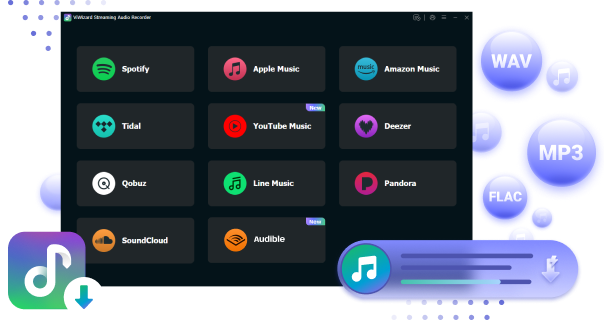
Switching between Apple Music and TIDAL can be frustrating if you need to rebuild your playlists manually. A simpler option is using ViWizard Streaming Music Recorder, an all-in-one toolkit that helps manage music across popular streaming services. It includes a Free Playlist Transfer tool that can connect your accounts and move playlists between platforms.
The tool automatically matches songs from your playlists and transfers them to the new service while keeping the original playlist structure. Most available tracks can be transferred, while unavailable songs are skipped if they cannot be found on the target platform.
For larger music libraries, ViWizard makes the process easier with batch transfers and support for moving playlists, albums, and tracks together. Instead of searching for every song again, you can keep your music collection organized while switching between Apple Music and TIDAL.

How do I transfer my Apple Music to Tidal? This post will show you 3 easy methods.
You May Be Interested


Adam Gorden is always looking for new ways to explore music and videos. He likes trying different media tools and learning how to manage audio and video files with ease.

Leave a Comment (0)