


If you're a student, you don't have to pay full price for YouTube Music. YouTube offers a student discount of around 50%, but many users don't fully take advantage of it.
In this guide, we'll break down what the YouTube Music Premium student discount is, how to claim it step by step, and how to get through the SheerID verification process. We'll also share a simple way to keep listening to your music even after your student plan ends.
Part 1. What Is YouTube Music Student Discount?
As Tidal and Spotify put forward their Student Plan with a lower cost, some YouTube Music student users asked: "Does YouTube Music have a student discount?" Yes, YouTube Music offers a student discount for eligible users enrolled in accredited institutions. This discount makes it significantly more affordable for students to enjoy the premium features of the service. Whether you're looking for ad-free music, offline listening, or the ability to play music in the background, the student plan provides all these perks at a fraction of the standard cost.
How Much Is YouTube Music Premium for Students?
The YouTube Music Student Plan costs $5.49 per month in the U.S. This is a significant 50% discount compared to the standard individual rate. To help you see the value, here is a quick pricing comparison of the available YouTube Music tiers:
| Plan Type | Monthly Price (2026) | Key Features |
| YouTube Music Free | $0 | Includes ads, no background play, no offline downloads. |
| YouTube Music Student | $5.49 | Ad-free, background play, offline downloads, 256kbps audio. |
| Individual Plan | $10.99 | All premium features for a single user. |
| Family Plan | $16.99 | Premium features for up to 6 household members (ages 13+). |
YouTube Music Premium Student vs. YouTube Premium Student
It's worth mentioning that YouTube also provide student plan for their YouTube Premium, which is priced differently from the YouTube Music ones. A brief comparison is as follows:
| YouTube Music Premium Student Plan | YouTube Premium Student Plan | |
| Price | $5.49/month | $7.99/month |
| Features | provide music, ad-free listening, offline downloads, play in the background, free switch from audio to video, exclusive content, listen to music and podcasts on Google Home or Chromecast Audio | provide music and video, ad-free enjoying, offline downloads, play in the background, exclusive content, enjoy your music and podcasts on your Google Home or Chromecast Audio, original content, get a subscription to YouTube Music Premium at no monetary cost |
| 1-Month Free Trial | √ | √ |
Read More : Latest Guidance to Get YouTube Premium for Free Forever
Part 2. How to Get YouTube Music Premium Student Discount
Eligibility for YouTube Music Student Membership
- Be enrolled in a college or university in a supported location.
- Get student verification through SheerID. For assistance with the verification process, contact SheerID at customerservice@sheerid.com.
Steps to Get YouTube Music student discount:
- Go to the YouTube Music Premium landing page, scroll down to find Student plan.
- Click on the Try 1 month for $0 button which will open a pop-up window warning to be redirected to SheerID page for verification. Click Continue.
- Once you enter the new window, fill your country, university and other personal information. Then click on NEXT.
- You may be prompted to provide more information about your student ID, transcript or other proof of enrollment. Click on SUBMIT.
- Once the verification is successful, click on your profile and go to Purchases and Memberships > Premium > Student Programs. Once you finish your student subscription, you will usually get a 1-month free trial before billing starts.


Student memberships are valid for a maximum of 4 years. At the end of each year, you must re-verify your eligibility. If you no longer qualify for the discounted student rate, you can switch to a regular YouTube Premium or Music Premium membership. You also have the option to cancel your membership at any time.
Part 3. How to Keep YouTube Music After Student Plan Expires
One of the biggest downsides of the student plan is that it's not permanent. Once you graduate or reach the 4-year limit, your subscription will switch to the full price (about $10.99/month). If you don't continue paying, you'll lose access to your offline downloads.
A simple solution is to download your music as local files before your student membership expires. ViWizard YouTube Music Downloader helps you do exactly that. With it, you can download your favorite albums, liked playlists, or even your entire music library to MP3, FLAC, WAV, AIFF, M4A, or M4B. It keeps the original audio quality and saves full ID3 tags for each track.
Once the downloads are done, you can still enjoy YouTube Music offline, ad-free, and with background play just like you did with your Student Premium membership. Plus, you can listen on any device with any media player, breaking free from those device limits!

Download songs, playlists, albums, and your whole music library from 10 major streaming platforms, including YouTube Music, to MP3, FLAC, WAV, AIFF, M4A, or M4B with original sound quality and full song info and keep your music forever.
How to Use ViWizard to Permanently Save Your YouTube Music Library
Step 1 Set Output Format and Quality
Open ViWizard and go to Menu > Preferences > Conversion. Choose an output format like MP3, FLAC, WAV, AIFF, M4A, or M4B. You can also adjust the bitrate to keep the original audio quality. Select an output folder, then click OK.

Step 2 Sign in to YouTube Music
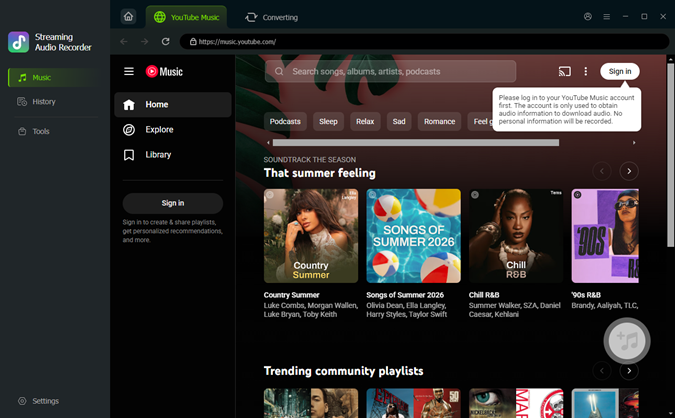
Launch the built-in YouTube Music player in ViWizard and log in to your account. This lets you access your liked songs, playlists, albums, and full library.
Step 3 Add Music for Batch Downloading
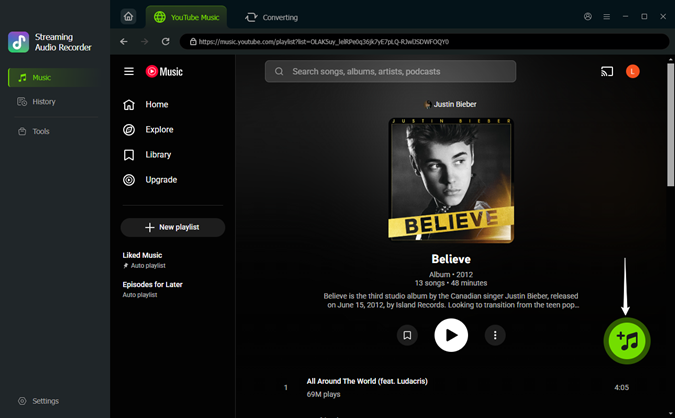
Browse your YouTube Music library or search for songs. When you find an album or playlist you like, click the Add (+) button. ViWizard will scan and list all available tracks. You can select specific songs or hit "Select All" for a quick batch download.
Step 4 Download and Save Your Music
Click the Convert button to start the process. ViWizard will convert the music with zero quality loss while preserving all essential ID3 tags (like artist name, album art, and genre). Once the conversion is complete, click the folder icon to find your files. You now own these tracks as local files, ready to be played on any device without a Premium subscription!

Part 4. FAQs about YouTube Music Student Discount
Can high school students get the YouTube Music student discount?
No, the student discount is typically reserved for students enrolled in accredited colleges or universities. High school students may not qualify.
Can I use the student plan on multiple devices?
Yes, your YouTube Music Premium account can be accessed on multiple devices, but simultaneous streaming may be limited to one device at a time. If you want to stream on several different devices concurrently, a subscription of YouTube Premium Family is required.
How does YouTube Music verify student status?
YouTube uses a third-party service called SheerID to confirm your enrollment. In most cases, SheerID verifies you instantly by checking your school's database via an API. If an instant match isn't found, you will be asked to upload official school-issued documentation for manual review.
Why is my SheerID verification being denied?
The most common reasons for rejection include:
- Name Mismatch: The name on your uploaded document doesn't exactly match your Google account name.
- Expired Info: Your document is from a previous semester or doesn't show a current enrollment date.
- Blurry Photos: The automated system cannot read your name or school name on the ID/transcript.
- Ineligible School: Your institution might not be a higher education facility (like a high school) or isn't in the SheerID database.
- Re-verification Limit: You may have already used the student discount for the maximum of 4 years.
What documents do I need for SheerID if my email doesn't work?
If your student email isn't recognized, you must upload a clear photo or PDF of one of the following:
- Student ID Card: Must be current and show an expiration date.
- Official Transcript: Showing your name and the current academic term.
- Tuition Receipt: A bill or letter from the registrar confirming you've paid for the current semester.
- Enrollment Letter: An official letter from your school confirming your status as a student.
Can I cancel my YouTube Music student plan anytime?
Yes, you can cancel your YouTube Music Premium subscription at any time without any penalties. To cancel it, go to YouTube purchases and membership page. Click Manage membership > Deactivate > Continue > Next > Yes, cancel.
Conclusion
The YouTube Music student discount is an excellent way for students to enjoy premium music streaming at an affordable price. By following this guide, you can easily subscribe to the plan, take advantage of its features, and even enjoy YouTube Premium after your student status expires, with the help of ViWizard YouTube Music Downloader. Whether you're studying or relaxing, YouTube Music's premium features can elevate your listening experience.
You May Be Interested



From new releases to old favorites, Matt Smith is always on the lookout for good music. He follows the latest in digital entertainment and shares songs and media he thinks are worth checking out.

Leave a Comment (0)