


Many Apple Music users look for easy tools to download music from Apple Music. Some want to save tracks as MP3 files for offline use on unsupported devices, USB drives, or DJ tools. This is why searches like "Apple Music downloader" or "Apple Music to MP3" are common.
One option is AAPLMusicDownloader. It works directly in a browser without installation. Users paste an Apple Music link, and the site generates a download option for MP3 files. It is free and easy to use on Windows, Mac, Android, and iPhone.
However, users should still consider safety, legality, reliability, and possible issues like downtime or ads.
If it is unavailable or not suitable, alternatives like ViWizard Apple Music Converter offer desktop software for Windows and Mac with more stable performance and extra settings, and it is free to try.

Need Apple Music in more flexible audio formats? ViWizard Apple Music Converter helps Apple Music subscribers create a personal music library with seamless music backup. Build your collection and keep your music beyond the Apple Music app.
Part 1. What Is AAPLMusicDownloader?
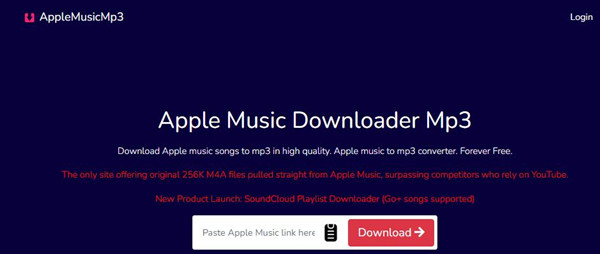
AAPLMusicDownloader (aaplmusicdownloader.com) is a browser-based tool that converts Apple Music songs into downloadable audio files.
It works by letting users paste an Apple Music link into the site, then generating MP3 or M4A files for download. The main appeal is convenience. It runs in a web browser, so there is no need to install software or go through setup steps. It works across devices including computers, smartphones, and tablets, making it useful for building offline libraries or moving songs to non-Apple devices.
Part 2. AAPLMusicDownloader Features and What It Does
Download Apple Music songs as offline files
Convert tracks to MP3 or M4A for easy use on any device
Download albums or playlists in bulk (ZIP option)
Keep basic info like song title, artist, and artwork
Works directly in your browser, no setup needed
Save DRM-free music for use on non-Apple devices
Share songs or albums with friends easily
The main draw of AAPLMusicDownloader is its link-based conversion process. You paste an Apple Music link, and it generates downloadable audio files. It supports MP3 conversion and M4A extraction from Apple Music sources. Unlike some other downloaders that rely on platforms like YouTube, it positions itself as working directly with Apple Music content.
Its official page claims it is "the only site offering original 256K M4A files pulled straight from Apple Music." The single-track process is quick and simple. It also supports bulk downloads, so users can download full albums or playlists instead of one track at a time.
Another useful feature is metadata retention. Files often include album art, artist names, and track titles, which reduces manual organization after downloading.
For more advanced needs like multiple formats, lyrics support, or lossless audio, desktop tools are more capable. ViWizard Apple Music Converter supports MP3, M4A, M4B, WAV, AIFF, and FLAC. It uses FFmpeg to process Apple Music streams, handling decoding and encoding for faster conversion.
A full-featured Apple Music converter that easily converts Apple Music songs, albums, playlists—including iCloud Music Library content, personalized recommendations, and curated playlists—into MP3, M4A, M4B, WAV, AIFF, and FLAC so you can keep your Apple Music forever or transfer it to any device without restrictions.
Part 3. Is AAPLMusicDownloader Safe and Legal to Use?
Free tools like AAPLMusicDownloader are often used for convenience, but they also come with a few caution points. First, it is not an official Apple service, which already places it outside Apple's ecosystem. On top of that, some independent security checks have flagged the domain as having low trust indicators. These do not confirm harm, but they suggest careful use if reliability matters.
In real-world use, that usually means being cautious about how often you rely on it. The site itself claims: "We are 100% safe & genuine to use. You will get only what you expect. No wild redirects, no random file downloads, only music."
Still, downloads are for personal use only and should not be redistributed, which is a key limitation of tools like this.
Part 4. How to Download Apple Music Songs with AAPLMusicDownloader Online
AAPLMusicDownloader is the site for those who want a simple way to download Apple Music songs without installing software.
First, open Apple Music and get the shareable link from the app or Apple Music Web Player. Then go to AAPLMusicDownloader and paste the link into the input box. The tool processes the link and takes you to the result page. From there, you can choose to generate a download link or download 320 kbps MP3 (achieved through its OneConv Video Converter). After adjusting the output settings, the file downloads directly to your device.
01Open the Apple Music app or web player on your device.
02Find the song, album, or playlist you want to download.
03Tap the three-dot menu next to the item.
04Select Share, then tap Copy Link.
05Open the AAPLMusicDownloader website in your browser.
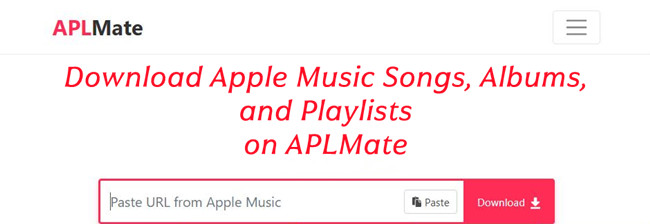
06Paste the copied Apple Music link into the main input box.
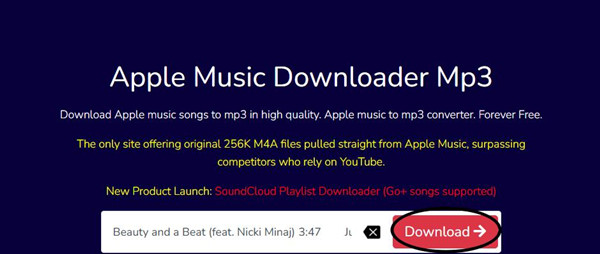
07Click the Download button to start processing the link.
08Wait for the site to analyze the track and redirect you to the results page. You may need to answer a simple question to pass verification.
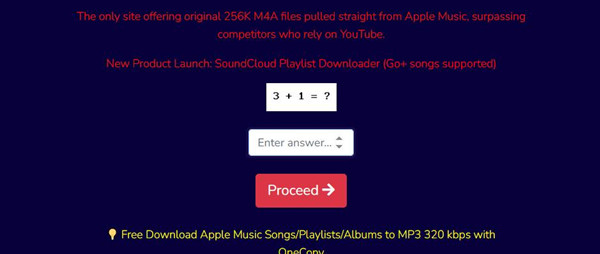
09On the results page, you will see two options: Generate Download Link and Download 320Kbps MP3 (OneConv). If you choose Download 320Kbps MP3, you will be redirected to OneConv Video Converter, which is AAPLMusicDownloader's software version for downloading Apple Music in multiple formats.

10Click Generate Download Link.
11Select your preferred output format or bitrate, such as "M4A Original File".
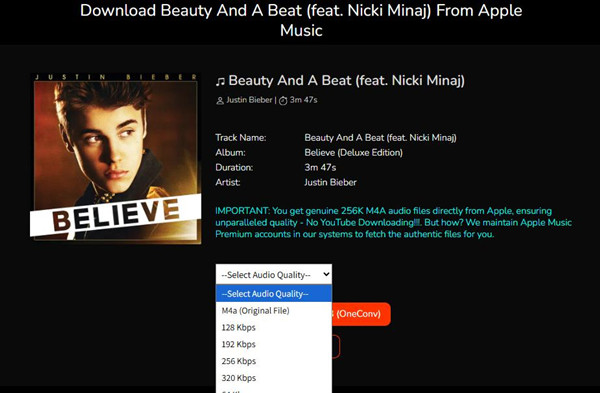
12The file will start downloading immediately.
13Wait for the download to finish, then check your browser's default download folder.
Part 5. AAPLMusicDownloader Review: Pros, Cons, and User Experience
Like many online download tools, AAPLMusicDownloader is convenient at first, but less consistent in real use. Some users like its speed and simple interface for quick downloads, while others notice limits in reliability with larger batches or repeated use.
While the tool is free, there are clear restrictions. Free users are capped at 2 songs per ZIP batch, and a premium plan starting at $8.99 is required to unlock the ZIP feature. In other words, it works well for light or occasional use, but it is not built for regular downloading.
- 100% free to use
- Simple web tool, no installation needed
- Supports bulk download option
- Offers MP3 and M4A formats (up to 256Kbps or 320Kbps)
- Works on most popular web browsers
- Keeps basic metadata like title and artwork
- Daily download limits exist
- Premium subscription required for batch downloads
- Depends on browser and internet connection
- Not an official Apple tool, so reliability varies
- Some safety/trust concerns reported online
- May need retries when downloads fail
For full Apple Music libraries or backups, a more stable desktop tool like ViWizard Apple Music Converter is often more practical. Online tools can be inconsistent and usually offer limited support.
ViWizard connects directly to Apple Music libraries, so there is no need to paste links. Users select and add tracks, choose an output format, and keep metadata retention. It also organizes output files into folders by Artist, Playlist, or Album. In practice, this makes it feel closer to managing a real music library instead of sorting scattered files afterward.

Part 6. Best AAPLMusicDownloader Alternatives for Desktop
When online tools start to feel limited, desktop software is often the next option users consider. These tools usually offer more stable performance, better control over audio settings, and stronger batch processing for larger libraries.
One common option is ViWizard Apple Music Converter. This desktop tool works on both Windows and Mac and offers a more direct workflow than browser-based tools. Instead of pasting links, users select Apple Music tracks directly within the program, where they are analyzed and prepared for batch conversion.
It supports faster batch processing and keeps consistent audio quality, including lossless output. Key metadata such as song title, artist name, album artwork, and lyrics can also be preserved. For organization, users can set output rules to sort files into folders like Artist, Album, or Playlist, making it easier to manage large libraries after download. It is free to try.
Key Features of ViWizard Apple Music Converter
Free Trial Free Trial* Security verified. 5, 481,347 people have downloaded it.
- Convert Apple Music songs, albums, playlists, and artists into MP3 for easy access
- Preserve lossless audio, high-resolution lossless, and Dolby Atmos quality
- Strip DRM from Apple Music for unrestricted offline listening
- Save converted audio files while retaining full ID3 tag details
 Step 1: Install and Launch the Program
Download and install ViWizard Apple Music Converter on your Windows PC or Mac. After opening it, sign in with your Apple Music account through the built-in web player. Once connected, your Apple Music library, including songs, albums, and playlists, will appear inside the program.
 Step 2: Set the Output Format
Open the settings menu and choose the format you want to save your music in. MP3 is commonly used for wide compatibility, but other formats like M4A, WAV, FLAC, and AIFF are also available. You can also adjust audio quality settings if needed, while keeping key track information such as song title, artist, and album artwork.
 Step 3: Select Songs or Playlists
Browse your Apple Music library within the program and select the songs, albums, or playlists you want to download. You can add multiple tracks at once for batch conversion.
 Step 4: Start the Conversion
Click the Convert button to begin the process. The tool will download and convert the selected Apple Music tracks into your chosen format. Once finished, you can open the output folder to access your files and play them locally or transfer them to other devices for offline use.
Part 7. Conclusion
Overall, AAPLMusicDownloader is a simple and accessible Apple Music downloader for users who want fast, browser-based conversion into offline audio files.
At the same time, real-world feedback is mixed. Users appreciate its convenience, but also report limitations and possible safety concerns. Because of this, ViWizard Apple Music Converter is often considered as a second option for a more stable desktop workflow. It connects directly to Apple Music libraries and offers a smoother process to select tracks, adjust settings, and convert and download music, along with more advanced features.
You May Be Interested





Nick Orin, a software developer at ViWizard, focuses on providing solutions for software-related challenges, including reviews, troubleshooting, and optimization tips.

Leave a Comment (0)