


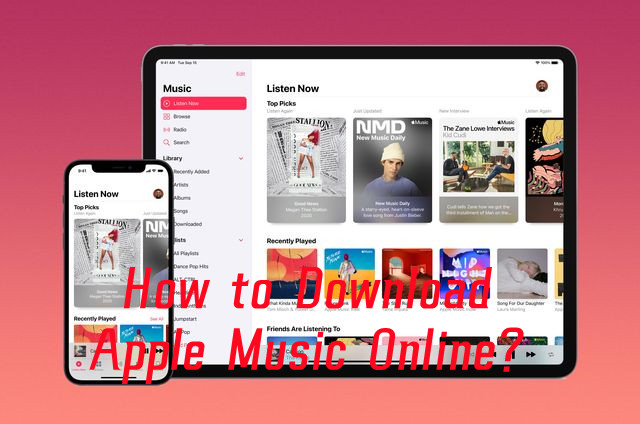
When people want to download Apple Music online, online Apple Music downloaders are one option. These browser-based tools typically require users to paste an Apple Music link and follow the available download options; some provide audio files such as MP3.
Apple Music does not offer online downloads as standalone audio files such as MP3. Its Download option works within the Apple Music app for offline playback rather than creating regular audio files. Online downloaders work differently, but some may be unstable, unable to process Apple Music content directly, or produce inconsistent results.
Desktop Apple Music downloaders use installed software instead of a browser to download and manage Apple Music. This distinction is important when comparing web-based and desktop options.
This post explains how online Apple Music downloaders work, their advantages and limitations, and how they differ from desktop options. It also introduces AAPLMusicDownloader, APLMate, and Soundloader Apple Music Downloader, along with other commonly used options.
Part 1. What Is an Online Apple Music Downloader?
An online Apple Music downloader is a web-based tool that processes an Apple Music link and lets users download the referenced music through a browser. Unlike a desktop downloader, it normally requires no dedicated software and operates fully online. Users open the downloader website, paste an Apple Music URL, and follow the available download options.
An online Apple Music downloader is separate from Apple Music's built-in download feature. Apple allows subscribers to download Apple Music content for offline listening on supported devices within the Apple Music app; online Apple Music downloaders operate outside the Apple Music environment and process Apple Music links through separate services.
Part 2. How Does an Online Apple Music Downloader Work?
The process starts with an Apple Music URL. Users find a song, album, or playlist, copy its share link, open the downloader in a browser, and paste the URL. The downloader processes the link, identifies the content, and prepares the available download. Depending on the implementation, it may also retrieve metadata or artwork. Features vary by tool. Supported browsers, devices, and content vary by service. Some open-source projects also offer browser-based interfaces, while self-hosted versions require users to run the software themselves.
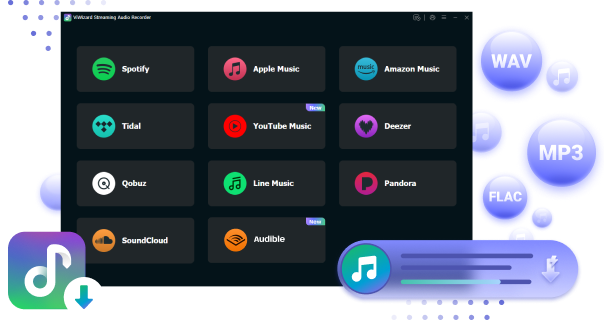
Desktop Apple Music downloaders such as ViWizard Apple Music Converter work differently. ViWizard requires an Apple Music account and provides access through its built-in Apple Music Web Player. It supports downloading and converting Apple Music content to MP3, WAV, and FLAC.

Need Apple Music in more flexible audio formats? ViWizard Apple Music Converter helps Apple Music subscribers create a personal music library with seamless music backup. Build your collection and keep your music beyond the Apple Music app.
01Find the Apple Music song, album, or playlist you want to download.
02Copy its Apple Music link. On Apple Music Web Player, click the three dots and choose "Share" > "Copy Link". On a phone or tablet, tap the three dots and choose "Share Song" > "Copy".
03Open an online Apple Music downloader in your web browser.
04Paste the Apple Music link into the search box.
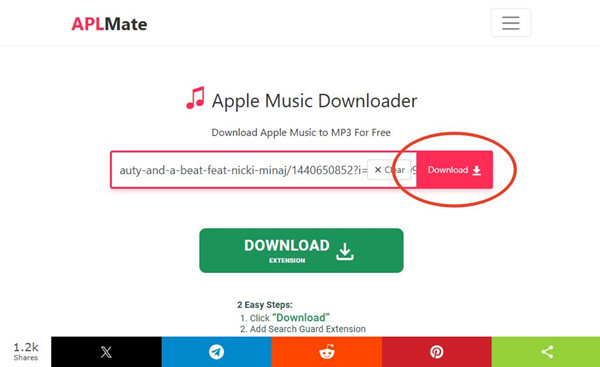
05Click the "Download" or "Generate Download Link" button and wait for the tool to process the link.
06Choose a download option, such as MP3 or your preferred bitrate, if available.
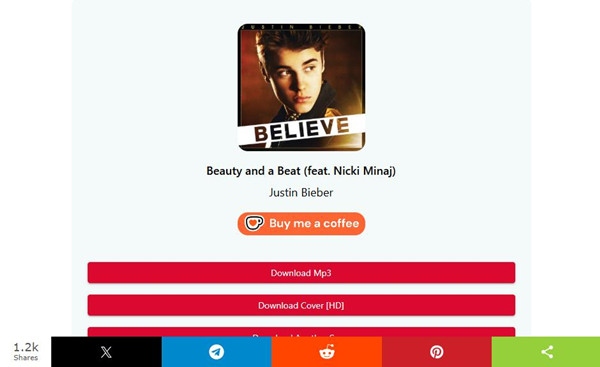
07Click the download button to save the file.
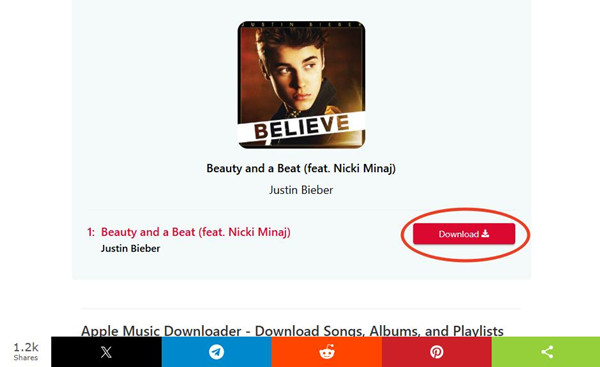
08Once the download is finished, open the file and listen to it offline on your device.
Part 3. What Can You Download with an Online Apple Music Downloader?
Online Apple Music downloaders can support different types of Apple Music content, depending on the specific tool. Songs are the most common, while some services also support albums and playlists.
-

Turn Apple Music links into local audio files
An online Apple Music downloader starts with an Apple Music URL and turns it into a downloadable audio file. This works differently from Apple's built-in downloads, which keep music inside Apple Music for offline playback. A third-party downloader can instead give you a standard audio file to manage locally, although the available formats, quality, and file options depend on the service.
-
Download songs, albums, and playlists
Songs are the most common type of content you can download, but some services also support albums and playlists. If a downloader supports playlists, it may let you process several tracks at once or package them into a ZIP file. The exact options depend on the service.
-
Choose different formats and quality options
Some downloaders give you a choice of how to save the audio. Depending on the service, you may see formats such as MP3, M4A, AAC, or ALAC, along with different quality settings. Not every downloader offers the same choices.
-
Keep metadata, artwork, or lyrics
Some tools also keep information that comes with the music. This can include cover art, lyrics, tags, and library data, which is useful if you want to keep your local files organized. What gets saved depends on the downloader.
-
Download without installing desktop software
One of the biggest conveniences is that you can use an online downloader right in your web browser. You paste an Apple Music URL, follow the available options, and download the result without installing dedicated software. This can be handy when you only need to download a few tracks.
-
Process multiple downloads at once
Some services make larger downloads easier with batch or queue features. Instead of submitting every track separately, you can process several songs or an entire playlist together when the service supports it.
-
Use a browser interface or run it locally
Browser-based does not always mean that the downloader is a public website. Some open-source projects provide their own browser interface that you run on your computer. These can include features such as URL submission, queues, format selection, lyrics controls, and download settings, but the interface runs locally rather than through a public online service.
Part 4. Best Online Apple Music Downloaders
Examples include AAPLMusicDownloader, APLMate, and the discontinued Soundloader Apple Music Downloader. All use a browser-based link workflow but differ in supported content and formats. Individual songs are the basic use case, with 320 kbps MP3 output commonly supported. AAPLMusicDownloader may limit batch downloading and 256 kbps M4A output to its software version, OneConv Video Converter. Soundloader previously offered MP3 downloads for individual tracks and small albums through a simple interface, but it is no longer accessible and had a history of downtime and failed downloads.
These tools are suited to quick browser-based downloads, but their formats, features, and availability differ. Check each service's current capabilities before choosing one.
| Tool | AAPLMusicDownloader | APLMate | Soundloader Apple Music Downloader |
|---|---|---|---|
| Platforms | Web (any device) | Web (any device) | Web (any device) |
| Formats | MP3, M4A (varies) | MP3 | MP3 |
| Ease | Very Easy | Very Easy | Very Easy |
| Batch | Limited | Limited | Limited |
| Stability | Medium | Medium | Low |
| Install | Not needed | Not needed | Not needed |
01AAPLMusicDownloader
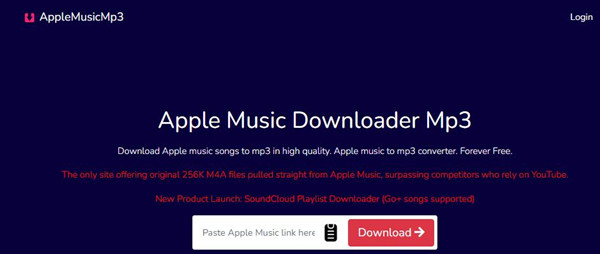
AAPLMusicDownloader is a free browser tool for downloading Apple Music songs, albums, and playlists in MP3 format at up to 320kbps, with no installation needed. It supports one-click bulk downloads for playlists or albums. Before downloading, it shows track details like name, artist, duration, and album. After confirmation, users click "Generate Download Link" and then "Download 320kbps MP3 (YT Saver)." It also offers bitrate options from 64kbps to 320kbps. It is often used for quick downloads because it supports batch use in a simple flow.
Download Apple Music Songs Online Using AAPLMusicDownloader
01Open Apple Music or the Apple Music Web Player and find the song, album, or playlist you want to download.
02Click More > Share > Copy Link to copy its Apple Music URL.
03Open AAPLMusicDownloader in your browser and paste the link into the main input box.
04Click Download and wait for the results page to load. You may need to complete a simple verification question.
05Click Generate Download Link, or select Download 320Kbps MP3 (OneConv) to open OneConv Video Converter.
06Select an available option, such as M4A Original File, to start the download.
07Find the downloaded file in your browser's Downloads folder.
Read More: AAPLMusicDownloader Guide and Review
- No installation needed
- Works directly in browser
- Fast single track download
- Daily download limits
- Premium needed for ZIP downloads and M4A
- May show ads
- Depends on website uptime
02APLMate
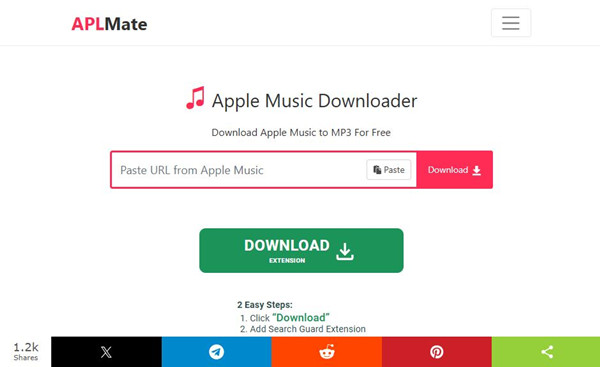
APLMate is another free online tool with a simple browser interface. It has a built-in search feature and supports MP3 downloads without installation or registration. After processing a link, it shows options like "Download MP3," "Download Cover [HD]," and "Download Another Song." It outputs MP3 files at 320kbps and works on most browsers and devices, including desktop and mobile. It is often used for quick downloads and also supports cover image saving.
Download Apple Music Songs Online Using APLMate
01Open Apple Music or the Apple Music Web Player and find the song, album, or playlist you want to download.
02Click More > Share > Copy Link to copy its Apple Music URL.
03Open APLMate in your browser and paste the link into Paste Apple Music URL.
04Click Download and wait for the download options to load.
05Select Download MP3 to save the audio file, or Download Cover (HD) to save the artwork.
06If a redirect appears, return to APLMate and retry the download.
07Find the saved MP3 in your browser's Downloads folder.
Read More: APLMate Guide and Review
- Simple web tool
- Free to use
- Works on all devices
- No setup required
- Limited bulk downloads
- May be unstable at times
- Occasional failed downloads
- Website may go offline
03Soundloader Apple Music Downloader (Discontinued)

Soundloader is a free online tool for downloading Apple Music tracks as MP3 files. It works in both browser and software form. It is mainly used for single tracks or small albums because the interface is simple. However, results can be unstable in real use. Some downloads may fail or not match the original file, and the service has also had downtime in the past due to legal issues. Because of this, it is seen as a less stable option compared to other tools.
Download Apple Music Songs Online Using Soundloader Apple Music Downloader
Soundloader is discontinued, so these steps describe its previous workflow.
01Open Apple Music, the Apple Music Web Player, or iTunes and find the track you want to download.
02Click More > Share > Copy Link to copy its Apple Music URL.
03Open the Soundloader website and paste the link into its search field.
04Click Search and select the matching track from the results.
05Click Download to save the track as an MP3 file.
06Find the saved file in your browser's Downloads folder.
Read More: Soundloader Apple Music Downloader Guide and Review
- Very easy to use
- No installation required
- Fast online download
- Works with simple links
- No longer accessible
- Not reliable for bulk use
- Limited features
- Depends on server availability
Part 5. Best Alternative to Online Apple Music Downloader

For a simpler and more stable option, a desktop Apple Music Converter such as ViWizard Apple Music Converter can process Apple Music in bulk instead of requiring users to paste links individually. It is a dedicated desktop tool that works with its built-in Apple Music Web Player and uses the original audio source rather than pulling content from platforms such as YouTube. It creates local copies of Apple Music songs in 6 common audio formats, including MP3, M4A, M4B, WAV, AIFF, and FLAC, while preserving tags such as album art, artist names, and track titles. It supports lossless audio conversion and uncompressed formats such as WAV and FLAC.
Key Features of ViWizard Apple Music Converter
Free Trial Free Trial* Security verified. 5, 481,347 people have downloaded it.
- Convert Apple Music songs, albums, playlists, and artists into MP3 for easy access
- Preserve lossless audio, high-resolution lossless, and Dolby Atmos quality
- Strip DRM from Apple Music for unrestricted offline listening
- Save converted audio files while retaining full ID3 tag details
- Easy batch conversion for playlists
- Keeps music tags and metadata
- Stable performance for large libraries
- Supports multiple audio formats
- Requires installation on computer
- Paid software after trial
- Not usable in browser
- Setup needed before use
Part 6. Are Online Apple Music Downloaders Free?
Online Apple Music downloaders use different pricing models, so they are not always free. Some offer direct downloads at no cost, while others charge for features such as batch downloading. Free services may rely on ads or donations. Their pricing is separate from an Apple Music subscription, so a free downloader does not necessarily provide Apple Music access without a subscription. Some instead match metadata with tracks from external sources and provide free MP3 download links.
Part 7. Are Online Apple Music Downloaders Legal and Safe?
Is It Legal to Use an Online Apple Music Downloader?
Using an online Apple Music downloader is not automatically legal simply because the service does not host the music itself. Downloading Apple Music content may still conflict with Apple's Media Services Terms and Conditions, which state that users may use the Services and Content only for personal, noncommercial purposes.
In many countries, including the U.S., breaking DRM or extracting music from streaming services may also be illegal, even for personal use. Laws vary by country, so users should check local law and Apple's current terms before downloading or sharing Apple Music content.
Is It Safe to Use an Online Apple Music Downloader?
Online Apple Music downloaders are third-party services, so security depends on the specific website or application. Users should check what information a service requests and whether it requires Apple Account credentials. A downloader that only accepts an Apple Music URL presents different security considerations from one that requires account login.
Self-hosted projects also require proper security configuration. Users should prefer established software and avoid unfamiliar sites that request unnecessary personal information.
Part 8. Online Apple Music Downloaders vs. Desktop Downloaders
The main difference is where the workflow runs. An online Apple Music downloader such as APLMusicDownloader works through a browser, while a desktop downloader such as ViWizard Apple Music Converter runs as installed software. Online downloaders require no installation, but supported formats, download limits, and processing methods depend on the service.
| Aspect | Online Apple Music Downloaders | Desktop Apple Music Downloaders |
| Installation | No install needed | Needs install |
| Ease of use | Very easy, paste and download | More steps |
| Speed | Fast for single songs | Faster for many songs |
| Stability | Less stable | More stable |
| Output quality | Usually MP3 only | MP3, FLAC, WAV, M4A, and more |
| Audio source | Often matched from public sources | Uses Apple Music original source |
| Batch download | Limited | Supported |
| Library use | Not suitable | Good for large libraries |
| Reliability | Can stop working or be blocked | More stable with updates and support |
| Best for | Casual downloads | Regular or backup use |
Desktop converters are better suited to large music libraries and stable local processing. They run on Windows or Mac and may work with the Apple Music Web Player, iTunes, or local M4P files. Although they require installation, they offer more local control over batch processing, output settings, file management, and conversion.
In short, online Apple Music downloaders offer convenience, while desktop downloaders provide greater local control for batch processing, file management, and format conversion.
Part 9. Final Thoughts
An online Apple Music downloader is a browser-based tool that processes Apple Music links outside the Apple Music app. Apple's built-in download feature is separate, allowing subscribers to download music for offline listening through Apple Music apps on iPhone, iPad, Apple Vision Pro, Android, Mac, and PC.
When evaluating an online downloader, consider supported content, URL processing, formats, subscription requirements, and account, copyright, and security practices. Online tools are convenient for quick use, while desktop Apple Music converters are more stable for long-term use and better suited to large playlists and offline libraries. They also support batch conversion, more output formats, and better music tag preservation. For a simple, steady way to convert Apple Music to offline files, ViWizard Apple Music Converter is a good starting option.
You May Be Interested



Nick Orin often turns to tech forums to see what apps people are talking about. He likes testing different software, comparing features, and finding out which tools are worth a try.

Leave a Comment (0)