


Ever wanted to save songs from Apple Music for offline use in MP3 format? You are not alone. Many users choose between desktop Apple Music converters and online downloaders. Desktop tools are often seen as more stable, while online Apple Music downloaders are popular because they are more convenient.
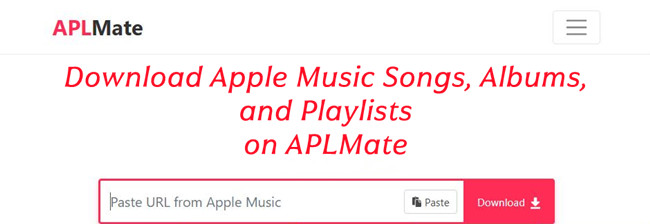
APLMate is a browser-based tool that converts Apple Music songs into MP3 files without installing software. Everything works online and the process is fast. You paste an Apple Music link, and the tool generates a downloadable MP3 file you can save on desktop or mobile.
This guide will help you understand APLMate so you can decide if it fits your needs. We will review what it is, how it works, and what to know before using it. If you want alternatives, ViWizard Apple Music Converter is worth considering as a desktop option for more stable Apple Music conversion.

Need Apple Music in more flexible audio formats? ViWizard Apple Music Converter helps Apple Music subscribers create a personal music library with seamless music backup. Build your collection and keep your music beyond the Apple Music app.
Part 1. What Is APLMate Downloader?
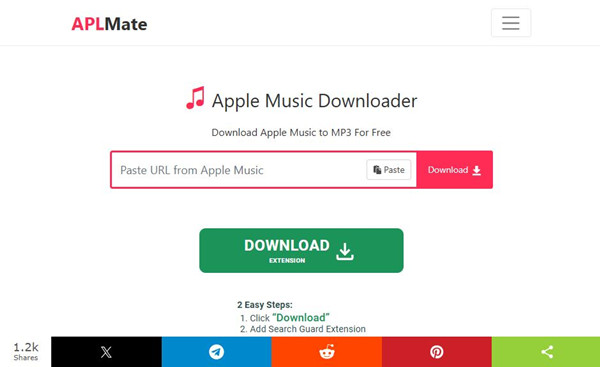
APLMate (https://aplmate.com/) is a web-based Apple Music downloader tool that lets users download Apple Music songs, albums, and playlists as MP3 files. It works directly in a browser, so no software installation is required. What's more, it is free and easy to use.
Users paste an Apple Music link into APLMate Apple Music Downloader, and the tool generates downloadable audio files at up to 320 kbps MP3. It is often used as a simple online tool to save Apple Music content for offline use, so users are not limited by supported devices.
- Fast downloads: Download Apple Music songs quickly with no waiting time.
- Bulk downloading: Download full playlists or albums at once with no limits.
- MP3 output: Save songs in MP3 format for use on phone, computer, iPhone, or iPod.
- Simple and free access: No apps or subscriptions needed, works in your browser.
- Ad-free experience: Clean downloads with no annoying ads or pop-ups.
- Metadata retention: Keeps song info like artist, album, and track details for organization.
Part 2. How Does APLMate Downloader Work for Apple Music Downloads?
Sounds attractive, but how does it really work behind the scenes? In fact, APLMate works by processing Apple Music links that users paste into its website. It reads track information such as title, artist, and album.
Instead of directly accessing Apple Music's protected audio, it appears to match metadata and find similar tracks from external sources. After matching, it provides MP3 download links. Because of this method, results can vary depending on the source used for each track. The quality, even if promoted as 320 kbps, may sometimes drop to 256 kbps or even 128 kbps. So results are not always consistent.
Since downloads may come from unknown sources, users cannot always confirm where the files come from. Caution is recommended when using the site.
Part 3. Is APLMate Downloader Safe and Legal to Use?
Before trying APLMate for free Apple Music downloads, it is important to understand possible risks:
Is APLMate Safe to Use?
APLMate is browser based, so it avoids software installation risks. However, the site often shows ads and pop-ups, which may lead to unsafe pages if clicked by mistake.
Is APLMate Legal?
APLMate may go against Apple Music's terms of service, which do not allow downloading or converting streamed content outside the official offline feature. In many regions, downloading Apple Music without permission may also create legal issues.
Laws can be different depending on the country, but the tool is generally not seen as an officially approved way to download Apple Music. If you use APLMate, it is better to avoid sharing or redistributing files and keep them for personal use only.
Part 4. How to Download Apple Music to MP3 Online with APLMate Downloader
First, open Apple Music on your phone, computer, or tablet, or use the Apple Music Web Player, and find the song, album, or playlist you want. Click More > Share > Copy Link, then open a browser and go to the APLMate website. Paste the link into the input box and submit it. The tool will process the link and show the available download options. Select MP3 and start the download, and the file will be saved directly to your device.
What APLMate Can Do for Apple Music Downloads:
Download Apple Music songs one by one
Support Apple Music albums and playlists
Save tracks in up to 320 kbps MP3 format
Easy to use with only a few steps
Always free to use, with only an optional "Buy me a Coffee" support option
Compatible with phones, computers, and tablets on all major browsers
Download Apple Music to MP3 Online with ALMate
01Open the Apple Music app or Apple Music Web Player on your device.
02Find the song, album, or playlist you want to download.
03Tap the three-dot menu next to the item and select Share > Copy Link.
04Open your browser and go to https://aplmate.com/.
05Paste the copied Apple Music link into the input field labeled "Paste Apple Music URL".
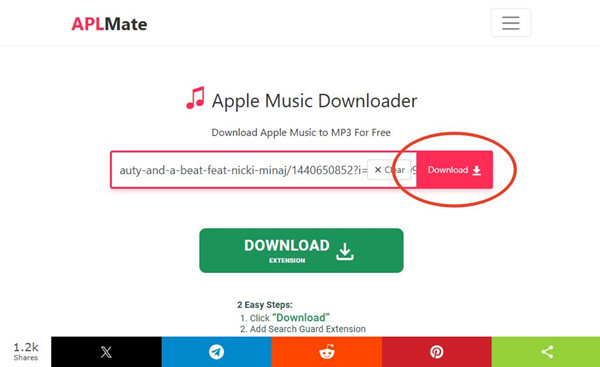
06Click the "Download" button to start processing the link.
07Wait for the download options to load.
08Select "Download MP3" or "Download Cover (HD)".

09Click "Download MP3" to start saving the file. If redirects appear, close them and retry until the download begins.

10Open your Downloads folder to find the saved MP3 file.
Part 5. APLMate Downloader Pros and Cons
APLMate is a simple online tool for downloading Apple Music songs, albums, and playlists without installing anything. It is quick and easy to use, making it useful for basic downloads. However, the experience can feel inconsistent in practice. Although it is advertised as 320 kbps, the actual bitrate can only be confirmed by checking the file with a tool like MediaInfo. It works, but results may vary depending on what you download.
- Easy web-based Apple Music downloader
- No installation needed, works directly in browser
- Supports downloading songs, albums, and playlists
- Simple link-paste process for quick downloads
- Free to use
- Only works online, no app version
- No bulk downloading
- May show ads and pop-ups during use
- Reliability can vary
- Some songs may not always be available
Part 6. Best APLMate Downloader Alternatives for Apple Music

A common alternative to APLMate is a desktop tool like ViWizard Apple Music Converter, designed for users who want to download Apple Music on Windows and Mac more reliably. Unlike browser-based tools, it does not require pasting links. Users select Apple Music tracks directly in the program, where they are analyzed and prepared for conversion.
ViWizard Apple Music Converter supports smoother batch downloading, consistent output, and even lossless audio. It also lets users choose different output formats and adjust settings such as bitrate, sample rate, and audio channels.
Another key benefit is better file organization. Metadata like song title, artist, album artwork, and lyrics can be kept during conversion. Users can also sort files into folders by artist, album, or playlist, which helps manage large music libraries more easily.
Overall, this desktop tool offers more control, better consistency, and stronger organization compared to online tools like APLMate. It is free to try, so users can compare it with APLMate and decide which one fits better.
Key Features of ViWizard Apple Music Converter
Free Trial Free Trial* Security verified. 5, 481,347 people have downloaded it.
- Convert Apple Music songs, albums, playlists, and artists into MP3 for easy access
- Preserve lossless audio, high-resolution lossless, and Dolby Atmos quality
- Strip DRM from Apple Music for unrestricted offline listening
- Save converted audio files while retaining full ID3 tag details
 Step 1: Install and Sign In
Download and install ViWizard Apple Music Converter on your Windows PC or Mac. After launching it, sign in with your Apple Music account using the built-in web player. Once connected, your Apple Music library, including songs, albums, and playlists, will be loaded inside the program.
 Step 2: Choose Output Format
Go to the Preferences section and select the format you want. MP3 is the most commonly used for broad compatibility, but other formats like M4A, WAV, FLAC, and AIFF are also available. You can also adjust audio quality settings and keep basic metadata such as song title, artist, and album info.
 Step 3: Select Music to Download
Browse your Apple Music library inside the program and select the songs, albums, or playlists you want to download. You can also select multiple items at once for batch conversion.
 Step 4: Start Download and Conversion
Click the Convert button to start the process. The software will download and convert the selected Apple Music tracks into your chosen format. After it finishes, you can open the output folder to access your files and play them offline or transfer them to other devices.
Conclusion: Is APLMate Downloader Worth Using?
APLMate and ViWizard Apple Music Converter both help users download Apple Music, but they offer different experiences.
APLMate is a quick, browser-based option that works without installation or setup. It is simple and free, making it useful for basic, occasional downloads. However, it can feel limited.
ViWizard Apple Music Converter is a desktop tool designed for more stable, long-term use on Windows and Mac. It offers more control over formats and audio settings, and better file organization with metadata support, which makes managing larger music libraries easier.
You May Be Interested






Nick Orin often turns to tech forums to see what apps people are talking about. He likes testing different software, comparing features, and finding out which tools are worth a try.

Leave a Comment (0)